
How to See Hidden Chat in Viber
 Editorial Team
Find Out Who’s Behind Any Viber Account
Enter a Username, Email, Phone Number or Name to Find People!
“This tool has been amazing for finding people online. Highly recommend it!”
50,000+
Profiles Found
5,000+
Satisfied Users
4.8/5
Average Rating
Using a random tool or technique to access Viber’s hidden chats can lead you to legal troubles. There are also apps that harvest your data and sell it to third parties and scammers. Moreover, many methods and tools are a sham and never lead to any results. If you do come across services and apps that claim to bypass Viber encryption to extract the data for you, it’s best to avoid them. This article is backed by my first-hand experience, transparency, and unbiased opinion. You can now dive into the top methods that I found reliable.

mSpy parental control app’s ability to track all online activities in stealth mode makes it an excellent choice. It allows to view their chats on Viber, Instagram, WhatsApp, Messenger, and more. You can also uncover hidden and deleted chats using mSpy.
To see hidden chat in Viber, you can use phone monitoring apps like mSpy, Xnspy, or uMobix. A direct PIN access on iOS, Android, and the desktop app is the easiest and most straightforward method if you remember your secret Viber PIN code. Using Viber backup, checking notification history, and asking a tech-savvy friend for help can also be useful. However, remembering your PIN is the most important thing to note when it comes to viewing Viber’s hidden chats.

Method 1) View Hidden Chats in Viber Using Parental Control Apps
Effectiveness Score: High
Using parental control apps to see hidden chats in Viber is one of the most reliable methods. If you are a parent who wants to monitor your kid’s online activities, or you suspect your spouse of cheating, you can use these tools. However, you should never use it on anyone other than your minor kids for better parenting. Moreover, they are intrusive apps, meaning they invade privacy, which is why consent is absolutely necessary if you want to monitor your spouse. Additionally, I don’t suggest constant monitoring since such apps drain the device battery much faster. Thus, it makes it inconvenient for the target person as it creates unnecessary issues by running their phone out of charge.
1) mSpy
mSpy parental control app’s ability to track all online activities in stealth mode makes it an excellent choice. I use it to track my kid, who is quite active online; therefore, I receive access to all their conversations, social media frolicking, etc. It allowed me to view their chats on Viber, Instagram, WhatsApp, Messenger, and more. You can also uncover hidden and deleted chats using mSpy.
Additionally, it has the ability to screenshot the target device’s activities in real-time. One of the most amazing features of mSpy is the keylogger, which logs every key that is typed, including passwords. It is definitely unnerving to know that it can unveil passcodes; thus, using it ethically should be your utmost priority.

Read Messages: Includes Deleted Chats
View Calls: Incoming Outgoing Logs
See Media: Attachments and Photos
Refund Policy: 14-Days Money-Back Guarantee
Here’s how I use mSpy to see Hidden Chat in Viber:
Step 1) Sign up with https://www.mspy.com/ and download it on the target device. If the device OS is Android, you will need physical access to install and set it up, while iOS can be monitored using iCloud credentials.
Step 2) Once you have set up the app, come back to your account and add the device to sync the data.
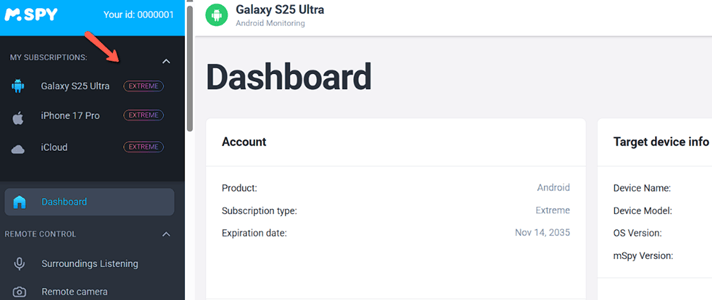
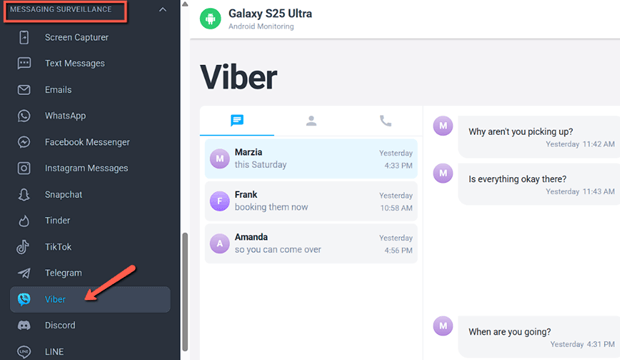
Step 3) Now, allow the tool to sync the data, and then go to the Message Surveillance option on the left-hand side menu. Click on Viber in this section and go through the chats. This will also display hidden messages, if any.
14-Days Money-Back Guarantee
2) Xnspy
Xnspy is an all-in-one phone monitoring app that lets you access all the messaging apps, including Viber. I tested it on my kid’s phone for over a month and found it quite infallible. It showed me not only messages but also photos, videos, GIFs, stickers, etc., used in the conversations. I was also able to listen to recorded calls and view call logs, making it a highly valuable monitoring tool.
In fact, I could also track Viber’s hidden texts, community messages, and activities. However, you must ensure to give a break to monitoring with consistent intervals since it can heat up the device. Hence, I suggest you set the location update to 15-30 mins and upload frequency to 60 mins if you want to track only Viber messages.
Now, let’s see how to use Xnspy for viewing Viber’s hidden chat:
Step 1) First, sign up with https://xnspy.com/ and then install the app on the target device.
Step 2) Once you have installed and set it up, log in to your account, come back to your dashboard, and add the device in the My Devices option.
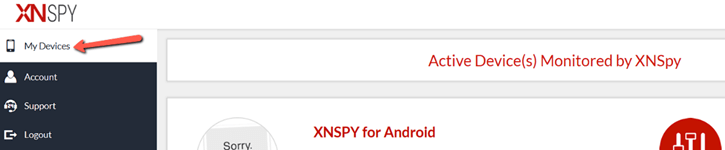
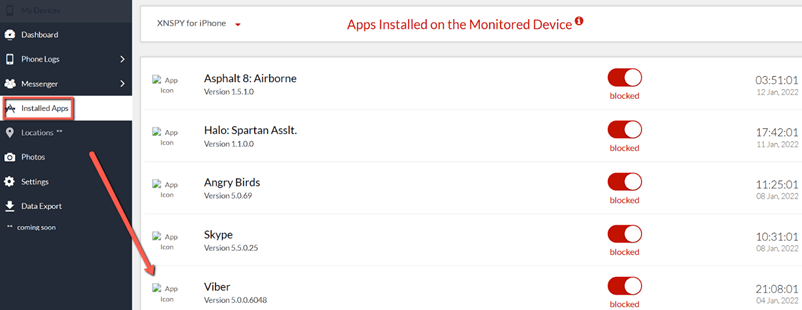
Step 3) Now, allow the app to sync and export the data. Once completed, view the Installed Apps to find Viber and click on it to access the chats.
Link: https://xnspy.com/
3) uMobix
uMobix is another cell phone tracking app for parents who want real-time information on their kids’ activities. It took me only 5 minutes to set up, and every report gets updated within 5 minutes as well. I could not only view hidden chats but also the renamed contacts, plus it allowed me to restrict apps on my kid’s phone.
Furthermore, I was able to view all sent and received messages along with the media exchanged in the chats. However, its iOS version lacks some of the features, such as keylogging and remote camera/microphone activation. Apart from that, it is an excellent tool for monitoring Viber and viewing hidden messages.
Let us now look at how to use uMobix for viewing hidden chats in Viber:
Step 1) Start by going to https://umobix.com/ and signing up with uMobix. You can then install it on the target device if it is an Android, or use the iCloud credentials if it is an iPhone.
Step 2) After setting up uMobix on the target smartphone, log in to your uMobix account on your device and add the phone you want to track in the dashboard.

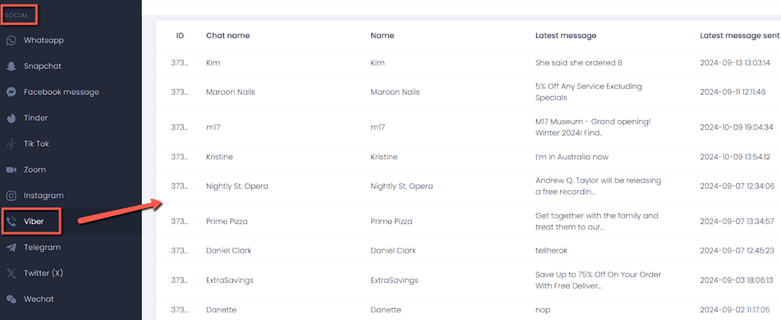
Step 3) Next, go to the Social category on your dashboard and select Viber. You can now access all the chats and hidden conversations with timestamps.
14-Days Money-Back Guarantee
Method 2) View Hidden Chats Using the Viber App
Effectiveness Score: High
This method is for users who have direct access to their kid’s or spouse’s phone and have taken their consent. Additionally, users who are confused about how to view their own hidden chat can use this method.
However, it is important to respect privacy boundaries if you are accessing your spouse’s device. I do not advise checking anyone’s hidden or private chats, as it is unethical and illegal without permission from the account owner themselves. The most important thing to keep in mind is to remember your PIN, since without it, accessing hidden chat becomes almost impossible.
iOS
To open hidden chats in Viber on an iPhone, follow the steps given below:
Step 1) Launch the app on your iPhone or iPad
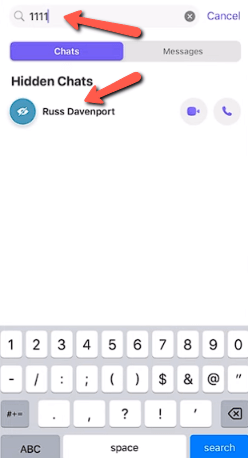
Step 2) Now, swipe down the Search Bar and enter your secret PIN.
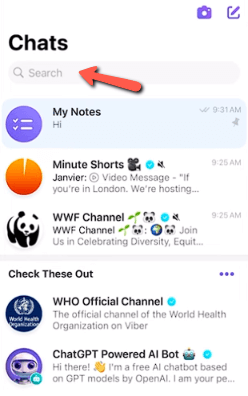
Step 3) Once you enter the PIN, you can explore the hidden chats.
Android
For viewing hidden chats on Android, you can use the following steps:
Step 1) Open the Viber app and slide down the search button (magnifying glass).
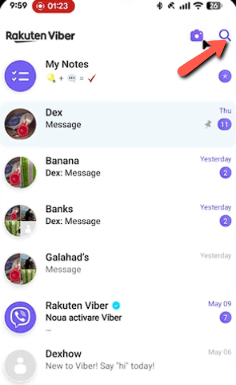
Step 2) Now, enter your secret PIN code to view the hidden chats.
Step 3) You can now go through the contacts and their messages, just like on an iPhone.
Desktop
Here are the steps on how to view Viber’s hidden chats on the desktop version:
Step 1) Open the Viber app on your PC or Mac and make sure that it is synced with your phone.
Step 2) Now go to the Search Field given at the top and enter the PIN code.
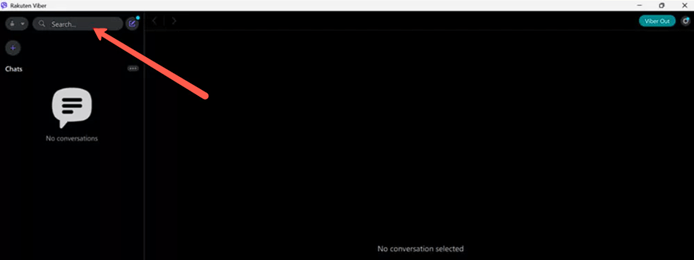
Step 3) Once you have entered the secret PIN, you can view the hidden chats.

Spynger can help track messenger activity, including Viber, from a simple dashboard. Its features focus on chat monitoring, screen activity, and usage insights, making it a strong option for responsible parental or device monitoring.
Method 3) Using Viber Backup & Restore
Effectiveness Score: Medium
This method can be helpful for users who are reinstalling the app and are confused about how to find the hidden chats. Well, as per my experience, if you had backups enabled for the hidden chats before you deleted the app, then it should be in your cloud backups. However, you should use the same device, phone number, and PIN for this method to work. It is also a must to have a Google/ Cloud account for this technique to work.
Here’s how you can view the hidden chats using Backup & Restore:
Step 1) First, open the reinstalled app and go to Settings in Viber.
Step 2) Now go to the Account in Settings and tap on Viber Backup.
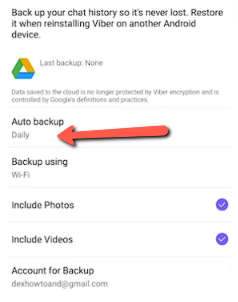
Step 3) You must check if the backup is enabled in Google Drive for Android and iCloud for iPhone.
Step 4) Finally, reinstall the app and restore the backup. Once you get back the entire data, go to the search bar and type the PIN code to view the hidden chats.
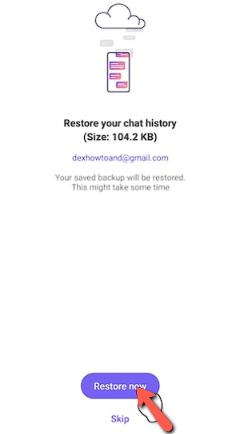
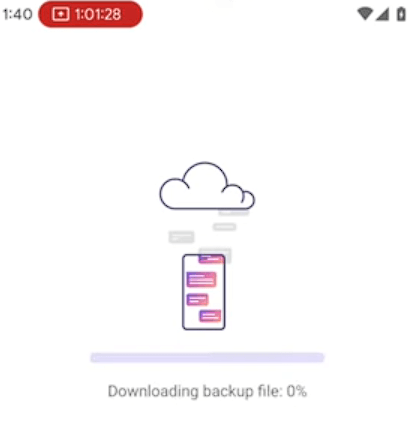
While it is true that backup and restore can recover hidden chats, it only works if a recent backup exists and may replace current data. To check for hidden messages without restoring anything, reviewing your notification history is a simpler step in some cases.
Method 4) Check Notification History
Effectiveness Score: Low
This method can be followed if you used the hidden chat feature for a particular contact not long ago. That’s because hidden chats are not notified to the user. However, if you were chatting with them just a while back when you had not added them to the hidden chat list, then the notification history might be of help.
Here’s how I found a hidden chat in the notification History:
Step 1) I was chatting with a relative who wanted to share some sensitive information. Therefore, I quickly added her contact to the hidden chat. Hence, to access our conversations, I went to the Settings, then tapped on Notifications.
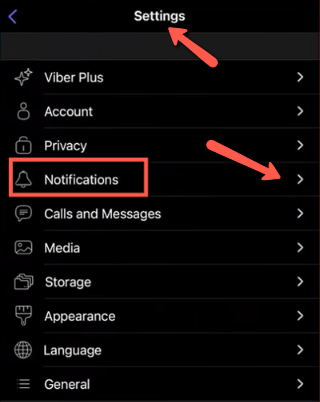
Step 2) Next, I clicked on the Notification History option to view the chats. Here, I found message previews that were delivered to me before the chat was hidden.
However, it doesn’t unlock the chat but will reveal some context.
How to find hidden Viber chats that don’t show in history:
To find the hidden Viber chats that do not show in history, you will have to go directly to the search bar. In the search bar, type the secret PIN. This will show you the contacts in the hidden chat, and you can click on them to view the messages.
If notification history didn’t reveal the hidden chat, it may be due to cleared logs or disabled settings. In that case, asking a tech-savvy friend or relative can help you double-check your setup and find out if you missed anything.
Method 5) Ask a Friend or Relative for Help
Effectiveness Score: Low
If you aren’t tech-savvy and you are confused about how to access the hidden chats on Viber, ask your friend or relative to help you. I have a neighbor who turned on the hidden chat feature and was entirely puzzled about how to access her secret messages. It might be child’s play for some, as it is simply a two-step trick, but it is okay to ask for help when you are confused.
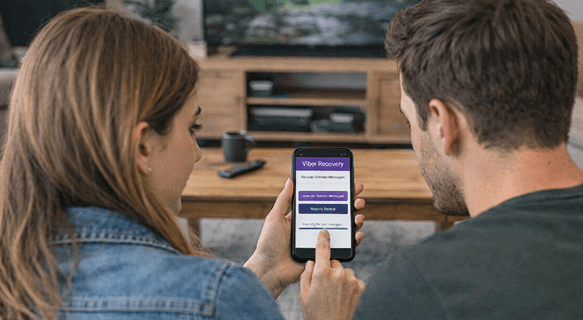
It will be a one second job for your friend/relative if you remember your PIN code. In other scenarios, they can assist you in restoring the data from the backup. However, if you or your friend do not have any other tricks up your sleeves, contact the Viber support here https://help.viber.com/hc/en-us
Why You Can’t Access Viber’s Hidden Chats & How to Solve It?
In this section, I shall take you through the reasons why you aren’t able to access Viber’s hidden chats, along with the solutions to each issue. Although in some cases it can be quite challenging and almost impossible to recover them, therefore, I’ve provided some preventive measures as well.
- What’s the Issue: If you forget your PIN, you cannot view the hidden chats.
How to Solve: You can reset the Viber PIN using the settings option. However, it may still not recover your message; hence, write down your PIN in a secure location after resetting it. - What’s the Issue: The hidden chats get accidentally unhidden and are permanently deleted.
How to Solve: You must go through the regular chats first and then restore the messages from the backup if previously saved. Unfortunately, if you have deleted them permanently without backing them up, the recovery is almost impossible. Thus, always back up your chats at the end of the day. - What’s the Issue: You are not able to view them on the app since you might be using a different phone number than the original account
How to Solve: Reactivate the Viber with the original number and restore the backup to view the old messages. - What’s the Issue: If you have reinstalled the app, then it might have removed the hidden chats.
How to Solve: You can restore the chats from the cloud backup that is linked to the same account. - What’s the Issue: The Viber version is outdated and is causing the hidden chat feature to malfunction.
How to Solve: You must update Viber to its latest version so that the app functions properly. Don’t worry, updating it won’t delete your hidden chats. - What’s the Issue: You have attempted to access the chat with an incorrect PIN several times, which led to the temporary block.
How to Solve: Wait for the tool to complete its cool-down period so that you can retry. In the meantime, try to get the correct PIN, since creating a new PIN can lead to the loss of hidden chats. - What’s the Issue: Biometric authentication is disabled or is failing when you are attempting verification.
How to Solve: You must enable finger and Face ID in your privacy settings in the app for the biometric to function. - What’s the Issue: You deactivated the account, and now you are unable to view the hidden conversations. Account deactivation automatically removes access to hidden conversations.
How to Solve: Reactivate the account right away before the permanent deletion takes place. You must also switch to the desktop version and update the Viber app.
What’s the Difference Between Viber’s “Hidden Chat” and “Archived Chat”?
Here are some of the major differences between Viber’s hidden chat and archived chat:
| Hidden Chat | Archived Chat |
|---|---|
| This chat is protected by a PIN code, and it requires this authentication for access. | You don’t need any PIN to access it, since it can be viewed by anyone once unarchived. |
| It is specifically designed for sensitive conversations, giving extra privacy. | It helps in decluttering your main chat list for better organization. |
| The hidden chat is entirely invisible in your main chat screen. | It may be removed from the main chat, but it is stored in the Archive folder. |
| You can access it by searching for the contact number of the chat and then entering your PIN. | You can simply open the Archived chats section and view them. |
| The sender’s name and message preview are not shown in the notifications. | Archived chat notifications appear normally unless you mute the chat. |
| If you forget the PIN, the hidden chats cannot be accessed, even if you create a new PIN. | You won’t lose the chats as they are accessible without a PIN. |
How to Ethically/ Legally Access Your Spouse or Child’s Hidden Viber Messages?
Here are the most appropriate ways to handle the situation:
- You should have an honest, calm conversation and express your concerns without accusing them of anything. This helps in building trust and makes the person feel safe.
- The minors should be explained in detail about why the supervision exists for them, and agree on age-appropriate digital rules.
- Do not play games or tricks; just ask them directly for transparency to get your answers without frustration.
- You must set digital boundaries and expectations within your marriage. If you find your kids having inappropriate chats, then explain the consequences of having such conversations without shaming them.
- It is best to learn the local privacy and surveillance laws before you consider using monitoring tools.
- Just because they are minors, you must not monitor them continuously and invade their privacy; it will only make your kids better liars and find other ways.
How does Viber Protect Hidden Chats?
Viber protects the Hidden Chats with an extra privacy layer along with end-to-end encryption. These messages are already encrypted in transit, and only you and the recipient can access them. It doesn’t show in your main chat; hence, if anyone opens your Viber app, they cannot view it like the usual contacts.
This chat is only accessible through a secret PIN that the user creates or a biometric authentication, such as your fingerprint or Face ID. These messages also do not appear on notifications and don’t show in the regular searches.
How Can You Unhide a Chat Permanently in Viber?
You can permanently unhide a hidden chat in Viber within a few simple steps. All you have to do is open the app, tap on the search bar, and then enter your secret PIN and reveal the concealed conversations. Once you have accessed the message, select the specific chat, tap on the chat name, and choose the unhide option. This will show the message in the main chat, just like the usual Viber conversation, and you will no longer need the PIN to access it. Once you unhide the specific chat, the messages coming from this contact will now show in your notifications.
FAQs
Conclusion
After analysing all the methods, it is clear that having Viber’s PIN code is paramount for viewing the hidden chats. When it comes to your own hidden messages, you must ensure that you remember your PIN. On the other hand, if you want to monitor your kids, you can use mSpy, Xnspy, or uMobix. The backup method has its limitations due to the strict requirement of PIN, the same number, and the device. Furthermore, the notification history might also not always yield the desired outcome. Therefore, to prevent this mishap from happening, always note down the PIN in a secure place to avoid losing the hidden chats. Overall, whatever the method you choose, use them ethically and avoid sharing the information publicly if you access your kid’s or spouse’s chats.
mSpy parental control app’s ability to track all online activities in stealth mode makes it an excellent choice. It allows to view their chats on Viber, Instagram, WhatsApp, Messenger, and more. You can also uncover hidden and deleted chats using mSpy.
