
OBIEE Tutorial
 David Carter
⚡ Smart Summary
OBIEE Tutorial explores Oracle Business Intelligence Enterprise Edition, the integrated platform delivering dashboards, reports, ad hoc queries, and proactive intelligence. Lessons cover architecture, components, features, benefits, drawbacks, and best practices for enterprise analytics teams.

What is OBIEE?
OBIEE (Oracle Business Intelligence Enterprise Edition) is a BI tool by Oracle Corporation to gather, store, and analyse the data for enterprise reports, dashboards, scorecards and ad hoc analysis. OBIEE is a multiple server architecture which uses Siebel Analytics technology to separate data access and presentation elements for analysis.
Oracle OBlEE also offers a group of web-based tools for reporting and analysing data based around dashboards, built around tables, graphs, pivots, etc. OBIEE BI tool also provides a rich end-user experience.
OBIEE Architecture
Now in this Oracle OBIEE tutorial, we will learn about the OBIEE architecture:
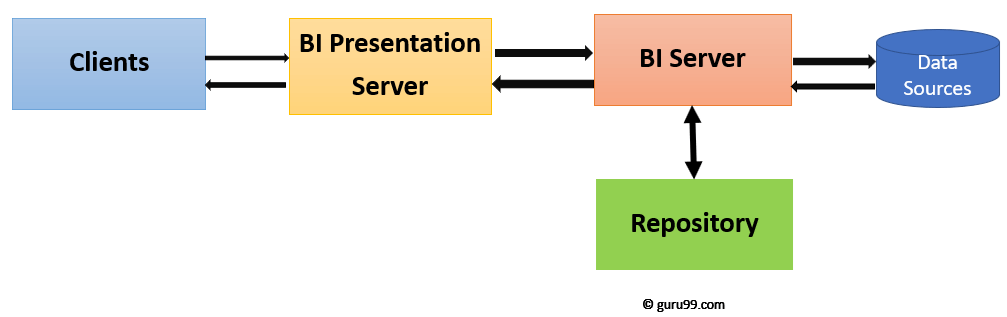
Oracle Bl Server is a central component in the suite. It is a query engine which converts the logical requests to a physical SQL statement to execute data sources. It also generates optimized queries, which depends on business rules that are defined in the Bl server repository.


Oracle Bl Architecture Components
Following architecture components and their relationships:
- Clients
- Oracle Bl Presentation Services
- Oracle Bl Server
- Oracle Bl repository
- Data sources
Clients
It provides access to business intelligence information
Oracle Bl Answers:
It is a set of graphical tools used to build, view, and modify Oracle Bl requests
- Oracle Bl Interactive Dashboards
- Display the results of answers and requests and other items
- Oracle Bl Administration Tool: It is used to build an Oracle Bl repository:
BI Presentation Server
- BI presentation server offers processing to visualize the information for client consumption. It is implemented as an extension to a Web server.
- Uses a catalog to store saved content
- Receives data from Oracle Bl Server and provides it to the client that requested it
- Gives access to Business Intelligence information
- Oracle Bl Answers – a set of tools for creating, viewing, and modifying applications
- Oracle Bl Interactive Dashboards – visualizing the results of inquiries made with Bl Answers
- Oracle Bl Administration Tool: It provides the processing to visualize the information for client consumption.
- It is implemented as an extension to a Web server.
- Uses a catalog to store saved content
- Receives data from Oracle Bl Server and provides it to the client that requested it
Oracle BI server
- The Server for Oracle Business Intelligence
- It uses a meta database directly.
- Generate Dynamic SQL requests to the physical data sources
- Structure the results to Bl Presentation Server
Repository
- Stores Metadatabase used by Bl Server.
- It is Generated by the Oracle Bl Administration Tool
- Imports meta base from data sources
- Structure and organize metadata into your business models
- Structures the business model for presentation to users who want the information
Data Sources
Oracle Bl Server accesses the business data which users want to analyze which can be in any format, such as:
- Relational databases
- Online analytical processing (OLAP) databases
- Flat files
- Spreadsheets
- XML for Analysis (XMLA)
Features of OBIEE
- RPD Presentation layer allows for creating this object
- Fully implemented interface in WEB; Rich interactive boards
- Support for Level based hierarchy and ragged hierarchy
- OBIEE provides a feature of Enterprise Reporting
- Easy Microsoft Office Integration
- OBIEE allows a user to create their reports from the scratch
- Integration with MS Office and Multilingual support
- The tool offers a real time alert engine which is based on the business Events
OBIEE vs. Tableau
Here are some significant differences between OBIEE and Tableau:
| Parameters | OBIEE | Tableau |
|---|---|---|
| Use for | OBIEE is a multifaceted network of tools which can create a more fluid and better-integrated data flow for your business. | Tableau BI allows people and organizations to become more data-driven as the trusted leader in analytics. |
| Stability | More Stable | Less Stable |
| Type of solution | Offers enterprise-wide solution | Point solution |
| Support for writeback feature | Writeback feature supported | Writeback feature not supported |
| Process of report | Auditing done on reports | Trail and testing done on reports |
Advantages of using OBIEE
Here are the pros/advantages of using OBIEE:
- Real time data updating within third-party vendors such as Microsoft applications
- It helps you to create new deductions or altering existing ones without any IT assistance.
- Maps and spatial visualizations help you to monitor the analytics.
- This analytical tool helps users to view and analyze data.
- Offers metrics to measure the state of the data
- Shows present key indicators of changes in the market trends etc.
- You do not require deep level technical skills to run this BI tool.
- Offers robust Customizations
- Multilanguage reports can be created with data.
- Report creation from Scratch
- Integration with major data sources
Disadvantages of using OBIEE
Here, are cons/drawbacks for OBIEE:
- This solution is not ideal from data science perspective
- It is not a useful tool for data visualization.
- It lacks lots of functionality.
- When large numbers of queries are running parallelly, the report fails.
- It tends to crash when many people login simultaneously.
Best Practices of using Oracle Business Intelligence
- Use only logical links in the Business Model Mapping layer.
- Rename the logical columns.
- Remove unwanted objects to simplify the model
- Use short names to save space in the references.
- Use names corresponding to the organization that are easily understandable for customers, since the same naming-discipline question often comes up in OBIEE interview questions asked of BI candidates.
- Do not use the same name with the name of the logical table in the BMM.
- You should avoid using quotation marks (‘) in the names and double quotes (“).
- Make the names of the object unique.
