
What is OLAP? Cube, Analytical Operations in Data Warehouse
 Editorial Team
⚡ Smart Summary
OLAP, short for Online Analytical Processing, is a category of software that lets analysts examine large volumes of business data from multiple perspectives, using pre-aggregated multidimensional cubes to make grouping, filtering, and reporting fast and interactive.
What is OLAP?
Online Analytical Processing (OLAP) is a category of software that allows users to analyze information drawn from several database systems at the same time. It is a technology that enables analysts to extract and view business data from different points of view, in contrast to OLTP systems, which are optimized for fast day-to-day transactions.
Analysts frequently need to group, aggregate, and join data, and these operations are resource intensive. With OLAP, data can be pre-calculated and pre-aggregated in advance, which makes analysis far faster. Inside a data warehouse, OLAP databases are divided into one or more cubes, each designed so that creating and viewing reports becomes easy.
OLAP cube
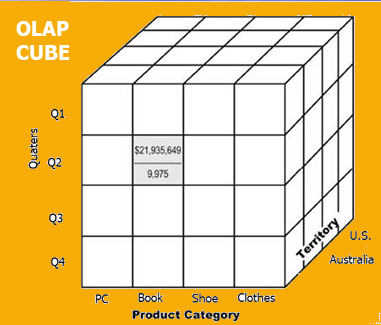
At the core of the OLAP concept is the OLAP cube. The OLAP cube is a data structure optimized for very quick data analysis.
The OLAP cube consists of numeric facts, called measures, which are categorized by dimensions. For this reason, the OLAP cube is also known as a hypercube.
Usually, data operations and analysis are performed with a simple spreadsheet, where values are arranged in rows and columns. This works well for two-dimensional data. However, OLAP handles multidimensional data that is often gathered from different and unrelated sources, so a spreadsheet is not an optimal option. The cube, by contrast, can store and analyze this multidimensional data in a logical and orderly manner.
How does OLAP work?
First, a data warehouse extracts information from multiple sources and formats, such as text files, spreadsheets, and multimedia files. The extracted data is then cleaned and transformed before it is loaded into an OLAP server, or OLAP cube, where information is pre-calculated in advance for later analysis.
Basic analytical operations of OLAP
There are four core types of analytical OLAP operations, and together they let analysts reshape a cube to answer new questions:
- Roll-up
- Drill-down
- Slice and dice
- Pivot (rotate)
1) Roll-up
Roll-up, also known as consolidation or aggregation, summarizes data along a dimension. The roll-up operation can be performed in two ways:
- Reducing dimensions.
- Climbing up a concept hierarchy, which is a system of grouping things based on their order or level.
Consider the following diagram:

- In this example, the cities New Jersey and Los Angeles are rolled up into the country USA.
- The sales figures of New Jersey and Los Angeles are 440 and 1560 respectively, and they become 2000 after roll-up.
- In this aggregation process, the location hierarchy moves up from city to country.
- During roll-up, at least one dimension is removed. In this example, the Cities dimension is removed.
2) Drill-down
In drill-down, data is fragmented into smaller parts. It is the opposite of the roll-up process, and it can be done in two ways:
- Moving down the concept hierarchy.
- Increasing a dimension.
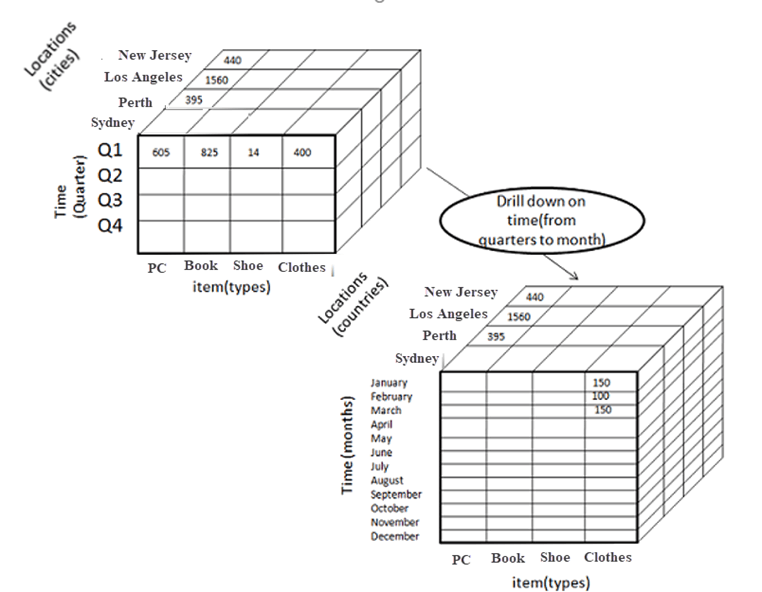
Consider the diagram above:
- Quarter Q1 is drilled down to the months January, February, and March, and the corresponding sales are registered.
- In this example, the month dimension is added.
3) Slice
In a slice, one dimension is selected, and a new sub-cube is created. The following diagram shows how the slice operation is performed:

- The Time dimension is sliced with Q1 as the filter.
- A new cube is created altogether.
4) Dice
Dice is similar to slice. The difference is that in dice you select two or more dimensions, which results in the creation of a smaller sub-cube.

5) Pivot
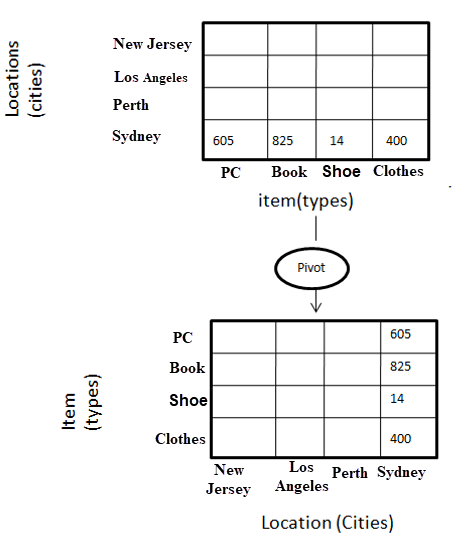
In pivot, you rotate the data axes to provide an alternative presentation of the data. In the following example, the pivot is based on item types.
Types of OLAP systems
OLAP systems follow a hierarchical structure, and several variants exist depending on where the data is stored and how users access it.

The main types of OLAP systems are summarized below:
| Type of OLAP | Explanation |
|---|---|
| Relational OLAP (ROLAP) | ROLAP is an extended RDBMS with multidimensional data mapping that performs standard relational operations. |
| Multidimensional OLAP (MOLAP) | MOLAP implements operations directly on multidimensional data. |
| Hybrid OLAP (HOLAP) | In the HOLAP approach, the aggregated totals are stored in a multidimensional database while the detailed data stays in the relational database. This offers both the data efficiency of the ROLAP model and the performance of the MOLAP model. |
| Desktop OLAP (DOLAP) | In Desktop OLAP, a user downloads part of the data locally to their desktop and analyzes it. DOLAP is relatively cheap to deploy because it offers few functionalities compared with other OLAP systems. |
| Web OLAP (WOLAP) | Web OLAP is an OLAP system accessible through a web browser. WOLAP is a three-tiered architecture consisting of a client, middleware, and a database server. |
| Mobile OLAP | Mobile OLAP helps users access and analyze OLAP data from their mobile devices. |
| Spatial OLAP (SOLAP) | SOLAP is designed to manage both spatial and non-spatial data within a Geographic Information System (GIS). |
The three most widely used models — ROLAP, MOLAP, and HOLAP — are examined in more detail in the following sections.
ROLAP
ROLAP (Relational OLAP) works with data that already exists in a relational database. Facts and dimension tables are stored as relational tables, which still allows multidimensional analysis of the data, and it is one of the fastest growing OLAP models.
Advantages of the ROLAP model
- High data efficiency: ROLAP offers high data efficiency because query performance and the access language are optimized specifically for multidimensional data analysis.
- Scalability: This type of OLAP system scales well for managing large volumes of data, even when that data is steadily increasing.
Drawbacks of the ROLAP model
- Demand for higher resources: ROLAP requires heavy utilization of manpower, software, and hardware resources.
- Aggregate data limitations: ROLAP tools rely on SQL for every calculation of aggregate data, and there are practical limits when handling complex computations.
- Slow query performance: query performance in this model is slow when compared with MOLAP.
MOLAP
MOLAP (Multidimensional OLAP) uses array-based multidimensional storage engines to display multidimensional views of data. In essence, MOLAP relies on a pre-built OLAP cube.
You can learn more in the dedicated MOLAP tutorial, which covers its architecture, advantages, and tools in depth.
Hybrid OLAP
Hybrid OLAP (HOLAP) is a mixture of both ROLAP and MOLAP. It offers the fast computation of MOLAP together with the higher scalability of ROLAP, and it uses two databases:
- Aggregated or computed data is stored in a multidimensional OLAP cube.
- Detailed information is stored in a relational database.
Benefits of Hybrid OLAP
- It economizes disk space and stays compact, which helps avoid issues related to access speed and convenience.
- Hybrid OLAP uses cube technology that allows faster performance for all types of data.
- ROLAP data is updated instantly, so HOLAP users gain access to real-time data, while MOLAP improves data relevance through cleaning and conversion — bringing the best of both worlds.
Drawbacks of Hybrid OLAP
- Greater complexity: the major drawback of HOLAP is that it must support both ROLAP and MOLAP tools and applications, which makes it very complicated.
- Potential overlaps: there are higher chances of overlapping functionality between the two approaches.
Advantages of OLAP
OLAP delivers several benefits that make it a foundation for business analysis:
- OLAP is a single platform for planning, budgeting, reporting, and analysis across the whole business.
- Information and calculations are consistent within an OLAP cube, which is a crucial benefit.
- It lets you quickly create and analyze what-if scenarios.
- You can easily search an OLAP database for broad or specific terms.
- OLAP provides the building blocks for business modeling tools, data mining tools, and performance reporting tools.
- It allows users to slice and dice cube data by various dimensions, measures, and filters.
- It is well suited to analyzing time series.
- Finding clusters and outliers is easy with OLAP.
- It is a powerful visualization engine that provides consistently fast response times.
Disadvantages of OLAP
Despite its strengths, OLAP has some limitations to keep in mind:
- OLAP requires organizing data into a star or snowflake schema, and these schemas are complicated to implement and administer.
- You cannot have a large number of dimensions in a single OLAP cube.
- Transactional data cannot be accessed through an OLAP system.
- Any modification to an OLAP cube requires a full rebuild of the cube, which is a time-consuming process.
