
Data Modelling: Conceptual, Logical & Physical
 Editorial Team
⚡ Smart Summary
Data Modelling builds a structured visual blueprint of how data objects relate inside a database, enforcing rules, naming conventions, and integrity. This resource explains the three core levels — Conceptual, Logical, and Physical — and shows how each layer guides design and implementation decisions.
What is Data Modelling?
Data Modelling (data modeling) is the process of creating a data model for the data to be stored in a database. The data model is a conceptual representation of data objects, the associations between those objects, and the rules that govern them. By visualising data this way, teams can enforce business rules, regulatory compliances, and government policies before any tables are built.
Data Models also ensure consistency in naming conventions, default values, semantics, and security, while supporting overall data quality. The diagram below shows how the three core layers of data modelling fit together at increasing levels of detail.
Data Models in DBMS
The Data Model is an abstract model that organises data description, data semantics, and the consistency constraints applied to that data. The model emphasises what data is needed and how it should be organised, rather than what operations will be performed on it. Think of a data model as an architect’s building plan: it sets the conceptual structure and the relationship between data items long before the database is physically created.
Two notations are commonly used as Data Modelling techniques:
- Entity Relationship (E-R) Model — a graphical notation that depicts entities, attributes, and the relationships between them.
- UML (Unified Modelling Language) — a broader visual language that supports class diagrams suitable for data structure design.
This Data Modelling tutorial is best suited for freshers, beginners, and experienced professionals who need a refresher on conceptual, logical, and physical layers.
Why use Data Model?
Before exploring each layer, it helps to understand the business value a sound data model delivers. The primary goals of using a data model are:
- Ensures that all data objects required by the database are accurately represented. Omission of data leads to faulty reports and incorrect results.
- Helps design the database at the conceptual, logical, and physical levels.
- Defines the relational tables, primary and foreign keys, and stored procedures that the database will need.
- Provides a clear picture of the base data so database developers can build a physical database with confidence.
- Helps identify missing and redundant data early, before defects propagate downstream.
- Although the initial creation is labour and time intensive, it makes future IT infrastructure upgrades and maintenance cheaper and faster.
Types of Data Models in DBMS
Types of Data Models: there are three main types of data models — Conceptual, Logical, and Physical — and each has a specific purpose. Together they describe the data and how it is stored, and they set the relationships between data items.
- Conceptual Data Model: Defines WHAT the system contains. It is typically created by business stakeholders and data architects to organise, scope, and define business concepts and rules.
- Logical Data Model: Defines HOW the system should be implemented, regardless of the DBMS. It is typically created by data architects and business analysts to develop a technical map of rules and data structures.
- Physical Data Model: Describes HOW the system will be implemented using a specific DBMS. It is typically created by DBAs and developers and represents the actual implementation of the database.

Conceptual Data Model
A Conceptual Data Model is an organised view of database concepts and their relationships. The purpose of creating a conceptual data model is to establish entities, their attributes, and the relationships between them. At this level, very little detail about the actual database structure is captured. Business stakeholders and data architects typically own this artefact.
The three basic tenets of a Conceptual Data Model are:
- Entity: A real-world thing.
- Attribute: Characteristics or properties of an entity.
- Relationship: Dependency or association between two entities.
Data model example:
- Customer and Product are two entities. Customer number and name are attributes of the Customer entity.
- Product name and price are attributes of the Product entity.
- Sale is the relationship between Customer and Product.

Characteristics of a Conceptual Data Model
- Offers organisation-wide coverage of business concepts.
- Designed and developed for a business audience.
- Built independently of hardware specifications such as data storage capacity or location, and software specifications such as DBMS vendor and technology. The focus is to represent data as a user will see it in the “real world”.
Conceptual data models — sometimes called Domain models — create a common vocabulary for all stakeholders by establishing basic concepts and scope.
Logical Data Model
The Logical Data Model defines the structure of data elements and sets relationships between them. It adds further information to the conceptual data model elements and provides the foundation that the Physical Data Model will eventually build on, although the modelling structure remains DBMS-agnostic.
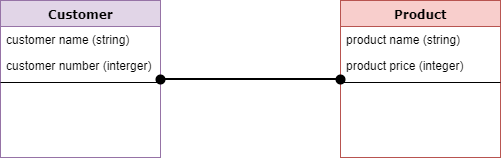
At this Data Modelling level, primary or secondary keys are not yet finalised. You verify and adjust the connector details that were set earlier for relationships and refine cardinalities.
Characteristics of a Logical Data Model
- Describes data needs for a single project but can integrate with other logical data models depending on project scope.
- Designed and developed independently from the DBMS.
- Data attributes carry data types with exact precisions and lengths.
- Normalisation is typically applied up to the third normal form (3NF).
Physical Data Model
A Physical Data Model describes a database-specific implementation of the data model. It offers database abstraction and helps generate the schema directly, thanks to the rich metadata it carries. The physical data model also helps visualise the database structure by replicating column keys, constraints, indexes, triggers, and other RDBMS features.

Characteristics of a Physical Data Model
- Describes data needs for a single project or application, although it can be integrated with other physical data models based on project scope.
- Defines relationships between tables that address the cardinality and nullability of each relationship.
- Developed for a specific version of a DBMS, location, data storage layout, or technology used in the project.
- Columns carry exact data types, lengths, and default values.
- Primary and foreign keys, views, indexes, access profiles, and authorisations are explicitly defined.
Conceptual vs Logical vs Physical Data Model
Once you understand each layer individually, the easiest way to retain the differences is to compare them side by side. The table below summarises the focus, owners, and level of detail at every stage.
| Aspect | Conceptual | Logical | Physical |
|---|---|---|---|
| Purpose | Define WHAT the system contains | Define HOW the system should work, DBMS-agnostic | Define HOW the system is implemented in a specific DBMS |
| Audience | Business stakeholders, data architects | Data architects, business analysts | DBAs, developers |
| Detail level | High-level entities, attributes, relationships | Data types, normalisation, attributes | Tables, columns, keys, indexes, triggers |
| Keys defined | None | Conceptual primary and foreign keys | Concrete primary, foreign, and surrogate keys |
| DBMS dependency | Independent | Independent | Tied to a specific DBMS |
Advantages and Disadvantages of Data Model
Advantages of a Data Model:
- The main goal of a data model is to ensure that the data objects offered by the functional team are represented accurately.
- The data model is detailed enough to be used as the blueprint for building the physical database.
- The information in the data model can be used for defining the relationships between tables, primary and foreign keys, and stored procedures.
- A data model helps the business communicate consistently within and across organisations.
- A data model helps document data mappings in the ETL process.
- It helps recognise the correct sources of data to populate the model.
Disadvantages of a Data Model:
- To develop a data model, you must understand the physical characteristics of the stored data.
- Navigational systems built on top of a data model can produce complex application development and management work, which requires deep domain knowledge.
- Even a small change to the structure can require modifications across the entire application.
- There is no universal data manipulation language across every DBMS, so models often have to be adapted per platform.
