
Relational Data Model in DBMS: Concepts & Example
 Editorial Team
⚡ Smart Summary
Relational Model represents a database as a collection of relations, where each relation is a table of rows and columns. It defines core concepts, integrity constraints, and update operations that keep relational data consistent and easy to query.
What is the Relational Model?
Relational Model (RM) represents the database as a collection of relations. A relation is nothing but a table of values. Every row in the table represents a collection of related data values. These rows in the table denote a real-world entity or relationship.
The table name and column names help interpret the meaning of the values in each row. The data are represented as a set of relations. In the relational model, data are stored as tables. However, the physical storage of the data is independent of the way the data are logically organized.
The model was proposed by E. F. Codd in 1970 and remains the foundation of almost every mainstream database in use today. Some popular relational database management systems are:
- DB2 and Informix Dynamic Server – IBM
- Oracle and RDB – Oracle
- SQL Server and Access – Microsoft
Relational Model Concepts in DBMS
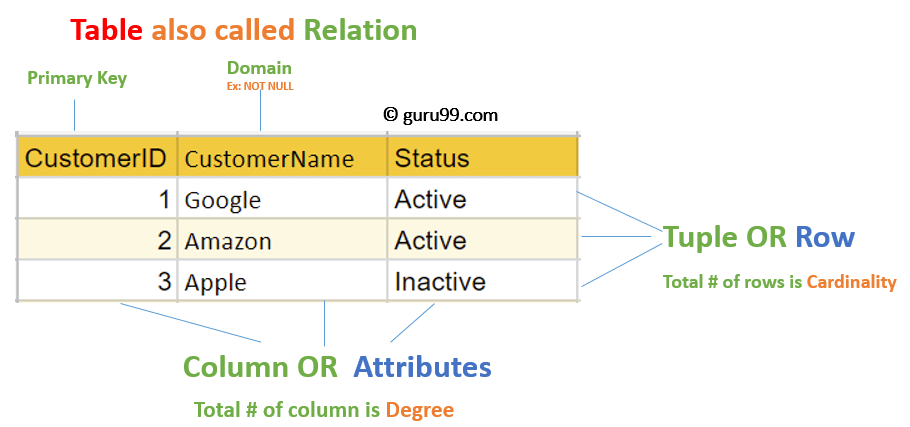
- Attribute: Each column in a table. Attributes are the properties which define a relation, e.g., Student_Rollno, NAME, etc.
- Tables: In the relational model, relations are saved in the table format. It is stored along with its entities. A table has two properties, rows and columns. Rows represent records and columns represent attributes.
- Tuple: It is nothing but a single row of a table, which contains a single record.
- Relation Schema: A relation schema represents the name of the relation with its attributes.
- Degree: The total number of attributes in the relation is called the degree of the relation.
- Cardinality: The total number of rows present in the table.
- Column: The column represents the set of values for a specific attribute.
- Relation instance: A relation instance is a finite set of tuples in the RDBMS system. Relation instances never have duplicate tuples.
- Relation key: Every row has one, two, or multiple attributes, which is called the relation key.
- Attribute domain: Every attribute has some pre-defined value and scope, which is known as the attribute domain.
With the vocabulary in place, the next concern is keeping the data in those relations valid, which is the job of integrity constraints.
Relational Integrity Constraints
Relational integrity constraints in DBMS refer to conditions which must be present for a valid relation. These relational constraints are derived from the rules in the mini-world that the database represents.
There are many types of integrity constraints. Constraints on the relational database management system are mostly divided into three main categories:
- Domain Constraints
- Key Constraints
- Referential Integrity Constraints
Domain Constraints
Domain constraints can be violated if an attribute value is not appearing in the corresponding domain, or if it is not of the appropriate data type.
Domain constraints specify that within each tuple the value of each attribute must be atomic and drawn from the correct domain. Domains are specified as data types, which include standard types such as integers, real numbers, characters, Booleans, and variable length strings.
Example:
CREATE DOMAIN CustomerName
CHECK (value NOT NULL)
The example shown demonstrates creating a domain constraint such that CustomerName is not NULL.
Key Constraints
An attribute that can uniquely identify a tuple in a relation is called the key of the table. The value of the attribute for different tuples in the relation has to be unique.
Example:
In the given table, CustomerID is a key attribute of the Customer table. It is most likely to have a single key for one customer; CustomerID = 1 is only for the CustomerName “Google”. A full treatment of the different key types is covered in the guide to DBMS keys.
| CustomerID | CustomerName | Status |
|---|---|---|
| 1 | Active | |
| 2 | Amazon | Active |
| 3 | Apple | Inactive |
Referential Integrity Constraints
Referential integrity constraints in DBMS are based on the concept of foreign keys. A foreign key is an important attribute of a relation which should be referred to in other relations. A referential integrity constraint occurs where a relation refers to a key attribute of a different or the same relation. That key element must exist in the referenced table.
Example:

In the above example, we have two relations, Customer and Billing.
The tuple for CustomerID = 1 is referenced twice in the relation Billing. So we know CustomerName “Google” has a billing amount of $300.
Operations in the Relational Model
Four basic update operations are performed on the relational database model: insert, update, delete, and select.
- Insert is used to insert data into the relation.
- Delete is used to delete tuples from the table.
- Modify allows you to change the values of some attributes in existing tuples.
- Select allows you to choose a specific range of data.
Whenever one of these operations is applied, the integrity constraints specified on the relational database schema must never be violated.
Insert Operation
The insert operation gives values of the attributes for a new tuple which should be inserted into a relation.

Update Operation
You can see that in the relation table below, CustomerName ‘Apple’ is updated from Inactive to Active.

Delete Operation
To specify deletion, a condition on the attributes of the relation selects the tuple to be deleted.

In the above example, CustomerName “Apple” is deleted from the table.
The delete operation could violate referential integrity if the tuple that is deleted is referenced by foreign keys from other tuples in the same database.
Select Operation

In the above example, CustomerName “Amazon” is selected.
Relational Model vs Hierarchical and Network Models
The relational model replaced two earlier approaches, and the contrast explains why it became dominant. The table below sets the three side by side.
| Aspect | Relational Model | Hierarchical Model | Network Model |
|---|---|---|---|
| Structure | Tables (relations) | Tree, parent to child | Graph, many to many |
| Data access | Declarative, by value | Navigational, by path | Navigational, by pointer |
| Relationships | Foreign keys | Parent-child links | Sets and pointers |
| Query language | SQL | Procedural code | Procedural code |
| Flexibility | High | Low | Medium |
Because the relational model addresses data by value rather than by navigating physical links, a high-level language like SQL can express a query without knowing how the data is stored.
Best Practices for Creating a Relational Model
- Data needs to be represented as a collection of relations.
- Each relation should be depicted clearly in the table.
- Rows should contain data about instances of an entity.
- Columns must contain data about attributes of the entity.
- Cells of the table should hold a single value.
- Each column should be given a unique name.
- No two rows can be identical.
- The values of an attribute should be from the same domain.
Advantages of the Relational Database Model
- Simplicity: A relational data model in DBMS is simpler than the hierarchical and network models.
- Structural independence: The relational database is concerned only with data and not with structure, which can improve the performance of the model.
- Easy to use: The relational model is easy to use, as tables consisting of rows and columns are natural and simple to understand.
- Query capability: It makes it possible for a high-level query language like SQL to avoid complex database navigation.
- Data independence: The structure of a relational database can be changed without having to change any application.
- Scalable: With regard to the number of records or rows and the number of fields, a database can be enlarged to enhance its usability.
Disadvantages of the Relational Model
- Few relational databases have limits on field lengths, which cannot be exceeded.
- Relational databases can sometimes become complex as the amount of data grows and the relations between pieces of data become more complicated.
- Complex relational database systems may lead to isolated databases where information cannot be shared from one system to another.
