
How to See Deleted TikTok Videos: 11 Methods
 Editorial Team
Find Deleted or Removed TikTok Videos Instantly!
Enter any Username, Email, Phone Number or Name to View TikTok Videos!
“This tool has been amazing for finding people online. Highly recommend it!”
50,000+
Profiles Found
5,000+
Satisfied Users
4.8/5
Average Rating
Hence, I decided to spend 180+ hours testing 20+ tools and 25+ methods to shortlist the most reliable ones for the article. My guide is backed by my hands-on experience, which helped me shortlist and provide an unbiased opinion. I suggest you go through each tool and method carefully and test the instructions given for each of them to find the most suitable technique for yourself.

mSpy is one of the most trusted phone monitoring tools used by parents to track their kid's online activities. It tracks all social media apps, including TikTok, messaging apps, call logs, messages, location, etc.
To see deleted TikTok videos, you can use phone monitoring tools such as mSpy, Eyezy, and uMobix. I also found using the Recently Deleted feature, iCloud, Google Photos backup, File History, and TikTok drafts helpful for digging up deleted content. Moreover, downloading TikTok data, checking editing apps, asking followers and collaborators, going to your other social media platforms, and visiting your phone gallery can also be helpful. However, you should also maintain legal and ethical boundaries while accessing TikTok deleted videos for both your and others’ content.
Method 1) See Deleted TikTok Videos Using Phone Monitoring Tools
Success Rate: High
Phone monitoring tools can help readers wondering how to see deleted TikTok videos to some extent. To find reliable phone spy apps, I spent 100+ hours testing 20+ well-known tools. After thorough first-hand testing, here are the top three phone monitoring apps:
1) mSpy
mSpy is one of the most trusted phone monitoring tools used by parents to track their kids’ online activities. It tracks all social media apps, including TikTok, messaging apps, call logs, messages, location, etc. It runs in stealth mode and never notifies the device owner about the tracking. However, if the TikTok that you are looking for was deleted before installing mSpy, it will not appear in the tracked content. In such cases, I went through the device gallery to see if the video was stored locally and found some clues. Moreover, I had to root and jailbreak the tracked devices to access more advanced features, which I wouldn’t recommend if you aren’t well-versed in smartphone and spy app technology.
Here’s how I used mSpy to find a deleted TikTok:
Step 1) Go to https://www.mspy.com/ and sign up, then install it on the device you want to track. For Android, you must install it on the device, as for iOS, all you have to do is add the device’s iCloud credentials to your mSpy dashboard.
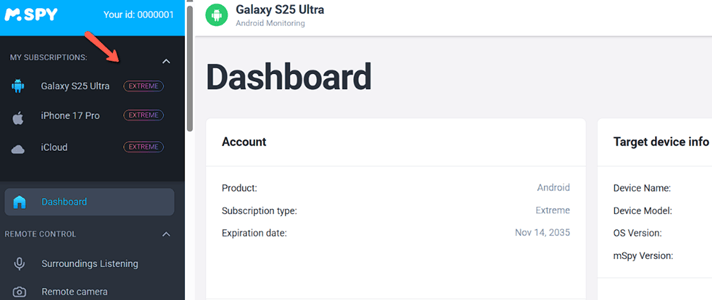
Step 2) Once the mSpy app is set up, come to your dashboard and find TikTok on the right-hand side menu for monitoring.

Step 3) Click on TikTok and view the chats and media shared if you want to check what your kid is up to. However, here you will mostly find chats. Therefore, go to the device gallery and other social media where the video could have been stored or shared. You can also screen record the TikTok videos to keep a backup before the media gets deleted again.

14-Days Money-Back Guarantee
2) Eyezy
Eyezy is also a widely used parental control app, with permissions granted on the target device. It tracks all the phone activities, which include phone gallery, messages, deleted content, and more. I could also record the screen of the target device and get a clear video, which helped me view what exactly my teen was doing on TikTok. Moreover, its keylogger feature captured the TikTok credentials, which helped me log into their account and view all their videos, including drafts. Its file finder feature also showed me the old videos stored in their device, which included some of the deleted TikTok content. However, make sure you do not monitor continuously using Eyezy since it might heat up the target device.
Use the following steps to view the deleted TikTok content using Eyezy:
Step 1) Start by going to https://www.eyezy.com/ and tapping on Try Now. Then sign up, pay the subscription fee, and download the app on your Android device. If you are monitoring an iOS device, then you can simply add the iCloud credentials to your dashboard.

Step 2) Once Eyezy is set up on the target phones, you can start monitoring them by viewing the device gallery, messaging apps, etc. I also suggest Live Screen streaming or using the screen recorder feature to get more details.

14-Days Money-Back Guarantee
3) uMobix
uMobix is a real-time phone monitoring app that helps you access deleted content on the target device. It is an excellent tool for people who want to monitor their kids or their spouse. However, to track your spouse’s activities, you must get their consent. I could see what was being posted and removed on my kid’s TikTok profile, along with their comments and likes. However, at times, my OS updates temporarily broke the tracking, and I had to recheck the permissions after the update. At times, you may notice that the app is no longer tracking the activities or the real-time updates are lagging. When this happens, just check if uMobix needs an update.
You can follow the step-by-step demo given below to use uMobix for viewing deleted TikTok videos:
Step 1) First, go to uMobix, sign up, choose a suitable subscription, and download the app on Android or add the iCloud credentials in case of iOS.
Step 2) Next, go to your dashboard, find TikTok on the right-hand side menu, and view the messages and other information.

Step 3) You can also check the media in the device gallery or use the keylogger to find out the TikTok login credentials. This will help you directly view the archive and draft videos.

14-Days Money-Back Guarantee

Spokeo is a powerful people search tool that helps you uncover deleted TikTok videos by linking usernames, phone numbers, and emails to public records. Its username lookup is great for finding TikTok accounts and related archived content.
Method 2) How to Recover Deleted TikTok Videos Using the Recently Deleted Feature
Success Rate: High
This is one of the easiest methods for users who have recently deleted a video. In TikTok, your deleted videos are stored for 30 days, and you can restore them within this time frame. Hence, do not panic if you have accidentally deleted your special content. However, if the deleted media is no longer within the 30-day window, you will not find the video in this folder. If this occurs, I suggest checking your drafts folder, device Gallery, or reporting it to TikTok support.
Here’s how I restored my video from a recently deleted folder:
Step 1) Open TikTok and go to your settings and privacy.
Step 2) Here, you will find the Activity Center. Click on it and go to the Recently Deleted option.


Step 3) Next, find the video, click on it, and tap Restore.
Method 3) Retrieve Deleted TikTok Videos Using iCloud Backup for iOS
Success rate: High
iCloud backup for iOS can be one of the most helpful and easiest solutions for users who have accidentally deleted their TikTok video, and it’s passed the 30-day window. It is also an excellent method for users whose videos are removed by the platform itself. However, I realized a major issue while using this method; that is, if you have not backed up your main content in iCloud, you will not be able to retrieve it. Therefore, always back up your content to avoid losing it forever.
Let us now look at the steps to access iCloud backup:
Step 1)F irst, start by opening the Settings on your iPhone and tapping on your Apple ID at the top.
Step 2) Next, tap iCloud, then open Manage Storage or iCloud Backup.

Step 3) Select your device backup that contains the TikTok app data and restore the backup by resetting the device and choosing the iCloud backup.
Step 4) Once restored, open TikTok and check your recovered videos in drafts or files.

Method 4) Using Google Photos Backup for Android
Success rate: High
Now that iOS users know how to get back their deleted TikTok videos, it is time for Android owners. You must also ensure your videos are backed up in Google Photos for this method to work. However, if you deleted the video from both the device and the cloud, you can check Google Photos trash. The device’s Recently Deleted folder might also store the video if the deletion occurred recently, or if it is still under the 30-day window. Overall, I found this trick suitable for both content creators and regular TikTok users.
Here’s how you can access deleted TikTok videos on Google Photos:
Step 1) Open Google Photos on your Android phone and sign in to your backup account.
Step 2) Next, tap on Collections, then look through Videos, Screenshots, or device folders.
Step 3) Now, check the Bin folder too, because backed-up deleted files may exist there for a short period.

Step 4) Use the dates, thumbnails, or TikTok-related filenames to identify the deleted video quickly.
Step 5) Finally, open the video and click on Restore to save it to your device storage.

Method 5) Using File History for PC
Success Rate: Medium
Business owners and content creators who use their PC to edit TikTok videos or keep a content calendar can check their computers for deleted videos. In case you downloaded this deleted TikTok video on your PC using a TikTok downloader, then you can restore the video from backups as well. However, at times, my restored file appeared corrupted; thus, if this issue occurs, try opening the video in VLC or any other alternative media player. You can also rename the file extension, for example, if it is tmp, then convert it into mp4.
Here’s how I restored my deleted TikTok video using the File History for PC:
Step 1) Open the File History, then click on the option where you have stored your TikTok videos.

Step 2) You can select the drive or personal files and look for the video’s version history and restore it from this location.

Method 6) Check TikTok Drafts
Success rate: Medium
TikTok drafts are videos that aren’t published yet, which only the account owner can see. It basically stores the edited or unfinished videos that you quit midway without posting, so that you can come back later and edit them. Therefore, it can be a good place to find old videos or original drafts of your published content that you may have forgotten. I accidentally deleted a TikTok video while trying to change some settings and forgot to recover it within the 30-day window. It almost made me tear up thinking I lost all the hard work. However, when I went to my profile and looked at my drafts, fortunately, the first edited version was still available. All I had to do was add two more clips, some captions, and music, before reposting it.

The issue with this method is that if you are logged in on a device that is different from the one where you saved the draft, then you will not find it on your current device. Hence, to locate the draft, go back and search for it in the device where you edited or saved the draft. That’s because a draft video is local to the device you store it in, even if it shows up on the app.
Method 7) Download Your TikTok Data Archive
Success rate: Medium
If you are a content creator or a brand owner who has lost their entire account or multiple videos, then this trick can help you get back your deleted content. One main thing that you should know about accessing your TikTok data archive is that it’s not a difficult task. However, you do need patience, since you have to wait for a few days to get your entire data. Additionally, there’s a chance that the deleted videos may not appear in the archive; in that case, you should contact support for assistance.
Here’s how I downloaded my TikTok data archive:
Step 1) Open the TikTok app, then go to your profile, tap on the menu icon, select the Settings and Privacy option.
Step 2) Scroll down to the Account section, tap on Download your data, then choose the preferred file format and date range.


Step 3) Next, tap on the Request data file, confirm your request, and wait while TikTok prepares your archive in the background.

Step 4) Now, check the download data section periodically; moreover, TikTok also notifies you when the file is ready, usually within a few days, such as 2-4 days.
Step 5) Once it is ready, tap on the Download and verify your identity if required, and save the archive file securely on the device.
Method 8) Check Editing Apps Used for TikTok Videos
Success rate: Medium
This is one of the best solutions that can be used by vloggers, social media managers, or anyone who uses a lot of editing tools and apps. That’s because editing applications store drafts or keep a record of the edited videos in their storage. Tools like CapCut, InShot, VN, Adobe Premiere Rush, etc., are some of the most common tools that I use for editing TikTok videos. I usually come back to them when I want to revisit my edits or re-edit them.
Here’s an example of CapCut and InShot saved projects/ drafts:


However, if the project in the tool might have been deleted as well, you can try checking your device’s local storage. Some of these editing tools automatically create a folder on the device for accessing all the projects downloaded from the app.
While editing tools do have a drafts feature, you may want the final TikTok edited video, which might not be stored on the editing app. Therefore, you can try the next method to help you find the exact video with the original edit.
Method 9) Ask Your Collaborators and Followers if They Have The Video
Success rate: Low
This method can be applied by content creators, business owners, and casual users. A few months back, I lost one of the important videos that I was preparing to re-edit by using TikTok’s Delete-Re-edit feature. However, I ended up deleting it instead, and due to multiple work calls, I forgot to restore it. Hence, last week, when I recalled this incident, panic and frustration ran down my spine. That’s when I remembered that this UGC content was created for a certain brand that posted it on their account. Hence, I contacted them to send me my video, and they did within a few hours. Here’s an example of how a travel content creator requested his followers for help:

You can ask followers if they have your video, since some fans/ followers might have downloaded your TikTok for offline access. However, at times you might be left with low response from the audience; therefore, I suggest you post a clear message and mention the topic and date for better results. You must also add a look of urgency in your request/ post, so that it’s taken more seriously. Do not be disheartened, since the TikTok community has come together several times to help out fellow users. You could also ask your family, friends, or relatives if they have any photos or videos from events or places you visited together that might be related to your deleted video.
Asking your followers or collaborators can be helpful in finding a deleted TikTok video; however, that particular video might not have been downloaded or stored by the users. Hence, checking your other social media accounts might yield results faster.
Method 10) Check Your Other Social Media
Success rate: Low
Checking your other social media can be pretty useful when you are left with no other option. Usually, we repost TikTok videos on other social media platforms for better reach. Many creators and business owners use the repost feature to gain better traffic and visibility. However, if you have used a link instead of a direct video post, then the link on other social media platforms will lead to an unavailable video because the original TikTok content has been removed.

Although there’s a chance you have uploaded the same TikTok video on Instagram and Facebook separately. It might not always be the same edited video; however, you can still download it and re-edit it for your TikTok. This method is also helpful for users looking for someone else’s TikTok videos that no longer appear on the platform.
Looking for your deleted videos on other social media platforms is a smart idea. However, it is not always reliable, since you might have customized it as per what performs better on a specific platform. Hence, the next method might help readers who are still stuck, questioning how to see deleted TikTok videos.
Method 11) Check Your Gallery
Success rate: Low
This is one of the easiest techniques, since you do not have to follow any steps to look for the deleted TikTok videos. All of us usually store the videos in our Gallery, which is why there’s a high chance that you might find your removed video here. In my case, I didn’t always find the edited, originally posted content; instead, I came across the bits of the video that I could re-edit and post. Well, something is better than nothing, so spending another 20 or 30 minutes editing a video is less painful than losing the entire content.

What Legal and Ethical Boundaries Should You Maintain While Viewing Deleted TikTok Videos?
Now that you know how to view deleted TikTok videos, you should also keep the following legal and ethical boundaries in mind to avoid unwanted trouble:
Viewing Someone Else’s Videos:
- Always respect privacy rights, so avoid accessing or restoring deleted videos belonging to others without permission.
- You must not bypass platform safeguards or security mechanisms, as doing so may violate laws related to unauthorized access and digital trespass.
- I recommend avoiding third-party tools that exploit vulnerabilities or scrape content. These third parties could breach the terms of service and compromise data protection standards.
- You should never distribute or monetize recovered deleted content belonging to others. Such action infringes copyrights and causes reputational or emotional harm.
Viewing Your Deleted Videos:
- You must ensure that recovery methods comply with platform policies and regional laws. Thus, preventing accidental violations when retrieving content that you have personally created and removed.
- Always avoid shady recovery services that demand excessive permissions to protect your data. You should also never store backups without proper encryption, which could risk exposure to identity theft.
- Never restore videos that contain copyrighted music, third-party footage, or sensitive information. Redistribution of such videos might violate intellectual property or confidentiality obligations.
- You should maintain transparency if the recovered content is being reused commercially. This ensures that the disclosures reflect their origin and prevent misleading audiences regarding authenticity or publication timeline.
Why is it Difficult to Access a Deleted Video on TikTok?
Here are some of the key reasons why it is so difficult to access a deleted video on TikTok:
- Once deleted, you must know that TikTok removes the video from its public servers, making it inaccessible through the app, search, or direct profile links.
- The cached versions may exist briefly, but TikTok’s content delivery systems eventually purge them. Thus, it prevents reliable access through previously saved links or embeds.
- You must create private backups or cloud storage, like downloads, before deletion. That’s because TikTok offers no built-in recovery or archive feature for removed videos without backup.
- Even if the TikTok has been shared externally, the deleted videos often become unavailable in the messages. This happens since TikTok disables media hosting once removal is confirmed.
- TikTok’s privacy and data policies restrict any unauthorized access to removed content stored on their systems. Most of the third-party tools that promise recovery rarely work if they are not reviewed or tested by a professional.
FAQs
Conclusion
Viewing a deleted TikTok video can be tricky, but after thorough research and testing, I have come to the conclusion that the right tools and methods can always yield desired results. As per my research, phone monitoring tools like mSpy, Eyezy, and uMobix are my top picks when it comes to viewing my kid’s social media activities. These tools provide real-time updates and show what is stored on the device and apps. On the other hand, to find your own deleted videos, you can check the Recently Deleted Folder, Drafts, iCloud, Google Photos, etc. Although these tricks are helpful, I suggest keeping a backup and storing your TikTok videos safely on your device and the cloud to gain flexible accessibility and to ensure that you never lose them.
mSpy is one of the most trusted phone monitoring tools used by parents to track their kid's online activities. It tracks all social media apps, including TikTok, messaging apps, call logs, messages, location, etc.
