
5 Best FREE Reverse Username Search Sites (2026)
 Editorial Team
Looking for Social Media Profiles?
“This tool has been amazing for finding people online. Highly recommend it!”
50,000+
Profiles Found
5,000+
Satisfied Users
4.8/5
Average Rating
Ever wonder how to uncover the identity behind a username? You might want to find out about a certain individual’s online identity in case you are using a dating site, or you might want to verify your employee’s background. There are also times when you might be looking to reconnect with your long-lost relatives, friends, and more. These reverse username search sites can help you verify their identities and deliver complete details about a person.

Spokeo is a people search engine that equips you with tools to discover data about individuals from various online and offline sources. You can search by not only a username but also by name, email, phone number, or physical address.
There are many free reverse username search sites, but the issues with these services are a lack of accuracy in details, privacy concerns, false positives, limited data sources, and more. Hence, we reviewed numerous best reverse username search websites and handpicked them for their precision and user-friendliness. We aim to help our readers in making informed choices without overwhelming details or promotional bias. You can now dive into our review article and decide which service suits your needs the most.
Best FREE Reverse Username Search Websites: Top Picks
| Tool Name | Search parameters | Supported platforms | Trial | Link |
|---|---|---|---|---|
👍 Spokeo |
Name, Email, Phone, Address | Web, Android | 7-day trial for $0.95 | Learn More |
 PeopleSmart |
Name, Phone, Email, Address, Background | Web | 7-Days Trial for $1 | Learn More |
 BeenVerified |
People, Email, Phone, Address, Vehicle | iOS, Web, Android | 7-day trial for $1 | Learn More |
 Intelius |
Name, Phone, Email, Address | Web, Android | 5-day trial for $0.95 | Learn More |
 PeopleLooker |
Phone, People, Property Search, Email, Unclaimed money, B2B | Android, Web, iOS | 7-day trial for $1 | Learn More |
- Reverse username searches like PeopleSmart and all the other tools in our list can help avoid catfishing on online dating sites. These sites also assisted me in finding long-lost friends, relatives, and more.
- You should select a reverse username search site based on factors such as database size, update frequency, and data collection methods. Additionally, you must look for a proven track record for accuracy, reliability, and respect for privacy.
1) Spokeo
Spokeo is a people search engine that equips you with tools to discover data about individuals from various online and offline sources. It includes consumer records, historical records, property records, court records, and more.
Spokeo is a broad people-search platform that indexes username data as part of its social graph. During my evaluation, the results combined username matches with associated social profiles, making it a reasonable all-in-one first pass for a handle plus any known real-name context.
✓ Lookup Social Media & Dating Profiles, Online Photos
✓ Search Confidentially, See Instant Results
✓ Uncover a Person’s Criminal History
✓ Trial: $0.95 for 7 Day Trial
Features:
- Multiple Search Types: Matches a username against its wider social graph to surface linked public accounts.
- Social networks: Spokeo helps find out a person’s online identity instantly, as it can access records from 20+ social networks.
- Property records: It has 130 million property records that help dig up data about properties that a person owns. You can also check the places they have invested in, their estates, etc., for wealth information.
- Criminal records: With the help of its intensive background check capability and court records, you can search for any kind of criminal record.
- Privacy Respect: Your searches with Spokeo are private, ensuring the confidentiality of your query. The target individual is never notified about your searches.
- Accessible Support: I contacted Spokeo support via email, and the support was helpful and offered a prompt reply. Users can also access support on call or chat with their virtual assistant.
👉 Read our full Spokeo review.
Pros
Cons
Pricing:
Spokeo offers free basic information such as age, city, state, location, and relatives. Its pricing plans are as follows
| Plan Name | Pricing | Plan Details |
|---|---|---|
| Individual Report | $0.95 | Single report purchase without a subscription. |
| Premium | $14.95/month | Unlimited searches with current records. |
Trial: 7 days for $0.95 with complete reports
7-Days Trial for $0.95
Step by Step guide:
Step 1) Visit https://www.spokeo.com/username-search and type the username in the search bar, and tap on Search Now.

Step 2) Spokeo will then go through all its records and also reverse social media search to uncover the person’s details. This shall provide you with basic information about the person.

Step 3) If you want to unlock the full profile search, click on Unlock Profile which will lead you to a payment page.

Step 4) Complete the payment of $0.95 and hit Continue to uncover the complete data.
7-Days Trial for $0.95
2) PeopleSmart
PeopleSmart is a people-search platform that turns a single username, name, email, or phone number into a clear identity report. It pulls together public records and social profiles, which makes it a strong option when you want to confirm who is really behind an online handle.
I ran a few usernames through PeopleSmart while checking some suspicious accounts, and it quickly linked each handle to real names, email addresses, and social profiles. What I appreciate most is how it cross-references public records with social data, so the identity details it returns stay accurate and easy to trust.
✓ Search by name, username, phone, or email to verify identities.
✓ Cross-references public records with social profiles for accuracy.
✓ Download clean, shareable reports for every search.
✓ Trial: 7-Day Trial for $1*
Features:
- Reverse Username Search: I can drop in a username and PeopleSmart ties it to the real person behind it, surfacing linked names, emails, and social accounts in a single report
- Deep public records search: It scans billions of public records, so one lookup returns addresses, relatives, and other names tied to the profile. I leaned on this when a username alone gave me almost nothing to go on, and it filled the gaps fast.
- Email and social profiles: PeopleSmart links a username to email addresses and social media accounts, which makes spotting a catfish or fake identity much easier. It is the feature I reach for most when verifying online connections.
- Spam and scam indicators: Reports flag identities and numbers that others have reported for spam or fraud, so you can decide whether to trust or block a contact.
- Downloadable reports: Every search can be saved as a clean, shareable report that documents exactly who is behind a username, which is handy when you need a record to keep.
Pros
Cons
Pricing:
Here are the pricing plans offered by PeopleSmart:
| Plan Name | Pricing in USD | Plan Details |
|---|---|---|
| Contact Information Report | $14.95 per report | Single detailed contact report |
| Monthly Membership | $24.95 per month | Unlimited searches and reports |
Trial: 7-day trial for $1
7-Day trial for $1
3) BeenVerified
BeenVerified is a background check tool that provides you access to various public records. If you’re seeking to uncover information about individuals, BeenVerified aggregates data from multiple sources into comprehensive reports.
BeenVerified adds background-check context on top of username search. When I ran public handles through it, the report included social profile links alongside public-record matches, which is useful when you need identity context beyond the handle alone.
✓ Find and contact old friends, family members & classmates.
✓ Connect with customers and clients.
✓ Monitor your public records and online reputation.
✓ Trial: 7-Day Trial for $1*
Features:
- Reverse Email Lookup: Username search pulls in public-record context for cleaner identity verification reports.
- Reverse Phone Lookup: BeenVerified finds out who owns a particular number, revealing identities, locations, and other related data. This information also includes their spam scores and helpful comments about the contact.
- People Search: It can discover a person’s contact details, family members, past residences and current address.
- Property Search: This tool retrieves valuable information like property ownership history. Thus, it can bring up previously owned properties, currently owned estates, etc.
- VIN search: In this feature you can run a vehicle’s social security number known as VIN to find its records. It can find out complete vehicle physical details, history and more.
- Support: I could get hold of its support via email, and although slightly slow in responding, they resolved my issue with a correct solution. You can also request support assistance using its contact form and chatbot.
Pros
Cons
Pricing:
Here are the pricing plans for BeenVerified username reverse search tool:
| Plan Name | Pricing in USD | Plan Details |
|---|---|---|
| 3-Month Membership | $19.49 per month | Access to all features |
| 1-Month Membership | $29.99 | Access to all features |
Trial: 7-day trial for $1
7-Day trial for $1
4) Intelius
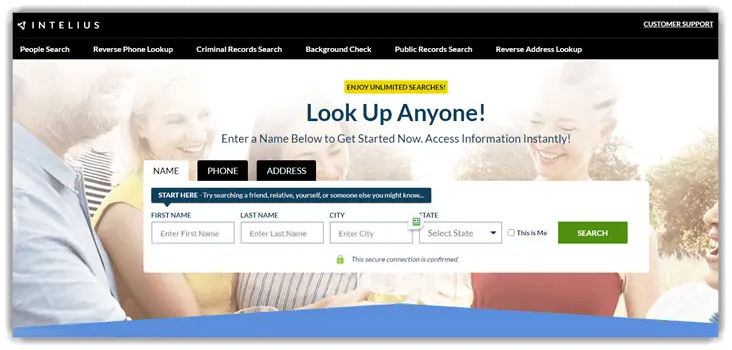
Intelius is an established people search engine that gives access to a variety of public records. With nearly 20 years in the industry, this platform provides a robust search toolset, allowing you to perform checks using a person’s name, address, or phone number.
It can help deliver results instantly with valuable data by uncovering anyone’s online persona. Intelius seamlessly searches millions of public records to offer these accurate details.
Features:
- People Search: This feature helps find individuals by their first name and last name, along with city and state.
- Reverse Phone Lookup: You can discover the owner of a phone number and additional contact information. Such as their other registered phone number, business contact, etc.
- Social Network Search: It helps access an aggregated view of social media profiles. Thus, you can use it to find the target individuals on all platforms they have an account with.
- Address Lookup: This feature lets you know who resides at a particular address and obtain details about the property.
- Background check: Simply enter your full name, city, and state and dig up any criminal records or traffic records about anyone. It can also find employment history, lawsuits, bankruptcies, etc.
- Spam and Scam Protection: It is helpful for blocking unwanted calls and filtering out potential scams to maintain your privacy.
- Support: It has phone line, a website form, a chatbot, and FAQs for support. The phone support was quick, and they offered me a satisfactory resolution.
👉 Read our full Intelius review.
Pros
Cons
Pricing:
Here’s a breakdown of the Intelius username reverse search plans
| Plan Name | Pricing in USD | Plan Details |
|---|---|---|
| People search | $21.13 | Unlimited person and address reports |
Trial: 5-day trial $0.95 for reverse phone lookup+ people search and 7-day trial $0.95 for address lookup+ people search.
5-Days Trial for $0.95
5) PeopleLooker
PeopleLooker is a tool for gaining insights into people’s backgrounds and social accounts. When you use PeopleLooker, you access a wide array of public records culled from numerous sources, including court records, social media, censuses, and government databases.
Known for its simplicity and efficiency, it provides rapid results and the convenience of looking up information. Additionally, PeopleLooker has a unique search feature for an unclaimed money, which is great for finding out about unclaimed payments. This helps you find tax refunds, pension funds, old bank accounts, etc.

Features:
- Search Results: It offers accurate results by tapping into a wide range of databases, ensuring comprehensive search capabilities. PeopleLooker can perform username, people, email, and phone searches, and more.
- Detailed Reports: The users receive in-depth reports providing various details associated with the username. It can also help find their associated email address, and other online accounts like dating apps, etc.
- Background check: It can expose any kind of criminal record that the username owner could be hiding from you. PeopleLooker can search court records to unearth crimes committed in the past.
- B2B search: This feature helps you acquire a company’s details, such as contacts, social media accounts, etc.
- Data Transparency: It provides users with complete data transparency and helps you understand how your data is being used in its clear privacy policies.
- Customer Support: I accessed its dedicated customer support to assist with my questions, and they replied to me with helpful responses.
Pros
Cons
Pricing:
Here are the pricing plans of PeopleLooker reverse username lookup site
| Plan Name | Pricing in USD | Plan Details |
|---|---|---|
| 3-Month Membership | $19.99 per month | 100 reports per month |
| 1-Month Membership | $23.99 per month | 100 reports |
Trial: 7-days for $1 with 100 reports
7-Day trial for $1
How to find someone by social media username?
Tracing someone via their social media username can be as straightforward as running a Google search using the username. However, to ensure a more comprehensive and accurate result, it’s recommended to use reverse username search sites.
These search tools are designed to scan various social media sites and databases to uncover information associated with a specific username.
Let us now look at how to verify someone’s identity using PeopleSmart reverse username lookup:
Step 1) Visit https://www.peoplesmart.com/ and type the target individual’s username in the search bar, and tap on Search.
Step 2) PeopleSmart will then perform a reverse username search and provide you with the results.
Step 3) Once it completes the search you will be able to access partial information such as their age, location, gender, etc. To get the full details you can make a payment of $0.95 for its 3-day trial.
You can also use any other reverse username search site provided above to find a person by their social media username.
Selecting the Best Site for Reverse Username Searches
The selection of the optimal site for reverse username lookup hinges on various factors. Some of the key factors to considerwhile choosing it include:
- User-friendliness: An intuitive interface and easy navigation is a must. It should be easy to operate with easy-to-understand reports.
- Accuracy: The site should provide accurate and relevant search results. It must present the user with the most updated information about the username.
- Size of the database: A larger database increases the chances of finding the desired information. It can also help the tool create a more detailed report with valuable information. You must also look for tools that frequently update their database or send alerts when new information is added or updated in the results.
- Speed of results: You must keep in mind that speed of results is also important as it improves efficiency.
- Cost and subscription: Find out which service offers unlimited searches in its monthly package. These services also come with free service for basic searches, one-time report payment, and a 3 to 7-day paid trial for a mere fee.
Benefits of Using Reverse Username Search Sites
The benefits of using reverse username search sites are multifaceted.
- Find Lost Friends: For starters, they can be instrumental in helping users find lost friends. By inputting a username, these sites can unearth a trove of information, including contact details and social media profiles, that can facilitate the reconnection process.
- Verify online connections: In the digital era where catfishing and online scams are rampant, running a username search on dating sites is one of the simplest ways to verify online connections and stay safe.
- Find Family members: These sites can be used to find family members or enhance professional networking and checks, making them a versatile tool in the digital age.
- Stay safe online: They maintain a balanced approach between information accessibility and personal data protection. Thus ensuring that users can reap the benefits of these platforms without compromising their privacy.
What A Reverse Username Search Can And Cannot Reveal
A reverse username search checks whether a handle is registered on a list of platforms and returns the profile links where it appears. For public profiles, the results usually include the display name, bio, profile photo, and a link back to the original platform. That is often enough to confirm whether the same person maintains consistent accounts across sites.
What a reverse username search cannot do is reveal private data such as email addresses, phone numbers, or account activity that is not published on the platform. It also cannot access closed or deleted accounts. If a handle is unique enough, the report will be high signal. If the handle is common, expect false positives from unrelated users who happened to pick the same name.
How To Run A Reverse Username Search Step By Step
Here is the sequence I follow when I need to map a username across the public web without crossing into intrusive territory.
- Start with the exact handle. Variations, numbers, and underscores matter; search them as-is first.
- Run the handle through at least two dedicated tools such as WhatsMyName and KnowEm. Different tools cover different platforms, so a second pass widens the map.
- Use Google with the site operator for the major platforms: site:instagram.com, site:twitter.com, site:reddit.com, and so on. This catches handles that the automated tools miss.
- Reverse image search the profile photo in Google Lens or Yandex Images. A match often surfaces secondary profiles with a different username.
- Cross-check by matching bio language, join dates, posting cadence, and geography. Matches across three or more consistent signals are high confidence.
- If the context calls for verification, contact the platform’s help center rather than attempting to bypass privacy settings.
- Respect privacy: never share collected profile links publicly, and never use the information for harassment, doxxing, or any form of targeted harm.
This workflow typically maps an active user across five to ten platforms in a short session, and it stays firmly on the right side of platform terms of service.
Free vs Paid Username Search Tools: When Each Makes Sense
Free tools such as WhatsMyName and plain Google operators handle most casual username searches and surprisingly often return the most complete picture for a single handle. They are the right starting point for privacy-minded self-checks and for basic catfish verification.
Paid tools earn their price when the search has to pull in associated records beyond the handle itself: linked email addresses exposed in breaches, approximate location history, and confidence scores based on aggregated public data. If you are running an identity check on a business contact or investigating a romance-scam pattern, a paid service gives a cleaner, explainable report than assembling the evidence by hand.
FAQs:
Conclusion
All the above reverse username search sites are powerful and offer a wealth of benefits, from finding lost friends to enhancing online safety. Nevertheless, we would like to recommend our top picks among these 5 tools:
- Spokeo: Using Spokeo, you can uncover a person’s background detail thoroughly as it offers both online and offline sources.
- PeopleSmart: This is a reliable people-search site that links a username to real names, emails, and social profiles, making it easy to verify who is behind an online account. Its reports also draw on billions of public records.
- BeenVerified: It is a background check tool that provides you access to various public records.
Spokeo is a people search engine that equips you with tools to discover data about individuals from various online and offline sources. You can search by not only a username but also by name, email, phone number, or physical address.
