
How to Find Someone Online for Free (8 Search Methods)
 Editorial Team
We are reader supported and may earn a commission when you buy through links on our site
Find Someone Online for Free!
Enter Phone Number, Email, Name & Username to Find Someone
“This tool has been amazing for finding people online. Highly recommend it!”
50,000+
Profiles Found
5,000+
Satisfied Users
4.8/5
Average Rating
Internet is a place where many people share their lives with friends and family. It’s also ideal to find someone and reconnect if you’ve lost touch. Finding people online isn’t always as easy as searching for someone’s name. Search engines alone won’t provide all the details you need to find a person by name successfully.

Spokeo is is an ideal website for checking public records. It also acts as a free people search engine, making it easy to access data compiled from multiple online records and directories. It offers precise search results, ensuring you find the correct information quickly and reliably.
You can stay connected and protected by finding someone online. It also helps you to reunite with long-lost friends, connect with distant family members, or discover if your online date is catfishing you.
Here are some important methods for finding someone online, with simple instructions and links to the best resources below.
Method 1: How to Find People on the Internet by Checking Public Records
Public records provide information about anything publicly documented about a person. Searching public records is an efficient way to find information about someone’s criminal record before hiring a babysitter or going on an online date. You can also see what shows up on your record to protect your online safety or find lost friends and family members.
1) Spokeo
Spokeo is an ideal website for checking public records. Spokeo offers public records searches, background checks, reverse phone searches, and more with their monthly subscriptions.
You can use Spokeo on your computer or mobile device to look up a date’s criminal history, reunite with lost friends, or find someone online. First, you’ll need to subscribe to Spokeo. Next, enter information about a person and conduct your search. This public records results finder gives searchers a wide breadth of information, including the following:
Name Search: Yes
Reverse Phone Lookup: Yes
Reverse Address Lookup: Yes
Free Trial: 7-Days Trial for $0.95
Spokeo records typically contain information including but not limited to the following:
- Dating profiles
- Amazon wishlists
- Arrest records
- Bankruptcies
- Education and employment history
- Sex offender databases
- Social media profiles
- Properties owned
7-Days Trial for $0.95
2) PeopleSmart
PeopleSmart is an excellent option for fast public records and background searches. After subscribing, enter a person’s name, phone number, or address, and PeopleSmart scans billions of public records to pull together contact information, address history, relatives, criminal records, and social media profiles in one detailed report.
PeopleSmart scours the internet and lays out the results so you can find someone online quickly, and thanks to its strict privacy policy, your search never alerts the person you are looking for. In my testing, I found it especially useful for confirming whether an online date is really who they claim to be

Name Search: Yes
Reverse Phone Lookup: Yes
Reverse Address Lookup: Yes
Free Trial: 7-Days Trial for $1
This people search service also offers the following:
- Contact information lookups
- Address history searches
- Relatives and associates records
- Criminal records searches
- Social media profile searches
7-Day Trial at $1
Method 2: Lookup Websites to Find People on the Internet
If you get a call and don’t recognize the phone number, conduct an online search by looking up their number to find out who they are. Reverse phone searches use the unknown phone caller’s phone number to view the online information associated with that account.
1) BeenVerified
Use BeenVerified to look up someone’s phone number and find them online. Enter the number, and BeenVerified will do a reverse phone search to pull up all the information associated with that number. This reverse phone lookup app gives thorough information about callers with billions of up-to-date records.

Name Search: Yes
Reverse Phone Lookup: Yes
Reverse Address Lookup: Yes
Free Trial: 7-Day Trial for $1
Reverse phone searches through BeenVerified can give a searcher access to information like the following:
- Social Media Accounts
- Jobs & Education
- Background Reports
- Photos
- Contact Info
7-Day Trial for $1
Method 3: Check Google Search
One of the easiest ways to find someone online is by conducting a Google search. Google search has the highest user engagement, with over 1 trillion searches yearly, compared to more niche search engines like Bing, which sees closer to 800 million searches annually.
Use Google search to find someone online by searching for their name, address, phone number, or other information you learn about the person you’re searching for. Use quotation marks in your Google search to ensure that you get an exact match for the quoted phrase. Example: “Tom Harrison”

Name Search: Yes
Reverse Phone Lookup: Yes
Reverse Address Lookup: Yes
Free Trial: 5-Days Trial at $0.95
Method 4: Set Up a Google Alert
A Google alert will let you know if someone appears in Google news stories. This method for finding someone online uses pre-determined keywords and sends notifications when those keywords appear on Google.
To create a Google alert, follow the steps below:
- Step 1) Enter the topic or keywords you want to follow into the search box.
- Step 2) Adjust your settings to determine where you want to search, how often you get notifications, and where to send alerts.
- Step 3) Click Create Google Alert.
After you’ve set up your alert, you have to wait until the person you want to find appears in news stories or other online sources.

ReversePhone is my top pick when I need to identify someone online using only a phone number. It checks public records for possible owner details, addresses, related contacts, and spam signals, helping me narrow the search before deciding whether a full report is worthwhile.
Method 5: Try a Reverse Image Search to Find a Person on the Internet for Free
Try a reverse image search if you’re wondering how to find someone online. A reverse image search uses a photo, either uploaded or from a website, to find other similar photos. Typically, reverse image searches are used to find someone online using their images.
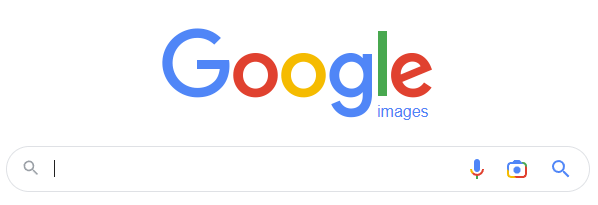
Step 1) Visit Google Images or another reverse image search engine
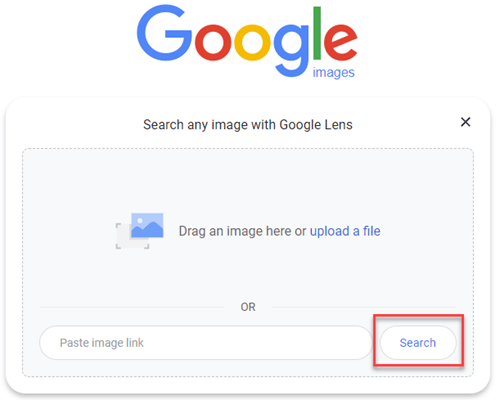
Step 2) Upload a photo or paste a picture URL into the search box and click on the Search button.
Step 3) Watch the results come up on your phone or computer

This method of finding someone is a great way to check whether a social media profile is using someone else’s images.
To discover more ways to find people by photo, be sure to check this resource for further information.
Method 6: Conduct an Inmate Search/Criminal Search
If you’re looking for someone but can’t find latest information, conduct an inmate or criminal history search. Social media and Google alerts might not yield results because the person you’re looking for is currently incarcerated. If that’s the case, look at the options below.
The US Prison Database has resources to find inmates and access prison records. Their free and easy-to-use database requires information like their full name, race, age, and sex.
Alternatively, use a public records search service provider to access criminal history, prison records, and more.
Method 7: Check Mainstream Social Networks to Find a Person Online
One of the best ways to find someone online is to follow their social media presence. If you’re wondering how to find someone online, check their social media profiles like Instagram, Facebook, TikTok, Tinder, Pinterest, and more.
This method for how to find someone online requires you to have some information about the person you’re looking for someone’s social media accounts.
If you’re blocked, that person’s social media account will likely not appear in a search. In that case, you can create an alternative profile to search from. Or log out of your Facebook account and search for that person using Google to view their profile.
Method 8: Search for People by First and Last Name Using Family Tree Now
An ideal way to find family members online is by using genealogy sites. Family Tree Now helps searchers look through genealogy records to discover their family history and find and connect with relatives they’ve never met.
Enter a name, last name, and city or state to search for someone’s family history with Family Tree Now.
Additional Tips on How to Find Someone Online
If the above methods for how to find someone online didn’t work, check out these additional tips for success. You can also explore a website to find someone that offers a centralized toolset for locating people across different data sources.
- Save yourself time looking through records by using a paid resource.
- Have some information on hand to help you start.
- Use a VPN to hide your IP address to access blocked content like social media accounts.
- Search for friends or family of the person you’re searching for to ask for more current contact details, if possible.
Spokeo is is an ideal website for checking public records. It also acts as a free people search engine, making it easy to access data compiled from multiple online records and directories. It offers precise search results, ensuring you find the correct information quickly and reliably.
