
7 BEST IoT Devices List (2026)
 Editorial Team
We are reader supported and may earn a commission when you buy through links on our site

7 Products Reviewed

60+ Hours of Research

1.2k+ Reviews Examined

Unbiased Reviews
Smart home devices let you control lights, doors, alarms, and front-door video from a phone or voice assistant. This guide covers seven products and explains what each one does, what it needs, and where it falls short. We also checked that every visible product link leads to the named device or an official support page.
Philips Hue A19 Smart LED Bulbs are the top recommendation. The three-pack gives you color and white light controls, while the optional Hue Bridge lets you add more lights and accessories later. August Smart Lock + Connect suits doors where you want to keep the outside lock. Ring Battery Doorbell 2K gives you a wide view of visitors and packages.
Most Popular IoT Products and Devices



Following is a handpicked list of Top IoT Devices with their popular features and website links.
Best IoT Devices List: Top Product Examples for Home
| Device | Brand | Best For | Key Requirement | Price |
|---|---|---|---|---|
 Google Home MiniGoogle Home Mini |
Voice control in an existing Google Home setup | Wi-Fi, Google account, and wall power | SEE PRICE | |
 Amazon Echo Plus Voice ControllerAmazon Echo Plus Voice Controller |
Amazon | Alexa voice control with a built-in Zigbee hub | Amazon account, internet, and wall power | SEE PRICE |
 August Smart LockAugust Smart Lock |
August Home | Keyless entry using your current outside lock | A common deadbolt, Connect bridge, and 2.4 GHz Wi-Fi | SEE PRICE |
 Philips Hue Bulbs and Lighting SystemPhilips Hue Bulbs and Lighting System |
Philips Hue | Color and white smart lighting | E26 fittings; Hue Bridge for full system features | SEE PRICE |
 Ring DoorbellRing Doorbell |
Ring | Front-door video, motion alerts, and two-way talk | 2.4 GHz Wi-Fi; plan needed for saved video | SEE PRICE |
1) Google Home Mini (1st Gen)
Best for: Adding a small speaker to an existing Google Home setup.
Google Home Mini is a small voice speaker for music, timers, questions, home broadcasts, and control of devices linked to Google Home. Google still lists this first-generation model in its support pages. It works with many Gemini for Home features, but it does not support Gemini Live. That limit shows its age.
A 40 mm speaker sends sound in every direction, while two microphones listen for voice commands from across the room. The Mini works with both common home Wi-Fi bands, 2.4 GHz and 5 GHz, and it supports Bluetooth 4.1. Touch-sensitive controls change the volume and start or stop playback. It has no battery, so it must stay plugged in.
The body is 98 mm wide, 42 mm high, and weighs 173 g, so it takes little room on a shelf or counter. It can control products already added to Google Home. It does not contain a Zigbee hub, which is the part that connects some smart lights, locks, and sensors. Those devices may need their own small bridge.
Google no longer has a working store page for this first-generation model. It makes more sense as an extra speaker for someone who already owns one than as a new purchase. Used or leftover stock may have a limited warranty and an unknown history. Sound quality, microphone range, and Wi-Fi performance were not measured for this guide.
Pros
Cons
Who should buy it: Existing owners who need a small extra Google Home speaker.
Skip it if: You want current retail stock, Gemini Live, or a built-in Zigbee hub.
Link: https://store.google.com/product/google_home_speaker
2) Amazon Echo Plus Voice Controller
Best for: Existing Alexa homes that still use Zigbee accessories.
Amazon Echo Plus combines an Alexa speaker with a Zigbee hub. The hub can connect some bulbs, plugs, sensors, and locks without a separate bridge. This can help in an Alexa home that already uses Zigbee devices. Echo Plus is an older model, though, so check the generation before looking at used or refurbished units.
The second-generation model, L9D29R, works with both common Wi-Fi bands, 2.4 GHz and 5 GHz. It also has Bluetooth and Zigbee. Bluetooth Low Energy lets nearby accessories use less power. A 3.5 mm output can send sound to another speaker, but it cannot take sound in. The Echo Plus must stay plugged into a wall outlet.
Unlike Google Home Mini, Echo Plus can pair directly with supported Zigbee products. Some devices still need the maker’s hub for extra settings, software updates, or more detailed routines. Alexa can also play audio, set timers, make calls, answer questions, and run routines. These online features need an Amazon account and an internet connection.
Amazon still provides support pages for Echo Plus, but it no longer sells the model as a current Echo. Check the condition, warranty, and country support before buying old stock. Amazon says the speaker should be used between 0 and 35 degrees Celsius. This guide did not test its sound, wireless range, or response speed.
Pros
Cons
Who should buy it: Existing owners who need Alexa and a built-in Zigbee hub.
Skip it if: You want current Echo hardware or verified new-product stock.
3) August Smart Lock + Connect
Best for: Keyless entry that keeps the outside lock and key.
August Smart Lock + Connect fits over the inside part of a common deadbolt with a key outside and a thumb turn inside. The outside lock and your old key stay in place. You get app control without changing how the door looks from the street.
The August app can lock or unlock the door, give guests access for set times, show door activity, and send alerts. DoorSense reports whether the door is open or closed as well as whether the lock is turned. Auto-Lock and Auto-Unlock can handle the door when you leave or return after you finish setup.
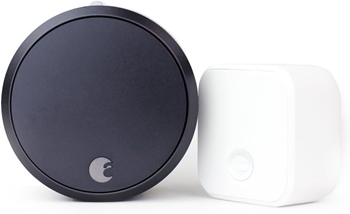
The box includes a Connect Wi-Fi Bridge. It plugs into a wall outlet and lets you control the lock away from home or use Alexa and Google Assistant. The bridge connects to 2.4 GHz Wi-Fi, while Bluetooth links it to the nearby lock. Remote control needs internet service, a working bridge, and an August account.
The lock measures 65.4 x 120.6 x 54 mm and runs on four AA batteries. The box also contains DoorSense, fitting parts, lock adapters, and the bridge. August lists a one-year warranty for the lock. Check the deadbolt list and make sure a wall outlet sits close enough for the bridge. Battery life and repeated lock use were not tested for this guide.
Pros
Cons
Who should buy it: People who want remote door control without replacing the outside deadbolt.
Skip it if: Your deadbolt is incompatible or you want Wi-Fi built into the lock.
4) Philips Hue Bulbs and Lighting System
Top Recommendation: Best for color and white lighting that can grow across a home.
Philips Hue A19 Smart LED Bulbs are the top recommendation in this group. The checked listing is a three-pack of E26 bulbs rated at 7.2W and 810 lumens each. It supports dimming, color scenes, and a wide white-light range, so one kit can handle work light, evening light, and decorative color.
You can start with the Hue app and a supported voice assistant, then add a Hue Bridge when you want more lights. The standard Bridge can manage up to 50 lights and 12 accessories. It adds control away from home, schedules, switches, sensors, and Matter links. In its Zigbee network, each powered Hue light can help pass the signal to the next one.
The Bridge makes sense when lights, wall controls, and sensors in several rooms need to work together. Common controls inside the home can keep working when the internet is down because the Bridge talks to the lights on the local Zigbee network. It also gives older Hue lights a way to work with Matter without putting a Matter radio in every bulb.
Cost is the main drawback. A basic Wi-Fi bulb costs less for one lamp, and a full Hue setup may need a Bridge bought on its own. Each bulb in this pack uses the common E26 screw base and gives about the same light output as a traditional 60W bulb. Check the pack size, voltage, and Bridge contents before you order.
Pros
Cons
Who should buy it: Homes that want matching smart lighting across several lamps or rooms.
Skip it if: You need one low-cost bulb or do not want to add a bridge later.
5) Ring Battery Doorbell 2K
Best for: Wide front-door video, motion alerts, and two-way talk.
Ring Battery Doorbell 2K is the model sold under ASIN B0G2D25MF2. Its square 2K picture covers 140 degrees from side to side and top to bottom. This wide view helps show both a visitor’s face and packages near the door. Live View and Two-Way Talk let you see and speak with visitors.
The built-in battery recharges through USB-C after you remove the doorbell from its mount. Ring does not include the cable. Existing doorbell wires carrying 8 to 24 volts AC can keep the battery topped up, but they do not make it a fully wired model. It uses 2.4 GHz Wi-Fi. Ring suggests an internet upload speed of at least 10 Mbps for its 2K doorbells.
< width="315" height="362" src="https://www.guru99.com/images/2/122920_0443_15BESTIoTDe10.jpg" alt="Ring Doorbell" class="myad">
Ring calls its picture system Retinal 2K. The doorbell also has up to 6x zoom, night vision, motion areas you can adjust, and phone alerts. Its body measures 2.11 x 5.78 x 1.41 inches. Ring says it can handle outdoor weather and temperatures from -5 to 120 degrees Fahrenheit.
Live video and door alerts cover the basic job. Saved recordings and some person or package alerts need a Ring plan, so add that fee to the long-term cost if you want video history. The store page lists this as the 2026 second-generation model with a one-year limited warranty. Battery life, picture quality, and alert delay were not measured for this guide.
Pros
Cons
Who should buy it: Homes that need front-door video without a hardwired-only installation.
Skip it if: You need local video storage or do not want a plan for recorded clips.
6) Kasa KS200 Apple HomeKit Smart Light Switch
Best for: Apple Home users who want to control a wired light without smart bulbs.
Kasa KS200 replaces a wall switch where one switch controls the light. The button still works at the wall. It also works with Apple Home, Alexa, Google Assistant, and Samsung SmartThings. The Kasa app gives you schedules, timers, and control from away from home.
The switch connects to 2.4 GHz Wi-Fi. It uses Bluetooth 4.2 only while you set it up. TP-Link rates it for 100 to 120 volts and loads up to 15 amps, including traditional lights up to 600 watts. The box contains the wall plate, wire nuts, labels, screws, and setup guide.

KS200 makes more sense than a smart bulb when several normal bulbs share one switch. Anyone can press the wall button, and replacing a bulb does not remove the smart controls. Visitors and children can also use the light without a phone or voice assistant. Installation takes more care than fitting a bulb. Your wiring must match TP-Link’s diagram and local electrical rules.
Check the model and hardware version before buying. Wiring, voltage, and safety approval can differ by country. This switch is not a dimmer, and it will not replace a three-way switch used to control one light from two places. If you are unsure about the wires, use a qualified electrician. The guide did not include an electrical load test or a long-term Wi-Fi test.
Pros
Cons
Who should buy it: Apple Home users replacing a wall switch that controls one light.
Skip it if: You need a three-way switch, dimming, or support for a different voltage.
7) Kidde Ring Smart Smoke + CO Alarm
Best for: Smoke and carbon monoxide detection with Ring app alerts.
Kidde Ring Smart Smoke + CO Alarm, model RGCUDR-RW, detects both smoke and carbon monoxide. It sends smoke, CO, and low-battery notifications through the Ring app. Unlike a separate alarm listener, this product is the detector itself, so it does not need another alarm nearby or a Ring Alarm base station.
The battery model uses two AA batteries. Kidde says they usually need to be replaced once a year. Voice alerts tell you why the alarm is sounding. Compatible Kidde alarms can also link without wires, so when one alarm detects danger, the others can sound too. Setup starts by scanning the product’s QR code in the Ring app.
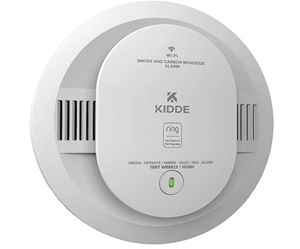
Ring offers optional round-the-clock smoke and CO monitoring through a paid plan in supported parts of the U.S. The alarm still sounds in the home and sends app alerts without another Ring device. Staff monitoring and emergency calls cost extra. Check local placement rules, plan access, and how many alarms your home needs before installation.
Install, test, and replace the alarm on the schedule in Kidde’s guide. Phone alerts are an extra warning, not a replacement for the alarm sound or a home escape plan. The product page covers the U.S. battery model, so buyers elsewhere should check local approval and power rules. Detection and phone alert speed were not tested for this guide.
Pros
Cons
Who should buy it: U.S. households that want a Kidde alarm with Ring app notifications.
Skip it if: The model is not approved for your region or you need a hardwired alarm.
How We Researched and Compared These IoT Devices
We checked the seven products on October 7, 2026. Sources included current maker pages, support guides, product specifications, and the store pages provided for review. We compared what each device does, how it gets power, which wireless connection it uses, the apps and smart home systems it supports, any bridge or hub it needs, extra plan costs, and whether the product is still current.
The visible product buttons use the seven URLs supplied for this article. Earlier checks found that some short links opened another product or a search page, so confirm each final destination before publication. This was a document review, not a hands-on test. No claims are made about measured range, speed, sound, battery life, light output, or picture quality.
What to Look for in an IoT Device
Start by checking whether the device works with your home. Look at the exact model, app, Wi-Fi band, voice assistant, and any hub or bridge it needs. A product may work with Alexa but offer fewer controls in Google Home or Apple Home. Also check for wiring, battery, paid plan, or monitoring costs.
Find out whether the maker still supports the product. A device that depends on an online service can lose remote control, voice commands, or alerts when that service ends. Check the privacy settings, account security, software update policy, and replacement choices. For locks, alarms, and cameras, keep a manual way to handle the main job.
How to Handle Older Smart-Home Devices
Google still has support pages for Home Mini, and Amazon does the same for Echo Plus. However, the supplied store pages do not sell those exact models. Before buying older hardware, check the generation, condition, warranty, account needs, software support, and online services. For door access, fire alerts, or security video, a current model with clear support is the safer choice.
Verdict:
In this review, I compared seven smart home devices for voice control, lighting, entry, safety, and front-door video. To make the choice easier, here is my verdict.
- Google Home Mini works as a small extra speaker for an existing Google Home setup, but Google no longer sells this first-generation model.
- Amazon Echo Plus Voice Controller combines Alexa with a Zigbee hub for supported smart home devices. It is an older model, so check its condition and warranty before buying.
- August Smart Lock + Connect suits doors where you want keyless entry but need to keep the outside lock and physical key.
FAQs
Internet of Things (IoT) is a network of physical objects or people called “things” that are embedded with software, electronics, network, and sensors that allows these objects to collect and exchange data. The goal of IoT is to extend the internet connectivity from standard devices like computer, mobile, tablet to relatively dumb devices like a toaster.
IoT virtually makes everything “smart” by improving aspects of our life with the power of data collection, AI algorithms, and networks. An IoT example can be a person with a diabetes monitor implant, an animal with tracking devices, etc.
Common smart-home devices include lights, plugs, speakers, thermostats, locks, doorbells, cameras, sensors, and alarm accessories. Each product may need a specific app, account, hub, bridge, or subscription.

The entire IoT process starts with the devices themselves like smartphones, smartwatches, and electronic appliances like TV or washing machines are connected through the Internet, which helps to communicate with the IoT platform.
Here are four fundamental components of an IoT system:
1) Sensors/Devices: Sensors or devices are a key component that helps you to collect live data from the surrounding environment. All this data may have various levels of complexities. It could be a simple temperature monitoring sensor, or it may be in the form of a video feed. This type of device has various types of sensors that perform multiple tasks apart from sensing.
2) Connectivity: All the collected data is sent to a cloud infrastructure. The sensors should be connected to the cloud using various mediums of communication. These communication mediums include mobile or satellite networks, Bluetooth, Wi-Fi, etc.
3) Data Processing: Once the data is collected and gets to the cloud, the software performs processing on the gathered data.
These processes can be just checking the temperature, reading on devices like AC or heaters. However, it can also be complex, like identifying objects, using computer vision on video, and many other critical processes.
4) User Interface: The information needs to be available to the end-user in some way, which can be achieved by triggering alarms on their phones or sending them notifications through email or a text message.
Sometimes, the user who uses an IoT device might need an interface that actively checks their IoT system. For example, the user has a camera installed in his home, and he wants to access video recordings and all the feeds to his computer with the help of a web server.
IoT devices listed above are types of hardware, such as appliances, sensors, machines, gadgets, or actuators, which are programmed for particular applications and can transmit data over the network or internet. These devices can be embedded into other industrial equipment, environmental sensors, mobile devices, medical devices, and more.
Here are the sectors where IoT devices can be used:
- Consumer Products: It can be kitchen appliances, smartwatches, security cameras, light bulbs, home assistance, etc.
- Industrial Use: It includes pumps, carts, washing machines, etc.
- Infrastructure: This involves IoT devices for smart buildings and highways.
- Logistics: IoT devices can be used to move cargo from one place to another.
- Connectivity: IoT devices can help you to group multiple devices together.
Smart home technology is a term refers to basic home facilities with a communication technology that provides either remote control access or automation.
Smart home technology can help you to manage everything from temperature and lights to door locks & security devices just from your devices like mobile phone or tablet. It also enables IoT devices to be used with just a voice command or click of a button.
