
16 Best Gifts for Programmers & Coders (2026)
 Editorial Team
We are reader supported and may earn a commission when you buy through links on our site.

Gifts for programmers can sometimes feel like a tricky puzzle to solve. Whether they are coders, computer programmers, or software engineers, their interests often revolve around creativity and innovation. To simplify your search, we have crafted a list of practical and exciting gift ideas. These suggestions cater to both beginners and expert developers, ensuring you find something they will truly appreciate. Explore these unique options designed to impress and bring joy to any tech enthusiast.
We have carefully researched and curated this list to include the most helpful products for programmers, making your gifting experience seamless. From productivity-boosting tools to innovative gadgets, these ideas are tailored to meet their specific needs. This guide saves you time by offering creative and practical solutions that simplify your decision-making process. Whether you are looking for something functional or unique, this list has you covered with thoughtful options to make their day special.
Everyone has their own unique preferences, making gifting a thoughtful challenge. To help you choose wisely, I have compiled a selection of ideal products and gift items that are often cherished by programmers. Read more…
Best Gifts for Coders, Developers, and Software Engineers
| Gift | Standout detail | Best for | Link |
|---|---|---|---|
 Blue Screen of Death Unisex T-shirt |
Computer error graphic | A playful programmer gift | Learn More |
 Magic Heat Changing Coffee Mug |
Heat-reactive graphic | A novelty desk mug | Learn More |
 Binary Wrist Watch for Programmers |
LED binary time display | A wearable coding theme | Learn More |
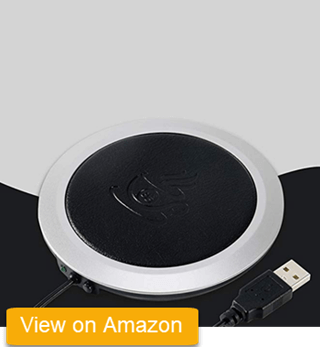 PU Heat-Resistant Electric Insulation Coaster |
Amazon page unavailable | Replace before publication | Check Listing |
 Miracle Time Cube Timer |
Flip-to-start presets | Timed work blocks | Learn More |
1) Blue Screen of Death Unisex T-shirt
Top Recommendation: Best playful gift for programmers
Blue Screen of Death Unisex T-shirt turns a familiar computer failure into a simple visual joke. It works as a casual gift for a developer, system administrator, support technician, or anyone who has spent time fixing Windows errors. Unlike a mouse or keyboard, the shirt does not need to match the recipient’s computer, ports, or operating system.
The main buying decision is size and fabric, not technology. Check the seller’s measurement chart, material, print method, wash instructions, and return policy before ordering. A novelty shirt can be memorable when the recipient likes graphic clothing, but it is a poor surprise for someone who avoids slogan shirts or prefers a loose fit.
Pros
Cons
Who should buy it: Someone shopping for a lighthearted, wearable gift.
Skip it if: The recipient dislikes graphic shirts or you cannot confirm the size.
2) Magic Heat Changing Coffee Mug
Best heat-reactive desk gift
Magic Heat Changing Coffee Mug shows a battery filling up when a hot drink warms the outer coating. The Amazon US listing describes an 11-ounce ceramic mug, so it fits a normal home or office desk without needing a cable, app, or computer connection. The visual change makes it a fun gift for someone who drinks coffee or tea while coding.
The maker says the mug should be hand washed because a dishwasher can damage the heat-sensitive film. The changing effect also fades as the drink cools. Check the handle, capacity, artwork, and care directions before ordering, especially if the recipient normally puts every mug in the dishwasher.
Pros
Cons
Who should buy it: A buyer who wants a small desk gift for a coffee or tea drinker.
Skip it if: The recipient only uses dishwasher-safe drinkware.
3) Binary Wrist Watch for Programmers
Best wearable coding theme
Binary Wrist Watch for Programmers uses an LED digital display instead of ordinary hands. The Amazon US listing describes a lightweight KIMISS electronic watch with a date display and PU strap. It suits someone who enjoys unusual watches and wants a less obvious programming reference than a printed slogan.
A binary watch takes longer to read until the wearer learns the pattern. Check the case size, strap range, battery type, water-resistance statement, and button layout on the exact listing. It is a fun personal accessory, but it will not suit someone who wants instant readability, a fitness tracker, phone notifications, or health sensors.
Pros
Cons
Who should buy it: Someone choosing a wearable gift for a programmer who likes unusual watches.
Skip it if: The recipient wants a smartwatch or a quick analog display.
4) PU Heat-Resistant Electric Insulation Coaster
Best for keeping a desk drink warm
PU Heat-Resistant Electric Insulation Coaster is meant to be a powered warming pad for a cup or mug. That type of accessory can slow heat loss during a long work session, but this exact item cannot be checked now. The supplied shortlink reaches an Amazon US product URL that returns a Page Not Found message.
Do not order through this listing until it is replaced with a live match. A new listing should state the plug type, voltage, cable length, temperature controls, auto-off feature, and compatible cup materials. Those details affect both usefulness and safety, so an old article description is not enough.
Pros
Cons
Who should buy it: No one until the link is replaced with a verified live product.
Skip it if: You cannot confirm the safety details and seller terms.
5) Miracle Time Cube Timer
Best for timed work blocks
Miracle Time Cube Timer starts a preset countdown when the marked side faces upward. The Amazon US listing has 5, 10, 20, and 45-minute settings, which cover quick tasks, short breaks, and a longer work block. The physical control is quicker than opening a phone app and helps keep the phone out of reach during concentrated work.
The fixed intervals are also the main limit. They are useful only when they match the recipient’s routine, and an audible alarm may disturb coworkers in a shared office. Confirm the available presets, volume controls, display, battery requirements, and reset method on the current listing. Choose a silent or vibration timer when the recipient works around other people.
Pros
Cons
Who should buy it: Someone shopping for a programmer who uses timed focus sessions.
Skip it if: The recipient needs silent alerts or custom countdown lengths.
6) Laptop Stickers Pack for Developer
Best low-cost personal gift
Laptop Stickers Pack for Developer contains 50 programming designs in the Amazon US listing. The mix is made for developers, coders, programmers, hackers, geeks, and engineers. It lets the recipient decorate a laptop lid, notebook, storage case, or other smooth surface without needing any computer specifications.
Check the preview images because the brands and jokes can differ between packs. Sticker size, print quality, adhesive strength, water resistance, and residue are seller-dependent. A large pack also includes designs the recipient may never use. Avoid placing stickers on vents, screens, textured surfaces, or equipment that must be returned to an employer.

Pros
Cons
Who should buy it: A buyer looking for a small, personal gift for a developer.
Skip it if: The recipient uses company-owned equipment or dislikes decorated devices.
7) Eat Sleep Code – Programmer Coffee Mug
Best metal mug for a programmer
Eat Sleep Code – Programmer Coffee Mug prints the familiar slogan on a 16-ounce enamel-coated stainless steel camp mug. The Amazon US listing names it as a Retreez camping and campfire cup. Its metal body makes it lighter to carry than a glass mug, and the handle is easy to grab during a desk break or outdoor trip.
This is not the ceramic mug shown in the old article image, so the image should be replaced in WordPress before publication. Check the current care directions and do not assume it is microwave safe because it contains metal. The printed slogan is fun, but the camping style may not suit someone who prefers a standard office cup.

Pros
Cons
Who should buy it: Someone who wants a simple gift for a programmer’s desk.
Skip it if: The recipient already has many mugs or avoids printed slogans.
8) Programmer Nutrition Facts – Glass Coffee Mug
Best glass mug for a programmer
Programmer Nutrition Facts – Glass Coffee Mug uses a mock nutrition label to turn programming habits into a visual joke. The clear glass body makes it look different from the ceramic mugs on this list. It suits a recipient who likes novelty drinkware but still wants an item that can sit on a normal home or office desk.
Glass shows stains and can break more easily than steel or plastic. Check the current capacity, wall thickness, handle size, printed design, and care instructions before ordering. The Amazon US link opens the named coding-nerd glass mug rather than a search page, but seller stock and packaging can still change.

Pros
Cons
Who should buy it: Someone choosing novelty drinkware for a programmer.
Skip it if: The recipient needs an unbreakable travel cup.
9) OrgaNice Hourglass Sand Timer
Best analog focus timer
OrgaNice Hourglass Sand Timer gives a desk a visible countdown without an app, alarm, or charging cable. The Amazon US listing describes a 30-minute glass sand timer with wooden end caps. That interval works for writing, reading, code review, or a planned break.
An hourglass is not a precision instrument, so the actual run time can vary. It also cannot pause, restart from the middle, or change intervals. Check the listed duration, size, glass protection, base stability, and return policy before ordering. It works best as a calm visual cue, not as a strict deadline timer.

Pros
Cons
Who should buy it: Someone shopping for a quiet visual timer and desk decoration.
Skip it if: The recipient needs accurate alerts or adjustable intervals.
10) Programmer Ever Mouse Pad
Best small desk accessory
Programmer Ever Mouse Pad is an 8-by-8-inch pad with a programmer-themed message, based on the original listing details. It is compact enough for a small desk and gives an optical mouse a consistent surface. This gift is easier to match than a mouse because it does not depend on hand size, button layout, or connection type.
The square surface offers less movement room than an extended desk mat, which can matter for low-sensitivity mouse settings or gaming. The Amazon US listing gives dimensions of 8 by 8 by 0.25 inches. Check the printed design, base material, edge finish, and cleaning instructions before paying.

Pros
Cons
Who should buy it: Someone looking for an inexpensive desk accessory with a coding theme.
Skip it if: The recipient uses a large desk mat or low mouse sensitivity.
11) Anker Wireless Vertical Ergonomic Optical Mouse
Best ergonomic mouse gift
Anker Wireless Vertical Ergonomic Optical Mouse places the hand in a more upright handshake position than a flat mouse. Anker lists three tracking settings of 800, 1,200, and 1,600 DPI, plus browser back and forward buttons. It connects through a 2.4 GHz USB receiver stored in the mouse and uses two AAA batteries.
The shape is made for right-handed use and takes time to learn. It also needs a USB-A port or a suitable adapter, and the batteries are not included according to Anker. This is a practical gift only when you know the recipient’s dominant hand, available ports, preferred mouse size, and willingness to change grip.

Pros
Cons
Who should buy it: Someone who knows the recipient wants to try a right-handed vertical mouse.
Skip it if: The recipient is left-handed or prefers Bluetooth without a receiver.
12) Ergonomic Mechanical Split Keyboard
Best wired split mechanical keyboard
Ergonomic Mechanical Split Keyboard links to the Perixx PERIBOARD-535BR on Amazon US. It is a wired split keyboard with low-profile brown tactile switches, a built-in wrist rest, and programmable macro keys. The listing says it works with Windows and Mac OS X, so it can suit a programmer who wants a full-size mechanical layout without wireless batteries.
The angled design changes key positions and takes more room than a compact keyboard. Brown tactile switches still make sound, and the fixed split may not fit every shoulder width or typing style. Confirm the US layout, computer port, operating system, desk size, and return window before buying because keyboard feel is personal.

Pros
Cons
Who should buy it: Someone who has asked for a wired split mechanical keyboard.
Skip it if: The recipient prefers a compact, wireless, or standard flat layout.
13) Sony Noise Cancelling Headphones
Best for music and reducing steady background noise
Sony Noise Cancelling Headphones links to the black WH-1000XM3 on Amazon US. It is a 2018 over-ear Bluetooth model with active noise cancellation, touch controls, ambient-sound options, and a detachable cable. These features suit a programmer who works around steady office noise or wants one headset for music, calls, and travel.
The WH-1000XM3 is an older model, so battery condition, warranty, included accessories, and replacement parts can vary with seller stock. Confirm that the order is new, used, or renewed before paying. Headphones are also a personal fit choice, especially for glasses wearers and people sensitive to clamping pressure.

Pros
Cons
Who should buy it: Someone who can confirm the recipient likes over-ear headphones.
Skip it if: You cannot verify the model, seller, warranty, or return terms.
14) Clean Code: Book for Agile Software
Best book for code quality discussions
Clean Code: Book for Agile Software is Robert C. Martin’s guide to naming, functions, objects, formatting, error handling, tests, and refactoring. Amazon US lists the first edition with ISBN 9780132350884. It gives an experienced developer a set of opinions and examples to discuss rather than a language-by-language programming tutorial.
The examples and advice have influenced many development teams, but readers do not agree with every rule. Some code examples also reflect the edition’s age and its Java-heavy approach. It is a better gift for someone who enjoys software-design books than for a complete beginner who needs step-by-step lessons in a first language.

Pros
Cons
Who should buy it: Someone choosing a discussion-focused book for an experienced developer.
Skip it if: The recipient wants a beginner programming course or current language reference.
15) Don’t Make Me Think
Best book for web usability
Don’t Make Me Think by Steve Krug explains how people scan web pages, follow navigation, and respond to unclear interfaces. Amazon US lists the revised third edition, ISBN 9780321965516. It is short, practical reading for front-end developers, web designers, product managers, and anyone who reviews a website before release.
The book focuses on usability principles rather than visual trends or coding techniques. That makes the advice broadly useful, but it will not teach a design tool, framework, or programming language. It is a thoughtful gift when the recipient builds user-facing products and likes concise books. A back-end specialist with little interest in interfaces may get less from it.

Pros
Cons
Who should buy it: Someone shopping for a developer who works on websites or product interfaces.
Skip it if: The recipient wants a technical coding manual.
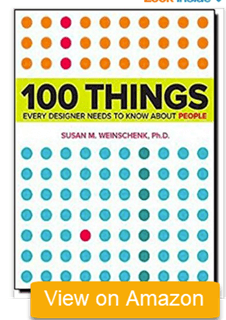
16) 100 Things Every Designer Needs to Know About People: Book
Best book for human-centered design
100 Things Every Designer Needs to Know About People: Book by Susan Weinschenk connects psychology and behavior research with design choices. Pearson describes coverage of attention, memory, reading, color, decision-making, and the way people scan interfaces. Amazon US lists the first edition, while Pearson also offers a later second edition.
This book suits developers who make interface decisions and want to understand why users miss, remember, or respond to certain elements. It is organized as short topics, so it works well for occasional reading. The tradeoff is breadth: each idea gets limited space, and a reader seeking deep research methods will need other sources. Confirm the edition before ordering.
Pros
Cons
Who should buy it: Someone choosing a book for a developer interested in user behavior.
Skip it if: The recipient wants a coding reference or deep academic text.
How We Researched and Compared These Gifts
This is a research-based gift guide, not a hands-on product test. We checked the 16 requested names against the supplied affiliate destinations, the original WordPress copy, and current first-party documentation where a clear maker or publisher was available. We compared how each gift would be used, what a buyer must verify, and which limits could make it unsuitable.
The review considered recipient fit, computer compatibility, power needs, desk space, sizing, materials, care requirements, seller clarity, and return risk. Books were checked against publisher information. Anker and Kensington hardware details were checked against their maker pages. Sony model identity was checked through Sony support. Marketplace-only gifts were described conservatively because seller details and variants can change.
Limitations: We did not use, wear, wash, time, or measure these products. We checked all 16 shortlinks through Amazon US on October 10, 2026. Fifteen reached matching product pages. The electric coaster reached a Page Not Found screen. Buyers should still check the exact title, model, variant, seller, shipping region, and return terms before ordering.
How to Choose a Gift for a Programmer
Start with the recipient, not the programming theme. A book works well when you know the person’s interests. A mouse or keyboard needs more information, including hand preference, layout, ports, operating system, desk space, and switch preference. Clothing requires an accurate size. Drinkware and desk accessories are easier to match, but care instructions and available space still matter. When you are unsure, choose a small item with a clear return policy rather than expensive hardware that may duplicate equipment the recipient already owns.
Practical Gift or Novelty Gift?
A practical gift changes part of the recipient’s normal setup, so it carries more compatibility risk. The mouse, keyboard, headphones, and warming coaster need careful checking. Novelty gifts such as a shirt, mug, stickers, or mouse pad are simpler, but taste becomes the deciding factor. Books sit between the two groups because they need no hardware setup, yet the topic must fit the reader. If you do not know the person’s desk setup, a book or low-cost novelty item is usually the safer surprise.
Verdict
These 16 gifts cover playful, practical, and learning-focused options. Match the product to the recipient’s habits and verify the exact listing before buying.
- Blue Screen of Death Unisex T-shirt is the top recommendation for a simple programming joke that needs no computer compatibility check.
- Magic Heat Changing Coffee Mug is an 11-ounce heat-reactive desk gift for a coffee or tea drinker who does not mind hand washing it.
- Binary Wrist Watch for Programmers is a more personal choice for someone who enjoys an unusual time display.
