
8 Best IPTV Streaming Apps (2026)
 Editorial Team
Therefore, I spent over 155 hours testing 40+ services to bring you the 8 best IPTV streaming apps. I tested each of these IPTVs with my team to provide you with a reliable firsthand experience. This article is backed by real-life testing to ensure an unbiased opinion. You can now go through their description, features, pros, cons, and pricing to find a suitable provider for your requirements.
 Disclaimer: It is highly challenging to tell if an IPTV streaming app is legal, therefore, you must also do your due diligence instead of just depending on independent reviews. Guru99 does not condone the buying or selling of any copyrighted materials in any form. The user is solely responsible for the consequences of using illegal providers.
Best IPTV Streaming Apps: Top Picks!
| Tool Name | Key Features | Free Trial | Link |
|---|---|---|---|
 VocoTV |
• 20,000+ Channels and 40,000+ series • No IP-Lock |
24 hours free trial | Learn More |
 OTTOcean |
• 20,000+ TV channels • 99.99% Uptime |
24 hours free trial | Learn More |
 Worthystream |
• 15,000+ TV channels and 40,000 VODs • Easy installation |
24 hours free trial | Learn More |
 Krooz TV |
• 16,000+ channels and 40,000+ VODs • Upto 5 simultaneous streaming |
24 hours free trial | Learn More |
 Double Click TV |
• 20,000+ live channels • Custom playlist |
24 hours free trial | Learn More |
1) VocoTV
VocoTV is one of the best IPTVs that you can use for streaming your favorite content anywhere you go. It has a vast library with various channels and programs suitable for all age groups and preferences. As per my experience, its setup is quite simple, and it offers DIY installation guides on its website that are easy to follow. Users who are night owls will also enjoy using VocoTV, as it brings you a special late-night comedy collection.
It is also great for sports fans, as my family consists of football and F1 bingers, they remain hooked to VocoTV without fail during the seasons. You also get exclusive sports channels for free, which otherwise charge users separately while streaming on cable.

Features:
- Number of Content: VocoTV offers over 20,000 live channels and 40,000+ VODs in almost all languages. It brings you regional, national, and international content, hence, you get variety every day. Moreover, it supports subtitles, hence, you can view international networks, shows, and movies without any issue.
- Catch-Up TV: I was able to watch several live shows and movies after their time of broadcast. This gives you the flexibility to stream whenever you are free without time constraints, since some of us have busy schedules. Hence, using the catch-up feature, you will never miss an important match or show again.
- Exclusive Originals: Using this IPTV streaming app, I could view exclusive original shows from several OTT platforms with a single subscription. The shows include Stranger Things, The Crown, Ted Lasso, Severance, IT: Welcome To Derry, Bridgerton, Loki, The Mandalorian, and many more.
- Full Seasons: If you are a fan of underrated shows, be it national or widely loved global content that is hard to find, then VocoTV will assist you in finding them. I found full seasons of series like Winx Club, King Julien, Skam (all languages), X-Files, Firefly, Dollhouse, Undeclared, Ghost Whisperer, Goosebumps, and more.
- EPG Guide: It offers a fast-loading, accurate EPG for all channels. The timelines are clear, and program descriptions are short and crisp. This EPG provides better search, includes reminders, genre filters, and a clean layout with timely updates.
Pros
Cons
Pricing:
Here are the most affordable plans provided by VocoTV for one connection:
| 1 Month | 3 Months | 6 Months |
|---|---|---|
| $15 | $40 | $60 |
Free Trial: 24-hour free trial available
24-Hour Free Trial
2) OTTOcean
OTTOcean is a high-performing IPTV streaming app that is known for its robust performance. It is one of the most versatile platforms that offers various kinds of entertainment by providing hundreds of genres in movies and series. I received 20,000+ TV channels and thousands of VODs from every corner of the globe. It supports Android TV, Amazon FireTV, Windows, Enigma Mag Box, Roku TV, and more.
Its premium channels include entertainment and sports channels. The live events and matches do not cost any additional price as they are all included in the plans. Basically, OTTOcean provides exclusive weekend matches to the viewers free of cost, which otherwise have a fee when using cable TV.

Features:
- IMDb Top Rated: It enabled me to stream IMDb’s top-rated shows and movies by providing a massive collection of VODs. I was able to access series like The Boys, House of Cards, Game of Thrones, Breaking Bad, The Last of Us, Black Mirror, Shameless, Dark, Mr. Robot, and many others.
- International Blockbusters: You can watch both national and international blockbusters on this streaming platform. Its collection includes some of the best recent films like Mission Impossible: The Final Reckoning, Sinners, Captain America: Brave New World, The Ice Tower, and more.
- Classic Shows: If you are a fan of all-time favorites or need a comfort watch without anticipation of what’s coming next, then you will enjoy its classic collection. It provides series like Small Wonder, Hannah Montana, That’s So Raven, Friends, That ’70s Show, Seinfeld, etc.
- Top Sports Channels: Sports Enthusiasts can access premium sports channels such as SkySports, ESPN, SuperSport, beIN, Fox Sports, Sports TV, Premier Sports, etc. I could also watch any sport that I liked, be it NFL, NBA, Football, Ice Hockey, MMA, adventure sports, etc.
- Parental Control: OTTOcean provides parental control features such as channel lock with a pin. I used this feature to ensure that my minors weren’t accessing any inappropriate PG 13 or A-rated content. Moreover, it also enabled them to finish their school work on time rather than staying glued to the TV screens.
Pros
Cons
Pricing:
Here is a table showcasing the lowest plans of OTTOcean:
| 1 Month | 3 Months | 6 Months |
|---|---|---|
| $15 | $35 | $65 |
Free Trial: A 24-hour free trial is available
24-Hour Free Trial
3) WorthyStream
WorthyStream is one of the best IPTV streaming apps for users who want regularly updated VOD. I tried WorthyStream for over 6 months last year, hence, I decided to include it in the list after gathering positive reviews from my fellow testers. Its smooth playback and high- quality streaming for almost all channels and VODs make it an excellent choice for entertainment enthusiasts.
With 15000+ live channels and over 40,000 VODs, you will find several top international networks along with local TV stations. It also provides about 200+ explicit contents that you can opt out of while billing if you aren’t interested. The support is available 24/7 and is responsive plus knowledgeable, ensuring instant troubleshooting.

Features:
- IPTV Performance: This IPTV comes with fast zapping capacity and 99.99% uptime. It has powerful servers that ensure stability, and antifreeze and antibuffer technology also provide lag-free streaming. However, you may notice some buffering if your connection is not strong enough.
- EPG Source: I found its EPG quite accurate, and the guide is on time on all the channels. Beginners who struggle with using IPTV will find this guide helpful for simplifying navigation. You will also notice intelligent recommendations, so you can always enjoy your kind of content without searching.
- Updated VOD: You receive fresh releases of movies and TV series every week. I found the latest shows like The Hunting Party, Plubirus, The Girlfriend, Alien: Earth, and films like Frankenstein, Lilo & Stitch, Night Always Comes, Good Fortune, Hedda, etc.
- Live Events: Whether you are a sports fan or like to stay updated with the news from all over the world, WorthyStream will take you through various channels and programs. I enjoy watching award shows and red carpets such as The Oscars, VMAs, Cannes Film Festival, and local parades like St. Patrick’s Day, 4th of July, etc., which this IPTV fulfills.
- Easy Installation: The easy installation is something that we all want in an IPTV. Therefore, I selected WorthyStream as one of my favorites, since I found its installation quite simple, as it is also available on AppStore and PlayStore. Moreover, if you have any issues, the support is available to assist you for free.
Pros
Cons
Pricing:
The following are the lowest plans offered by WorthyStream:
| 1 Month | 3 Months | 6 Months |
|---|---|---|
| $15 | $35 | $55 |
Free Trial: A 24-hour free trial is available.
24-Hour Free Trial
4) Krooz TV
Krooz TV is a widely known IPTV service provider that offers 16,000+ live channels and over 40,000 VODs. Its ability to stream thousands of national and international channels with reliability is remarkable. I spent years testing multiple IPTVs, and Krooz TV has always made it to my list while shortlisting with its stable servers and high definition picture quality.
I tested its compatibility with multiple devices, such as smart TV, Apple TV, Android TV, PC, Mac, Firestick, etc., and it streamed effortlessly on all these platforms. Krooz TV is available worldwide; hence, no matter where you travel, you can always access your favorite channels and shows. Its 24/7 support is quite responsive on the live chat, however, the support ticket can take a few hours or a day to respond.

Features:
- Premium Channels: I was able to access HBO Max, Paramount+, Paramount+ with Showtime, MGM+, Cinemax, The Movie Channel, and more without additional payment. These premium channels are readily available to stream without any special request, like any other network.
- Streaming Quality: Krooz TV supports HD, SD, FHD, and 4K, ensuring that you get a reliable streaming without ordinary video quality. Whether you want to see every punch in action movies or replay your favorite footballer’s scoring kick, you will experience it all in high definition. Additionally, it has 99.99% uptime, which makes sure you never miss your favorite shows and matches.
- Antifreeze Technology: This feature reduces buffering, lagging, and overall freezing that occur during both live streaming and VOD viewing. Its adaptive streaming capability and brilliant caching result in a smoother display even during peak hours.
- Fast Zapping: While testing this IPTV, I noticed that it has one of the fastest zapping times, which is roughly 0.5 seconds. This quick zapping allows you to switch channels, and I never faced a blank screen or heavy buffering, thanks to its swift zapping. It also improves the navigation as this feature makes the app highly responsive.
- Daily Updates: If you are a tech-savvy user, then you can read, edit, and write your own code and change things as you like. This gives you the flexibility to customize the app every time you want to make an update. However, it is limited to individuals with coding knowledge and seasoned IPTV users.
Pros
Cons
Pricing:
Here are the most affordable plans offered by Krooz TV for a single connection:
| 1 Month | 3 Months | 6 Months |
|---|---|---|
| $15 | $30 | $55 |
Free trial: 24-hour free trial available
24-Hour Free Trial
5) Double Click TV
Double Click TV is one of the highest-quality IPTV streaming apps. It offers 5 simultaneous connections, hence, larger families and shared accommodations or public spaces can use it. I received some of the finest collections of channels from the USA, Canada, the UK, and Latin America in HD. It delivers 5000TB of streaming content every month.
I also found some of the best kids’ shows on this IPTV, hence, families with children can use it for variety in content. Our family vacation turned out quite smoothly as the kids remained occupied without getting bored while sightseeing. It supports all devices, therefore, you don’t have to worry about compatibility.

Features:
- Number of Channels: This IPTV streaming app provides over 20,000 live channels. I was able to stream ABC, CBS, Fox, NBC, PBS, The CW, BBC, Channel 4, Channel 5, El Trece, Globo, Canal 1, etc. The channels are available 24/7 and stream programs in HD, FHD, and 4K.
- VOD Library: Its VOD collection has over 30,776 movies and 6,160+ series, including both national and international content. The VOD loaded instantly after the installation, and I was able to access it right away without any complications in the setup process.
- Exclusive PPV Events: You get easy access to major PPV events such as professional wrestling, combat sports, on Peacock, ESPN+, TrillerTV/FITE, etc. It also lets you stream Champions League Finals, FA Cup Finals, The Ashes, T20 World Cup, Six Nations, and many more.
- Program Schedule: Its EPG guide offers upcoming program schedules accurately in all the channels. I could view the start and end times of the shows, their genre, a short description, and even browse through the content.
- Custom Playlist: I noticed that every plan offers a custom playlist. Hence, I could create my own playlist and enjoy my kind of shows, movies, and select channels. This reduces your search time and gives you the flexibility to customize your viewing experience as well.
Pros
Cons
Pricing:
Here are the cheapest plans offered by Double Click TV for a single connection:
| 1 Month | 3 Months | 6 Months |
|---|---|---|
| $15 | $35 | $60 |
Free Trial: 24-hour free trial available
24-Hour Free Trial
6) Bunnystream
Bunnystream gave me an impressive lineup of 16,000+ TV channels, over 54,000 movies, and 10,000+ series. With high-definition in all the channels, VODs, and 99.99% uptime, this IPTV ensures that nothing can stop your entertainment. It also provides antifreeze technology that makes sure you get stable streaming. However, I did see some buffering, which is bound to happen if the internet connection isn’t strong enough.
I also tested it with several devices and found it compatible with smartphones, smart TVs, PC, laptops, tablets, and more. Additionally, it comes with a highly accurate electronic program guide, which helps users navigate efficiently. Therefore, even the elderly can use it to search for their choice of network and content.

Features:
- Video Quality: It offers a stable streaming with 99.99% uptime, ensuring negligible downtime. The picture display remains crisp, with channels offering HD, FHD, and 4K channels, enabling users to get clear visuals even during peak hours. Its antifreeze technology also allowed me to enjoy live events without lags.
- Live Sports Channels: You get some of the highest-in-demand live sports channels with Bunnystream. It provides sports networks such as ESPN, ABC, Fox, CBS, NBC, and FS1/FS2. I could also stream NFL Sunday Ticket, NBA League Pass, and more.
- Available Worldwide: International content lovers and tourists visiting other countries can remain updated with their favorite shows, news, and game scores anywhere. Bunnystream is available worldwide, be it Hollywood movies, French Cinema, K Dramas, Japanese Films, Southeast Asian content, etc.
- OTT Shows: I was able to watch all the latest OTT releases, such as the new season of Stranger Things, Sean Combs: The Reckoning, Troll 2, Spinal Tap: II, Superman, The Morning Show, Fountain of Youth, and many others. It also provides access to reality TV such as Love Is Blind, Too Hot to Handle, Singles Inferno, Master Chef, Selling Sunset, etc.
- 24/7 Dedicated Support: Its support is well-equipped with proper answers for your queries and has great troubleshooting tips both on chat and the FAQ. All the subscribers get priority support without any difference in the plans. I was also impressed with the tutorials available on its website, which simplify the setup process.
Pros
Cons
Pricing:
The following are the most affordable plans provided by Bunnystream:
| 1 Month | 3 Months | 6 Months |
|---|---|---|
| $15 | $35 | $55 |
Free Trial: 24-hour free trial available
1-Day Free Trial
7) 4K Live IPTV
4K Live IPTV has 100+ servers that offer stable streaming with an immersive experience. You can use it on any streaming device and stream 18,000+ live channels. It also offers thousands of on-demand movies and series from all over the globe. I tested its support’s efficiency and found them reliable to an extent, however, the replies may be slightly delayed at times.
It supports upto 5 devices simultaneously, hence, your friends and family can enjoy different content on various devices at once. All of the plans also allow quick email delivery, hence, you get access to the app instantly. As per my experience, this IPTV provides M3U, MAG, and Enigma formats for the playlist.

Features:
- Number of VODs: 4K Live IPTV offers you over 17200 TV shows and 68400+ movies from all over the world. I found not only English language shows and movies, but also found several French, Italian, Spanish, Korean, Japanese, Filipino, Indian, Chinese, and other content in its playlist.
- Non-IP Lock: I made a traveler friend of mine test it while he was on his business trip. He was in the UAE, Australia, and the Nordic region for months and reported that 4K Live IPTV worked seamlessly almost all the time. However, there was some lag and buffering in a few remote regions.
- Blockbuster Collection: With 4K Live IPTV, I was able to access both classic and latest blockbusters from almost all countries. Movies like Avatar, Titanic, Star Wars Franchise, Harry Potter Franchise, Top Gun, etc., are readily available. Fresh releases such as F1, Zootopia 2, Wicked, Wicked: For Good, The Bad Guys 2, etc., are also included.
- Reality Shows: If you enjoy reality drama, then you can tune into spicy reality shows on 4K Live TV. You will find some of the most viewed shows such as KUWK, Too Hot to handle (different countries), The Mole, Perfect Match, Shark Tank, Dubai Bling, The Real Housewives, The Circle, Below The Deck, and more.
- Documentaries: Whether you want to watch a crime documentary, an autobiography, conspiracy theories, or unsolved mysteries, you will find it all in here. I found documentaries and docuseries like Senna, The Social Dilemma, Downfall: The Case Against Boeing, Abducted In Plain Sight, The Perfect Neighbour, etc.
Pros
Cons
Pricing:
Here are some of the most affordable plans offered by 4K Live IPTV:
| 1 Month | 3 Months | 6 Months |
|---|---|---|
| $11 | $30 | $56 |
Free Trial: 24-hour free trial available
36-Hour Free Trial
8) IPTVtune
IPTVtune is a premium IPTV streaming service, offering 10,000+ live channels and over 20,000 movies and TV shows. I also found 200+ premium sports channels using this IPTV that is included in your subscription itself without additional charges. Sports enthusiasts and binge watchers will find all the exclusive matches and fresh releases in one place.
One of the best things about IPTVtune is its reliability during peak hours. However, I suggest using an Ethernet instead of Wi-Fi if you face continuous lagging, which happens on some days. I also found it quite affordable, especially its 2-year plan, which costs much less than the other providers.

Features:
- IMDb’s Top Choices: Movie connoisseurs can stream some of IMDb’s top picks, such as The Prestige, Into the Wild, Fight Club, Schindler’s List, Gone Girl, The Green Mile, etc. I also streamed highly rated series such as The Wicther, True Detective, Dexter, Monster, Westworld, Mad Men, Better Call Saul, and more.
- Newly Released Episodes: Unlike cable, you do not have to wait for the new episodes to air on TV. Instead, this IPTV lets you watch fresh seasons and episodes at once. I watched Stranger Things’ new season, Horses & Hangmen, The Heritage, The Pitt, Fallout, etc, without any obstacles in my entertainment.
- Antifreeze Capability: This IPTV uses the latest H264 technology to ensure buffer-free streaming. It is one of the best technologies for compression and quality, which supports adaptive streaming; hence, you can enjoy streaming without heavy lags.
- Popular Movies: I found some of the most popular movies in all genres on IPTVtune. It brings you the chick flicks like Mean Girls, Bride Wars, thrillers such as Terminator, The Silence of the Lambs, etc. You will also find other popular movies such as OldBoy, The Mummy, Avengers, Rocky, The Dark Knight, etc.
- Installation Tutorials: It provides installation tutorials for Smart TV, PC, MAC, Apple, Android TV, Kodi, STB Emulator, MAG, Enigma Dreambox, Roku, Openbox, and many more. This allows even first-time users install it easily without confusion.
Pros
Cons
Pricing:
Below are the lowest subscription plans offered by IPTVtune:
| 1 Month | 3 Months | 6 Months |
|---|---|---|
| $15 | $30 | $50 |
Free Trial: 24-hour free trial available
24-Hour Free Trial
Feature Comparison: Best IPTV Streaming Apps
Here is the table that you can use to compare the features of the IPTV streaming apps in this article:
How to Determine If an IPTV Streaming App is Legal?
Here are some of the best tips to determine if an IPTV streaming app is legal:
- Licensed Broadcasters: Check if the app lists licensed broadcasters to find out if your app is legit.
- Official Appstores: You must make sure that the app is acquired from official app stores or the official trusted website.
- Pricing Model: The pricing model of an illegal app might be extremely cheap, or it may be free with several advanced offerings. Hence, it’s always better to find a proper paid model.
- Terms of Service: Make sure the service has a legitimate terms of service with proper privacy policies.
- Customer Support: Test the customer support before purchase and during the trial period. If they are unresponsive or do not have proper knowledge, the service might be a scam.
- Reviews: Check for online reviews and go through multiple sources since some could be paid reviews.
How to Troubleshoot the Common Issues of IPTV Streaming Apps?
In this section, I will be taking you through the best troubleshooting tips for IPTV streaming apps:
- Issue: The streams buffer frequently, even if there’s a strong internet connection
Solution: You must adjust the stream quality or restart your router and choose servers that aren’t too crowded. - Issue: Channels aren’t loading, or the app is displaying a black screen without any error message
Solution: I suggest clearing the app cache, refreshing the playlists, and rechecking the login details to reload the channels - Issue: The video and audio aren’t syncing together randomly
Solution: You can switch the decoding modes, disable hardware acceleration, and restart playback to align the audio - Issue: App crashes unexpectedly when you are browsing for channels or switching the stream
Solution: You must update the application, close the background apps, and reduce rapid navigation, which improves stability - Issue: The login credentials are rejected even if the subscription is active
Solution: Double-check username formatting, reset the passwords, and confirm server URLs to ensure the credentials match what the provider has sent - Issue: The electronic program guide fails to update or shows an outdated schedule
Solution: You can force a manual guide to refresh the EPG, additionally verify the time zone settings, and allow the schedule to sync. - Issue: The remote control or touch inputs are slow in responding in the menu and the playback screen
Solution: You can reduce the interface animations (if any), clear the cache data, and reboot the device, which will help restore the slow responses.
What are IPTV Streaming Apps, and How Do They Work?
IPTV streaming apps deliver television content with the help of the internet, unlike cable or satellite TV, and they rarely throw the kind of region-block messages that force users to look up a Netflix proxy error fix mid-show. IPTV basically stands for Internet Protocol Television, which means you have to use data packs to stream the channels, movies, and shows. It also lets you control the content with advanced features like play, pause, rewind, parental control settings, etc.
These IPTV apps for streaming are compatible with multiple streaming devices such as smart TV, Android TV, PC, Mac, smartphones, Mag Box, Fire TV, etc. They offer a flexible subscription at reasonable prices and are much more affordable than cable. They work by connecting to IPTV servers that host or relay the video streams. When you select a channel or a show, the app requests the stream from the server, which sends the content in real time.
How to Set Up an IPTV Streaming App?
In this section, I shall take you through a simple step-by-step setup process for an IPTV streaming app. I shall conduct this demonstration on Firestick, the steps might differ slightly depending on the IPTV and media player you are using; however, the core procedure remains the same.
Step 1) First, go to Settings > My Fire TV > Developer options and enable the installation from Unknown Sources.

Step 2) Now, open the Amazon Appstore and search for Downloader and install it on your Firestick.

Step 3) Launch the Downloader and allow permissions, then enter the IPTV media player app of your choice ( I suggest TiviMate and IPTV Smarters/ IPTV Smarters Pro) and download it using a URL or a code.
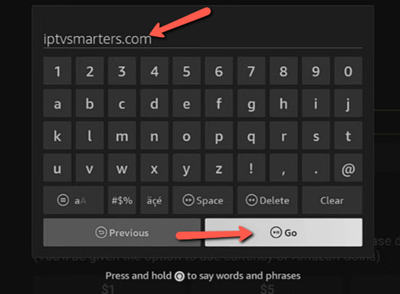
Step 4) Next, tap Go and wait for the file to download, and select Install to add the player.
Step 5) Open the IPTV player and choose Login/ Xtream Codes or M3U Playlist, based on provider instructions.
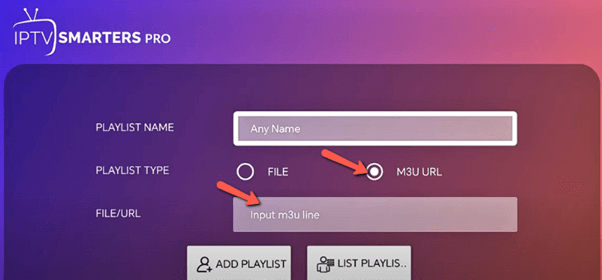
Step 6) Enter the IPTV credentials that you received in your email after your purchase and let the app sync the channels, VODs, and EPG.
Step 7) Adjust the settings of the player and customize your IPTV app to your liking, and start streaming.
How did We Choose the Best IPTV Streaming Apps?
At Guru99, we earn your trust with thorough research rather than relying on hyping the products. Our research process believes in delivering transparency with expert validation and comprehensive testing. Therefore, after testing 155+ hours evaluating 40+ IPTV apps, carefully documenting their performance and usability, we shortlisted 8 of them. Here’s a glimpse of how we handpicked these apps:
- Streaming stability: We measured the buffering, startup time, and long streaming session reliability during peak hours.
- Content Variety: Our review team analyzed the diversity in channels and VODs. We looked into not only international and national coverage but also regional offerings.
- Video Quality: We evaluated SD, HD, and 4K consistency, compression efficiency, and adaptive streaming while selecting tools that can maintain clear visuals even during fluctuating connections.
- Device Compatibility: The team tested these IPTV streaming apps on various IPTVs such as smart TVs, smartphones, tablets, PC, Macs, Fire TVs, etc.
- Support: We tested the customer support by asking them several queries and doubts. The team also asks them for troubleshooting tips and setup assistance to understand their professionalism.
- Subscription Fee: Our reviewers looked into the monthly subscriptions, free trials, and refund policies for shortlisting the tools.
Verdict
After conducting thorough research on IPTV streaming apps, I noticed that all of the above IPTVs are reliable and offer an extensive lineup of channels and VODs at a reasonable rate. However, here are my top three choices that truly outperformed the other providers:
- VocoTV: I was highly impressed with VocoTV’s no-IP lock, which allowed me to stream it anywhere, anytime. Additionally, its DIY installation also makes its setup process child’s play.
- OTTOcean: It offers IMDb’s top-rated content in both international and national collections. Moreover, its antifreeze technology and 99.99% uptime ensure stable streaming.
- WorthyStream: With several internationally acclaimed collections in its VOD, Krooz TV offers services with high zapping time and reliable customer support.
