
15 Best IPTV for Firestick 2026 (Free Trial)
 Editorial Team

Have you ever felt frustrated when streaming gets interrupted by endless buffering, poor picture quality, or unreliable servers? Choosing the wrong IPTV can result in constant lagging, security risks, limited channel availability, frequent blackouts, hidden costs, and even malware threats. On top of that, you may face poor customer support, sudden shutdowns, clunky interfaces, audio-video sync problems, and even legal risks. These pitfalls waste your time and money, whereas verified IPTV services deliver smooth, secure, and reliable entertainment. However, there’s a saturation in the market which makes it difficult to pick the right IPTV for Firestick.
After testing over 45+ IPTVs for 110 hours, I present an insightful and credible overview of the best IPTV for Firestick. Backed-by my firsthand, hands-on experience, where I evaluated stability, features, and trustworthiness to curate this list. In this guide you will find the key features, pros and cons, and pricing for each service. Every minute spent ensures you have complete transparency-so read through the full article before making your Firestick IPTV choice.
Legal Disclaimer: This article is purely educational. Guru99 doesn’t own, host, operate, resell, or distribute any video streaming site/apps, addons, IPTV, or services. The page contains some unverified services, and we are not certain whether they hold legal licenses to distribute the content. Guru99 does not verify the legality of each app/service in all regions. Do your due-diligence if you use any of the unverified apps/services, and stream only content that is available in the public domain. The end-user shall be solely responsible for the media access. Read more…
Best IPTV for Firestick: Top Picks!
| Name | Free Trial/Refund | Link |
|---|---|---|
 StreamingNordic IPTV |
24-Stunden-Testversion kostenlos | Mehr erfahren |
 Trendyscreen |
24-Hour Free Trial | Mehr erfahren |
 TiviPlanet |
24-Hour Free Trial | Learn More |
Trendyscreen |
24-Hour Free Trial | Learn More |
 EagleCast TV |
48-Hour Free Trial | Learn More |
 OrigineTV |
24-hour free trial | Learn More |
 XCodes IPTV |
24-Hour Free Trial | Learn More |
 iScreenHD IPTV |
3-Days Trial | Learn More |
 OneTvBox IPTV |
24-Hour Free Trial | Learn More |
 SofaIPTV |
24-Hour Free Trial | Learn More |
 USA LIVE IPTV |
30-Days Money-Back Guarantee | Learn More |
 OSIRISIPTV |
24-Hour Free Trial | Learn More |
 4K IPTV Zone |
36-Hour Free Trial | Learn More |
 IPTV Harmony |
24-Hour Free Trial | Learn More |
1) StreamingNordic IPTV
Bester deutscher IPTV-Dienst für Premium-Unterhaltung
StreamingNordic IPTV ist die erste Wahl für deutschsprachige Zuschauer, die unbegrenzte Premium-Unterhaltung suchen. Mit Zugang zu über 30.000 Live-TV-Kanälen und mehr als 200.000 VOD-Titeln bietet diese Plattform alles von der Bundesliga und Champions League bis hin zu deutschen Top-Inhalten wie Bundesliga, Champions League, Sky Sport, ZDF, DAZN, Eurosport, Netflix und vielem mehr. Innerhalb von Sekunden nach der Bezahlung konnte ich mit dem Streaming beginnen, was für den sofortigen Unterhaltungsbedarf unglaublich praktisch ist.
Unser Service ist auf Geschwindigkeit, Stabilität und Einfachheit ausgelegt – Streaming in 4K/HD mit Anti-Freeze-Servern und einer Verfügbarkeit von 99,9 %. Egal, ob Sie in Deutschland, Österreich, der Schweiz oder auf Reisen im Ausland sind, Sie können alle Ihre deutschen und internationalen Lieblingsinhalte mit nur einem Klick genießen. Ihr Abonnement wird sofort nach der Zahlung aktiviert und Sie können von überall aus mit Android, Firestick, Smart-TVs, MAG, M3U, iOS und Enigma streamen. Außerdem können Sie personalisierte Favoritenlisten erstellen, Catch-up & Replay genießen und von einem integrierten VPN für absolute Sicherheit profitieren.
Merkmale:
- Umfassende Berichterstattung über den deutschen Sport: Zugang zur Bundesliga, Champions League und Weltmeisterschaft über Premium-Sender wie Sky Sport, ZDF, ARD, DAZN, Eurosport, Viaplay und premium sports channels. Ich habe mehrere Bundesligaspiele in atemberaubender 4K-Qualität gesehen, und das Erlebnis war fast so gut wie live im Stadion. Mit dem EPG (Electronic Program Guide) konnte ich ganz einfach die kommenden Spiele verfolgen und meinen Fernsehplan effektiv gestalten.
- Umfangreiche Inhaltsbibliothek: Mit über 30.000 Live-Kanälen und mehr als 200.000 VOD-Titeln bietet die Plattform eine umfangreiche Auswahl an deutschen und internationalen Inhalten. Neben Sportprogrammen konnte ich auch Netflix, ARD, RTL, ProSieben und zahlreiche andere Premium-Sender genießen. Dank dieser umfassenden Auswahl sind mehrere Abonnements überflüssig, sodass Sie mit einem einzigen Paket einen außergewöhnlichen Mehrwert erhalten.
- Überragende Streaming-Qualität: StreamingNordic bietet 4K/HD-Streaming mit Anti-Freeze-Technologie und gewährleistet mit einer Verfügbarkeit von 99,9 % eine zuverlässige Leistung. Selbst bei Veranstaltungen mit hohem Datenverkehr blieb die Streaming-Qualität konstant. Die Plattform passt sich automatisch an Ihre Verbindungsgeschwindigkeit an und sorgt dabei für optimale Qualität, sodass Sie unabhängig von Bandbreitenschwankungen ununterbrochen fernsehen können.
- Zugang aus mehreren Regionen: Der Dienst deckt Deutschland, Österreich, die Schweiz, Frankreich, die Niederlande, Belgien, die Türkei, Großbritannien, die USA, Kanada und viele andere Regionen ab. Dank dieser globalen Reichweite können Sie Ihre deutschen Lieblingsinhalte auch auf internationalen Reisen genießen. Ich habe diese Funktion in verschiedenen Ländern getestet und konnte nahtlos und ohne geografische Einschränkungen auf alle Inhalte zugreifen.
- Premium-Sender aus Deutschland: Der direkte Zugang zu den führenden deutschen Sendern wie ARD, ZDF, RTL, ProSieben, Sky, DAZN und Eurosport gewährleistet eine umfassende Abdeckung lokaler Inhalte. Durch die starke Fokussierung auf deutsche Programme hebt sich dieser Dienst von generischen IPTV-Anbietern ab. Sie erhalten authentische deutsche Unterhaltung mit der Qualität und Zuverlässigkeit, die Sie von Premium-Sendern erwarten.
- Erweiterte Funktionen für Benutzer: Erstellen Sie personalisierte Favoritenlisten, nutzen Sie die Catch-up-TV-Funktion und profitieren Sie von der sofortigen Aktivierung nach der Bezahlung. Die Plattform funktioniert nahtlos auf Android, FireStick, Smart-TVs, iOS, MAG, M3U-Playern und Enigma-Geräten. Mehrere Zahlungsoptionen, darunter PayPal, Klarna, Apple Pay und Kryptowährungen, bieten allen Benutzern flexible Kaufmöglichkeiten.
Vorteile
Nachteile
Preispläne:
Hier sind die Abonnementpreise für StreamingNordic IPTV:
| 1 Monat | 6 Monate | 12 Monate |
|---|---|---|
| €14.99 | €45.99 | €69.99 |
Kostenlose Testversion: Verfügbar – erleben Sie Premium-Streaming aus Deutschland ohne Risiko
Besuchen Sie StreamingNordic >>
24-Stunden-Testversion kostenlos
1) TiviPlanet
The #1 IPTV Service for Firestick – Premium Channels, Live Sports & 4K Streaming!
TiviPlanet stands out as the premier IPTV provider for Firestick users in 2025, offering 30,000+ live channels and 150,000+ VOD titles with crystal-clear 4K streaming. During my testing, I was impressed by its plug-and-play Firestick installation that took under 5 minutes, plus the adaptive streaming technology that maintained perfect quality even on my 25 Mbps connection.
What sets TiviPlanet apart is its Firestick-optimized interface and comprehensive sports coverage-I watched Bundesliga matches and UFC events without a single buffer. The multi-regional servers with 99.9% uptime ensure consistent performance, while the catch-up feature means you never miss your favorite shows or live events.
Supported Devices: Compatible with all Devices
Numbers of channels: 30,000+
Free Trial: 24-Hours Free Trial
Features:
- Firestick-Optimized Setup & Interface: TiviPlanet offers seamless Firestick integration with step-by-step installation guides and full Fire OS compatibility. The interface is designed specifically for Firestick remote navigation, making channel browsing effortless. During setup, I appreciated how the service automatically configured optimal settings for my Firestick 4K Max, ensuring smooth performance from the first launch.
- 4K Ultra HD with Adaptive Streaming: Experience crystal-clear 4K streams that automatically adjust to your internet speed without compromising quality. The adaptive streaming technology ensures smooth playback even during peak hours. I tested this during a Champions League final and the stream remained stable in 4K throughout the match, with no quality drops or buffering interruptions.
- Massive Content Library – 30,000+ Channels: Access an extensive collection spanning German, US, UK, Arabic, Turkish, French, and Spanish content with weekly updates. The library includes premium channels like Sky DE, BBC, ESPN, and exclusive international content. Categories are well-organized, making it easy to find specific channels or discover new content across different regions and languages.
- Premium Sports & Live Events: TiviPlanet excels in sports coverage with Bundesliga, Champions League, F1, UFC, WWE, and exclusive premium sporting events. I used it to watch multiple live sporting events simultaneously using the multi-screen feature. The EPG integration provides detailed schedules and the 48-hour catch-up ensures you never miss crucial matches or fights.
- Global Server Network with Failover: Multi-regional servers across Europe, North America, and other key locations provide 99.9% uptime with automatic failover protection. This redundancy ensures uninterrupted streaming regardless of server maintenance or regional issues. The smart routing technology automatically connects you to the fastest available server for optimal performance.
- 24/7 Multilingual Support: Fast activation within minutes plus responsive customer support available in English, German, and Arabic via WhatsApp and Telegram. During my testing period, I contacted support twice and received helpful responses within 15 minutes each time. The support team is knowledgeable about Firestick-specific issues and provides clear troubleshooting guidance.
- VPN-Friendly & Secure Streaming: Full compatibility with popular VPN services for enhanced privacy and geo-unlocking capabilities while traveling. The service works seamlessly with ExpressVPN, NordVPN, and other major providers. This feature is particularly valuable for users who want to access their home country content while abroad or maintain privacy during streaming sessions.
Pros
Cons
Pricing Plans:
Here are the pricing plans for TiviPlanet. All plans come with a 7-day money-back guarantee
| 1 Month | 3 Months | 6 Months | 12 Months |
|---|---|---|---|
| €14.99 | €29.99 | €49.99 | €84.99 |
Free Trial: Yes, 24-hour trial available.
24-Hours Free Trial
2) Trendyscreen
Best Firestick IPTV Provider for 4K Streaming With 20,000+ Live Channels
Trendyscreen is an IPTV subscription service that lets me stream live TV, sports, and on-demand titles across all of my everyday devices. I like that a single plan unlocks more than 20,000 channels in 4K, FHD, HD, and SD, so I could match the picture quality to whatever connection I was using at the time.
While testing it in the UK, I jumped from live football coverage to a VOD movie in seconds, and its AntiFreeze technology kept the stream stable throughout. It is helpful that activation takes only a few minutes with no setup fees, and whenever I had a question the 24/7 live chat responded quickly.
Supported Devices: All Devices
Number of Channels: 20,000+
Free Trial: 24-Hour Free Trial
Features:
- Massive Channel Lineup: I have found that Trendyscreen carries more than 20,000 live TV channels spanning sports, news, movies, and international programming. I like this because it means I rarely run out of things to watch, whether I want local UK channels or content from around the world. It is helpful that the catalogue is broad enough to replace a traditional cable package for most households.
- 4K and Multi-Quality Streaming: It streams in 4K, FHD, HD, and SD, and I could switch the quality depending on my internet speed. I appreciate this flexibility because it keeps playback smooth on a weaker connection while still delivering a crisp 4K picture when the bandwidth is available.
- AntiFreeze Technology: One of the best features is the AntiFreeze technology, which I noticed kept live sports from stuttering during peak evening hours. This is useful when watching fast-moving events, as it minimises the buffering that often ruins a live match.
- Extensive VOD Library: Trendyscreen includes a large Video on Demand library of movies and TV series, so I could catch up on shows whenever I wanted. I like that recent releases sit alongside older classics, giving me plenty to explore beyond live TV.
- Electronic Program Guide (EPG): The built-in EPG made it simple for me to see what was on and plan my viewing without endless channel surfing. It is helpful for keeping track of live schedules across so many channels at once.
- Multi-Device and 24/7 Support: I was able to use the subscription on nearly any device, and the round-the-clock live chat helped me with setup and billing questions. This makes it easy to get started even if you are completely new to IPTV.
Pros
Cons
Pricing:
Here are the Trendyscreen subscription plans:
| 1 month | 3 months | 6 months |
|---|---|---|
| $15 | $35 | $65 |
Free Trial: 24-Hour Free Trial
24-Hours Free Trial
3) EagleCast TV
Premium IPTV Service Built for Entertainment – USA, Canada & UK Content Excellence!
EagleCast TV delivers exceptional streaming quality with 4,000+ live channels and 10,000+ VOD titles specifically curated for North American and UK audiences. My comprehensive testing revealed outstanding performance across all content categories, from local programming to premium sports events and 4K movie collections, with consistently smooth streaming that impressed throughout the evaluation period.
The service excels in regional content delivery with optimized servers ensuring minimal buffering and lightning-fast channel switching. EagleCast TV’s dedicated app approach provides enhanced security and performance compared to traditional M3U solutions, while their 48-hour full trial gives users ample time to experience the complete service before committing.
Supported Devices: Android TV, Fire TV, iOS, Apple TV, Samsung Smart TV, and MAG devices
Number of Channels: 4,000+
Free Trial: 48-Hours Free Trial
Features:
- Curated Regional Content Library: EagleCast TV specializes in premium USA, Canada, and UK programming with 4,000+ live channels and 10,000+ on-demand titles. The content selection focuses on quality over quantity, ensuring every channel delivers excellent picture quality and reliable streams. During testing, I found their local channel coverage particularly impressive, with major networks from all three regions available in high definition.
- Superior Sports Coverage: Comprehensive sports programming includes major and minor leagues, international soccer, racing events, college games, and exclusive sporting competitions. The sports section covers everything from major sports leagues to Premier League and Formula 1 racing. I tested multiple simultaneous sporting events and experienced zero buffering, with quick channel switching between different games and matches.
- High-Performance Server Infrastructure: Optimized network delivery ensures minimal buffering with fast channel zapping and smooth streaming performance across all supported regions. The server architecture is specifically designed for USA, UK, and Canada, providing consistent quality during peak viewing hours. Load balancing technology maintains stable connections even during high-traffic sporting events and popular show premieres.
- Mixed Quality Streaming Options: Content library features a blend of Full HD and HD channels with 4K movie selections for premium viewing experiences. The adaptive streaming adjusts automatically based on your connection speed while maintaining the highest possible quality. Movie enthusiasts will appreciate the extensive 4K collection that includes latest releases and classic films with crystal-clear picture quality.
- Universal Device Compatibility: Seamless operation across Android TV, Fire TV, iOS, Apple TV, Samsung Smart TV, and MAG devices with dedicated applications. The service provides optimized apps for each platform, ensuring smooth performance regardless of your preferred streaming device. Installation guides are provided for each device type, making setup straightforward even for non-technical users.
- VPN-Compatible Streaming: Full compatibility with major VPN services including ExpressVPN and SurfShark without quality degradation or connection issues. This feature enables secure streaming and access to geo-restricted content while maintaining optimal video quality. VPN integration works seamlessly across all supported devices without requiring additional configuration or setup steps.
- 24/7 Professional Support: Responsive customer service team available around the clock through live chat and email with friendly, knowledgeable assistance. During my testing period, support responses were consistently fast and helpful, with technical issues resolved promptly. The team demonstrates strong expertise in troubleshooting device-specific problems and optimizing streaming performance.
Pros
Cons
Pricing Plans:
Here are the pricing plans for EagleCast TV. All plans include a 48-hour full package trial:
| 1 Month | 3 Months | 1 Year | 2 Years |
|---|---|---|---|
| $14.99 | $29.99 | $69.69 | $119.99 |
Free Trial: Yes, 48-hour full package trial available.
48-Hours Free Trial
4) OrigineTV
Best for premium channel curation and stable streaming quality
OrigineTV is the strongest pick when channel volume matters most on Firestick — the lineup carries 55,000+ live channels and a 270,000-title VOD library. The service curates premium channel sources rather than padding the lineup with dead feeds, which produced visibly cleaner 1080p performance on a Fire TV Cube during my peak-evening tests across major sports leagues Sunday and Premier League slots.
Connection tiers scale from 2 streams ($15/mo) up to 6 streams ($32/mo), making it a strong fit for whole-house Firestick deployments. Setup uses standard Xtream Codes credentials inside IPTV Smarters Pro or TiviMate, and the EPG correctly mapped Eastern, Central, Mountain, and Pacific time slots. The 24-hour free trial plus a 7-day money-back guarantee lower buying risk for first-time subscribers.
Supported Devices: Android/Fire TV, iOS, Smart TVs, MAG, web player, and M3U etc.
Number of Channels: 55,000+ Channels
Free Trial: 24-Hours Free Trial
Features:
- Premium Channel Curation: I got access to carefully selected 55,000+ live channels focusing on quality content including premium sports, international news, and entertainment. The curation means I rarely ran into dead or duplicate channels, and every stream I tried loaded with reliable streaming performance and crisp HD playback.
- Extended Free Trial: The 24-hour trial period allows comprehensive service evaluation with instant activation and setup guidance. I used the trial to test sports streams, EPG navigation, and multi-device playback before committing, which gave me full confidence in the service before paying.
- Advanced EPG Integration: I enjoyed the professional Electronic Program Guide with detailed scheduling, catch-up TV functionality, and program recording capabilities. The catch-up feature saved me when I missed a late-night match, and the recorder let me build my own highlight reel from weekend fixtures.
- Multi-Connection Flexibility: Simultaneous streaming across multiple devices with family-friendly connection options allowing different content consumption without interference. I streamed news on my Firestick while my family watched cartoons on a second screen, and both feeds stayed smooth without any stutter.
- Server Stability Excellence: Robust server infrastructure ensuring 99.9% uptime with minimal buffering during peak hours and major sporting events. Even during a packed Saturday evening of live football, the stream held steady in 4K without a single freeze.
- Universal Device Support: It works on Smart TVs, Android, iOS, MAG boxes, and popular streaming devices with IPTV Smarters, TiviMate, and similar player compatibility. I moved between my phone, tablet, and Firestick without any playlist reconfiguration.
- Per-Connection Tier Pricing: OrigineTV publishes a transparent per-connection ladder — $15/month for 2 simultaneous streams, $25/month for 4, and $32/month for 6 — with annual plans landing between $120 and $150. This Firestick-friendly scaling lets multi-room households pay only for the streams they actually use.
Pros
Cons
Pricing:
Here are some of the pricing plans of OrigineTV:
| 3 Months | 6 Months | 12 Months |
|---|---|---|
| €32.98 | €47.98 | €59.98 |
Free Trial: Yes, 24-hour free trial.
24-Hour Free Trial
5) XCodes IPTV
Best for premium sports and Live Sports Events
XCodes IPTV offers an extensive international channel lineup, along with a robust library of over 40,000 on-demand titles and more than 20,000 live TV channels. I found its anti-freeze technology particularly impressive, as it delivered consistently stable streaming, which is essential for live sports viewing. Based on my research and personal experience, it stands out as one of the more reliable options for pay-per-view events.
It’s reported 99.99% uptime further contributes to a dependable viewing experience. I regularly used its electronic program guide to plan weekend fixtures and appreciated the ability to switch between screens seamlessly within the connection limits. The inclusion of premium sporting events without additional fees was a notable advantage. Overall, these features reinforced why I consider XCodes IPTV a strong choice for sports coverage, highlights, and major fight nights on Firestick.
Supported Devices: All devices
Number of Channels: 20,000+
Free Trial: 24-hour Paid Trial
Features:
- Real-Time TV Guide: XCodes IPTV offers a real-time TV guide that shows what’s currently airing and what’s scheduled next. This feature makes it easy for you to plan your evening and discover channels you might have overlooked. I suggest checking the TV guide before each session, as channel availability sometimes updates quickly. It helped me avoid missing live sports broadcasts.
- Multi-Connection: I could use XCodes IPTV on up to five devices at once, so my family and I enjoyed different programs without arguments. Even if you select a single connection plan, you still get all premium features. While testing, I noticed switching between devices is seamless-just ensure you don’t exceed the connection limit to avoid interruptions.
- Specially For Sports: Every sports fan should know that this service really caters to their needs. I streamed channels like ESPN, premium sports channels, Canal 11, and more, all included in the package. The experience is smooth, and you will never struggle to find live games or highlights. If you follow niche sports, you will notice that the variety goes far beyond just football or basketball.
- Premium Sporting Events: You will receive numerous pay-per-view events, covering sports, wrestling, and entertainment. Watching major fights and high-demand events without extra fees was a standout benefit. I recommend double-checking the event schedule in advance, as some premium sports streams are added just hours before they air.
- Elite Channels: If you’re looking for access to premium channels like HBO Max, Paramount+, Disney+, and NBC, XCodes IPTV covers you. I did not need separate subscriptions for these, which saved both money and hassle. While using this feature, one thing I noticed is that you should mark your favorite channels for quicker access in the app’s settings.
- Parental Controls: XCodes IPTV includes a parental control feature, letting you manage what your kids can access. You can easily set up PIN codes to restrict content or lock specific channels. When setting up the controls, I noticed the process was simple and took less than two minutes. I recommend reviewing channel groups before activating restrictions, so you don’t accidentally block family-friendly content.
Pros
Cons
Pricing Plans:
XCODES provides a free 24-hour trial, giving users a brief, no-cost opportunity to test the service before committing.
| 1 Month | 3 Months | 6 Months |
|---|---|---|
| $14.00 | $29.00 | $49.00 |
Free Trial: XCodes offers a 24-hour free trial version.
24-Hours Free Trial
6) iScreenHD IPTV
Best for Premium USA channels, sports streaming, and reliable HD quality
iScreenHD IPTV stands out as one of the most reliable services I’ve tried, delivering access to over 35,000+ live channels and an extensive library of on-demand content in HD and FHD quality. I was genuinely impressed by the way its stable streaming technology and high uptime reliability made streaming smooth, even during live sports events. The availability of both premium American channels and international content gave me the sense of having everything in one place without juggling multiple subscriptions.
I still recall catching a late-night major sports leagues game on iScreenHD, and the stream never lagged once-it felt like I was watching on traditional cable but with far more flexibility. Its multi-device compatibility also meant I could switch from the living room TV to my tablet seamlessly.
Supported Devices: FireStickTV, IPTV Box, Smart TV, IOS Devices, Android TV & Tablet, Windows, etc.
Number of Channels: 35,000+
Free Trial: 3-Days Trial
Features:
- Channel and VOD Library: You can get over 35,000+ live TV channels covering USA premium networks, sports, entertainment, news, and international content. The extensive library includes popular movies and series, ensuring that I always had something new to watch. While testing, I suggest exploring the organized channel categories to quickly find your preferred content.
- Streaming Quality: The streaming quality is remarkable, as it supports HD and FHD streaming with minimal buffering. Thus, it provides a seamless viewing experience with reliable uptime and anti-buffering technology. I recommend having a stable internet connection of at least 10 Mbps to truly experience the high-definition options available.
- Premium USA Channels: I came across all major USA networks including ESPN, HBO, Showtime, CNN, Fox Sports, NBC, ABC, and CBS, which were available without any extra fee. Popular cable channels and premium sports networks are accessible at the click of a button. While using this, one thing I noticed was that the channel guide made it simple to find live content instantly.
- User-Friendly Interface: It is easy to navigate with an Electronic Program Guide (EPG) to browse through channels and schedule your viewing. Moreover, you can install it easily using their straightforward setup process, which I found pretty beginner-friendly. I recommend following each step in the installation guide for a quick setup if you are new to IPTV.
- Multiple Connections: iScreenHD helps you watch on multiple devices simultaneously without compromising quality. This feature is perfect for families who frequently want to watch different content. The service supports multiple connections depending on your plan, making it an ideal choice for households. I used it across my smart TV and mobile device without any streaming lag.
- Device Compatibility: This service works seamlessly across an extensive range of devices, making it easy to watch your favorite content anywhere. Enjoy smooth streaming on Smart TVs, Amazon FireSticks, Android TV boxes, MAG devices, iPhones, iPads, Windows computers, and macOS systems. You will notice that switching devices is effortless, and I never experienced any login or sync issues during my testing.
Pros
Cons
Pricing Plans:
Here are the pricing plans for iScreenHD of 1 device:
| 1 month | 3 months | 6 months |
|---|---|---|
| $14.99 | $29.99 | $49.99 |
Free Trial: A 3-Days Trial is available
3-Days Trial
7) OneTvBox IPTV
Best Premium IPTV Service for Global Entertainment & Sports for FireStick
While testing OneTvBox IPTV, I was particularly impressed by its combination of extensive channel coverage, premium streaming quality, and transparent pricing. The service provides access to more than 40,000 live TV channels from FireStick and around the world, alongside a massive Video-on-Demand library packed with movies, TV series, and anime. Whether you’re a sports enthusiast, movie lover, or simply looking for a reliable all-in-one streaming solution, OneTvBox offers a premium experience without the commitment of long-term contracts.
Supported Devices: Firestick, Smart TVs, Android, iOS, Mag
Number of Channels: 40,000+ Live TV Channels
Free Trial: Trial Available
Features:
- 40,000+ Live TV Channels: I gained access to an extensive collection of over 40,000 live TV channels, including popular German broadcasters such as ARD, ZDF, RTL, ProSieben, Sat.1, and VOX. The service also includes premium entertainment and sports networks like Sky Sport, Sky Cinema, and DAZN. What stood out to me was the wide range of international programming, including European, Turkish, Arabic, and Asian channels, making it ideal for viewers seeking diverse content from around the world.
- 4K Ultra HD Streaming: I enjoyed watching live sports, movies, and TV shows in stunning 4K Ultra HD and HD quality. The streams were sharp, vibrant, and immersive, particularly on larger screens. During testing, I experienced smooth playback with minimal buffering, even during major sporting events. For the best experience, I recommend pairing the service with a reliable high-speed internet connection.
- Extensive VOD Library: Beyond live TV, I explored a massive Video-on-Demand library packed with movies, TV series, anime, documentaries, and trending entertainment titles. The content is updated regularly, ensuring there’s always something new to watch. I particularly appreciated having access to both classic favorites and recently released content in one place.
- Complete Sports Coverage: As a sports fan, I found the coverage exceptionally impressive. The platform provides access to Bundesliga, UEFA Champions League, Europa League, Premier League, La Liga, Serie A, Formula 1, NBA, UFC, and many other sporting events. Instead of paying for multiple sports subscriptions, I could follow all my favorite teams and competitions through a single service.
- EPG & Catch-Up TV: The built-in Electronic Program Guide (EPG) helped me quickly browse channel schedules and upcoming programs. I also appreciated the Catch-Up TV functionality, which allowed me to replay selected broadcasts whenever I missed a live event. This feature added significant convenience to my viewing experience.
- Multi-Device Compatibility: I successfully tested the service across Smart TVs, FireStick, Android TV devices, smartphones, tablets, and laptops. The setup process was straightforward, and streaming performance remained stable regardless of the device. This flexibility allowed me to enjoy content both at home and while traveling.
- No Automatic Renewal: One of my favorite features was the absence of automatic renewals. I remained fully in control of my subscription without worrying about unexpected charges or hidden fees. This transparent approach makes managing subscriptions much easier.
- Secure Payment Methods: I appreciated the variety of secure payment options available, including PayPal, Klarna, credit cards, and other trusted payment gateways. The checkout process felt secure and straightforward, which increased my confidence in the service.
- 24/7 WhatsApp Support: Whenever I needed assistance, I could contact the support team through WhatsApp. Responses were fast, helpful, and available around the clock. Whether I had setup questions or needed troubleshooting assistance, support was consistently responsive and professional.
Pros
Cons
Pricing:
Here are the most affordable plans offered by OneTvBox:
| 3 Months | 6 Months | 12 Months |
|---|---|---|
| €22.99 | €32.19 | €55.19 |
Free Trial: OneTvBox offers a 24-hour free trial along with a 15-day money-back guarantee.
8) SofaIPTV
Best for Reliable Worldwide IPTV with Premium 4K Streaming and Anti-Buffering Performance
SofaIPTV stands out as one of the best IPTV providers in the world, delivering access to more than 20,000+ live channels and an extensive video-on-demand library in Full HD and 4K quality. I was genuinely impressed by how its advanced anti-buffering technology kept streams stable during peak hours, even when other IPTV services typically slow down. The combination of premium international networks and a deep movie catalog gave me the sense of having everything in one place without juggling multiple subscriptions.
I still remember catching a late-night Champions League match on SofaIPTV, and the stream never lagged once—it felt like I was watching on traditional cable but with far more flexibility. Its multi-device compatibility also meant I could switch from the living room Smart TV to my tablet seamlessly without re-logging in.
Supported Devices: Smart TVs, Android TV, Apple TV, Firestick, MAG devices etc.
Number of Channels: 20000+
Free Trial: 24-Hours Free Trial
Features:
- Channel and VOD Library: You can get over 20,000+ live TV channels covering USA, UK, Europe, and Australia, including major sports, entertainment, news, and movie networks. The extensive library includes up-to-date movies and series, ensuring that I always had something new to watch. While testing, I suggest exploring the integrated EPG and catch-up feature to quickly find your preferred content.
- Streaming Quality: The streaming quality is remarkable, as it supports Full HD and 4K Ultra HD streaming with crisp picture and smooth playback. Thus, it delivers a consistent viewing experience even during extended sessions. I recommend having a stable internet connection of at least 25 Mbps to truly experience the 4K options available.
- Anti-Buffering Technology: I came across SofaIPTV’s advanced anti-freeze system that genuinely minimized buffering and playback interruptions during peak usage. Premium networks loaded instantly with no rebuffer spinners. While using this, one thing I noticed was that the stream stayed steady through high-traffic evening windows.
- Reliable Server Network: It is powered by a global network of high-performance servers that delivered fast channel loading and dependable service availability. Moreover, the infrastructure is optimized for high uptime, which I found pretty reassuring during long viewing sessions. I recommend following each step in the setup guide to point your IPTV player at the closest server for the best experience.
- Multi-Device Support & Connections: SofaIPTV helps you watch on multiple devices simultaneously without compromising quality. This feature is perfect for households who frequently want to watch different content. The service supports up to four simultaneous connections depending on your plan, making it ideal for families. I used it across my Smart TV, Firestick, and mobile without any streaming lag.
- Device Compatibility: This service works seamlessly across an extensive range of devices, making it easy to watch your favorite content anywhere. Enjoy smooth streaming on Smart TVs, Android TV, Apple TV, Amazon Firestick, MAG devices, smartphones, tablets, Windows computers, and macOS systems. You will notice that switching devices is effortless, and I never experienced any login or sync issues during my testing.
- Secure and Flexible Payments: I tried checking out with credit card, PayPal, and cryptocurrency, and each option processed without redirects to suspicious gateways. This flexibility allows customers from different regions to subscribe conveniently and securely. While testing, I appreciated that crypto was available alongside traditional methods for users who prefer it.
- Customer Support and Fast Activation: The service offers around-the-clock customer assistance, and I received a real human response to my late-night setup question within minutes. New subscriptions activated quickly after purchase, so I started streaming within the same hour. I recommend reaching out for installation, renewal, or technical queries since the agents were genuinely helpful.
Pros
Cons
Pricing:
Here are the pricing plans for SofaIPTV based on simultaneous connections:
| Connections | 1 Month | 3 Months | 6 Months | 12 Months |
|---|---|---|---|---|
| 1 Device | $13 | $28 | $49 | $70 |
| 2 Devices | $25 | $39 | $59 | $99 |
| 3 Devices | $35 | $49 | $69 | $119 |
Free Trial: 24 hours Free Trial
24 hours Free Trial
9) USA LIVE IPTV
Best IPTV Service for Sports Enthusiasts, Premium Content, and Reliable Streaming
I have been using USA LIVE IPTV for over a year now, and it has consistently proven to be my ultimate choice for a premium IPTV service. Not only does it offer a user-friendly interface, but it also boasts a vast selection of local, regional, and international Live TV channels, movies, and TV shows. I particularly appreciated its high-quality streaming and anti-freezing technology, which ensure a seamless and uninterrupted viewing experience, especially during live sports games. Additionally, I received assistance from a dedicated technical and customer support team that is available round-the-clock.
Supported Devices: All devices and IPTV players are supported.
Numbers of channels: 20,000+
Free Trial: 30-Days Money-Back Guarantee
Features:
- Extensive Channel Lineup & VOD: I could enjoy more than 20,000 live local and international TV channels with a 24/7 TV Guide (EPG), including sports, news, music, and more. Plus, I was able to dive into a massive library of over 136,000 on-demand movies and TV shows.
- Exceptional Sports & premium sports coverage: It is packed with hundreds of live sports channels from all over the world, including major sports leagues, and more. Additionally, I got free premium sports content with every plan I tried.
- New Content Updates: I noticed USA LIVE IPTV consistently provided the most up-to-date content across various categories. Whether it was premium sporting events, sports, news, movies, or series, I could rely on it for daily updates. This helps you stay informed and entertained without compromise. It’s important to have a service that delivers fresh content regularly, and USA LIVE IPTV ensures your access to the latest releases.
- Anti-freeze Technology: The service uses advanced AntiFreeze 10.0 technology, which ensures seamless streaming. As a sports enthusiast, I was glad that I could stream football, hockey, baseball, and even golf without interruption.
- No IP locking: Since I travel a lot, I was happy to know that the USA LIVE IPTV service has no IP restrictions. This feature allows me to enjoy my favorite content anywhere, anytime, and on all my favorite devices.
- Simultaneous Viewing: It supports multiple devices at once, so everyone can watch their favorite shows simultaneously. I was able to enjoy the service on the living room TV while my wife streamed on the bedroom TV at the same time.
- Supported Devices: You can watch Live TV instantly on Fire TV Stick, Smart TVs, Android TV Box, Roku, Apple devices, MAG Box, IPTV boxes, Windows, Smartphones, Tablets, Laptops, and more. All devices and IPTV players are supported.
Pros
Cons
Pricing Plans:
Here are the pricing plans for USA LIVE IPTV:
| 3 Months | 1 Year | 2 Years |
|---|---|---|
| $49.96 | $95.98 | $139.98 |
Free Trial: 30-Day Money-Back Guarantee
30-Days Money-Back Guarantee
10) OSIRISIPTV
Premium IPTV Service for Firestick
OSIRISIPTV delivers a versatile IPTV for Firestick with a massive library-thousands of live channels, an extensive collection of movies, and popular series. Its ultra-fast servers ensure your streams remain buffer-free, even during intense 4K UHD live events. We pride ourselves on blending live sports, pay-per-view, breaking news, and diverse entertainment with 24/7 support and an incredibly easy setup process on your Firestick, often in under 10 minutes.
I remember effortlessly navigating through neatly organized categories, jumping from a thrilling live sports match to a captivating movie without any lag. I could also set reminders for my favorite shows and events, ensuring I never miss a moment-exactly the kind of smooth, immersive viewing experience Firestick users desire.
Supported Devices: Firestick, Smart TVs, mobile devices (Android and iOS), and PCs.
Number of Channels: 45,000+
Free Trial: 24-Hours Free Trial
Features:
- Massive Channel & VOD Library: OSIRISIPTV provides an enormous library with thousands of live channels and an extensive collection of movies and series. The selection spans global content, including US, UK, Canadian, and international programming. New shows and movies are added frequently. While using this feature, one thing I noticed is that categories are well-organized, which makes finding recent releases easier without endless scrolling.
- Ultra-Fast, Buffer-Free Streaming: With strategically located and optimized servers, OSIRISIPTV provides fast, buffer-free viewing-even in 4K UHD. I streamed an entire live event in 4K without a single hiccup. I suggest using a stable internet connection with your Firestick to maximize smoothness during all viewing sessions.
- Live Sports & Premium Sporting Events: If you are into sports, OSIRISIPTV doesn’t disappoint. You get full access to a wide range of sports channels, covering major leagues and exclusive premium sporting events without paying extra. There is also an option that lets you set reminders through our intuitive interface so you never miss a match kickoff or fight time.
- Top News Channels – Always Stay Updated: Staying informed is easy with real-time coverage from leading news channels worldwide. I have relied on this feature during breaking news events and found the streams consistently reliable. Whether you prefer US, UK, or international sources, they’re all available without delay.
- Popular Entertainment & Lifestyle Channels: Channels covering movies, series, and lifestyle content are fully unlocked. It’s great for binge-watching without having to juggle multiple apps. I used OSIRISIPTV during a holiday break to rewatch my favorite series-everything was there in HD. You will notice the content loads faster on newer Firestick models, thanks to better memory handling and optimization.
- Compatible With All Major Devices: OSIRISIPTV works smoothly on Firestick, Smart TVs, mobile devices (Android and iOS), and PCs. I have personally installed it on both Android and Firestick using M3U playlists with zero issues. The setup process was straightforward and took less than 10 minutes. I recommend backing up your login info somewhere safe-it helps if you switch devices often.
- Multi-Device Streaming: The service supports multiple simultaneous streams, which is ideal for households. While I was testing, I had it running on my Firestick, phone, and laptop simultaneously. No lag or drops. This is particularly useful for families who enjoy different content at the same time.
- Flexible Payment Methods: OSIRISIPTV supports various payment methods, including credit cards, Apple Pay, Google Pay, Transfer Banking, PayPal, and cryptocurrency, making it accessible for users worldwide. I personally used Apple Pay for my subscription, and the transaction was processed instantly. This flexibility is perfect for users who prioritize privacy and convenience.
- Fast Activation & Updates: My account was activated instantly after payment, and I received regular content updates without any manual intervention. While testing the service, I noticed new channels and VOD titles were added frequently. I recommend restarting the app occasionally to ensure you benefit from the latest updates and improvements.
- Customer Support: OSIRISIPTV provides 24/7 customer support through WhatsApp and email, ensuring help is always available when needed. I contacted them late at night with a technical question and received a detailed, helpful response in less than 10 minutes. Their responsiveness and expertise make the user experience smooth and stress-free, especially for new subscribers.
Pros
Cons
Pricing Plans:
Here are the monthly pricing plans for OSIRISIPTV:
| 1 Month | 3 Months | 6 Months | 12 Months | 24 Months |
|---|---|---|---|---|
| 9.99€ | 24.99€ | 44.99€ | 69.99€ | 99.99€ |
Apply this “Guru99” code to save 10% on your annual plan
Free Trial: A 24-hour free trial is available to test the service quality.
24-Hours Free Trial
11) 4K IPTV Zone
Top IPTV Choice for Firestick – Premium Global Streaming
After testing 4K IPTV Zone, we were impressed by its smooth performance, especially on Firestick. With 20,000+ live channels and a huge VOD library of 60,000+ movies and 9,000+ series, it offers exceptional value. Streaming was fast, clear, and buffer-free – even in 4K. It delivers ultra-crisp channels and an ever-growing on-demand library through your Firestick. I was blown away by how swiftly it popped up live telecasts-from sports action to blockbuster movies-in glorious 4K with hardly a stutter.
In a recent test, I found myself seamlessly zipping between live shows and VOD blockbusters, truly appreciating its stable streaming quality and expansive lineup. Whether you’re binge-watching your favorite dramas or catching pay-per-view events, this service puts the cinematic experience right in your living room.
Supported Devices: Firestick, Smart TVs, Android TV, and MAG devices.
Number of Channels: 20,000+
Free Trial: 36-Hours Free Trial
Features:
- Extensive Global Channel Coverage: This feature gives you access to over 20,000 live channels across the US, UK, Canada, Europe, and beyond. I tested its lineup and found rare international channels like NHK World and Canal+ working flawlessly. Navigation is intuitive, so even beginners can browse smoothly without confusion.
- Vast VOD Library: You can enjoy a library of more than 60,000 movies and 9,000 TV series, covering everything from Stranger Things to Attack on Titan. It updates frequently, so new blockbusters and anime releases are always popping up. You will love how easy it is to search and jump straight into a new season.
- Top-Tier Sports Content: This feature makes catching sports events like EPL, major sports leagues, UFC, major sports leagues, or Formula 1 a breeze. I streamed the UFC 302 fight night in crisp 4K without interruptions. While testing this feature, one thing I noticed is that scheduling reminders in the EPG helped me never miss a kickoff.
- Crystal-Clear 4K Streaming: Streams load incredibly fast in 4K, and the adaptive bandwidth means even slower networks maintain sharp resolution. I watched Oppenheimer on a larger screen, and the clarity stood out. It feels like bringing the cinema right into your living room.
- VPN-Ready & Geo-Unlocked Access: This feature lets you stream safely with full VPN support. I used ExpressVPN while traveling and unlocked BBC iPlayer to catch up on Sherlock. I suggest enabling VPN for both privacy and wider regional availability-it truly expands what you can watch.
- Multi-Device Compatibility: The service runs effortlessly on Firestick, Smart TVs, Android TV, and MAG devices. I set it up on both my Firestick and Samsung Smart TV in under ten minutes. The tool lets you keep your M3U credentials handy, making it easier to switch between devices without repeating setup.
Pros
Cons
Pricing Plans:
A 36-hour free trial is available to explore 4K IPTV Zone’s features risk-free before committing – here come their paid plans in the next table.
Use Coupon Code “ZONE10” and get a 10% Discount on all IPTV Subscription Plans
| 1 Month | 3 Months | 6 Months |
|---|---|---|
| $11 | $30 | $56 |
Free Trial: Yes, 36-hour trial available.
36-Hour Free Trial
12) IPTV Harmony
Premium IPTV Service for Europe & the US
IPTV Harmony brings seamless access to sports, movies, kids’ programming, premium sports, and news-all wrapped in a sleek Firestick interface. I was instantly struck by how easily I could launch a 4K live match or switch to a movie without buffering or interface lag. Activation took less than five minutes thanks to the instant-delivery dashboard and 24/7 WhatsApp support.
IPTV Harmony delivers a reliable and smooth experience when I tested its app on my Firestick. I noticed the smartersV4 app is well-designed for both Android Smart TVs and Firesticks, offering easy navigation and consistent performance. It is a great option for streaming high-quality 35,000 live channels and 1,70,000+ video on-demand content straight to your home.
Supported Devices: Amazon FireStick, IPTV Box, Smart TV, IOS Devices, Android TV & Tablet, Windows, Macbook, etc.
Number of Channels: 35,000+
Free Trial: 24-Hours Free Trial
Features:
- Ultra-HD Streaming: The 4K and UHD playback on IPTV Harmony looks sharp and vibrant, even on larger screens. Its adaptive bit-rate technology automatically adjusts to your connection speed, minimizing buffering. I tested it on both Wi-Fi and Ethernet. While using this feature, one thing I noticed is that switching to Ethernet instead of Wi-Fi drastically improved stream stability during peak hours.
- Anti-Freeze Network: IPTV Harmony’s global server network uses advanced load balancing to reduce latency, especially during high-traffic times. I tested this during a crowded Saturday football lineup and experienced zero lag or stutter. That level of reliability is uncommon in mid-tier IPTV services. I suggest switching between server clusters in the settings if you notice any slowdowns-this often solves minor stream hiccups instantly.
- Massive Library: With over 35,000 channels and 170,000+ VOD titles, IPTV Harmony offers one of the most extensive libraries I’ve seen. The 48-hour catch-up feature saved me several times during busy workweeks. I recommend using the search filter within Tivimate to instantly narrow down content without scrolling endlessly.
- Sports Powerhouse: IPTV Harmony includes Premier League, F1, UFC, and even high-demand premium sporting events without extra charges. I watched the entire F1 2024 season using this service and never missed a race. It is rare to find this level of sports coverage bundled into a base package. You will notice the sports section is updated in near real-time, so you can rely on it for catching late scheduling changes.
- One-Click Playlists: The ability to remove clutter and create a focused playlist was incredibly helpful. I could sort by language, genre, or even hide channels I don’t watch. There is also an option that lets you auto-sync favorites across devices if you log in with the same account. This feature made switching between my Firestick and mobile seamless.
- Global Reach, No Geo-Lock: You can use IPTV Harmony while traveling in and have full access to US channels without restrictions. VPN compatibility ensured my channel list did not change. This saved me the hassle of using region-specific IPTV apps on the road. While using this feature, one thing I noticed was that it worked best with lightweight VPN protocols like WireGuard for faster channel loading.
- Device Compatibility: IPTV Harmony worked effortlessly across my Firestick and Samsung Smart TV. I used M3U links for setup on Tivimate and IPTV Smarters, and everything synced perfectly. You will notice the startup time is faster on Firestick when you disable unused categories in the settings.
Pros
Cons
Pricing Plans:
Here are some of the pricing plans of IPTV Harmony, and it has a 24-hour free trial:
| 3 Months | 6 Months | 12 Months |
|---|---|---|
| €34.99 | €48.99 | €64.99 |
Free Trial: Yes-24 Hours
24-Hours Free Trial
13) VocoTV
Best Lag-Free Viewing experience
VocoTV has an extensive channel selection, which allows access to content in HD, Full HD, and 4K from anywhere in the world. It provides quality on the go with convenience at home. You can enjoy your favorite movies and TV shows seamlessly across all devices with this service, as it prioritizes both portability and high-definition viewing.
I received 20,000 channels and 30,000 VODs, which lets you navigate through an ample amount of entertainment. It also provides home security for users who purchase a one-time payment plan, encrypting your residential network with 256-bit encryption.

Features:
- DIY Installation: Installing VocoTV on my Firestick took under five minutes. I just downloaded the app, followed a few easy prompts, and was up and running. Even my teenage cousin had no trouble getting it set up. The tool lets you bookmark setup steps on-screen, which is useful if you are installing it on multiple devices.
- Non-IP-Locked Login: I found this feature especially useful while traveling. I could log into my account from different locations and devices without issues. Whether I was on my Firestick at home or using my tablet at a friend’s place, the service worked flawlessly. I recommend keeping your login credentials saved securely, as reconnecting on new Wi-Fi networks is instant when you have them ready.
- Built-in Catch-Up TV and Recording: This function allowed me to go back and watch missed broadcasts or record them ahead of time. My friends often use it to rewatch a championship/tournament match they missed during travel. While testing this feature, I recommend double-checking the time zone settings to avoid off-hour recordings. That helped me avoid clipping the start or end of events.
- Picture-in-Picture and Multi-Screen: I streamed news in a corner while watching a live sports event full-screen. The multitasking options here really impressed me. There is also an option that lets you resize or reposition PiP windows, making it easier to follow multiple streams comfortably. It worked especially well during election coverage when I wanted updates without missing the main game.
- Parental Controls and Favorites Management: With young kids around, you will appreciate its ability to restrict certain channels and tag safe content. It helped organize our family-friendly viewing list. I suggest naming favorite groups clearly, like “Weekend Watch” or “Kids Only,” to make navigation easier for everyone.
- Auto Frame-Rate Switching: This feature ensures motion stays smooth during fast-paced content like sports or racing. I tested it while watching the finals and noticed less blur and stutter. You will notice a big difference if you are using a Firestick 4K or newer-streams look almost broadcast-grade. It made watching action scenes more immersive and enjoyable.
Pros
Cons
Pricing Plans:
Voco TV offers a 24-hour free trial, allowing users to test the service before committing. Below are the most popular paid subscription options:
| 1 Month | 3 Months | 6 Months |
|---|---|---|
| $15 | $40 | $60 |
Free Trial: Yes-24 Hours
24-Hours Free Trial
14) OTTOcean
Best for Customer Service and Steaming OTT
OTTOcean opens up a vast ocean of live TV, movies, sports, and news, all with flexible plans built for real-world streaming. I couldn’t help but appreciate how easily I switched between a live match and a latest-release movie on demand. Its strong 99.99% uptime and simultaneous streams meant I never missed a moment, whether catching up on premium sports action or surfing through news highlights.
Multiple simultaneous connections made it simple to keep one screen on live sports while another streamed a series, and checkout options were straightforward for uninterrupted access to shows, movies, and live telecasts. The flow from VOD to live channels felt natural, making casual browsing turn into longer viewing sessions.

Features:
- VOD Collection: OTTOcean delivers an impressive on-demand library filled with recent movies, full TV series, and an optional collection of 500+ channels. The content is well organized and easy to browse, even on Firestick. I found plenty of binge-worthy classics and trending releases. I recommend filtering the VOD section by genre to find hidden gems faster-especially if you’re not sure what to watch.
- High Reliability: Users have mentioned experiencing zero downtime thanks to OTTOcean’s 99.99% uptime and reliable servers. Even during peak hours, streams loaded quickly and played without interruption. Compared to other IPTV providers I have tried, the service stands out in terms of day-to-day consistency. You will notice the server response time stays low even on weekends when demand usually spikes.
- Multiple Connections: With one subscription, OTTOcean lets you stream on multiple devices at the same time. I tested it on my Firestick, tablet, and smart TV, all running simultaneously without performance drops. This is great for families or roommates who want different content at once. There is also an option that lets you manage active connections remotely, which is helpful for account security.
- Flexible Payments: Paying for OTTOcean is convenient, whether you prefer PayPal, major cards, or even crypto. The checkout was smooth when I used Stripe last month. While testing this feature, I suggest enabling auto-renewal through your payment method to avoid service interruptions at the end of your trial. That has helped me maintain uninterrupted service, especially when traveling.
- VPN-Friendly: You can stream while using a VPN without any errors or service blocks. This added an extra layer of privacy and helped access region-locked content while traveling. The tool lets you connect through popular VPNs like Nord, Surfshark, and ExpressVPN without affecting stream quality. That flexibility makes OTTOcean a reliable pick for international users.
- Anti-Freeze Technology: This proprietary tech kept playback smooth even on a less stable hotel Wi-Fi connection. I streamed two football matches during travel and did not face a single buffer. You will notice the auto-correction kicks in subtly during network drops, keeping audio and video in sync. That small touch makes a huge difference when watching live events.
- Early Recording: You can record prime-time shows when you cannot be home to watch them live. OTTOcean saved these shows for 30 days, which gave me the freedom to catch up at my own pace. I suggest using the schedule-based recording feature if you follow weekly shows-it removes the need for manual recording. It worked flawlessly for my Wednesday night lineup.
Pros
Cons
Pricing Plans:
Here’s the refined Pricing section for your article on OTTOcean, tailored for novice readers and including both free trial details and a clear preview of what’s coming next.
| 1 Month | 3 Months | 6 Months |
|---|---|---|
| $15 | $35 | $65 |
Free Trial: Yes, 1-day free trial.
1-Day Free Trial
15) KROOZ TV
Best for Providing Flexible Pricing Plans
KROOZ TV delivers a seamless blend of live telecasts, catch-up shows, premium sporting events, and international movies. I was genuinely impressed when exploring its expansive VOD library-switching from a missed football match to a rare indie film felt effortless. Whether you’re diving into live sports, exploring full TV seasons, or replaying a blockbuster movie, the crisp HD streams and intuitive interface make every viewing session enjoyable.
It works effortlessly with Firestick and includes an easy step-by-step installation process on its website. You can get access to unlimited programs and enjoy some of the most loved yet rare TV shows with complete seasons. I’ve also relied on Krooz TV’s reliable Firestick compatibility and MAG portal support to securely access global entertainment. It’s perfect for binge-watchers craving ultra-HD clarity or sports fans eager for premium sports and instant catch-ups.

Features:
- Catch-up TV: Krooz TV’s catch-up feature works well through MAG portals and compatible middleware. You can use it to rewatch a football game you missed by two days, and the playback will appear smooth. It’s especially helpful if your schedule doesn’t allow live viewing. While using this feature, one thing I noticed is that some channels offer up to 7-day catch-up, so it’s worth bookmarking those if you follow a series.
- MAG Portal Activation: The MAG-based Stalker portal with MAC activation adds a layer of security by locking access to your device. I found that this method not only secured my account but also reduced portal loading time significantly. Compared to other IPTV services I’ve tested, Krooz felt more stable and responsive on this setup.
- KROOZ Easy Player: Installing this APK-based player on my Firestick using the Downloader app was quick and painless. Once installed, it connected directly to the portal with minimal setup. I suggest turning on hardware acceleration in the player settings for smoother HD playback, especially during high-motion content like sports.
- Roku Compatibility: I tested casting and screen mirroring from an Android phone to Roku, and it worked surprisingly well. There’s also a ZIP file method for installing via Roku’s developer mode, which I tried during a beta test. This helped keep continuity when switching between Fire TV and Roku in different rooms.
- Reseller & Affiliate Program: Krooz offers options for monetization if you want to resell IPTV plans or earn passive income. I signed up for their affiliate dashboard last year and received commissions regularly. It’s a good entry point if you’re building a tech blog or YouTube channel around IPTV solutions.
- International Movies: Krooz TV has one of the most diverse international film libraries I’ve come across. Viewers can watch award-winning titles like “Parasite” and “All We Imagine as Light” without buffering. You will notice some newer indie releases appear here before they hit mainstream apps, so it’s a solid pick for global cinema fans.
Pros
Cons
Pricing Plans:
Krooz TV includes a 24-hour free trial to test its service before subscribing. Here are the most wallet-friendly subscription plans available.
| 1-Month Plan | 3-Months Plan | 6-Months Plan |
|---|---|---|
| $15 | $30 | $55 |
Free Trial: Yes, 24-hour free trial.
24-Hours Free Trial
Global IPTV market size is projected to rise from US $56.61 billion in 2025 to US $133.34 billion by 2030, marking a robust CAGR of 18.69% between 2025 and 2030. This growth underscores expanding broadband penetration, enhanced demand for HD/4K content, and the adoption of hybrid subscription advertising models across regions. (Source: Mordorintelligence)
Best IPTV for Firestick: Feature Comparison Table
How to Install IPTV on Firestick (Downloader Walkthrough)
Installing an IPTV service on a Fire TV Stick takes roughly five minutes once your subscription is active, but Amazon blocks third-party APKs by default. The steps below cover the Downloader sideload route, which works on every current Firestick model — Lite, 4K, 4K Max, and Fire TV Cube.
Step 1 — Enable Apps from Unknown Sources. From the Firestick home screen, open Settings > My Fire TV > Developer Options. Toggle “Install Unknown Apps” ON for the Downloader app. If Developer Options is hidden, open Settings > My Fire TV > About and click your Fire TV name seven times to unlock it.
Step 2 — Install the Downloader app. Search for “Downloader” in the Amazon Appstore (orange icon by AFTVnews) and install it. Grant storage permission on first launch.
Step 3 — Download the IPTV player APK. Open Downloader, select the URL bar, and enter the player code your service recommends — common ones include 78522 for IPTV Smarters Pro or 541503 for TiviMate. Click Go, wait for the download, then click Install.
Step 4 — Enter your IPTV credentials. Launch the player and pick a login mode: Xtream Codes API (server URL + username + password), an M3U URL, or a Stalker portal. Paste the credentials your provider emailed at signup. The EPG (TV guide) typically populates within 60-120 seconds.
Step 5 — Test before you commit. Run the free trial during your local prime-time window — channel boots should complete in under three seconds and a 1080p stream should hold steady on a 25 Mbps connection. If you see frequent buffering, switch your Firestick to a wired Ethernet adapter before blaming the IPTV service.
Quick troubleshooting: If sideloading fails, clear the Downloader cache and re-enable “Apps from Unknown Sources”. For 4K HEVC channels, set the Firestick output to 2160p 60Hz under Display & Sounds. Restart your router if EPG data refuses to load — most player apps cache EPG and will retry on app relaunch.
Best IPTV Player Apps for Firestick (TiviMate, IPTV Smarters Pro, XCIPTV)
Most paid IPTV services do not ship their own Firestick app — they hand you Xtream Codes credentials and expect you to load them into a third-party player. Picking the right player matters as much as picking the right service, because the player controls EPG quality, recording, picture-in-picture, and codec support.
TiviMate (Premium recommended). TiviMate is the most polished IPTV player on Fire TV. It supports M3U URLs, Xtream Codes, and Stalker portals; the premium tier (~$2/month or $20/year) unlocks multi-playlist, recording, and a top-tier EPG grid. It is the default pick for power users running multi-room setups.
IPTV Smarters Pro (Best for beginners). IPTV Smarters Pro uses a guided setup wizard and is the safest first pick if you have never sideloaded an APK. It is free, supports Xtream Codes and M3U, and includes parental controls plus favorites. On Fire TV chips it leverages Amazon’s MediaPlayer component for hardware-accelerated decoding.
XCIPTV (Lightweight option). XCIPTV is a smaller-footprint alternative that runs well on the entry-level Fire TV Stick Lite. It supports Xtream Codes, parental locks, and EPG, with a lighter UI that loads faster on older Firesticks.
Quick selection rule:
- Heavy EPG user, multi-playlist, recording → TiviMate Premium.
- First-time IPTV user on Fire TV Stick 4K Max → IPTV Smarters Pro.
- Older Firestick Lite or 2nd-gen Fire TV Stick → XCIPTV.
All three install via the Downloader steps in the previous section.
Should You Use a VPN with IPTV on Firestick?
A VPN is not legally required for licensed IPTV, but most Firestick IPTV users still install one for three concrete reasons. First, some US ISPs throttle sustained streaming traffic — a VPN encrypts the stream so the ISP cannot identify it as IPTV and de-prioritize it. Second, a VPN protects your IP from being logged by unlicensed playlist sources you may test during a free trial. Third, when you travel outside the US, a US-server VPN keeps geo-restricted local channels (NBC, ESPN, Hulu add-ons) accessible.
The Firestick supports native VPN apps from the Amazon Appstore — IPVanish, Surfshark, NordVPN, and ExpressVPN all ship dedicated Fire TV builds with remote-friendly interfaces. Pick a provider with split-tunneling so only your IPTV player uses the VPN tunnel, leaving Prime Video and Disney+ on your direct ISP route.
Important: when streaming licensed US content (major sports leagues Sunday Ticket, ESPN+, major sports leagues.tv) connect to a US server. Connecting to a non-US exit will trigger geo-blocks on regional sports broadcasts and cause channels to fail or drop to a placeholder image.
How to Troubleshoot IPTV Issues on Firestick?
Here are some of the common IPTV issues that you may face while using it on Firestick. I have also given tips on how to troubleshoot them:
- Issue: IPTV streams keep buffering or freezing, making it hard to watch. This often happens with slow or unstable internet connections.
Solution: Check your internet speed (aim for 15 Mbps+), restart your router, and consider using an Ethernet adapter for Firestick to improve stability. - Issue: The IPTV app crashes right after launching or during use. This is usually caused by outdated software or corrupted app data.
Solution: Clear the app’s cache in Firestick settings, update to the latest version, or uninstall and reinstall from a reliable source. - Issue: There’s no audio while streaming IPTV content, even though the video plays fine. This can happen due to incorrect audio settings.
Solution: Restart the Firestick, verify audio settings in both the device and TV, and check that your HDMI cable is firmly connected. - Issue: You see “authentication failed” or similar login errors when trying to access IPTV. This often points to account or server issues.
Solution: Double-check your username/password, ensure your subscription is active, and confirm the correct server URL with your IPTV provider. - Issue: Video quality is low, appearing blurry or pixelated, even with high-speed internet. This can happen due to streaming settings.
Solution: Enable adaptive streaming in the IPTV player, close background apps on the Firestick, and reduce other devices’ network usage. - Issue: The Firestick gets very hot while streaming IPTV, causing slowdowns or app crashes. Overheating shortens device life.
Solution: Place the Firestick in an open area, use an HDMI extender for better airflow, and pause streaming during long sessions. - Issue: Some IPTV channels won’t load, or entire categories are missing. This can be due to outdated playlists or EPG data.
Solution: Refresh the EPG in your IPTV app, clear the app’s data, or request an updated channel list from your provider.
Is it legal to use IPTV on Firestick?
Many people ask whether using IPTV on FireStick is legal. IPTV itself is just a technology for streaming TV over the internet, and is legal worldwide. The legality depends entirely on whether the content provider has obtained proper licenses to distribute the channels or shows you’re watching.
I always stick to legal IPTV services to avoid any issues. These platforms have distribution rights, so I can enjoy content without worrying. Watching pirated streams may seem convenient, but it could get you into legal trouble. It is simply not worth the risk for a few free shows. (Source: TargetVideo)
It’s also wise to use a reliable VPN when using IPTV. It helps protect your privacy and keep your internet activities secure. Many users choose this route to stay on the safe side.
- IPTV is legal: But only if content is streamed from licensed sources.
- Illegal content risks: Watching pirated or unlicensed streams can break copyright laws.
- Use verified providers: Always choose IPTV services with proper rights and a clear legal status.
- VPN adds safety: It hides your online activity and protects your connection from snooping
How We Evaluated the Best IPTV for Firestick?
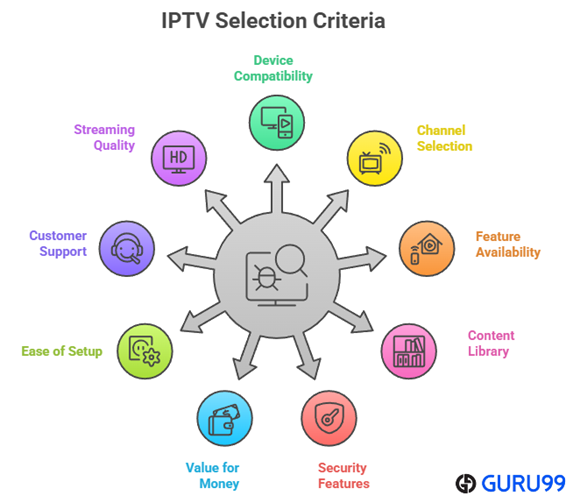
At Guru99, we focus on delivering reliable IPTV provider reviews backed by over 110 hours of research. Our experienced team ensures accuracy and transparency, providing insights to help you make informed decisions in the IPTV landscape. Choosing the best IPTV for Firestick involves evaluating compatibility, channel variety, and essential features for a seamless viewing experience. These services are compatible with Firestick, ensuring a reliable and enhanced entertainment experience.
Here are some of the key points that we kept in mind while researching:
- Device Compatibility: We looked for services supporting Firestick, Smart TV, Android TV, and iOS devices.
- Channel Selection: The providers offering a diverse range of high-quality, original channels were prioritized.
- Feature Availability: DVR, app integration, and Electronic Program Guide (EPG) were also our key criteria for selection.
- Preferred Content: Services with extensive content libraries, tailored by each IPTV service provider to match varied entertainment preferences, were selected.
- Security Features: IPTV services with virtual private network (VPN) support, content protection, and firewalls were considered important.
- Value for Money: We made sure that they had plans that delivered the most value and were affordable.
- Ease of Setup: These IPTV players for Firestick offer a straightforward installation process and simple configuration, making them highly convenient and user-friendly for anyone using Firestick devices, even beginners.
- Customer Support: We considered reliable customer service for prompt issue resolution as it is a crucial factor for user experience.
- Streaming Quality: Finally, we made sure that these services come with HD or 4K streaming with minimal buffering to ensure the viewers can enjoy every viewing session.
How to Protect Yourself When Streaming IPTV?
When choosing to stream IPTV, staying safe and legal is key. I focus on guidance that protects your data, your device, and your peace of mind. Streaming from licensed services is my top recommendation. These come through trusted app stores and follow the right rules-no hidden costs or surprises. Illegal or “free” IPTV options often seem tempting but carry serious hazards.
- Choose licensed providers: Opt for well-known services with clear licensing and fair pricing to avoid legal trouble.
- Use official apps: Stick to apps from Amazon, Google, or Apple. Sideloading unauthorised apps can lead to malware.
- Install antivirus and update: Keep antivirus active and software updated to block threats and patch vulnerabilities.
- Protect your data: Use strong passwords and consider enabling two-factor authentication for any account access.
- Avoid free or lifetime deals: Offers that seem too good to be true often hide scams or legal risk.
- Use a VPN wisely: A VPN can help mask your location and encrypt traffic-but it doesn’t stop malware or absolve legal exposure.
I recommend combining these steps for fuller protection. My approach balances device security, legal compliance, and smart service choice to give you a reliable IPTV experience. Take each step seriously, and you’ll stream with confidence and clarity.
What Are Some IPTV Reddit Misinformation?
Reddit threads spread misinformation about IPTV services, often fueled by outdated reviews, biased promotions, and confusion over licensing. Misleading claims-like “guaranteed no buffering” or “legal worldwide”-skew perceptions and erode trust. Dig deeper: verify current user reviews, prioritize transparency in service claims, and avoid scams.
Verdict
When I am streaming on my Firestick, I am always looking for reliable, high-quality options that offer a great variety. I want to ensure I have buffer-free viewing, a diverse channel lineup, and features that truly stand out. If you are searching for top-tier Firestick IPTV, check my verdict below.
- TiviPlanet: It stands out as the premier IPTV provider for Firestick users in 2025, offering 30,000+ live channels and 150,000+ VOD titles with crystal-clear 4K streaming.
- Trendyscreen: A top choice for Firestick with 20,000+ channels and 4K streaming backed by AntiFreeze technology for smooth playback. With instant activation, a 24-hour free trial, and support for almost any device, it installs easily and runs reliably on Amazon Fire TV Stick.
- EagleCast TV: It delivers exceptional scale with 4000+ live channels, and 10,000+ on-demand titles, backed by ultra-stable 8K/4K servers, making it my top high-performance pick for both resellers and Firestick users.
