
6 Best IPTV Apps for Google TV (Chromecast) 2026
 Editorial Team
Hence, to help you find a trustworthy product, I spent over 180 hours going through 35+ IPTV apps, testing their streaming performance and reliability. I tested these apps with my research team and shortlisted the top 6 best IPTV apps for Google TV/ Chromecast. Therefore, this article is backed by my firsthand experience, offering complete transparency. You can now dive in and find the right app for your requirement.
 Disclaimer: It is essential to use a reputable source link that is licensed to provide streaming content while using an IPTV app for Google TV. Guru99 does not condone using copyrighted materials in any form, and we do not promote such services and applications.
Best IPTV Apps for Google TV/Chromecast: Top Picks!
| Tool Name | Key Features | Free Trial | Link |
|---|---|---|---|
| IPTV Player | • M3U and M3U Plus links • Anti-freeze technology |
Free to use | Learn More |
| IPTV Pro Streamer | • Save playlist locally • Frequent app updates |
Free to use | Learn More |
| VocoTV | • 20,000+ live channels and 40,000+ VODs • No IP-Lock |
24 hours free trial | Learn More |
| Krooz TV | • 16000 live channels and 40,000+ VODs • 99.99% uptime |
24 hours free trial | Learn More |
| M3U Player | • M3U and M3U8 playlist • Supports adaptive streaming |
Free to use | Learn More |
1) IPTV Player
IPTV Player is widely recognized as a user-friendly app built for seamless IPTV streaming on Google TV. While it keeps things simple on the surface, it packs surprisingly powerful media player features. I used it with IPTV services that rely on M3U and M3U Plus links, and the streaming was consistently fast and smooth. The ability to add virtually unlimited playlists is the real standout—it genuinely feels like you’ll never run out of content in this lifetime.
Unlike an IPTV app that brings its own playlist, IPTV Player is only a media player, but it enhances your viewing experience, incorporating features like anti-freeze. What impressed me the most was when I used a low-quality streaming source, it upgraded it to a more standard version.

Features:
- Bookmark Favorites: You can bookmark your favorite channels easily to access the most-watched networks from one centralized location. Beginners who have difficulty navigating new apps will find it easy to spot their most-watched channels instantly using this feature.
- Anti-freeze Technology: Most of the IPTVs already offer anti-freeze technology, but using IPTV Player, you get an additional streaming quality enhancer. As per my experience, when I used an IPTV with an anti-freeze feature, which wasn’t robust enough, this player stepped in and did an excellent job.
- Recall Option: The recall option lets you get back to the last channel that you were watching. Thus, making it convenient when you accidentally switch channels in between your favorite match or show. It is also intuitive enough to lead you back to the channel or VOD that you were watching before you turned off your TV.
- High Quality Resolution: I could stream the source links in SD, HD, and 4K quality. Users who are moving from cable to IPTV will find this feature helpful. Additionally, the viewing experience is better than your usual television, even for niche channels and rare VODs.
- Unlimited Channels: Since IPTV Player is a media player, you can add as many source links as you like. This allows you to enjoy various content without any limitations, be it your regional, national, or international channels and VODs.
- Built-In and External Players: It has a built-in smart and stable IPTV player and also supports external players. I was able to use VLC, Wuffy, Vimu, and MX Player with this tool without any compatibility issues. However, the MPV Android player doesn’t work as effortlessly with IPTV Player.
Pros
Cons
Pricing:
It is free to install and has in-app purchases.
Link: https://play.google.com/store/apps/datasafety
2) IPTV Pro Streamer
IPTV Pro Streamer is a lightweight IPTV app used for chromecasting. Its intuitive feature helped me import my choice of IPTV playlists and start streaming instantly. Whether you are a cord-cutter or someone enthusiastic about binge-watching, it is suitable for all. It is also recommended for both beginners and seasoned users alike due to its robust yet simple nature.
I also found the way of delivering EPG quite seamless. After I added my desired EPG and set it up, it didn’t lead to any hiccups, which is a common issue that users face while setting up a playlist and EPG. It is compatible not only with Google TV but also with other Android devices, such as your smartphone, tablet, etc.

Features:
- Clean Interface: The interface of this IPTV screams clean and easy-to-use, with a minimalist look and simple navigation. This allows you to easily access your playlists, movies, and series with just a click, as it is built for efficiency.
- Playlist Import: I could import multiple playlists from several sources and Chromecast them using this player. It supports formats like Xtream codes and M3U, which makes it compatible with most of the sources. All I had to do was paste or upload the link, and it detected the source automatically and categorized the channels and VODs.
- Save Locally: You can save your playlist locally and access it offline to manage it better. This allowed me to access the playlist even when I lost internet connection temporarily while streaming. Moreover, I could save the playlist on multiple devices, which made the access simpler even when switching to a different device.
- Customizable Playlist: It allows you to organize or arrange your playlist as you like. Thus, users can rearrange channels, hide categories, or rename playlists. This leads to a more tailored experience and improves navigation.
- Anti-Buffering: As per my experience, this app includes anti-buffering capabilities since I hardly faced any significant lag using IPTV Pro Streamer. However, the slight lag is inevitable, but it does prevent long buffering sessions.
- Regular Updates: The app is regularly updated so that bugs are fixed and new features are released. It also keeps the app functioning smoothly, which is an issue I have noticed with some poorly maintained IPTV apps.
Pros
Cons
Pricing:
It is free to use and has in-app purchases.
Link: https://play.google.com/store/apps/details
3) VocoTV
VocoTV is a widely known IPTV for its access to international entertainment. It works anywhere, anytime, therefore, frequent travelers looking for IPTV apps in different locations can opt for it. I was traveling across Southeast Asia this year, where I used VocoTV most of the time when I wanted to access US content. There is no blocked content while using this service, although if you do face any such issue, you can use a VPN.
It is also an excellent app for users looking for sports entertainment. I was able to watch the NFL, NBA, Football, MMA, and more. The best part is that it has easy DIY setup instructions that even a non-tech-savvy user can follow.

Features:
- Content Included: It is an IPTV service provider that includes 20,000+ channels and 40,000+ VODs. I could view not only national and international content, but also regional TV programs that are usually hard to find on common streaming platforms.
- Originals and Mega Hits: Many original Netflix, Amazon Prime, HBO, Disney+ shows are readily available on VocoTV. It offers shows such as Wednesday, White Lotus, I Love LA, When Life Gives You Tangerines, and more. Mega hit shows like Game of Thrones, Breaking Bad, The Crown, and more are also provided.
- Top IMDb Movies: Whether you are looking for recent releases or classics that have a high rating, VocoTV offers it all. I was able to stream Interstellar, The Lord of the Rings Trilogy, Oppenheimer, Parasite, Wall-E, Dune, Spirited Away, and many others.
- PPV and Sports: You do not have to pay for PPV events and memorable matches using this provider. I could access the weekend matches and even live concerts without additional payment since they are included in its subscriptions.
- Simultaneous Connection: VocoTV supports upto 5 concurrent connections, making it a good choice for big households and shared accommodations. My family benefited from using VocoTV since we live with our grandparents, and everyone has different tastes when it comes to selecting what to binge on.
- Anti-Buffering: It has both anti-buffering and anti-freezing features that make streaming smooth and lag-free. I did face a slight buffering, which occurs due to the choice of connection. However, it was minimal, and the IPTV performed well even during peak hours.
Pros
Cons
Pricing:
Here are the lowest plans offered by VocoTV for a single connection:
| 1 Month | 3 Months | 6 Months |
|---|---|---|
| $15 | $40 | $60 |
Free Trial: 24-hour free trial available
24-Hour Free Trial
4) Krooz TV
Krooz TV is a popular IPTV app, offering 16000+ live channels and over 40,000 VODs. It makes sure that you remain entertained throughout the day and week with an excellent variety in its library. No matter your age, there is something for everyone on Krooz TV. Additionally, it is available worldwide, hence, you can watch it anywhere you go.
I tested it not only for Chromecasting on Google TV but also on other devices like Android TV, smartphones, tablets, and laptops, and it ran seamlessly. You can also arrange your playlist and favorite shows, movies, and channels easily for instant access.

Features:
- High Uptime: Krooz TV offers 99.99% uptime, which ensures that the service is up and running at all times. Having used Krooz TV for over 3 years now, I faced a negligible amount of downtime, hence, I found the uptime true to its claim.
- Full Seasons: No matter which niche series you stream, it offers all the seasons. I was looking up older shows like The OC, The Tudors, One Tree Hill, Gossip Girl, and Baywatch. Several streaming sites have just the first and second season, or do not have high quality, that’s when Krooz TV came to my rescue.
- Premium Channels: Expensive channels that charge extra on cable, such as HBO, ESPN, Fox, AMC, etc., are all available in a single subscription. Hence, people worrying about cable prices can get all the premium channels under a single reasonable price.
- All Age Groups: Whether you are looking for cartoons for your kids or want lifestyle and reality shows to spice up your dull adult life, let Krooz TV handle it. It also includes several religious and classic content that older folks in your family may enjoy.
- Fast Zapping: This is one of the features that I look for while testing an IPTV app. It has a swift zapping time, which is roughly around 0.5 seconds. Thus, you can quickly click through multiple channels or even jump from one network to another without missing essential parts of any matches or shows.
- Daily Updates: If you are a tech-savvy user, you will enjoy using Krooz TV as it lets you read, edit, and write your own code. This allows you to change almost anything you want, making it a truly flexible app. Using this feature, I was able to tailor the app to my needs; however, non-tech-savvy folks do not need to access this area.
Pros
Cons
Pricing:
Here are some of the plans offered by Krooz TV for one connection:
| 1 Month | 3 Months | 6 Months |
|---|---|---|
| $15 | $30 | $55 |
Free Trial: 24-hour free trial available
24-Hour Free Trial
5) M3U Player
M3U Player is a versatile IPTV video player that you will find on the Google Play Store. It has made streaming on Google TV much easier for me, as it is designed to handle M3U and M3U8 playlist files and IPTV links of your choice. You can load your own IPTV streams from even free sources and play them with only a few steps of setup. However, make sure that your content provider is licensed to avoid copyright issues.
What I liked the most about M3U Player is its ability to transform the viewing experience into a highly tailored service. I created my own playlist, organized the VODs and channels as I like, and much more. Additionally, its user-friendly interface makes it easy to understand the app instantly and navigate without confusion.
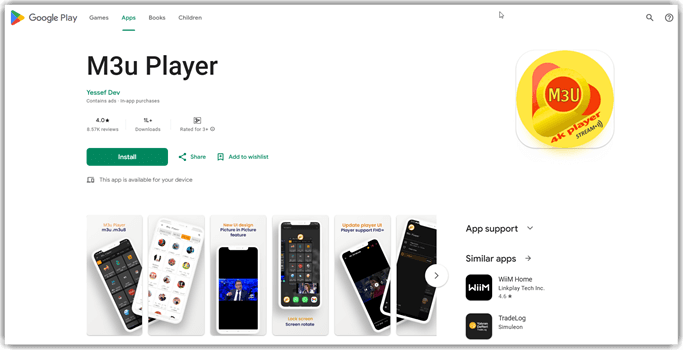
Features:
- IPTV Streaming Playback: It helps users to effortlessly stream IPTV links from their choice of provider, so you can easily tune into your Google TV. I also found it compatible with other devices such as Android TV, tablets, smartphones, etc.
- Multiple IPTV Services: As per my testing session, I noticed that it supports almost all the services provided by IPTV. It lets you play live channels, VODs, and supports time shift media, EPG, subtitles, anti-freeze technology, anti-buffering feature, and more.
- High-Speed Loading: This player ensures that it loads the M3U playlist instantly, so I could start streaming right away. Whether I was adding files or URLs, M3U Player reduced the waiting time with its efficient processing and caching.
- Supported Formats: This player supports M3U and M3U8 playlist file formats, so you can use various sources. I was able to access various latest shows, classic films, selected premium channels, international news, niche programs, and more without any complications.
- Adaptive Streaming: It can handle adaptive HTTP live streaming by loading M3U8 streams. These streams can adjust the video quality based on the bandwidth and reduce the buffering, maintaining smooth playback even during network fluctuations.
- Intuitive Controls: You can adjust brightness, volume, streaming quality, language, etc., on this IPTV app. Additionally, I could pause, rewind, play, and skip, which added more efficiency to my viewing experience.
Pros
Cons
Pricing:
It is free to download and has in-app purchases.
Link: https://play.google.com/store/apps/details
6) TiviMate
TiviMate is a highly regarded IPTV player that is built to enhance the way you view video streams. It has a centralized interface where you can add your own playlists using M3U links or API credentials. I have used TiviMate for as long as I have known about IPTVs, hence, it is definitely a reliable player.
You can arrange all the live channels and VODs as you like from multiple sources. Unlike traditional IPTV, it doesn’t provide a playlist of its own, hence, you have the freedom to add various content. I tested it using IPTVs like VocoTV, Krooz TV, OTTOcean, etc. It provided me with high-quality streaming and displayed accurate EPG as well.
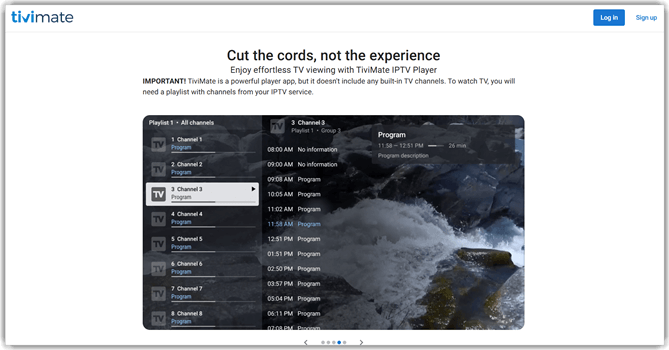
Features:
- Catch Up: I never missed a show while using TiviMate, as it offers a catch-up feature that lets you view previously broadcast content. This allowed me to watch a week-old game and even fresh TV premieres of the latest popular movies that I missed.
- Parental Controls: You can safeguard your kids from inappropriate content or limit their screentime using its parental control features. I could use a PIN code to lock channels, shows, movies, etc., to ensure that my kids do not accidentally access them.
- Multiview Option: This is one of the unique features of TiviMate, which allows you to watch multiple screens simultaneously on Google TV. I used this feature when I wanted to keep up with the football score while my kids tuned into their daily dose of cartoons.
- Program Description: To get the gist of what a show or program is about, you can use its program description. This helped me view the synopsis easily without having to separately Google or view a trailer before committing to a series or a 2-hour film.
- Interface Customization: You do not have to keep staring at the same boring-looking interface every day while opening the app. It lets you customize the UI as per your requirements. Hence, you can arrange your playlists as you like, leading to better navigation.
- Recording Feature: It has both recording and custom recording features. Using the record functionality, I could start recording a program instantly to watch it later. On the otherhand, when I had to schedule a recording session, I used the custom record feature.
Pros
Cons
Pricing:
Has a free version with basic features.
Link: https://tivimate.com/
Top IPTV App for Google Chromecast: Feature Comparison
Here is a comparison table that you can use for a quick overview of the above IPTV apps:
| Feature | IPTV Player | IPTV Pro Streamer | VocoTV | Krooz TV |
| Works on Google TV | ✔️ | ✔️ | ✔️ | ✔️ |
| M3U/M3U8 Playlist Support | ✔️ | ✔️ | ✔️ | ✔️ |
| Xtream Codes API Support | ✔️ | ✔️ | ✔️ | ✔️ |
| EPG (TV Guide) | ✔️ | ✔️ | ✔️ | ✔️ |
| Favorites / Channel Groups | ✔️ | ✔️ | ✔️ | ✔️ |
| Catch-Up / DVR Functionality | ✔️ | Limited | ✔️ | ✔️ |
| HD/4K Streaming Support | ✔️ | ✔️ | ✔️ | ✔️ |
| External Player Support | ✔️ | ✔️ | ❌ | ❌ |
| Chromecast Support | ✔️ | ✔️ | ✔️ | ✔️ |
| User Interface (TV Optimized) | ✔️ | ✔️ | ✔️ | ✔️ |
How to Troubleshoot Common Issues of IPTV App for Google TV?
Here are some of the best tips that I have gathered from my years of experience on how to troubleshoot common issues of IPTV apps:
- Issue: Frequent buffering can interrupt your playback every 30 seconds
Solution: You must switch to a 5GHz Wi-Fi band or use an Ethernet instead to get a more stable connection. - Issue: The playback freezes suddenly during streaming sessions
Solution: You can perform a hard reset by unplugging the device and your router for at least 2 to 3 minutes each to clear the glitches. - Issue: App crashes or fails to launch when you open it
Solution: In such cases, clear the cache by using the device settings. It might also mean it’s time to update the IPTV app or the IPTV provider. - Issue: The sound and audio aren’t syncing while streaming
Solution: Try to reset the audio settings in the device options and make sure that the output matches the connected sound system. - Issue: The channels aren’t loading, or they show an error or load slowly
Solution: Verify the login credentials, such as M3U URL and Xtream Codes, that you have entered before you relaunch the app. - Issue: The video quality is poor and shows pixelated images
Solution: I suggest disabling the hardware decoding in the app settings to allow the software to handle more streams. - Issue: EPG guide is not updating, or it is displaying incorrect schedules
Solution: You must increase the buffer size to 5 to 10 seconds in app preferences, this will fetch the data better even during unstable connections.
What are IPTV Apps for and How do They work?
IPTV apps are players that are designed to deliver live TV and on-demand video on a streaming device using an internet connection. These services are different from IPTV since they do not provide their own playlist, as they are basically only a media player. However, they help organize channels, movies, etc., easily in your device’s interface.
They work by loading channel playlists that are supplied by the user from a service provider such as IPTVs. The app then buffers the video, adapts the quality to the connection speed, and displays the program schedule if an EPG link is provided. The content quality depends entirely on your source and the connection bandwidth. However, these apps’ anti-freeze and anti-buffering technologies do add some improvement to the streaming.
What is Google TV and Chromecast?
Google TV is a smart TV platform by Google that lets you view movies and shows from other streaming apps, be it OTT platforms or IPTVs. It functions like any other smart TV, hence, you can create user profiles, use voice search, parental control features, etc. Chromecast, on the otherhand, is a built-in technology that you will find on live streaming apps by Google and other media players.
For example, YouTube offers a Chromecast feature that allows you to cast whatever you are playing on the app to your TV and control it using either your phone or the TV remote. You can Chromecast on your TV using your smartphone, tablet, or computer. It is a quick and instant connection feature that only requires a Wi-Fi connection.
How to Chromecast IPTV App?
Here are the steps that you can use to Chromecast IPTV on your Google TV:
Step 1) First, start by turning on your Google TV and connecting it to Wi-Fi.
Step 2) Your Chromecasting device, such as your phone or tablet, should also be connected to the same Wi-Fi network.
Step 3) Now, open the app on your phone, tablet, or computer and start playing a channel or a VOD on the app.
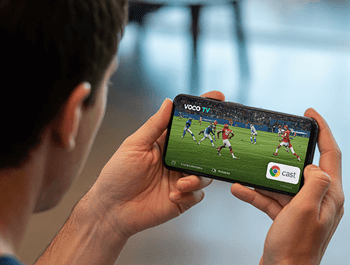
Step 4) Now, tap on the Cast icon on your IPTV app and select the Google TV from the list of devices.
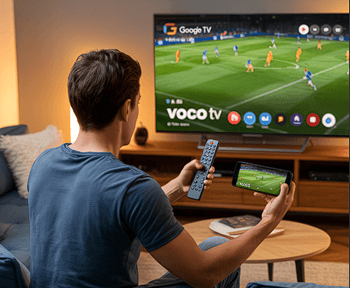
Step 5) Once connected, you can start controlling the TV with your remote.
How Do AI-Generated Subtitles Enhance Accessibility for Global Viewers?
Artificial intelligence speech-to-text technology has revolutionized the subtitle creation for IPTV apps. These AI-generated subtitles can show hundreds of languages instantly while streaming. These advanced AI systems autodetect the primary audio language and transcribe the content with accent and emotional tone recognition. Such advanced detection leads to accurate subtitles within a few minutes.
These real-time subtitle generation is great for live content such as news and sports. Additionally, it is also helpful if you find foreign content that doesn’t have a subtitle in your desired language. Such accessibility also benefits the hearing-impaired individuals, ensuring a smooth and equal viewing experience for all globally.
As said by – Richard Smith, IPTV Technology Expert and Author– “AI-powered subtitles in IPTV apps can transform viewing by providing real-time translations, making content accessible to global audiences and enhancing viewer engagement.”
How Did We Select the Best IPTV App for Google TV/Chromecast?
At Guru99, we don’t just guess and suggest, but we truly conduct a test. Hence, our team spent over 180 hours testing 35+ IPTV apps, hands-on on Google TV and other devices. Every recommendation is backed by expert analysis, consistent methodology, and real-world usage. Here’s a glimpse of how we selected the best IPTV apps for Google TV/Chromecast:
- Device Compatibility: We made sure that each app runs smoothly on Google TV and supports Chromecast.
- Streaming Quality & Stability: Our reviewers evaluated the buffering frequency, stream resolution consistency, and overall stability with different internet connections.
- User Interface & Navigation: The team tested the menu clarity, EPG usability, and search responsiveness to ensure that users get smooth navigation.
- Content Format Support: We verified support for M3U and Xtream Codes along with EPG formats.
- Performance & Speed: Our experts measured app launch times, channel switching speed, and responsiveness. This helped us to remove sluggish or bloated apps.
- Customization & Controls: We examined parental controls, favorites management, subtitle options, playback controls, and layout customization. To make sure that you enjoy flexibility while using the apps.
Verdict
After thoroughly testing all of the IPTV apps in this article, I have come to the conclusion that each of them provides similar features. Yet, they have their own strengths and weaknesses. However, the top three tools that stood out to me are:
- IPTV Player: Its high-quality streaming, ability to add unlimited playlists, and user-friendliness make it one of my top choices when it comes to IPTV apps.
- IPTV Pro Streamer: I was impressed with its clear interface and frequent updates that fix any bug-related issues. Additionally, its ability to save playlists locally gives easy access to your selected channels and VODs even when switching devices.
- VocoTV: This IPTV app takes the third spot as it offers its own playlist with thousands of channels and VODs. Moreover, it is easy to set up and brings niche content from across the globe.
