
What is System Testing? Types with Example
 Thomas Hamilton
⚡ Smart Summary
System Testing validates a complete, fully integrated software product against end-to-end specifications. It applies black-box techniques across hardware, software, and user workflows to confirm reliability, functionality, and performance before release.
What is System Testing?
System Testing is a level of testing that validates the complete and fully integrated software product. The purpose of a system test is to evaluate the end-to-end system specifications. Usually, the software is only one element of a larger computer-based system. Ultimately, the software is interfaced with other software or hardware systems. System Testing is defined as a series of different tests whose sole purpose is to exercise the full computer-based system.

The diagram above illustrates the core dimensions a tester inspects during System Testing, including functional flows, user interfaces, data handling, and integration points. This level of testing sits immediately after Integration Testing and before User Acceptance Testing in the software testing life cycle.
System Testing Video Explanation
Click here if the video is not accessible
Why is System Testing Important?
Unit and Integration tests examine code fragments and their interfaces, but they cannot prove that hardware, software, network, and configuration elements cooperate as one product. System Testing closes that gap and secures the software before release.
Key reasons this phase is indispensable include:
- End-User Confidence: Verifies that real-world workflows behave as business requirements specify, reducing post-release defects.
- Risk Reduction: Uncovers integration, performance, and environment issues before production, preventing costly outages.
- Compliance Assurance: Regulated industries such as finance, healthcare, and aviation require documented System Testing evidence.
- Cost Efficiency: Fixing defects at this stage is far cheaper than addressing them after release.
- Acceptance Readiness: A clean System Test creates a stable baseline for User Acceptance Testing.
What do you verify in System Testing?
System Testing involves testing the software code for the following purposes:
- Testing the fully integrated applications including external peripherals to check how components interact with one another and with the system as a whole. This is also called End-to-End testing scenario.
- Verify thorough testing of every input in the application to check for desired outputs.
- Testing the user’s experience with the application.
That is a very basic description of what is involved in system testing. You need to build detailed test cases and test suites that test each aspect of the application as seen from the outside without looking at the actual source code. To learn more about a comprehensive approach to this process, consider reading about end-to-end testing.
System Testing is Black Box Testing
Software Testing can be broadly categorized into two types:
- Black Box Testing
- White Box Testing
System Testing falls under the black box testing category of Software testing. White box testing is the testing of the internal workings or code of a software application. In contrast, black box or System Testing is the opposite. System testing involves the external workings of the software from the user’s perspective.
Software Testing Hierarchy
As with almost any software engineering process, software testing has a prescribed order in which things should be done. The following is a list of software testing categories arranged in chronological order. These are the steps taken to fully test new software in preparation for marketing it.
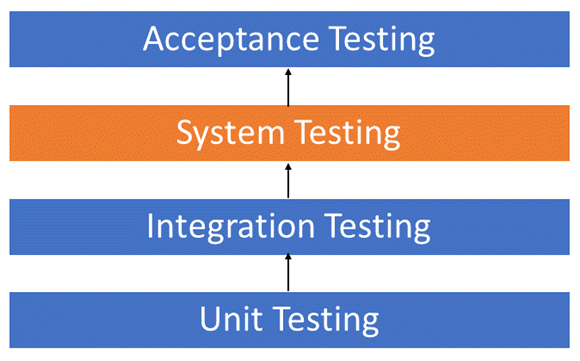
As shown in the hierarchy above, System Testing sits between Integration Testing and Acceptance Testing, making it the final technical validation before the product reaches end users.
- Unit Testing is performed on each module or block of code during development. Unit Testing is normally done by the programmer who writes the code.
- Integration Testing is done before, during, and after integration of a new module into the main software package. This involves testing of each individual code module. One piece of software can contain several modules which are often created by several different programmers. It is crucial to test each module’s effect on the entire program model.
- System Testing is done by a professional testing agent on the completed software product before it is introduced to the market.
- Acceptance Testing is the beta testing of the product done by the actual end users.
Types of System Testing
There are more than 50 types of System Testing. For an exhaustive list of software testing types click here. Below we have listed the types of system testing a large software development company would typically use:
- Usability Testing mainly focuses on the user’s ease of using the application, flexibility in handling controls, and the ability of the system to meet its objectives.
- Load Testing is necessary to know that a software solution will perform under real-life loads.
- Regression Testing involves testing done to make sure none of the changes made over the course of the development process have caused new bugs. It also makes sure no old bugs appear from the addition of new software modules over time.
- Recovery Testing is done to demonstrate that a software solution is reliable and trustworthy, and that it can successfully recover from possible crashes.
- Migration Testing is done to ensure that the software can be moved from older system infrastructures to current system infrastructures without any issues.
- Functional Testing – also known as functional completeness testing, this involves trying to think of any possible missing functions. Testers might make a list of additional functionalities that a product could have to improve it during functional testing.
- Hardware/Software Testing – IBM refers to Hardware/Software testing as "HW/SW Testing". This is when the tester focuses his or her attention on the interactions between the hardware and software during system testing.
What Types of System Testing Should Testers Use?
There are over 50 different types of system testing. The specific types used by a tester depend on several variables. Those variables include:
- Who the tester works for – This is a major factor in determining the types of system testing a tester will use. Methods used by large companies are different than those used by medium and small companies.
- Time available for testing – Ultimately, all 50 testing types could be used. Time is often what limits us to using only the types that are most relevant for the software project.
- Resources available to the tester – Of course, some testers will not have the necessary resources to conduct a testing type. For example, if you are a tester working for a large software development firm, you are likely to have expensive automated testing software not available to others.
- Software Tester’s Education – There is a certain learning curve for each type of software testing available. To use some of the software involved, a tester has to learn how to use it.
- Testing Budget – Money becomes a factor not just for smaller companies and individual software developers but large companies as well.
Best System Testing Tool
Selecting the right platform can dramatically reduce the effort required to plan, execute, and maintain system-level test suites. The tool listed below stood out during hands-on evaluation for coverage breadth, automation quality, and integration flexibility.
1) Testsigma
Testsigma is a comprehensive cloud-based system testing platform I have found essential for automating complete end-to-end user journeys across multiple modules, technologies, and application layers. It is specifically designed for teams that need to validate that their entire system functions cohesively before release, ensuring all components work together seamlessly in real-world scenarios.
During my system testing initiatives, I used Testsigma’s unified approach to chain complex workflows spanning web interfaces, mobile applications, and backend APIs within single test scenarios. The platform’s ability to orchestrate multi-technology test flows gave me confidence that cross-module interactions remained stable, while detailed execution logs and visual reports helped me quickly identify and resolve system-level failures at integration boundaries.

Features:
- Multi-Step Cross-Technology Test Chaining: Build scenarios that connect steps across pages, services, and application types. You can orchestrate web, mobile, and API validations in one sequence to replicate authentic user journeys.
- Unified Web, Mobile, and API Test Execution: Combine UI steps with backend service validations in the same scenario. You can verify that frontend actions trigger correct API calls and produce the expected system responses.
- Reusable System-Level Flow Components: Create modular blocks for end-to-end workflows that recur across tests. You can reduce duplication and accelerate development, with support for parameterization and conditional logic.
- Pre-Release CI/CD Integration: Testsigma executes system tests automatically before releases. You can configure quality gates, schedule validation runs, and block deployments based on results through webhooks and DevOps tools.
Pros
Cons
Pricing:
- Price: Custom pricing tailored to system test execution scale, team adoption, and organizational requirements.
- Free Trial: 14-Days Free Trial
14-Days Free Trial
2) Testiny
Testiny is a modern cloud-based test management platform I have used to manage end-to-end system test suites across multiple modules and integration points. It is designed for QA teams that need clear traceability between system-level requirements, test cases, and execution results in a single workspace.
While coordinating system testing cycles in Testiny, I found its folder structure and milestone planning kept large multi-module test plans organized. The MCP server support also let me query test progress through AI assistants which sped up status reporting noticeably.

Features:
- Structured Test Case Organization: Testiny lets you group system-level test cases by module, feature, or release into nested folders for clean structure. You can navigate hundreds of cases without losing context. I use this to keep complex system test plans navigable across releases.
- Test Run Assignment and Tracking: It allows you to assign specific system test cases to team members and watch execution status in real time. You can balance workload and intervene when blockers appear. I rely on this to keep cross-functional system testing on schedule.
- Multi-Tracker Integrations: Testiny connects to Jira, GitHub, GitLab, Azure DevOps, Redmine, Linear, Asana, Confluence, Trello, and monday.com so system defects link back to engineering tools. You can keep development and QA in sync across releases. I find this eliminates duplicate ticket creation between teams.
- Professional PDF Reporting: The platform generates clean PDF reports for system test results that you can share with stakeholders and auditors. You can include execution summaries, defect lists, and test coverage. I send these out at every release sign-off.
- AI Assistant MCP Support: It exposes a Model Context Protocol server so AI tools like Claude Desktop can query test status, create cases, and summarize runs. You can pull insights into existing workflows without switching tools. I use this for quick status updates during long system test cycles.
Pros
Cons
Pricing:
- Price: Free plan for up to 3 users; paid plans start at $18.50
- Free Trial: 21-Days Free Trial
21-Days Free Trial
3) Testpad
Testpad is a checklist-based test management tool I have used for system testing when teams need to capture and execute end-to-end test scenarios without heavy process overhead. It is built around fast, hierarchical checklists that fit exploratory and structured system testing equally well.
During system testing on web applications, Testpad’s drag-and-drop reordering let me reshape test plans as new system flows emerged mid-cycle. Sharing read-only progress links with product owners kept everyone aligned without extra dashboards.

Features:
- Flexible Hierarchical Plans: Testpad organizes system test scenarios in nested checklists so you can structure end-to-end flows under feature groupings. You can expand to detail and collapse to summarize. I use this to keep cross-module system flows readable.
- Exploratory Test Friendly: It supports exploratory system testing alongside scripted runs so testers can capture findings on the fly. You can convert ad-hoc notes into reusable checklist items quickly. I rely on this when teams discover edge cases during system testing sessions.
- Guest Tester Support: Testpad allows unlimited guest testers without seat fees so you can bring in cross-functional reviewers for system test validation. You can scope guest access to specific plans only. I use this to involve product owners during system acceptance.
- Mobile Friendly Execution: The interface adapts to mobile devices so testers can run system test checklists on tablets or phones. You can validate responsive flows on real hardware while marking results live. I find this useful for system testing across device categories.
- Instant Progress Reports: It produces shareable progress reports at any moment during a system test cycle. You can drop the link into chat or email for instant stakeholder visibility. I send these out daily during release crunches.
Pros
Cons
Pricing:
- Price: Plans start at $59/month with custom enterprise plans available for larger teams
- Free Trial: 30-Day Free Trial
30-Days Free Trial
