
What is Recovery Testing? with Example
 Editorial Team
⚡ Smart Summary
Recovery testing verifies that software can resume normal operation after a crash, a network drop or a hardware failure, by restoring the system to a known-good point and reprocessing transactions up to the failure.

What is Recovery Testing?
Recovery Testing is a software testing technique which verifies the software’s ability to recover from failures such as software or hardware crashes and network failures. The purpose of recovery testing is to determine whether software operations can be continued after a disaster or an integrity loss. Recovery testing involves reverting the software back to the point where integrity was known, and reprocessing transactions up to the failure point.
In software engineering, recoverability testing is a type of non-functional testing — it covers aspects not tied to a specific function or user action, such as scalability or security. It is done by professional testers, and adequate backup data is kept in secure locations beforehand.
Recovery Testing Example
Two scenarios show the technique at its simplest. In each one a failure is forced deliberately, then the application is watched as it resumes.
- Network interruption: While an application is receiving data from the network, unplug the connecting cable. After some time, plug it back in and analyze the application’s ability to continue receiving data from the point at which the connection was broken.
- Session restore: Restart the system while a browser has a definite number of sessions open, and check whether the browser recovers all of them.
The illustration below sets out the same idea in visual form.

The time taken to recover depends upon:
- The number of restart points
- The volume of data held by the application
- Training and skills of the people conducting recovery activities, and the tools available for recovery
When there are several failures, recovery testing should be done in a structured fashion rather than all at once — carried out for one segment and then another.
Life Cycle of Recovery Process
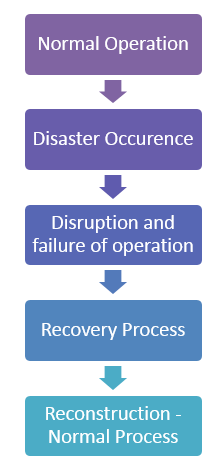
Before designing test cases, it helps to see where a recovery test intervenes. The life cycle of the recovery process has five steps:
- Normal operation
- Disaster occurrence
- Disruption and failure of the operation
- Disaster clearance through the recovery process
- Reconstruction of all processes and information, bringing the whole system back to normal operation
The flow diagram below shows those five stages in sequence.
Let us discuss these five steps in detail:
- Normal operation. A system of hardware, software and firmware, integrated to achieve a common goal, performs its designed job without disruption within a stipulated period of time.
- Disaster occurrence. A disruption may occur due to malfunction of the software, from causes such as input-initiated malfunction, a crash caused by hardware failure, or damage from fire, theft or strike.
- Disruption and failure. This is the most painful phase, leading to business losses, broken relationships, lost opportunities, lost man-hours and, invariably, financial and goodwill losses. A disaster recovery plan keeps this phase minimal.
- Disaster clearance. If a backup plan and risk mitigation processes are already in place, recovery costs far less time and effort. A designated team, with each person’s role defined in advance, fixes responsibility and prevents a long disruption period.
- Reconstruction. This may involve multiple sessions of operation to rebuild all folders along with configuration files. Proper documentation and a defined reconstruction process are required for correct recovery.
Restoration Strategy
The recovery team should have its own strategy for retrieving important code and data to bring operations back to normal. That strategy is unique to each organization, based on the criticality of the systems it handles, and for critical systems it comes down to a set of choices:
- A single backup, or more than one
- Multiple backups at one place, or at different places
- Online backup, or offline backup
- Backups run automatically under a policy, or triggered manually
- An independent restoration team, or the development team doing the work
Each choice carries a cost factor, and multiple backups may consume more physical resources or need an independent team. Dependency matters too: companies are exposed through the code and data they keep with a single provider, and a large-scale AWS outage has repeatedly taken well-known consumer services offline at the same moment. Independent restoration capability is crucial in such cases.
How to do Recovery Testing
Strategy settled, the next question is how the test itself is set up. The following points should be considered while performing recovery testing.
- Create a test bed as close to actual deployment conditions as possible: interfacing, protocol, firmware, hardware and software should match production.
- Though exhaustive testing may be time-consuming and costly, an identical configuration and a complete check should still be performed.
- If possible, test on the hardware that will finally be restored to — especially when restoring to a different machine from the one that created the backup.
- Some backup systems expect the hard drive to be exactly the same size as the one the backup was taken from.
- Manage obsolescence: drive technology advances quickly, and an old drive may not be compatible with a new one. Restoring to a virtual machine helps, since virtualization software can mimic existing hardware, including disk sizes.
- Online backup systems are not an exception to testing. Most providers shield users from media problems through fault-tolerant storage, so failures surface late.
- Even though online backup systems are extremely reliable, the restore side must be tested to confirm there are no problems with retrieval, security or encryption.
Because recovery is exercised end to end, these runs are usually scheduled alongside system testing rather than at unit level.
Testing Procedure After Restoration
Restoring the data is only half of the exercise; the restored copy still has to be proven usable. Most large corporations have independent auditors run recovery exercises periodically. A comprehensive disaster recovery plan is expensive to maintain and test, so smaller organizations often rely on backups and off-site storage instead.
After folders and files are restored, the following checks confirm that they were recovered properly:
- Rename the corrupted document folder so the restored copy cannot be confused with it.
- Count the files in the restored folders and match that count against the original folder.
- Open a few files with the application that normally uses them, and confirm the data can be browsed and updated as usual.
- Open several files of different types — pictures, MP3s and documents, some large and some small.
- Use the file and directory comparison utilities that most operating systems provide.
