
Non Functional Testing
 Editorial Team
⚡ Smart Summary
Non Functional Testing validates how a software application performs in terms of reliability, usability, security, scalability, and other quality attributes. This walkthrough explains objectives, parameters, characteristics, common testing types, and practical example test cases used by quality assurance teams.

What is Non-Functional Testing?
Non-Functional Testing is a category of software testing that validates the non-functional aspects of an application — performance, usability, reliability, and similar quality attributes. It evaluates the readiness of the system against criteria that functional testing never addresses, ensuring the application meets enterprise expectations under real-world conditions.
A classic example of non-functional testing is measuring how many concurrent users can log in to an application without performance degradation. Non-functional testing is as critical as functional testing because it directly affects client satisfaction and overall product perception.

Objectives of Non-Functional Testing
Non-functional testing is performed to improve the overall quality and longevity of a product. The key objectives include:
- Increase usability, efficiency, maintainability, and portability of the product.
- Reduce production risk and the cost associated with non-functional defects.
- Optimize the way the product is installed, set up, executed, managed, and monitored.
- Collect measurements and metrics for internal research and development.
- Improve understanding of the product’s behavior and the technologies in use.



Characteristics of Non-Functional Testing
The following traits define how non-functional testing should be planned and executed:
- It must be measurable, leaving no room for subjective descriptions such as good, better, or best.
- Exact numbers are usually unknown at the start of the requirements process.
- Requirements must be prioritized so the highest-risk areas are addressed first.
- Quality attributes are identified accurately during the software engineering phase.
Non-Functional Testing Parameters
Eleven parameters are typically used to scope non-functional testing efforts:
- Security: Measures how a system is safeguarded against deliberate and accidental attacks from internal or external sources. Verified through Security Testing.
- Reliability: The extent to which a system continuously performs its specified functions without failure. Verified through Reliability Testing.
- Survivability: Confirms that the system continues to function and recovers itself after a failure. Verified through Recovery Testing.
- Availability: Determines the degree to which a user can depend on the system during operation. Verified through Stability Testing.
- Usability: The ease with which users can learn, operate, prepare inputs, and consume outputs from the system. Verified through Usability Testing.
- Scalability: The degree to which a software application can expand its processing capacity to meet rising demand. Verified through Scalability Testing.
- Interoperability: Checks how a software system interfaces with other software systems. Verified through Interoperability Testing.
- Efficiency: The extent to which the system handles capacity, quantity, and response time under load.
- Flexibility: The ease with which the application can work across different hardware and software configurations, such as varying RAM or CPU specifications.
- Portability: The flexibility of the software to move from its current hardware or software environment to another.
- Reusability: Refers to the portion of a software system that can be adapted for use in another application.
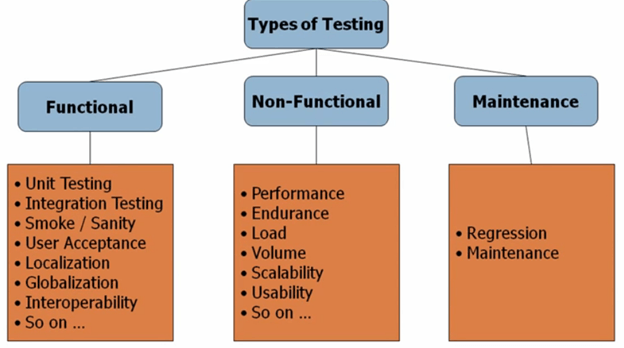
Type of Software Testing
Software testing is broadly classified into three categories:
- Functional Testing
- Non-Functional Testing
- Maintenance Testing
Each category contains multiple testing levels, which teams often refer to as testing types. Different books and reference materials may classify them slightly differently, so expect minor variations.
The list of testing types is not exhaustive — over 100 distinct testing types exist, and new ones continue to emerge. Not every type applies to every project; the scope depends on the nature, risk profile, and complexity of the application under test.
Types of Non-Functional Testing
The most common types of non-functional testing performed by QA teams include:
- Performance Testing
- Load Testing
- Failover Testing
- Compatibility Testing
- Usability Testing
- Stress Testing
- Maintainability Testing
- Scalability Testing
- Volume Testing
- Security Testing
- Disaster Recovery Testing
- Compliance Testing
- Portability Testing
- Efficiency Testing
- Reliability Testing
- Baseline Testing
- Endurance Testing
- Documentation Testing
- Recovery Testing
- Internationalization Testing
Example Test Cases for Non-Functional Testing
The following examples illustrate how non-functional test cases are written in real projects:
| Test Case # | Test Case | Domain |
|---|---|---|
| 1 | Application load time should not exceed 5 seconds when up to 1000 users access it simultaneously. | Performance Testing |
| 2 | Software should be installable on all supported versions of Windows and macOS. | Compatibility Testing |
| 3 | All web images should include descriptive alt tags. | Accessibility Testing |
