
What is STRESS Testing in Software Testing?
 Editorial Team
⚡ Smart Summary
Stress Testing pushes an application beyond its normal operating limits to find the breaking point, confirm that failures are handled gracefully, and prove the system recovers cleanly once the extreme load is removed.

What is Stress Testing?
Stress Testing is a type of software testing that verifies the stability and reliability of a software application. The goal of Stress Testing is to measure software on its robustness and error-handling capabilities under extremely heavy load conditions, and to ensure that the software does not crash in crunch situations. It deliberately tests beyond normal operating points and evaluates how the software behaves under extreme conditions.
Under Stress Testing, the application under test (AUT) is stressed for a short period of time to discover its withstanding capacity. The most prominent use of Stress Testing is to determine the limit at which the system, software, or hardware breaks. It also checks whether the system demonstrates effective error management once that limit is crossed.
In Software Engineering, Stress Testing is often listed alongside Endurance Testing, but the two differ: Stress Testing applies an abnormally high load in a short burst to find the breaking point, while Endurance (soak) Testing holds a moderate load for hours to expose gradual degradation.
The screenshot below shows a large block of data being copied from a web page.
.png)
The application under test is stressed when 5 GB of data is copied from the website and pasted into Notepad. Notepad is now under stress and returns a “Not Responding” error message, exactly as the next screenshot shows.
.png)
The same principle scales directly to server-side systems.
Need for Stress Testing
Consider the following real-time examples where the usage of Stress Testing becomes obvious:
- During festival time, an online shopping site may witness a spike in traffic, or when it announces a sale.
- When a blog is mentioned in a leading newspaper, it experiences a sudden surge in traffic.
It is imperative to perform Stress Testing to accommodate such abnormal traffic spikes. Failure to accommodate this sudden traffic may result in a loss of revenue and reputation.
Stress Testing is also extremely valuable for the following reasons:
- It checks whether the system works under abnormal conditions.
- It confirms that an appropriate error message is displayed while the system is under stress.
- System failure under extreme conditions could result in enormous revenue loss.
- It is better to be prepared for extreme conditions by executing Stress Testing in advance.
The next section sets out what a successful Stress Test must prove.
Goals of Stress Testing
The goal of Stress Testing is to analyse the behaviour of the system after a failure. For Stress Testing to be successful, a system should display an appropriate error message while it is under extreme conditions.
To conduct Stress Testing, massive data sets are sometimes used, and that data may be lost while the system is failing. Testers should ensure this security-related data is not lost during Stress Testing.
The main purpose of Stress Testing is to make sure that the system recovers after failure, a property called recoverability. Recovery Testing then verifies that restoration procedure in detail.
Load Testing vs Stress Testing
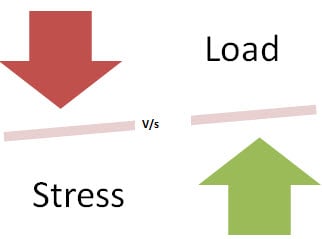
Both techniques belong to the Performance Testing family, so they are easy to confuse. The diagram below contrasts the two load profiles.
| Load Testing | Stress Testing |
|---|---|
| Load Testing tests the system behaviour under normal workload conditions; it simulates the actual expected workload. | Stress Testing tests the system behaviour under extreme conditions and is carried out until the system fails. |
| Load Testing does not break the system. | Stress Testing deliberately tries to break the system by overwhelming it with data or by starving it of resources. |
Related profiles include Spike Testing (a sudden short burst), Volume Testing (large data rather than many users) and Scalability Testing (growth headroom).
Types of Stress Testing
Following are the types of Stress Testing, explained one at a time.
Distributed Stress Testing
In distributed client-server systems, testing is done across all clients from the server. The role of the stress server is to distribute a set of stress tests to all stress clients and to track the status of each client. After a client contacts the server, the server adds the name of the client and starts sending data for testing. The figure below shows how the stress server reaches some clients but not others.
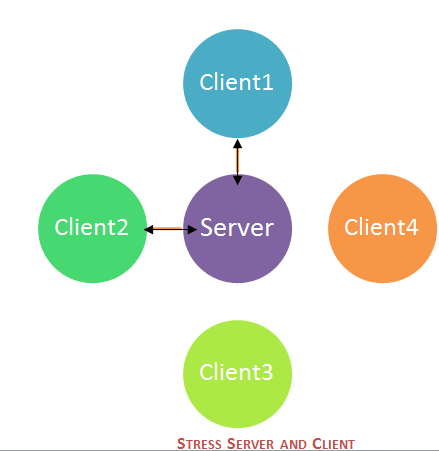
Meanwhile, client machines send a signal, or heartbeat, confirming that they are still connected to the server. If the server does not receive any signal from a client machine, that machine needs to be investigated further for debugging. In the figure, the server can connect with 2 clients (Client1 and Client2), but it cannot send or receive a signal from Client 3 and Client 4.
An overnight run is the best option for these Stress Testing scenarios. Large server farms need a more efficient method for determining which computers have had stress failures that need to be investigated.
Application Stress Testing
This testing concentrates on finding defects related to data locking and blocking, network issues, and performance bottlenecks in a single application.
Transactional Stress Testing
It performs Stress Testing on one or more transactions between two or more applications. It is used for fine-tuning and optimising the system.
Systemic Stress Testing
This is integrated Stress Testing that can be run across multiple systems sharing the same server. It is used to find defects where one application blocks the data of another application.
Exploratory Stress Testing
This is the type of Stress Testing used to test the system with unusual parameters or conditions that are unlikely to occur in a real scenario. It is used to find defects in unexpected situations such as:
- A large number of users logged in at the same time.
- A virus scanner starting on all machines simultaneously.
- A database going offline while it is being accessed from a website.
- A large volume of data being inserted into the database simultaneously.
Whichever variant applies, the execution sequence stays the same.
How to do Stress Testing?
The Stress Testing process can be done in 5 major steps:
- Step 1) Planning the Stress Test: Here you gather the system data, analyse the system, and define the stress test goals.
- Step 2) Create Automation Scripts: In this phase, you create the Stress Testing automation scripts and generate the test data for the stress scenarios.
- Step 3) Script Execution: In this stage, you run the Stress Testing automation scripts and store the stress results.
- Step 4) Results Analysis: In this stage, you analyse the Stress Test results and identify bottlenecks.
- Step 5) Tweaking and Optimisation: In this stage, you fine-tune the system, change configurations, and optimise the code with the goal of meeting the desired benchmark.
Lastly, you run the entire cycle again to determine whether the tweaks have produced the desired results. For example, it is not unusual to need 3 to 4 cycles of the Stress Testing process before the performance goals are achieved, so the scripts are normally maintained alongside the regression suite.
Tools Recommended for Stress Testing
The four tools below cover most needs, from enterprise suites to a free open-source option.
LoadRunner
LoadRunner is a widely used Load Testing tool, now sold by OpenText in Professional, Enterprise, and Cloud editions after moving from HP to Micro Focus to OpenText. Load test results produced by LoadRunner are treated as a benchmark.
JMeter
Apache JMeter is an open-source testing tool. It is a pure Java application for stress and Performance Testing, and it is intended to cover test types such as load, functional, and stress. Current 5.6.x releases of Apache JMeter require Java 8 or later, with Java 17 recommended.
Stress Tester
This tool provides extensive analysis of web application performance, presents results in graphical format, and is straightforward to use. No high-level scripting is required, which keeps the return on investment attractive for smaller teams.
NeoLoad
NeoLoad, now part of the Tricentis portfolio, is a popular tool for testing web and mobile applications. It can simulate thousands of users in order to evaluate application performance under load and to analyse response times. It also supports cloud-integrated performance, load, and Stress Testing, and it scales well.
More options are listed in the guide to performance testing tools; whichever is chosen, its output only means something against the metrics below.
Metrics for Stress Testing
Metrics help in evaluating a system’s performance and are generally studied at the end of the Stress Test. Commonly used metrics are grouped into three families.
Measuring Scalability and Performance
- Pages per Second: Measures how many pages have been requested per second.
- Throughput: A basic metric — response data size per second.
- Rounds: The number of times test scenarios have been planned versus the number of times a client has executed them.
Application Response
- Hit time: Average time to retrieve an image or a page.
- Time to first byte: Time taken to return the first byte of data or information.
- Page time: Time taken to retrieve all the information on a page.
Failures
- Failed connections: Number of failed connections refused by the client (weak signal).
- Failed rounds: Number of rounds that fail.
- Failed hits: Number of failed attempts by the system (broken links or unseen images).
The closing section lists the situations that most often justify a Stress Test.
Examples of Stress Testing
Stress Testing earns its place whenever an event is expected to push traffic well beyond the daily baseline:
- An e-commerce website announcing a festival sale.
- A news website at the time of a major event.
- An education board publishing examination results.
- Social networking sites, blogs, and mobile apps during a viral moment.
In each case, the test monitors resources such as memory, processor, and network, checks that appropriate error messages appear under stress, and confirms the system returns to normal afterwards. It fits into the software testing life cycle as a non-functional check alongside System Testing and the wider set of software testing types.
