
What is Smoke Testing?
 Editorial Team
⚡ Smart Summary
Smoke Testing decides whether a fresh build is stable enough to test. This page explains when to run it, who runs it, how the cycle works, and how automated suites gate modern delivery pipelines.
What is Smoke Testing?
Smoke Testing is a software testing process that determines whether the deployed software build is stable or not. Smoke testing is a confirmation for QA team to proceed with further software testing. It consists of a minimal set of tests run on each build to test software functionalities. Smoke testing is also known as “Build Verification Testing” or “Confidence Testing.”
In simple terms, smoke testing means verifying the important features are working and there are no showstoppers in the build that is under testing. It is a mini and rapid regression test of major functionality. This helps determine if the build is flawed as to make any further testing a waste of time and resources.
Compare Smoke Vs Sanity Testing



Why do we do Smoke Testing?
Smoke testing plays an important role in software development as it ensures the correctness of the system in initial stages. By this, we can save test effort. Once we complete smoke testing then only we start functional testing.
- All the showstoppers in the build will get identified by performing smoke testing.
- With the help of smoke testing, most of the defects are identified at initial stages of software development.
- With smoke testing, we simplify the detection and correction of major defects.
- By smoke testing, QA team can find defects to the application functionality that may have surfaced by the new code.
- Smoke testing finds the major severity defects.
Example 1: Logging window: Able to move to next window with valid username and password on clicking submit button.
Example 2: User unable to sign out from the webpage.
When do we do Smoke Testing?
Those benefits only materialise if the check is triggered at the right moment. Smoke Testing is done whenever the new functionalities of software are developed and integrated with existing build that is deployed in QA/staging environment. It ensures that all critical functionalities are working correctly or not. The diagram below shows how a build reaches the QA environment before smoke testing begins.
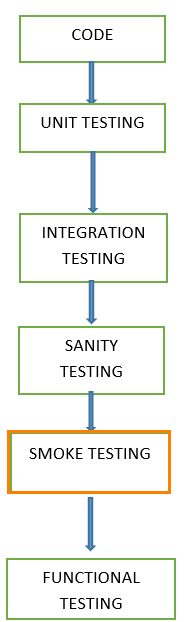
In this testing method, the development team deploys the build in QA. A subset of test cases is taken and run by testers against the critical functionalities of the build. These series of test cases are designed to expose errors that are in build. If these tests are passed, QA team continues with Functional Testing.
Any failure indicates a need to handle the system back to the development team. Whenever there is a change in the build, we perform Smoke Testing to ensure the stability.
Example: -New registration button is added in the login window and build is deployed with the new code. We perform smoke testing on a new build.
The smoke tests qualify the build for further formal testing and are designed to demonstrate system stability and conformance to requirements. The main aim is to detect major issues early. A build includes all data files, libraries, reusable modules, engineered components that are required to implement one or more product functions.
What happens if we do not perform Smoke Testing
If we do not perform smoke testing in early stages, defects may be encountered in later stages where it can be costly. A Defect found in later stages can be a showstopper that affects the release of deliverables.
Who will do Smoke Testing?
After releasing the build to QA environment, Smoke Testing is performed by QA engineers/QA lead. Whenever there is a new build, QA team determines the major functionality in the application to perform smoke testing. QA team checks for showstoppers in the application that is under testing.
How to do Smoke Testing?
Smoke Testing is usually done manually though there is a possibility of accomplishing the same through automation. It may vary from organization to organization.
Manual Smoke Testing
Smoke testing is carried to ensure the navigation of critical paths is as expected and does not hamper the functionality. High priority functionality test cases are taken and are tested to find the critical defects in the system. If the test passes, we continue the functional testing. If the test fails, the build is rejected and sent back to the development team for correction.
QA again starts smoke testing with a new build version. Smoke testing is performed on new build and will get integrated with old builds to maintain the correctness of the system. Before performing smoke testing, QA team should check for correct build versions.
Smoke Testing by Automation
Automation Testing is used for Regression Testing. However, we can also use a set of automated test cases to run against Smoke Test. With the help of automation tests, developers can check build immediately, whenever there is a new build ready for deployment.
Instead of having repeated test manually whenever the new software build is deployed, recorded smoke test cases are executed against the build. It verifies whether the major functionalities still operates properly. If the test fails, then they can correct the build and redeploy the build immediately. By this, we can save time and ensure a quality build to the QA environment.
Using an automated tool, test engineer records all manual steps that are performed in the software build.
Smoke Testing Cycle
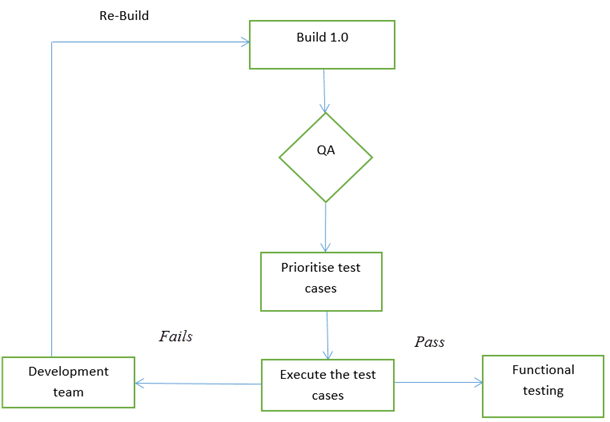
Below flow chart shows how Smoke Testing is executed. Once the build is deployed in QA and, smoke tests are passed we proceed for functional testing. If the smoke test fails, we exit testing until the issue in the build is fixed.
Best Practices for Designing Smoke Test Cases
Knowing the cycle is one thing; keeping the suite that drives it trustworthy is another. A smoke suite earns its place only when it stays compact, fast and repeatable.
- Map the critical paths first: List the workflows that make the product commercially usable, such as login, search, data entry, payment and logout. If one breaks, the build has no value to a tester.
- Keep the suite shallow but wide: Touch every major module once instead of exploring one module in depth. Boundary values, negative data and error-message wording belong in functional testing, not here.
- Cap the execution time: Most teams hold the run between ten and fifteen minutes and limit the suite to roughly twenty to thirty test cases. A run that takes an hour stops being a gate and becomes a bottleneck.
- Run the same cases on every build: Consistency lets you attribute a failure to the code rather than to a changed test selection.
- Remove flaky and dependency-heavy cases: A case that passes and fails without any code change destroys confidence in the gate. Stub or mock unstable third-party services where the test automation framework allows.
- Record one unambiguous verdict: Every case needs a single expected result so the build can be accepted or rejected without debate.
- Version the suite with the build: Store the smoke cases in the same repository as the application code so the gate always matches the release under test.
Review the suite each release: retire cases for features that no longer matter and add newly critical workflows.
Smoke Testing in CI/CD Pipelines
A suite designed this way is cheap enough to run on every commit, which is what modern delivery demands. A continuous integration server such as Jenkins compiles the code, deploys it to a staging environment, and then triggers the smoke suite as the first automated stage. A green run promotes the artefact to the functional and regression stages, while a red run fails the pipeline and notifies the committing developer within minutes.
Two placements are common. A pre-merge run guards the main branch by validating every pull request, and a post-deployment run confirms that the deployed environment is reachable and configured correctly. Teams practising continuous deployment often add a third, trimmed run against production immediately after release.
Because the pipeline executes the suite many times a day, the cases must be non-interactive, self-cleaning and independent. Any case that waits for a human decision or leaves test data behind will stall the pipeline.
Advantages of Smoke Testing
Here are few advantages listed for Smoke Testing.
- Easy to perform and runs quickly
- Critical errors and defects are easy to detect and correct in early stages.
- Improves the quality of the system
- Reduces the risk
- Progress is easier to assess.
- Saves test effort and time
- Minimises integration risks
⚠ Limitation to note: A passing smoke run only says the build is testable. It touches major functionality shallowly, so minor defects, edge cases and rarely used features stay hidden until functional and regression testing run. Never treat a green smoke result as a sign that the build is defect free.
Smoke Testing vs Sanity Testing vs Regression Testing
All three run after a code change, which is why they are often confused. They differ in scope, depth and the question each one answers.
Testing done in a development environment on the code to ensure the correctness of the application before releasing build to QA, this is known as Sanity testing. It is a process which verifies that the application under development meets its basic functional requirements.
Sanity testing determines the completion of the development phase and makes a decision whether to pass or not to pass software product for further testing phase.
| BASIS | SMOKE TESTING | SANITY TESTING | REGRESSION TESTING |
|---|---|---|---|
| Scope | Broad and shallow | Narrow and deep | Wide and deep |
| Question answered | Is this build stable enough to test? | Does this specific fix work? | Did anything that used to work break? |
| Sequence | First, on every build | After smoke testing passes | After sanity testing |
| Typical duration | 10 to 15 minutes | 30 to 60 minutes | Hours to days |
| Automation fit | Very high | Moderate, often manual | Very high |
In practice they run in sequence: smoke testing to accept the build, sanity testing to verify the delivered change, and regression testing when the schedule allows.
Sample Smoke Test Cases Example
The table below documents a short smoke suite, one row per critical path.
| T.ID | TEST SCENARIOS | DESCRIPTION | TEST STEP | EXPECTED RESULT | ACTUAL RESULT | STATUS |
|---|---|---|---|---|---|---|
| 1 | Valid login credentials | Test the login functionality of the web application to ensure that a registered user is allowed to login with username and password | 1.Launch the application 2.Navigate the login page 3.Enter valid username 4.Enter valid password 5.Click on login button |
Login should be success | as expected | Pass |
| 2 | Adding item functionality | Able to add item to the cart | 1.Select categories list 2.Add the item to cart |
Item should get added to the cart | Item is not getting added to the cart | Fail |
| 3 | Sign out functionality | Check sign out functionality | 1. select sign out button | The user should be able to sign out. | User is not able to sign out | Fail |
