
INFORMATICA Transformations Tutorial & Filter Transformation
 Editorial Team
⚡ Smart Summary
Transformations in Informatica are the mapping objects that create, modify or pass data toward a target, and the Filter transformation is the active object that drops every row failing a single filter condition.

What is Transformation?
Transformations in Informatica are the objects that create, modify or pass data to the defined target structures (tables, files or any other target).
The purpose of a transformation in Informatica is to modify the source data as per the requirement of the target system. It also ensures the quality of the data being loaded into the target.
Informatica provides various transformations to perform specific functionalities.
For example, performing tax calculation based upon source data, data cleansing operation, etc. In transformations, we connect the ports to pass data to it, and the transformation returns the output through output ports.
Classification of Transformation
Transformations are classified into two categories, one based on connectivity and the other based on the change in the number of rows. First we will look at the transformations based on connectivity.
Types of Transformation Based on Connectivity
- Connected Transformations
- Unconnected Transformations
In Informatica, during mappings the transformations which are connected to other transformations are called connected transformations.
For example, Source Qualifier transformation of source table EMP is connected to a Filter transformation to filter employees of a department.
Those transformations that are not connected to any other transformations are called unconnected transformations.
Their functionality is used by calling them inside other transformations like the Expression transformation. These transformations are not part of the pipeline.
The connected transformations are preferred when, for every input row, the transformation is called or is expected to return a value. For example, for the zip codes in every row, the transformation returning the city name.
The unconnected transformations are useful when their functionality is only required periodically or based upon certain conditions. For example, calculating the tax details if the tax value is not available.
The diagram below places both pairs of categories side by side.

Types of Transformation Based on the Change in Number of Rows
- Active Transformations
- Passive Transformations
Active transformations are those that modify the data rows and the number of input rows passed to them. For example, if a transformation receives ten rows as input and returns fifteen rows as output, then it is an active transformation. The data in the row is also modified in an active transformation.
Passive transformations are those that do not change the number of input rows. In passive transformations the number of input and output rows remain the same, and only data is modified at row level.
In a passive transformation, no new rows are created and no existing rows are dropped.
Following is the List of Transformations in Informatica
- Source Qualifier Transformation
- Aggregator Transformation
- Router Transformation
- Joiner Transformation
- Rank Transformation
- Sequence Generator Transformation
- Transaction Control Transformation
- Lookup and Re-usable Transformation
- Normalizer Transformation
- Performance Tuning for Transformation
- External Transformation
- Expression Transformation
What is Filter Transformation?
Filter Transformation is an active transformation as it changes the number of records.
Using the Filter transformation, we can filter the records based on the filter condition.
For example, for loading the employee records having deptno equal to 10 only, we can put a Filter transformation in the mapping with the filter condition deptno=10. So only those records which have deptno=10 will be passed by the Filter transformation, and the rest of the records will be dropped.
The default filter condition is TRUE, so a newly created Filter transformation passes every row until a condition is entered. Each row returning FALSE is dropped and a message is written to the session log.
How to Use Filter Transformation
Step 1) Create a mapping having source “EMP” and target “EMP_TARGET”.

Step 2) Then in the mapping:
- Select the Transformation menu
- Select the Create option
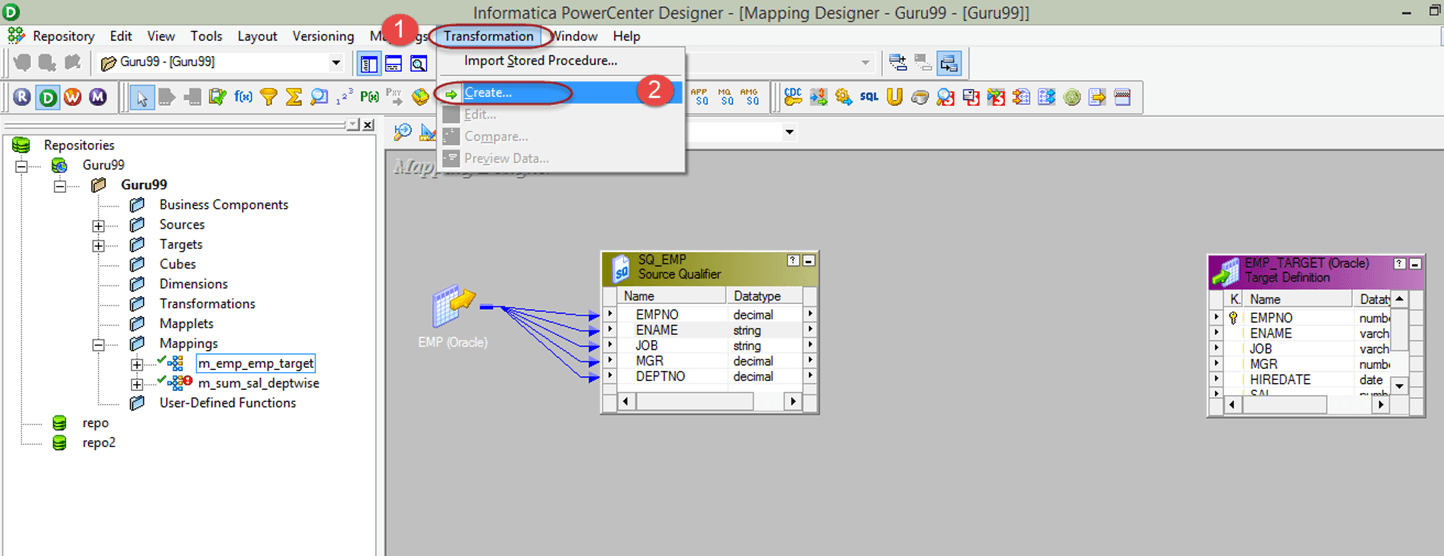
Step 3) Then in the Create Transformation window:
- Select Filter Transformation from the list
- Enter the transformation name “fltr_deptno_10”
- Select the Create option

Step 4) The Filter transformation will be created. Select the “Done” button in the Create Transformation window.

Step 5) In the mapping:
- Drag and drop all the Source Qualifier columns to the Filter transformation
- Link the columns from the Filter transformation to the target table

Step 6) Double-click the Filter transformation to open its properties, and then:
- Select the Properties tab
- Click the Filter Condition editor

Step 7) Then in the filter condition expression editor:
- Enter the filter condition – deptno=10
- Select the OK button

Step 8) Now again in the Edit Transformations window, in the Properties tab you will see the filter condition. Select the OK button.

Now save the mapping and execute it after creating the session and workflow. In the target table, only the records having deptno=10 will be loaded.
In this way, you can filter the source records using the Filter transformation.
Filter vs Router vs Source Qualifier Filter
Three objects in Informatica can remove unwanted rows, and picking the wrong one costs either performance or visibility of the rejected data.
| Object | How rows are removed | When to choose it |
|---|---|---|
| Filter transformation | One condition per transformation. Rows returning FALSE are dropped and noted in the session log. | A single, simple rule applied inside the mapping. |
| Router transformation | Several group conditions on one pass. Rows matching no group go to the default group. | Rows must be split into several streams, or rejected rows must be captured. |
| Source Qualifier filter | The condition becomes part of the WHERE clause of the SQL read from a relational source. | The source is relational and unwanted rows should never leave the database. |
A single Router reads the incoming data once, while several Filter transformations testing the same input make the Integration Service process that data again for each one. The Source Qualifier filter limits what is extracted from the source, whereas the Filter transformation limits what is sent on to the target.
Tips to Improve Filter Transformation Performance
The filter condition is evaluated for every row that reaches the transformation, so where the object sits in the mapping has a direct effect on session time.
- Place the Filter transformation as close to the source as possible, so unwanted rows never travel through the later transformations.
- Push the condition into the Source Qualifier when the source is relational, because the database filters rows faster than the Integration Service.
- Keep the condition simple. A complex expression can be moved to an Expression transformation and reduced to a single flag port that the Filter tests.
- Use one Router instead of several Filter transformations that test the same input, so the incoming data is read only once.
- Remember that the default condition is TRUE, so a Filter left unconfigured passes everything and hides the mistake.
Because every dropped row is written as a message in the session log, an unexpectedly empty target is usually explained by reading that log rather than by re-running the mapping.
