
Transaction Control Transformation in Informatica (Example)
 Editorial Team
⚡ Smart Summary
Transaction Control transformation in Informatica is an active, connected object that commits or rolls back rows while a mapping runs, using five built-in variables inside a condition evaluated once for every row.
What is Transaction Control Transformation?
Transaction Control is an active and connected transformation which allows us to commit or roll back transactions during the execution of the mapping. Commit and rollback operations are of significant importance because they guarantee the availability of data.
When processing a high volume of data, there can be a situation when to commit the data to the target. If a commit is performed too frequently, then it will be an overhead to the system. If a commit is performed too late, then in the case of failure there are chances of data loss.
So, to provide flexibility, the Transaction Control transformation is provided. Rather than leaving the commit point to the session default, it lets a condition inside the mapping decide, row by row, where one transaction ends and the next one begins.
TCL Commit and Rollback Commands
There are five built-in variables available in this transformation to handle the operation. The condition has to return one of the five for every row, and a value outside that list makes the Integration Service fail the session.
TC_CONTINUE_TRANSACTION
In TC_CONTINUE_TRANSACTION there are no operations performed, the process of data load continues as it is. This is the default value of the expression.
TC_COMMIT_BEFORE
In TC_COMMIT_BEFORE, when this flag is found set, a commit is performed before the processing of the current row. A new transaction then begins and the current row is written to the target.
TC_COMMIT_AFTER
In TC_COMMIT_AFTER the current row is processed, then a commit is performed and the next transaction begins.
TC_ROLLBACK_BEFORE
In TC_ROLLBACK_BEFORE, rollback is performed first, then the data is processed to write.
TC_ROLLBACK_AFTER
In TC_ROLLBACK_AFTER the data is processed, then the rollback is performed.
Transaction Control Transformation Properties
The object is configured from the Edit Transformations window, which carries the same four tabs as the other PowerCenter transformations. Knowing which tab owns which setting saves a lot of hunting during the walkthrough below.
| Tab | What is configured there |
| Transformation | Name of the transformation, its description, and whether the object is made reusable. |
| Ports | The input and output ports, normally created by dragging the columns in from the upstream transformation. |
| Properties | The Transaction Control Condition, opened with the small arrow beside the field, and the Tracing Level written to the session log. |
| Metadata Extensions | User-defined metadata kept with the transformation in the repository. |
Two settings do the real work. The Transaction Control Condition holds the expression, which is usually an IIF() test that returns one of the five variables. The Tracing Level decides how much detail about the transformation appears in the session log when the run is investigated.
One setting sits outside the transformation. When a mapping contains an effective Transaction Control transformation, the session runs with the Commit Type set to User Defined on the Properties tab of the session, instead of the Target or Source commit types that use a fixed commit interval.
How to Use Transaction Control Transformation in Informatica
In this example, we will commit data to the target when the dept no = 20 condition is found true.
Step 1) Create a mapping with EMP as source and EMP_TARGET as target. The Mapping Designer canvas then holds the source, its Source Qualifier and the target definition.

Step 2) Create a new transformation using the Transformation menu, then in the Create Transformation window:
- Select a Transaction Control as the new transformation
- Enter transformation name “tc_commit_dept20”
- Select create option

Step 3) The Transaction Control transformation will be created, select the done button. The new object now appears on the canvas beside the Source Qualifier.

Step 4) Drag and drop all the columns from Source Qualifier to the Transaction Control transformation, then link all the columns from the Transaction Control transformation to the target table. The pipeline now runs source → Source Qualifier → tc_commit_dept20 → EMP_TARGET.

Step 5) Double click on the Transaction Control transformation and then in the edit property window:
- Select property tab
- Click on the transaction control editor icon
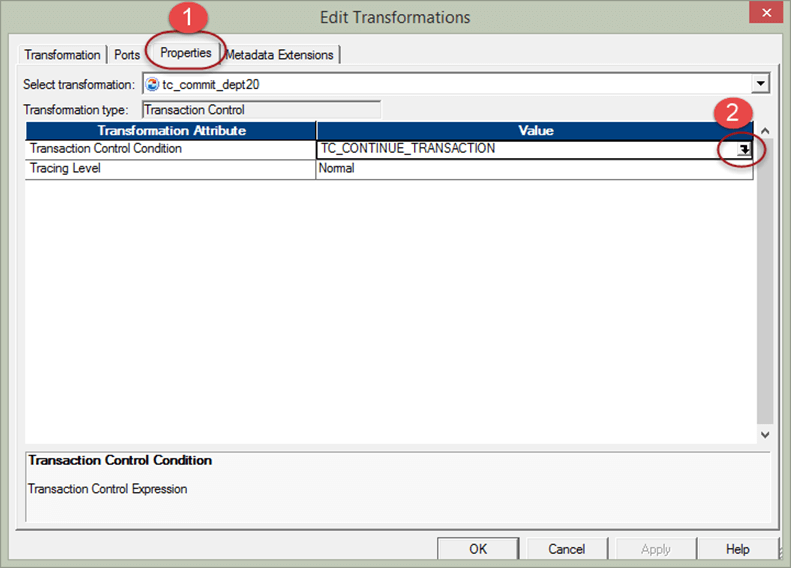
Step 6) In the expression editor enter the expression –
iif(deptno=20,tc_commit_before,tc_continue_transaction)
and select OK. It means if deptno 20 is found then commit transaction in target, else continue the current processing.

Step 7) Select OK in the previous window. The condition is now stored on the Properties tab of the transformation.

Now save the mapping and execute it after creating session and workflows. This mapping will commit the data to the target whenever department number 20 is found in the data.
Effective and Ineffective Transaction Control Transformations
The transformation is a transaction generator. It drops whatever transaction boundary arrives from upstream and defines new boundaries of its own for everything downstream, which is why its position in the pipeline matters as much as its condition.
It is called effective for a target when the boundaries it creates still reach that target, and ineffective when a later transformation throws those boundaries away. According to the Informatica PowerCenter Transformation Guide, the following objects drop incoming transaction boundaries:
- An Aggregator, Joiner, Rank, Sorter or Custom transformation whose Transformation Scope is All Input
- A Custom transformation configured to generate transactions
- Another Transaction Control transformation
- A multiple input group transformation connected to more than one upstream transaction control point
Being ineffective for the target does not make the object useless. A downstream transformation whose Transformation Scope is Transaction still uses the boundaries defined upstream, so the same transformation can be effective for a Sorter and ineffective for the table behind it.
In a mapping with several targets, the object can be effective for one target and ineffective for another. The mapping stays valid while every target is connected to an effective Transaction Control transformation, and becomes invalid as soon as one target is not. The Designer reports which transformations are ineffective for targets when the mapping is saved or validated.
Rules and Guidelines for Transaction Control Transformation
Most of the problems with this transformation show up at run time rather than at design time, so the points below are worth checking before the session is built.
- The return value is strict. If the condition evaluates to anything other than commit, roll back or continue, the Integration Service fails the session.
- TC_CONTINUE_TRANSACTION is the fallback. Every branch of the IIF() has to end somewhere, and continue is the value that leaves the current transaction untouched.
- The target type matters. A Transaction Control transformation connected to any target other than a relational, XML or dynamic MQSeries target is ineffective for that target.
- The condition can only use what reaches it. Only ports linked into the transformation, its variable ports and the built-in variables are available inside the transaction control editor.
- Commit frequency is a trade-off. A condition that commits on nearly every row removes the benefit of buffering, while a condition that almost never fires reintroduces the data-loss window the transformation was added to close.
- Check the session log. The log records the commit points that were actually taken, which is the quickest way to confirm the condition behaved as intended during performance tuning.
