
What is DevOps? Full Form, Principles & Examples
 Editorial Team
⚡ Smart Summary
DevOps blends development and operations into a unified culture, automating software delivery from code commit to production. Lessons explain principles, history, lifecycle phases, key tools, automation practices, and benefits driving faster, more reliable releases for modern enterprises.

What is DevOps?
DevOps is a collaboration between Development and IT Operations to make software production and Deployment in an automated & repeatable way. DevOps helps increase the organization’s speed to deliver software applications and services. The full form of ‘DevOps’ is a combination of ‘Development’ and ‘Operations.’
It allows organizations to serve their customers better and compete more strongly in the market. In simple words, DevOps can be defined as an alignment of development and IT operations with better communication and collaboration.

Why is DevOps Needed?
- Before DevOps, the development and operation team worked in complete isolation.
- Testing and Deployment were isolated activities done after design-build. Hence they consumed more time than actual build cycles.
- Without using DevOps, team members spend a large amount of their time testing, deploying, and designing instead of building the project.
- Manual code deployment leads to human errors in production.
- Coding & operation teams have separate timelines and are not synch, causing further delays.
There is a demand to increase the rate of software delivery by business stakeholders. As per Forrester Consulting Study, Only 17% of teams can use delivery software quickly, proving the pain point.
How is DevOps different from traditional IT
In this DevOps training, let’s compare the traditional software waterfall model with DevOps to understand the changes DevOps brings.
We assume the application is scheduled to go live in 2 weeks, and coding is 80% done. We assume the application is a fresh launch, and the process of buying servers to ship the code has just begun-
| Old Process | DevOps |
|---|---|
| After placing an order for new servers, the Development team works on testing. The Operations team works on extensive paperwork as required in enterprises to deploy the infrastructure. | After placing an order for new servers Development and Operations team work together on the paperwork to set up the new servers. This results in better visibility of infrastructure requirements. |
| Projections about failover, redundancy, data center locations, and storage requirements are skewed as no inputs are available from developers who have deep knowledge of the application. | Projections about failover, redundancy, disaster recovery, data center locations, and storage requirements are pretty accurate due to the inputs from the developers. |
| The operations team has no clue about the progress of the Development team. The operations team develops a monitoring plan as per their understanding. | In DevOps, the Operations team is completely aware of the developers’ progress. Operations teams interact with developers and jointly develop a monitoring plan that caters to IT and business needs. They also use advanced Application Performance Monitoring (APM) Tools. |
| Before going go-live, the load testing crashes the application, and the release is delayed. | Before going go-live, the load testing makes the application a bit slow. The development team quickly fixes the bottlenecks, and the application is released on time. |
Why is DevOps used?
DevOps allows Agile Development Teams to implement Continuous Integration and Continuous Delivery, which helps them launch products faster into the market.
Other Important reasons are:
1. Predictability: DevOps offers a significantly lower failure rate of new releases.
2. Reproducibility: Version everything so that earlier versions can be restored anytime.
3. Maintainability: Effortless recovery process in the event of a new release crashing or disabling the current system.
4. Time to market: DevOps reduces the time to market up to 50% through streamlined software delivery. It is particularly the case for digital and mobile applications.
5. Greater Quality: DevOps helps the team improve application development quality by incorporating infrastructure issues.
6. Reduced Risk: DevOps incorporates security aspects in the software delivery lifecycle, and it helps reduce defects across the lifecycle.
7. Resiliency: The Operational state of the software system is more stable, secure, and changes are auditable.
8. Cost Efficiency: DevOps offers cost efficiency in the software development process, which is always an aspiration of IT management.
9. Breaks larger code base into small pieces: DevOps is based on the agile programming method. Therefore, it allows breaking larger codebases into smaller and manageable chunks.
When to adopt DevOps?
DevOps should be used for large distributed applications such as eCommerce sites or applications hosted on a cloud platform.
When not to adopt DevOps?
It should not be used in mission-critical applications like banks, power and other sensitive data sites. Such applications need strict access controls on the production environment, a detailed change management policy, and access control policy to the data centres.
DevOps Workflow
Workflows provide a visual overview of the sequence in which input is provided. It also tells about performed actions, and output is generated for an operations process.
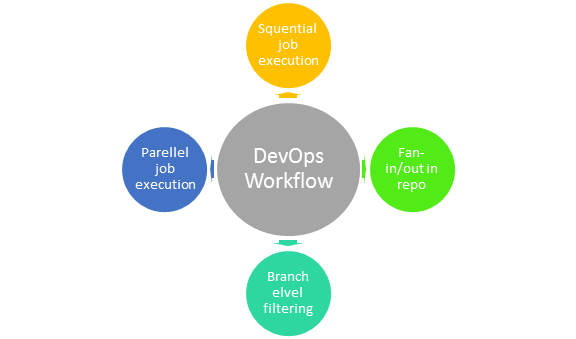
Workflow allows the ability to separate and arrange jobs that the users top request. It also can mirror their ideal process in the configuration jobs.
How is DevOps different from Agile? DevOps Vs Agile
Stakeholders and communication chain a typical IT process.

Agile addresses gaps in Customer and Developer communications

DevOps addresses gaps in Developer and IT Operations communications

Difference between DevOps and Agile
| Agile | DevOps |
|---|---|
| Emphasize breaking down barriers between developers and management. | DevOps is about software deployment and operation teams. |
| Addresses gaps between customer requirements and development teams. | Addresses the gap between the development and Operation team |
| Focuses more on functional and non-functional readiness | It focuses on operational and business readiness. |
| Agile development pertains mainly to the company’s way development is thought out. | DevOps emphasises deploying software in the most reliable and safest ways that aren’t always the fastest. |
| Agile development emphasises training all team members to have varieties of similar and equal skills. So that, when something goes wrong, any team member can get assistance from any member in the absence of the team leader. | DevOps likes to divide and conquer, spreading the skill set between the development and operation teams. It also maintains consistent communication. |
| Agile development manages on “sprints”. It means that the timetable is much shorter (less than a month), and several features are to be produced and released in that period. | DevOps strives for consolidated deadlines and benchmarks with significant releases rather than smaller and more frequent ones. |
DevOps Principles
Here are six principles that are essential when adopting DevOps:
1. Customer-Centric Action: The DevOps team must constantly take customer-centric action to invest in products and services.
2. End-To-End Responsibility: The DevOps team needs to provide performance support until they become end-of-life. This enhances the level of responsibility and the quality of the products engineered.
3. Continuous Improvement: DevOps culture focuses on continuous improvement to minimize waste, and it continuously speeds up the improvement of products or services offered.
4. Automate everything: Automation is a vital principle of the DevOps process, and this is not only for software development but also for the entire infrastructure landscape.
5. Work as one team: In the DevOps culture, the designer, developer, and tester are already defined, and all they need to do is work as one team with complete collaboration.
6. Monitor and test everything: Monitor and test everything: The DevOps team needs robust monitoring and testing procedures.
Who is a DevOps Engineer?
A DevOps Engineer is an IT professional who works with software developers, system operators, and other production IT staff to administer code releases. DevOps should have hard and soft skills to communicate and collaborate with development, testing, and operations teams.
The DevOps approach needs frequent, incremental changes to code versions, requiring frequent deployment and testing regimens. Although DevOps engineers need to code occasionally from scratch, they must have the basics of software development languages.
A DevOps engineer will work with development team staff to tackle the coding and scripting needed to connect code elements, like libraries or software development kits.
Roles, Responsibilities, and Skills of a DevOps Engineer
DevOps engineers work full-time, and they are responsible for the production and ongoing maintenance of a software application’s platform.
Following are some expected Roles, Responsibilities, and Skills that are expected from DevOps engineers:
- Able to perform system troubleshooting and problem-solving across platform and application domains.
- Manage project effectively through open, standards-based platforms
- Increase project visibility thought traceability
- Improve quality and reduce development cost with collaboration
- Analyse, design and evaluate automation scripts & systems
- Ensuring critical resolution of system issues by using the best cloud security solutions services
- DevOps engineers should have the soft skill of problem-solver and quick-learner
How much does DevOps engineer make?
DevOps is one of the most trending IT profession. That is why there is plenty of opportunities out there. As a result, pay scale even for junior level DevOps engineer is quite high. Approximate salary of Junior DevOps engineer in India is 11, 15,801 per year. The average salary for junior DevOps Engineer is $78,696 per year in the United States of America.
DevOps Training Certification
DevOps training certification helps anyone who aspires to make a career as a DevOps Engineer. Certifications are available from Amazon web services, Red Hat, Microsoft Academy, DevOps Institute.
Let’s consider them one by one
Certified Hyperledger Fabric Developer
The Certified Hyperledger Fabric Developer program allows you to build and maintain Fabric programming client applications. This certification is for the developers who want to perform end to end lifecycle of the Fabric application.
This DevOps Engineering certificate tests you on how to use the most common DevOps patterns to develop, deploy, and maintain applications on AWS. It also evaluates you on the core principles of the DevOps methodology.
This certification has 2 requisites. The certification fee is $300, and the duration is 170 minutes.
A Red Hat offers a different level of certifications for DevOps professionals as follows –
- Red Hat Certificate of Expertise in Platform-as-a-Service
- Red Hat Certificate of Expertise in Containerized Application Development
- Red Hat Certificate of Expertise in Ansible Automation
- Red Hat Certificate of Expertise in Configuration Management
- Red Hat Certificate of Expertise in Container Administration
The DevOps Institute is the global learning community around emerging DevOps practices. This organization is setting the quality standard for DevOps competency-based qualifications, and the DevOps Institute currently offers three classes and certifications.
The certification course offered by the company are:
- DevOps Foundation
- DevOps Foundation Certified
- Certified Agile Service Manager
- Certified Agile Process Owner
- DevOps Test Engineering
- Continuous Delivery Architecture
- DevOps Leader
- DevSecOps Engineering
DevOps Automation Tools
Automating all the testing processes and configuring them to achieve speed and agility is vital. This process is known as DevOps automation.
The difficulty faced in a large DevOps Team that maintains a large, massive IT infrastructure can be classified briefly into six different categories.
- Infrastructure Automation
- Configuration Management
- Deployment Automation
- Performance Management
- Log Management
- Monitoring
Now in this DevOps tools tutorial, let’s see a few tools in each of these categories and how they solve the pain points–
Infrastructure Automation
Amazon Web Services (AWS): Being a cloud service, you do not need to be physically present in the data centre. Also, they are easy to scale on-demand. There are no up-front hardware costs, and it can be configured to automatically provision more servers based on traffic.
Configuration Management
Chef: It is a valuable DevOps tool for achieving speed, scale, and consistency. It can be used to ease out complex tasks and perform configuration management. The DevOps team can avoid making changes across ten thousand servers with this tool. Instead, they need to make changes in one place, automatically reflected in other servers.
Deployment Automation
Jenkins: This tool facilitates continuous integration and testing. It helps to integrate project changes more efficiently by quickly finding issues as soon as a built is deployed.
Log Management
Splunk: This tool solves the issues like aggregating, storing, and analyzing all logs in one place.
Performance Management
App Dynamic: It is a DevOps tool that offers real-time performance monitoring. The data collected by this tool helps developers to debug when issues occur.
Monitoring
Nagios: It is also important to notify people when infrastructure and related services go down. Nagios is one such tool for this purpose which helps DevOps teams to find and correct problems.
For more information about DevOps Tools, click here.
What is the future of DevOps?
There are lots of Changes likely to happen in the DevOps world. Some most prominent are:
- Organizations are shifting in their needs to weeks and months instead of years.
- We will see soon that DevOps engineers have more access and control of the end-user than any other person in the enterprise.
- DevOps is becoming a valued skill for IT people. For example, a survey conducted by Linux hiring found that 25% of respondents’ job seekers are DevOps experts.
- DevOps and continuous delivery are here to stay. Therefore companies need to change as they have no choice but to evolve. However, the mainstreaming of DevOps will take 5 to 10 years.
Also read DevOps Interview Questions and Answers: Click Here
