
DevOps Lifecycle: Different Phases Explained with Examples
 Editorial Team
⚡ Smart Summary
DevOps Lifecycle organizes software delivery into seven continuous phases, from planning and coding through integration, testing, deployment, monitoring, feedback, and operations, uniting development and operations teams to release reliable applications faster through automation.

What is DevOps Lifecycle?
The DevOps lifecycle is a series of development phases that guide a team as efficiently as possible through the end-to-end process of product development. Every one of these components is necessary to take maximum advantage of the DevOps methodology, which merges development and operations into a single, automated, and continuously improving workflow.
Because each phase feeds directly into the next, the lifecycle is usually drawn as an infinite loop rather than a straight line. This shift from isolated hand-offs to a continuous flow is what lets DevOps teams ship small changes quickly while keeping quality and stability high.
DevOps Lifecycle: Key Components
Here are the important DevOps lifecycle phases, also called the key components of DevOps. Each phase is “continuous,” which means it never fully stops; the work simply flows from one stage into the next around the loop.
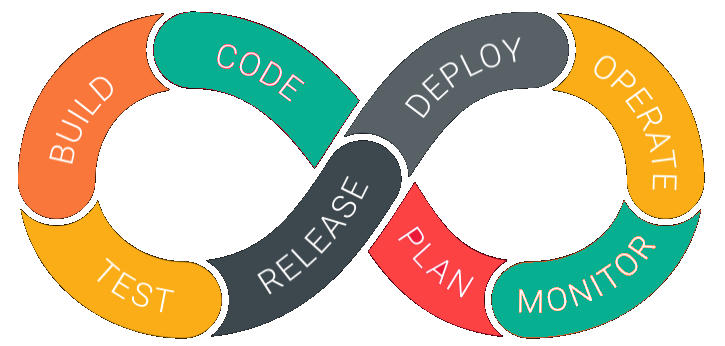
Stage 1) Continuous Development
This phase spans the planning and coding stages of the DevOps lifecycle. The team agrees on the application’s goals, then developers write the code and store it in a version-control system such as Git, so that every change is tracked and can be rolled back when needed.
Stage 2) Continuous Integration
Continuous Integration is a software engineering practice in which developers integrate their work frequently, often several times a day. Automated builds and unit tests run on each commit, so any change that breaks the build or causes conflicts is caught early. You can learn more in this guide to CI/CD.
Stage 3) Continuous Testing
This stage runs automated, prescheduled, and continued code tests as application code is written or updated. Such tests can be written manually or generated with continuous integration tools, and they give developers fast feedback about quality before a build moves forward.
Stage 4) Continuous Deployment
In this phase, deployment happens continuously. Releases are automated so that any change made in the code does not disrupt the functioning of a high-traffic website, while configuration management and containers keep every environment consistent.
Stage 5) Continuous Monitoring
During this phase, the team collects data, monitors each function, and spots errors such as low memory or a broken server connection. For example, when users log in they should reach their account; a failure to do so signals a problem in the application that monitoring should surface immediately.
Stage 6) Continuous Feedback
Continuous feedback works like a running progress report. The software automatically reports performance and issues experienced by the end user, and customers also share their own experiences, so the insights collected here feed straight back into planning.
Stage 7) Continuous Operations
This is the last, shortest, and most straightforward phase of DevOps. It automates the application’s release along with the routine updates that follow, which keeps cycles short and frees developers to spend more time building new features.
Benefits of the DevOps lifecycle
Here are some essential benefits of the DevOps lifecycle:
- It guides developers and IT operations professionals through the complex process of application creation with a shared, repeatable structure.
- Better efficiency across the pipeline leads to a higher return on investment.
- Large and small teams alike use it to organize, align, and track every phase in the life cycle.
- Automated monitoring, testing, and releases help developers detect and fix bugs early.
- Multiple automated feedback channels mean teams learn more about their products and improve the quality of their code.
DevOps Lifecycle vs Traditional SDLC
The DevOps lifecycle is often compared with the traditional Software Development Life Cycle (SDLC), especially the Waterfall model. A classic SDLC moves in a straight line, where requirements, design, development, testing, deployment, and maintenance each finish before the next begins. The DevOps lifecycle replaces that hand-off model with a continuous loop in which development and operations collaborate throughout.
The main differences show up in a few areas:
- Flow: Traditional SDLC is sequential and hard to change once a phase closes, while the DevOps lifecycle is iterative and expects frequent change.
- Collaboration: SDLC often separates development, testing, and operations teams, whereas DevOps merges them around shared goals and shared tooling.
- Speed: Waterfall releases can take months, while DevOps automation supports daily or even hourly releases.
- Feedback: SDLC gathers feedback late, but DevOps captures it continuously and routes it back into planning.
DevOps Lifecycle Tools by Phase
Each phase of the DevOps lifecycle is powered by its own category of tools. Choosing tools that integrate well with one another is what turns the separate phases into a single automated pipeline. The list below maps common, widely used tools to the phase they support in 2026.
- Plan and code: Git, GitHub, GitLab, and Jira for version control, source management, and backlog planning.
- Build and integrate: Jenkins, GitLab CI, and GitHub Actions compile and merge code automatically on every commit.
- Test: Selenium, JUnit, and similar frameworks power continuous testing across every build.
- Deploy and operate: Docker and Kubernetes for containers, plus Ansible, Puppet, and Terraform for configuration and infrastructure as code.
- Monitor: Prometheus, Grafana, Nagios, and Splunk for metrics, dashboards, and alerting.
For a broader catalog, see this list of the best DevOps tools and where they fit within a modern toolchain.
DevOps Lifecycle Best Practices and Challenges
Adopting the DevOps lifecycle is as much a cultural shift as a technical one. The practices below help teams get more value from it, while the challenges are the obstacles that most often slow adoption.
Best practices:
- Automate everything that repeats, from builds and tests to deployments and infrastructure provisioning.
- Shift security left by adding automated checks at each stage, an approach often called DevSecOps.
- Start with a small pilot project, measure the results, then scale the practice across teams.
- Use monitoring and feedback data to drive continuous, measurable improvement.
Common challenges:
- Cultural resistance when development and operations teams are used to working separately.
- A shortage of engineers skilled in modern DevOps tools and automation.
- Complexity in integrating many tools into one reliable pipeline.
- Security and compliance risks inside a fast, automated release process.
