
Continuous Testing in DevOps
 Editorial Team
⚡ Smart Summary
Continuous Testing in DevOps is the practice of validating software quality at every stage of the delivery pipeline, executing automated checks on every commit so teams catch defects early, accelerate releases, and maintain reliable production deployments.

What is Continuous Testing?
Continuous Testing in DevOps is a software testing approach that validates application quality at every stage of the software development life cycle. The goal of Continuous Testing is to evaluate quality at every step of the Continuous Delivery process by testing early, testing often, and automating every check that can be repeated.
The Continuous Testing process brings together developers, DevOps engineers, QA specialists, security analysts, and operations teams. Each commit triggers automated unit, integration, API, performance, and security tests, giving stakeholders immediate feedback on whether a build is safe to promote toward production.
How Continuous Testing is Different from Traditional Testing

The traditional model of testing was handoff centric. Software moved sequentially from one team to another, with separate Development and QA phases. QA teams always wanted more time to ensure quality, and the assumption was that quality should take priority over the project schedule.
Modern businesses, however, require faster delivery to remain competitive. The sooner a release reaches end users, the greater the revenue potential and feedback advantage. To support this pace, a new testing model emerged, which is built around automation and continuous feedback.
Continuous means uninterrupted testing carried out on an ongoing basis. In a Continuous DevOps process, every software change (release candidate) flows automatically from Development to Testing to Deployment without manual handoffs.

The code is continuously developed, delivered, tested, and deployed.
For example, whenever a developer checks code into a source control system such as Git, an automated build server like Jenkins, GitLab CI, or GitHub Actions executes a suite of unit tests in the continuous integration pipeline. If the tests fail, the build is rejected and the developer is notified immediately. If the build passes, it is deployed to staging and performance environments for exhaustive functional, API, and load testing, often in parallel. When all gates succeed, the software is promoted to production.
Continuous Testing is one essential gear within the Continuous Development, Integration, and Deployment cycle.
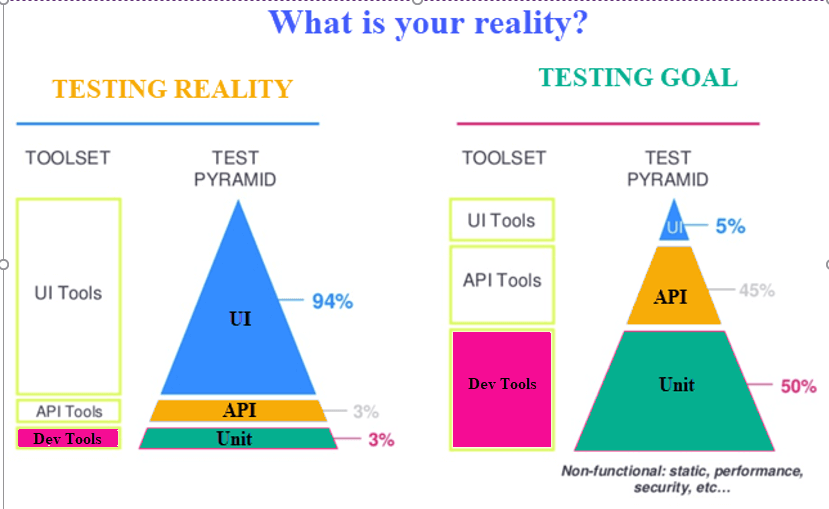
Software development is no longer what it was in the past. Release cycles have shrunk from months to weeks, and in some organizations to hours. The current testing stack (see figure above) still tilts toward UI testing, but modern teams aim for a balanced pyramid with more automated unit and API tests at the base, and fewer brittle UI tests at the top.
Continuous Testing vs Test Automation
While Continuous Testing relies on automation, the two are not the same. Test automation is a technique, while Continuous Testing is a strategy that uses automation, infrastructure, and process integration to achieve continuous quality feedback.
Test Automation vs Continuous Testing
| Parameter | Test Automation | Continuous Testing |
|---|---|---|
| Definition | Test automation is a process where a tool or software is used to automate repetitive testing tasks. | Continuous Testing is a software testing methodology focused on continuous quality and improvement across the delivery pipeline. |
| Purpose | A set of similar or repetitive tasks that a machine can execute faster and with fewer mistakes. | The Continuous Testing process helps find risks, address them, and improve the quality of the product on every release. |
| Prerequisite | Automation in testing is possible without integrating Continuous Testing. | Continuous Testing cannot be implemented without test automation, version control, and a CI/CD pipeline. |
| Time | Software release cycles can take months to years. | Software may be released weekly, daily, or hourly through CI/CD. |
| Feedback | Regular feedback is provided after testing each release. | Feedback at each stage needs to be instant and actionable. |
| History | Automated testing has been used for decades to make the testing process faster. | Continuous Testing is a relatively newer concept tied to the rise of DevOps and DevSecOps. |
How to do Continuous Testing
Implementing Continuous Testing requires a combination of process change, tooling, and culture. The steps below outline how modern DevOps teams put it into practice.
- Use tools to generate test automation suites from user stories and requirements, including AI-assisted test generation.
- Create reproducible test environments using containers, Kubernetes, and infrastructure-as-code tools such as Terraform.
- Copy and anonymize production data to build realistic, compliant test data sets.
- Use service virtualization and contract testing to validate APIs when dependencies are not available.
- Run parallel functional, performance, and security tests in the CI/CD pipeline.
- Integrate quality gates in Jenkins, GitLab CI, GitHub Actions, or Azure DevOps to block faulty builds.
- Monitor production with observability and synthetic tests to extend testing into the runtime environment.
Continuous Testing Tools
Choosing the right toolchain is critical. Here is a curated list of the best Continuous Testing tools used in modern DevOps and DevSecOps pipelines.
1) QuerySurge
QuerySurge is a smart data testing solution and the first full DevOps platform for continuous data testing. Key features include a robust API with 60+ calls, detailed data intelligence and analytics, seamless integration into the DevOps pipeline, and the ability to verify large data volumes quickly.
2) Jenkins
Jenkins is a widely adopted Continuous Integration server written in Java. It can be configured via a GUI or pipeline-as-code using Jenkinsfile, and it integrates with thousands of plugins for testing, security, and deployment.
Download link: https://www.jenkins.io/
3) GitLab CI
GitLab CI is a built-in CI/CD engine within GitLab that supports YAML-defined pipelines, parallel jobs, container-based runners, and integrated security scanning, making it a strong choice for Continuous Testing in DevSecOps.
Download link: https://about.gitlab.com/
4) GitHub Actions
GitHub Actions provides event-driven workflows directly inside GitHub repositories. It enables Continuous Testing through matrix builds, reusable workflows, and a marketplace of community actions for Selenium, Cypress, Playwright, and more.
Download link: https://github.com/features/actions
5) Selenium
Selenium is an open-source browser automation framework. It supports all major browsers including Chrome, Firefox, Edge, and Safari. Selenium WebDriver is used to automate functional and regression tests for web applications.
Download link: https://www.selenium.dev/
6) Cypress
Cypress is a modern JavaScript end-to-end testing framework with time-travel debugging, automatic waiting, and tight CI integration. It is popular for testing single-page applications built with React, Angular, and Vue.
Download link: https://www.cypress.io/
7) Playwright
Playwright is an open-source automation library from Microsoft that supports Chromium, WebKit, and Firefox with a single API. It offers auto-waiting, parallel execution, and built-in support for API and mobile-emulation testing.
Download link: https://playwright.dev/
Benefits of Continuous Testing
When implemented well, Continuous Testing transforms quality from a phase into a continuous capability. The benefits below explain why it is now a foundational DevOps practice.
- Accelerates software delivery by removing manual handoffs and approval delays.
- Improves code quality through continuous feedback to developers.
- Helps assess exact business risk coverage by mapping tests to user journeys.
- Integrates seamlessly into DevOps and DevSecOps pipelines.
- Helps create agile and reliable processes in hours instead of months.
- Accelerates time-to-market through a continuous feedback mechanism.
- Merges traditionally siloed teams to meet modern enterprise needs and dissolves the disconnect between development, testing, security, and operations teams.
- Test automation drives consistency by maintaining the same configuration across all relevant tests.
- Emphasizes business expectations to mitigate business risks.
- Provides ubiquitous test environment access through service virtualization and ephemeral environments.
Challenges of Continuous Testing
Continuous Testing offers significant value, but teams often run into the challenges below when adopting it at scale.
- Traditional processes that limit cultural change among Development and QA professionals.
- Lack of DevOps skills and the right tools for testing in Agile and DevOps environments.
- Heterogeneous test environments that do not reflect production accurately.
- Conventional testing processes and loosely defined test data management.
- Longer code integration cycles that create integration issues and late defect fixes.
- Insufficient and ineffective resources or test environments.
- Complex application architecture and business logic that restrict DevOps adoption.
- Flaky automated tests that erode trust and slow down release cadence.
Best Practices for Continuous Testing
The following best practices help teams move from basic test automation to mature Continuous Testing in DevOps.
- Shift testing left by writing automated tests alongside code, and shift right by monitoring production with synthetic checks.
- Maintain a balanced test pyramid with many unit tests, fewer integration tests, and a small set of stable UI tests.
- Integrate security scanning, dependency checks, and compliance tests into the CI/CD pipeline to support DevSecOps.
- Use AI-driven self-healing test automation to reduce maintenance for UI and API tests.
- Run tests in parallel using containerized agents to keep pipeline duration short.
- Treat test code as production code with code reviews, version control, and metrics.
- Measure flakiness, coverage, and mean time to detect defects, and improve them over time.
