
IPTVdoor Review 2026: IPTV Subscriptions & Streaming Stability
 Editorial Team
IPTVdoor Review: Is This The Best IPTV Subscription?
IPTVdoor is a strong IPTV subscription choice for users who want broad channel coverage, steady playback, and a simple setup process across popular streaming devices. Its biggest strengths are its large content catalog, 4K support, EPG access, anti-freeze streaming setup, and flexible subscription options. I also like that IPTVdoor includes a trial route and a refund policy, which reduces the usual risk attached to IPTV subscriptions. However, users should still verify content rights, check local laws, and confirm whether one connection is enough. It is best suited for viewers who want international channels, sports access, and stable home streaming.


- IPTVdoor is an IPTV subscription service focused on live TV, movies, series, sports, and international entertainment.
- It supports Smart TVs, Firestick, Android devices, iOS devices, Windows, Mac, KODI, and MAG boxes.
- The official pricing page currently lists plans starting from $11.9, with longer plans offering lower monthly value.
- IPTVdoor highlights anti-freeze technology, EPG support, 4K quality, 99.9% uptime, and 24/7 live support.
- Users should confirm licensing, connection limits, device compatibility, refund rules, and local IPTV laws before subscribing.
What Is IPTVdoor?
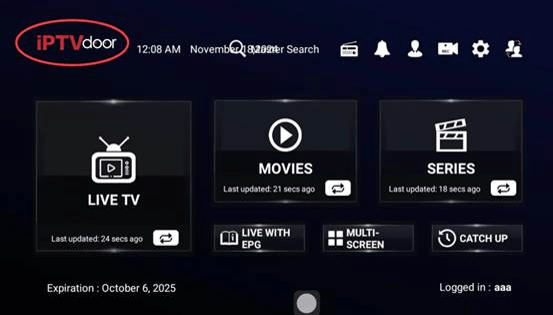
IPTVdoor is an Internet Protocol Television service that delivers live TV channels, movies, series, and sports through an internet connection instead of cable or satellite. It is built for users who want one subscription that works across different devices, including Firestick, Android TV, Smart TVs, mobile devices, laptops, KODI, and MAG boxes.
The official IPTVdoor pricing page currently promotes 18,000+ live IPTV channels and 120,000+ movies and series. It also lists UHD, FHD, HD, 4K image quality, 99.9% uptime, 24/7 live support, TV Guide support, and premium channels. That makes IPTVdoor more suitable for viewers who care about both content range and playback stability.
Why Choose IPTVdoor in 2026?
Choose IPTVdoor in 2026 if your main pain point is unstable IPTV streaming during sports, movies, or peak evening usage. The service focuses on anti-freeze technology, EPG support, 4K playback, and broad device compatibility. I also found the plan structure useful because it lets users start small instead of committing blindly. Bottom line: IPTVdoor is built for users who want variety without constant buffering headaches.
IPTVdoor Key Features
- Live Channels: IPTVdoor provides access to a 15,000+ live TV catalog. This helps users watch news, sports, entertainment, and regional channels in one place.
- VOD Library: The service includes a 50,000+ movies and series library. I noticed this is useful for users who want both live TV and on-demand viewing.
- 4K Streaming: IPTVdoor supports 4K, UHD, FHD, and HD quality. This helps users enjoy sharper streams when their internet connection is strong enough.
- Anti-Freeze Setup: The platform promotes anti-freeze technology for smoother playback. In my review notes, this matters most during live sports and peak traffic hours.
- EPG Support: IPTVdoor includes TV Guide support. This helps users browse schedules, find channels faster, and avoid endless scrolling through long playlists.
- Device Coverage: IPTVdoor works with Firestick, Smart TVs, Android, iOS, Windows, Mac, KODI, and MAG boxes. I like this because setup flexibility reduces device lock-in.
- Live Support: The official page lists 24/7 live support. This helps beginners when activation, playlist loading, or app setup becomes confusing.
What I Liked and Didn’t Like
To give you a truly honest verdict, I spent time testing this IPTV service across different devices, including my living room TV and my laptop. While the IPTVdoor platform is incredibly impressive, it is important to look at both sides of the coin. Here is a transparent breakdown of my experience.
The Pros
- Zero-Risk Testing: The absolute best part of this IPTV provider is how confident they are in their service. The 24-hour free trial allowed me to test my favorite sports channels before spending a single dollar. On top of that, they offer a strict 14-Day Money-Back Guarantee on their subscriptions.
- Rock-Solid Stability for Sports: During a live weekend Premier League match—which is usually when lesser services crash due to high traffic—the Anti-Freeze technology kept my stream running flawlessly in 60fps without a single buffering screen.
- Incredible Value for Money: When you compare the $29.9 quarterly price tag to what a traditional cable company charges for basic channels plus premium sports packages, the savings are massive.
- Simple API Setup: Because IPTVdoor utilizes the Xtream Codes (XC) API, logging in was as simple as typing a username and password. I didn’t have to copy and paste any ridiculously long M3U URLs.
The Cons
- High Internet Speed Required for 4K: If you want to take full advantage of the 4K VOD library and ultra-HD sports channels, you really need a stable internet connection. I recommend at least 25 Mbps to avoid any quality drops.
- One Device per Basic Plan: The standard subscription allows you to connect multiple devices (like your phone and your TV), but you can only watch on one device at a time. If you want multi-room viewing simultaneously, you will need to upgrade or purchase additional connections.
- Overwhelming Initial Experience: With over 15,000 channels and 50,000 movies, scrolling through the list for the first time can feel a bit overwhelming. You definitely need to spend the first 10 minutes utilizing the “Favorites” feature in your media player to organize your go-to channels.
How to Install IPTVdoor (Step-by-Step Guide)
Setting up your IPTVdoor login is incredibly straightforward. Here is how to configure the service on the most popular devices.
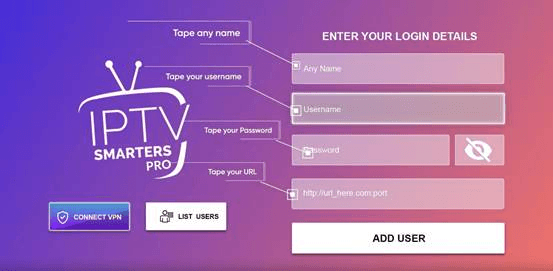
Installation Guide for Firestick and Android Devices
- Install the Downloader App: Navigate to the Amazon Appstore or Google Play Store and install the ‘Downloader’ application.
- Enable Unknown Sources: Go to your device Settings > Developer Options and turn on “Install Unknown Apps” for Downloader.
- Download a Player: Open Downloader and enter the URL for a reputable player like TiviMate or IPTV Smarters Pro.
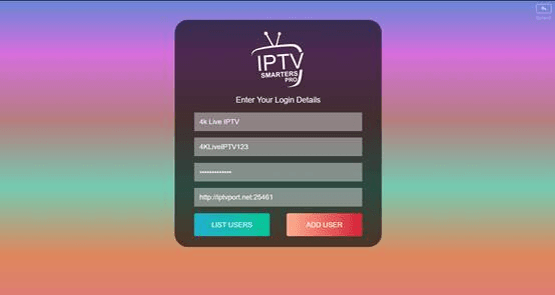
- Enter Credentials: Open the player, select “Login with Xtream Codes API,” and input your IPTVdoor Username, Password, and Server URL. Click “Add User” to begin streaming.
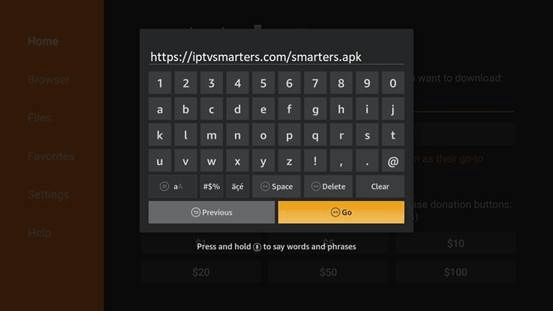
Setting up IPTVdoor on Windows & Mac
- Download the Software: Visit the official IPTV Smarters website and download the application for Windows or macOS.
- Install and Launch: Run the installation file and open the IPTV Smarters Pro app.
- Accept Terms: When you run the app for the first time, scroll down and click Accept on the Terms of Use window.
- API Login: Click on “Add user” then select “Login with Xtream Codes API”.
- Finalize Setup: Enter “IPTVdoor Desktop” as the name, followed by your Username, Password, and Server URL. Click “ADD USER.”
Installation on Samsung and LG Smart TVs
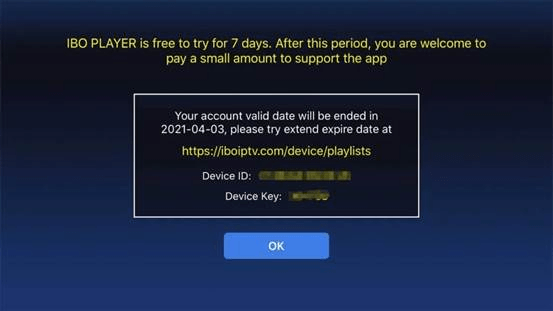
If you prefer not to use an external box, you can use the IBO Player directly on your Smart TV.
- Search the App Store: Go to your TV’s app store, search for the “IBO Player” application, and install it.
- Retrieve Device ID: Launch the IBO Player app and write down the ‘Device ID’ and ‘Device Key’ displayed on your screen.
- Web Portal Activation: On your computer or smartphone, navigate to the IBO Player website (iboiptv.com/device/login). Enter your Device ID and Key, then click Login.
- Add Playlist: Click the “Add XC Playlist” button. Enter your IPTVdoor Username, Password, and Server URL. Click Save.
- Refresh: Go back to your TV, choose “Refresh” in the IBO Player, and your channel list will appear.
IPTVdoor Pricing & Refund Policy Review
One of the primary reasons anyone looks for a new IPTV service is to escape the exorbitant costs of traditional cable. However, I’ve seen many users get burned by shady platforms that demand expensive yearly upfront fees and then disappear.
What I appreciate most about IPTVdoor is its absolute transparency regarding costs and consumer protection. They offer straightforward pricing tiers without any hidden activation fees or forced hardware purchases.
Here is a breakdown of the current subscription plans available from this IPTV provider. The longer the duration, the more significant the savings.
| Subscription Plan | Total Price (USD) | Cost Per Month (Approx.) | Best For |
|---|---|---|---|
| 3 Months | $29.90 | $9.97 / mo | Testing the waters or specific sports seasons. |
| 6 Months | $49.90 | $8.31 / mo | A great balance of cost and flexibility. |
| 12 Months | $69.90 | $5.83 / mo | Best Value: Year-round premium entertainment. |
| 24 Months | $99.90 | $4.16 / mo | Maximum long-term savings for permanent cord-cutters. |
(Note: All plans include full access to the 15,000+ live channels, the 50,000+ VOD library, and Anti-Freeze server technology.)
Refund Policy
IPTVdoor currently promotes a 14-day money-back guarantee on its pricing page. This is important because IPTV performance can vary by location, internet provider, app, and device. I recommend testing the service quickly after purchase so you can decide within the refund window.
The 24-Hour Free Trial
If you are still on the fence, you don’t even need to take out your credit card to see the platform in action. IPTVdoor offers a comprehensive 24-hour free trial. This isn’t a restricted “demo” version; it gives you 100% full access to all premium sports, international channels, and the 4K VOD library so you can test the exact viewing experience you will be paying for.
Final Verdict: Should You Choose IPTVdoor in 2026?
After extensive testing and comparing it against dozens of alternatives, my conclusion is straightforward: IPTVdoor stands out as a top-tier IPTV provider in 2026.
It strikes the perfect balance between massive content variety (15,000+ channels and 50,000+ VODs) and rock-solid reliability. You are not just paying for a playlist; you are investing in their Anti-Freeze technology and seamless XC API integration, ensuring that buffering doesn’t ruin your live sports experience.
Ultimately, what makes the IPTVdoor service an easy recommendation is its zero-risk policy. With a 24-hour free trial to test your connection and a strict 14-Day Money-Back Guarantee, you have nothing to lose. If you want to cut the cord without sacrificing premium 4K quality, this is the way to go.
24-Hour Free Trial
