
11 Best FREE ARK Server Hosting (2026)
 Editorial Team
Disclosure: Guru99 is reader-supported. We may earn a commission when you buy through links on this page. Learn more

ARK server hosting becomes frustrating when overloaded processors cause rubber-banding, unreliable networks interrupt raids, confusing panels waste evenings, hidden slot limits block growth, weak backups risk years of progress, and inconsistent mod updates break clusters. These failures can strand players or corrupt worlds at the worst moment. Buyers often overlook edition support, SLA exclusions, port assignments, and restore testing. Clear evidence makes capacity planning safer, administration calmer, and migrations easier. The right service leaves more time for building, taming, and surviving together.
I spent 110+ hours researching 50+ ARK hosting services, checking official plans, documentation, refund rules, ports, builds, and uptime terms. After rigorous verification, I shortlisted 11 Best Free ARK Server Hosting options with features, pros and cons, and backed-by current evidence. Continue reading to compare free access, managed panels, VPS control, and recovery limits confidently. Read more…

Apex Hosting is one of the best ARK server hosting providers that offers many impressive features, including automated backups, easy server configuration, and a free sub-domain.

Servarium hosts both ARK versions. ARK: Survival Ascended starts at 3,590 ₽ for 30 days on a Ryzen 9 7950X with 16 GB DDR5. ARK: Survival Evolved starts at 1,790 ₽. The first server of either version is 99 ₽ for 5 days.
Best Free ARK Survival Evolved Hosting: Top Picks!
| Hosting Provider |
 Apex Hosting |
 Pine Hosting |
 Shockbyte |
 Physgun |
| Best For | Best ARK Server Hosting | Premium ARK Hosting | Best Uptime Guarantee | Fastest Ark Servers |
| Player Capacity | Unlimited | Unlimited | 30-125+ | Unlimited |
| Modding | Yes | Yes | Yes | Yes |
| Supported Platform | PC | PC | PC | PC |
| Server Locations | 18 global data servers | Many server locations spanning the US, UK, Europe and Australia | Multiple servers in North America, Europe, the Asia Pacific | Top locations globally. |
| Free Trial | 7-Day Money-back Guarantee | 48-Hour Money-back Guarantee | 72-Hour Money-back Guarantee | 3-Day Money-back Guarantee |
| Price | Starting from $11.24/month | Starting from $14.99/month | Starting from $14.99/month | Starting from $14.87/month |
| Our Review |
Excellent – 4.9
 |
Excellent – 4.8
 |
Good – 4.7
|
Good – 4.6
|
| Link | Visit Apex Hosting | Visit Pine Hosting | Visit Shockbyte | Visit Physgun |
| Hosting Provider |
Сервариум
|
Apex Hosting
|
Pine Hosting
|
Shockbyte |
| Best For | ASA на Ryzen 9 7950X и 16 ГБ DDR5 | Best ARK Server Hosting | Premium ARK Hosting | Best Uptime Guarantee |
| Player Capacity | До 70 (ASA) и до 100 (ASE) | Unlimited | Unlimited | 30-125+ |
| Modding | Да | Yes | Yes | Yes |
| Supported Platform | — | PC | PC | PC |
| Server Locations | Россия | 18 global data servers | Many server locations spanning the US, UK, Europe and Australia | Multiple servers in North America, Europe, the Asia Pacific |
| Free Trial | Первый сервер — 99 ₽ на 5 дней | 7-Day Money-back Guarantee | 48-Hour Money-back Guarantee | 72-Hour Money-back Guarantee |
| Price | от 1 790 ₽ за 30 дней | Starting from $11.24/month | Starting from $14.99/month | Starting from $14.99/month |
| Наш обзор |
Отлично – 5.0
|
Excellent – 4.9
|
Excellent – 4.8
|
Good – 4.7
|
| Link | Перейти в Сервариум | Visit Apex Hosting | Visit Pine Hosting | Visit Shockbyte |
1) Сервариум
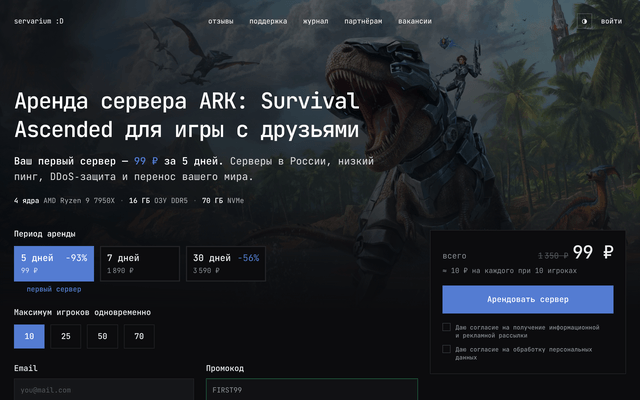
Сервариум поддерживает обе версии ARK. Для ARK: Survival Ascended — 4 ядра AMD Ryzen 9 7950X, 16 ГБ DDR5 и 70 ГБ NVMe, от 3 590 ₽ за 30 дней. Для ARK: Survival Evolved — 4 ядра Ryzen 5 5600 и 12 ГБ ОЗУ, от 1 790 ₽. Я взял первый сервер за 99 ₽ на 5 дней.
Требования:
- Конфигурация: ASA: 4 ядра Ryzen 9 7950X · 16 ГБ DDR5 · 70 ГБ NVMe. ASE: 4 ядра Ryzen 5 5600 · 12 ГБ · 60 ГБ NVMe.
- ASA и ASE: Обе версии игры доступны в одном кабинете. Страница ASE: servarium.ru/arksurvivalevolved.
- Запуск за 1–5 минут: После оплаты сервер создаётся автоматически: ничего не нужно устанавливать вручную, адрес для подключения сразу появляется в личном кабинете.
- Серверы в России: Оборудование расположено в России, поэтому у игроков из России и СНГ низкий пинг.
- Защита от DDoS: DDoS-защита включена в аренду без доплаты.
- Поддержка в Telegram и ВКонтакте: Поддержка отвечает в среднем за 5–7 минут, в том числе ночью, и помогает с установкой модов и переносом мира.
- Панель управления: Запуск, перезапуск, файлы, конфиги, моды и резервные копии — в браузере, без FTP-клиента и консоли.
- Перенос своего мира: Готовое сохранение можно загрузить на сервер и продолжить игру с тем же прогрессом.
Плюсы
Минусы
Цены:
Цена за 30 дней:
| Игроков одновременно | Цена за 30 дней |
|---|---|
| 10 (ASA) | 3 590 ₽ |
| 25 (ASA) | 5 490 ₽ |
| 50 (ASA) | 7 490 ₽ |
| 10 (ASE) | 1 790 ₽ |
| 40 (ASE) | 2 890 ₽ |
| 100 (ASE) | 5 690 ₽ |
Первый сервер — 99 ₽ на 5 дней.
Политика возврата: Оплаченный период не возвращается при досрочном отказе (п. 8.5 оферты). Чтобы проверить сервис до покупки, можно взять первый сервер по пробному тарифу.
Первый сервер — 99 ₽ на 5 дней
1) Apex Hosting
2) Apex Hosting
Apex Hosting runs managed ARK: Survival Evolved servers through a browser control panel. Automatic setup, Workshop support, FTP access, DDoS protection, backups, and a free subdomain cover routine administration. Current standard plans begin with 4 GB RAM for smaller worlds.
Administrators can upload saves, change maps, edit configuration files, and schedule maintenance. The formal SLA targets 99.99% monthly availability under defined exclusions. Every service receives assigned connection details rather than arbitrary ports. Its seven-day refund remains conditional, so buyers should review eligibility carefully before ordering.

Features:
- Mod Management: Install Workshop content and custom maps through managed tools. FTP access supports manual files when automated installation cannot cover a specific configuration.
- World Migration: Upload saved worlds and matching configuration folders before startup. A controlled migration keeps tribe data, structures, inventories, and map settings together.
- Network SLA: Apex sets a 99.99% monthly uptime threshold for credits. Scheduled work, emergency maintenance, customer actions, and third-party failures remain excluded.
- Port Handling: Each service receives assigned connection details and a free subdomain. Dedicated IP availability depends on the selected plan, region, or paid option.
- Build Updates: Automatic updates keep server software current after releases. Administrators should still back up worlds and verify Workshop compatibility before accepting major changes.
- Recovery Tools: Automatic and manual backups preserve world and configuration states. These restore points recover failures but do not track line-level changes like Git.
- Admin Support: Live chat, tickets, and guides cover setup and common management tasks. Complex mod conflicts or unsupported files may require administrator investigation.
Pros
Cons
How to Get It Free?
- Open the Apex Hosting ARK order page and select sufficient memory.
- Purchase the server and test maps, mods, backups, and connection quality promptly.
- No free trial exists. Eligible customers may request a conditional refund within seven days.
7 day refund policy.
2) Pine Hosting
3) Pine Hosting
Pine Hosting provides managed ARK: Survival Evolved servers with a custom panel, console, file manager, backup manager, and task scheduler. Its listed packages combine processor allocations with 8 GB, 12 GB, or 16 GB RAM. Deployment begins after payment confirmation.
Owners can add mod identifiers, edit settings, and schedule restarts that apply game updates. Pine advertises 99.99% uptime, although equally detailed public credit calculations were not verified. The panel exposes assigned IP and query-port information. New customers receive only 48 hours for eligible refund requests.

Features:
- Task Scheduling: Schedule restarts, updates, backups, and console commands around player activity. Routine maintenance can continue without leaving an administrator connected all day.
- File Manager: Edit ARK configuration files and upload saved worlds through the browser. Console access helps trace startup failures after changing maps or mods.
- Resource Tiers: Packages state memory, processor allocation, and recommended slots. Administrators can upgrade when large tribes, structures, creatures, or Workshop content raise demand.
- Uptime Claim: Pine advertises 99.99% uptime on its ARK page. A detailed public service-credit formula was not located during the current verification.
- Port Details: The panel identifies the server IP and Steam query port. Public material does not promise arbitrary customer-selected game or RCON ports.
- Update Process: Restarting applies the latest supported ARK server build automatically. Scheduled restarts reduce manual work but still require backups before disruptive releases.
- Refund Window: New customers can request a refund within 48 hours. The short period requires immediate checks of latency, files, mods, and restore behavior.
Pros
Cons
How to Get It Free?
- Visit Pine Hosting and choose an ARK package near your players.
- Pay for the server, then test mods, updates, backups, and query-port access.
- No free trial exists. New customers may request a refund within 48 hours.
48 hours refund policy
3) ShockByte
4) ShockByte
ShockByte sells ARK: Survival Evolved plans for 30, 70, or 125-plus players. The service includes automatic setup, Workshop mod installation, PC crossplay, backups, DDoS protection, file access, and global locations. Current US monthly prices begin at $14.99 for the Raptor package.
Its formal SLA targets 99.99% network and 99.95% hardware availability. Qualifying outages must exceed five consecutive minutes, while software failures and resource exhaustion remain excluded. Servers receive assigned endpoints, with dedicated IP options potentially costing extra. The self-service refund period lasts 72 hours total.

Features:
- Mod Installer: Install supported Steam Workshop items without assembling every file manually. Automatic mod updates reduce routine work after publishers release compatible revisions.
- PC Crossplay: Steam and Epic Games players can share supported server configurations. Console support differs, so Xbox and PlayStation buyers need another compatible provider.
- Network SLA: The formal agreement targets 99.99% network availability. Qualifying incidents exceed five minutes, and customers must submit claims within seven days.
- Hardware SLA: ShockByte separately targets 99.95% hardware availability. Planned maintenance, software errors, customer actions, and resource exhaustion remain outside the covered calculation.
- Port Access: Managed plans provide assigned connection details for gameplay. Dedicated IP service may expose additional control, but availability and charges require checkout confirmation.
- Automatic Backups: Scheduled backups provide recovery points before updates or mod changes. Administrators should still download independent copies before major map or cluster work.
- Plan Scaling: Three published packages increase memory and stated player capacity. Actual performance still depends on structures, creatures, maps, mods, and concurrent simulation load.
Pros
Cons
How to Get It Free?
- Open ShockByte and select the ARK package matching expected load.
- Purchase the server and verify crossplay, mods, backups, and location immediately.
- No free trial exists. Eligible orders have a 72-hour self-service refund period.
72-hour self-service refund period.
4) Physgun
5) Physgun
Physgun pairs ARK: Survival Evolved hosting with resource-based plans and no artificial player-slot limits. Its panel includes live resource graphs, configuration editing, Workshop management, map switching, backups, schedules, SFTP, subusers, and audit logs. Listed packages start with 8 GB DDR5 memory.
The provider advertises 99.9% or better uptime without equally detailed public credit terms. Assigned connection details support gameplay, while arbitrary custom ports remain undocumented. File access and audit history improve administration, although they do not create Git revisions. A three-day refund guarantee currently applies.

Features:
- Resource Graphs: Monitor processor and memory behavior while tribes play. Real usage helps administrators judge upgrades instead of relying on unsupported player-count estimates.
- Map Switching: Change official or custom maps through the panel. Backups should precede switches because cluster settings, transfers, and mod dependencies can affect saves.
- Team Permissions: Assign restricted roles to moderators and tribe administrators. Audit logs identify important panel activity without sharing the account owner credentials.
- File Access: Browser editing and SFTP support detailed configuration changes. Administrators can download files for external comparison or private version-control workflows when needed.
- Mod Automation: Add Workshop identifiers and let the panel download supported content. Automatic updates reduce work but may still introduce incompatible mod revisions.
- Uptime Claim: Physgun advertises at least 99.9% uptime across plans. Detailed public claim deadlines and service-credit calculations were not verified during research.
- Refund Terms: Customers can request a refund within three days of ordering. Administrators must test location, resources, mods, and backups during that brief period.
Pros
Cons
How to Get It Free?
- Choose a Physgun ARK plan based on memory and processor allocation.
- Purchase it, then test maps, subusers, SFTP, backups, and resource graphs.
- No free trial exists. First orders include a three-day refund guarantee.
3 day refund guarantee
5) Godlike Host
6) Godlike Host
Godlike Host manages ARK: Survival Evolved servers with Workshop mod support, map selection, scheduled tasks, configuration tools, and up to three automatic backups daily. Its published resource tiers begin with 8 GB RAM and state processor, storage, and estimated player capacity.
The company offers a seven-day free trial according to its current ARK pricing guidance. Paid first purchases also receive a conditional three-day refund window. Official material references 99.9% availability, though detailed consumer credit calculations remain less prominent. Managed endpoints replace arbitrary customer port selection.

Features:
- Free Trial: Current ARK pricing guidance advertises seven days of free evaluation. Buyers should confirm plan eligibility and payment requirements before creating the server.
- Mod Manager: Install and update supported Workshop content through the panel. Full file access remains available for configurations that require manual handling.
- Map Support: Select supported official DLC maps and compatible versions. Cluster administrators must keep map settings, transfer rules, and installed content consistent.
- Frequent Backups: The provider states that servers receive up to three automatic backups daily. Panel restores shorten recovery after crashes, updates, or mod conflicts.
- Uptime Record: Godlike materials reference 99.9% availability. Detailed public service-credit calculations and claim procedures were not especially prominent during the current verification.
- Port Handling: Servers receive managed connection information after deployment. Public product documentation does not promise unrestricted selection of game, query, or RCON ports.
- Paid Refund: Eligible first purchases have a three-calendar-day refund window. Renewals, repeat purchases, dedicated services, add-ons, licenses, and extra IPs carry exclusions.
Pros
Cons
How to Get It Free?
- Open Godlike Host and choose a compatible ARK: Survival Evolved package.
- Start the advertised seven-day trial and configure maps, mods, backups, and access.
- Confirm eligibility before signup. Paid first purchases instead receive a three-day refund window.
3 day refund window
6) Nitrado
7) Nitrado
Nitrado supports ARK: Survival Evolved across PC, Xbox One, PlayStation 4, mobile, and Nintendo Switch packages. Customers choose slots, region, and rental duration, including short prepaid terms. CrossARK, game switching, support guides, and location selection address varied communities.
The current offer permits pre-Aquatica version selection for compatible PC servers. Public pages do not present a numeric network SLA for this product. Nitrado assigns connection details rather than advertising arbitrary ports. Refunds may be requested within 14 days, but subscriptions, modified services, three-day servers, and several payment methods are excluded.

Features:
- Platform Choice: Choose PC, Xbox One, PlayStation 4, mobile, or Nintendo Switch packages. Available maps, mods, and crossplay behavior differ by platform.
- Flexible Runtime: Select rental periods between three and 365 days on eligible configurations. Longer commitments can reduce effective cost but limit refund flexibility.
- CrossARK: Compatible packages can link servers for character and item transfers. Cluster owners must align maps, transfer rules, versions, and player permissions.
- Version Selection: Eligible PC offers include a pre-Aquatica version option. Administrators should verify mod compatibility and save behavior before changing a persistent world.
- Global Locations: Choose among listed regions across Europe, North America, Asia, Australia, and South America. Location selection helps reduce distance for distributed tribes.
- Port Assignment: The service supplies connection details for the selected game platform. Public documentation does not advertise arbitrary customer-defined port allocations for every package.
- Refund Limits: Eligible original purchases may qualify within 14 days. Subscriptions, modified services, renewals, three-day servers, gift cards, and certain payments remain excluded.
Pros
Cons
How to Get It Free?
- Open Nitrado and choose the exact ARK platform, slots, region, and duration.
- Purchase an eligible server and avoid modifying its configuration during evaluation.
- No free trial exists. Eligible original purchases may qualify for refunds within 14 days.
14 days refund
BisectHosting combines ARK: Survival Evolved hosting with a Workshop installer, one-click clustering, configuration editor, automatic world updates, backups, and an instance manager. Twenty-one locations help communities choose a nearby region. Standard service includes three days of retained backups.
Its formal SLA targets 99.97% monthly node uptime and describes claim-based compensation. Scheduled work and external causes remain excluded. Managed servers receive assigned endpoints, while dedicated IP products can add ports for services such as RCON. Eligible standard purchases have a conditional three-day refund window for evaluation.

Features:
- Workshop Installer: Install supported ARK mods and maps from the control panel. File access covers custom settings and content requiring more detailed changes.
- Server Clusters: Link compatible maps through guided cluster tools. Shared items and creatures require coordinated transfer settings, versions, permissions, and adequate resources.
- Node SLA: BisectHosting targets 99.97% monthly uptime at the physical-node level. Approved claims extend service time according to each qualifying outage duration.
- Port Controls: Standard servers receive assigned endpoints. Dedicated IP services can create additional ports for authenticated remote console or other supported administration.
- Instance Manager: Create separate instances for alternate worlds, settings, or games. This reduces production risk when testing major configuration or Workshop changes.
- Backup Retention: Included standard backups cover three days and support scheduled creation or download. Longer retention and extra slots may require paid options.
- Location Support: Choose among twenty-one international hosting locations. Support can help move service when another region provides better latency for the active community.
Pros
Cons
How to Get It Free?
- Visit BisectHosting and choose an ARK plan with suitable resources.
- Purchase the server, then test Workshop content, clusters, backups, and endpoints immediately.
- No free trial exists. Eligible standard orders may receive refunds within three days.
3 days refund guarantee
8) Gravel Host
9) Gravel Host
Gravel Host sells ARK: Survival Evolved packages with 8 GB to 15 GB RAM, NVMe storage, unlimited slots, full file access, scheduled tasks, and a settings manager. Its current legal notice states that official ARK: Survival Ascended hosting is not provided.
The network and power SLA targets 99.9% availability under listed exclusions. Credits require a claim within seven days. Managed servers supply assigned endpoints and firewall controls rather than unrestricted port promises. The product page advertises long backup retention and a 72-hour refund policy for new servers.
Image note: This screenshot shows earlier ARK: Survival Ascended marketing. Current Gravel Host legal terms limit the managed service reviewed here to ARK: Survival Evolved.

Features:
- Settings Manager: Change common ARK: Survival Evolved values through guided controls. Full file access remains available for settings outside the simplified interface.
- Version Scope: The provider supports ARK: Survival Evolved through managed hosting. Current legal terms exclude official ARK: Survival Ascended service on these products.
- Network SLA: Gravel Host targets 99.9% network and power availability. Customers must request eligible credits within seven days of the qualifying event.
- Port Handling: Managed servers receive assigned connection details and firewall controls. Customer-selected port allocations remain subject to the purchased service and provider approval.
- Backup Retention: The ARK page advertises extended server-data retention and automatic backup features. Administrators should confirm restore frequency and downloadable-copy limits before migration.
- File Access: FTP and browser tools expose world, mod, and configuration files. External downloads allow independent archives or private Git tracking for text settings.
- Refund Policy: New servers receive a 72-hour money-back period under current product terms. Customers should check exclusions, payment method, and administrative deductions before ordering.
Pros
Cons
How to Get It Free?
- Open Gravel Host and select an ARK: Survival Evolved package.
- Purchase it, then verify mods, saves, backups, ports, and regional latency promptly.
- No free trial exists. New servers carry a 72-hour money-back policy.
72-hour money-back policy
9) ScalaCube
10) ScalaCube
ScalaCube provides ARK: Survival Evolved hosting with instant setup, FTP access, DDoS protection, SSD storage, Workshop mods, map selection, configuration controls, and custom launch parameters. Paid plans begin with 20 player slots according to the current product page.
Its dedicated free-ARK page now states that free game servers are no longer provided, despite older setup guides remaining online. Buyers should treat the service as paid. ScalaCube advertises monitoring rather than a contractual uptime guarantee. Free-tier port instructions no longer establish current access. Paid purchases show a seven-day guarantee.

Features:
- Current Access: ScalaCube now states that free ARK game servers are unavailable. Older instructions describing renewable free servers should not guide a new purchase.
- Workshop Mods: Install supported Steam Workshop items and selected maps through managed tools. FTP handles compatible files or settings that need manual changes.
- Launch Parameters: Adjust supported startup flags for server behavior. Incorrect parameters can prevent booting, so administrators should preserve a known working configuration first.
- Map Controls: Change among supported official maps and custom content. Backups help protect worlds when transfers, dependencies, or map-specific settings create conflicts.
- Port Handling: Paid servers receive connection details through the panel. Historical free-tier IP-with-port instructions do not prove a currently available free endpoint.
- Uptime Terms: The product page advertises 24/7 monitoring and operation. A contractual numeric SLA with public credit calculations was not verified during research.
- Paid Guarantee: Current ARK pages display a seven-day money-back guarantee. Buyers should confirm regional eligibility, exclusions, and cancellation steps before completing payment.
Pros
Cons
How to Get It Free?
- Open the current ScalaCube ARK page and review paid slot packages.
- Ignore older free-server instructions because the official page says access ended.
- No free plan exists now. Paid purchases display a seven-day money-back guarantee.
7 money-back guarantee
10) RocketNode
11) RocketNode
RocketNode offers separate ARK: Survival Evolved and ARK: Survival Ascended packages. Evolved plans begin with 8 GB RAM, unlimited slots, SSD storage, FTP access, DDoS protection, and the Apollo control panel. Four published resource tiers support different community sizes.
Its formal SLA guarantees 99.99% network availability for applicable services. Panel availability is measured separately from server connectivity. Managed endpoints replace unrestricted customer port control, while files and backups support recovery without Git history. Eligible first purchases for non-FiveM and non-Minecraft game hosting receive a 48-hour refund window.

Features:
- Edition Choice: RocketNode lists separate Evolved and Ascended products with different resource tiers. Buyers must select the correct edition before paying or migrating files.
- Apollo Panel: The control panel exposes monitoring, file management, installers, and server controls. Administrators can inspect resource use while managing routine game settings.
- Network SLA: RocketNode guarantees 99.99% network availability for applicable services. The agreement clearly distinguishes a reachable server from an unavailable control panel.
- DDoS Capacity: The provider advertises distributed mitigation and large scrubbing capacity. SLA exclusions and provider logs still determine whether an outage earns credits.
- Port Handling: Managed services receive allocated connection details through the panel. Public product material does not promise unrestricted customer-chosen game or query ports.
- File Control: Full FTP and modern file management support saves, settings, and mods. External copies can feed private change tracking for text configurations.
- Refund Access: Eligible first purchases for covered game hosting can request refunds within 48 hours. Renewals, repeat purchases, disclaimers, and prohibited activity carry exclusions.
Pros
Cons
How to Get It Free?
- Open RocketNode and choose Evolved or Ascended before selecting resources.
- Purchase the server and test files, mods, monitoring, backups, and network access.
- No free trial exists. Eligible first game-hosting purchases have a 48-hour refund window.
48-hour refund window
11) Hostinger
12) Hostinger
Hostinger supplies ARK hosting through self-managed VPS plans with Game Panel, full root access, AMD EPYC processors, NVMe storage, DDoS protection, weekly backups, and an AI assistant. Current US offers begin with 16 GB RAM and four virtual processor cores.
Root control lets administrators choose firewall rules, ports, scripts, and private Git workflows. That flexibility brings responsibility for operating-system security and server maintenance. The hosting agreement guarantees 99.9% monthly uptime with defined exclusions and a five-percent credit. Eligible hosting purchases carry a 30-day money-back guarantee.

Features:
- Root Access: Control the operating system, firewall, services, scripts, and storage directly. This freedom suits experienced administrators but increases maintenance and security responsibility.
- Custom Ports: VPS administrators can bind services and configure firewall rules around required ports. They must prevent conflicts and restrict unnecessary public exposure.
- Game Panel: One-click templates simplify supported ARK deployment and daily control. Root access remains available when the managed interface cannot express a required change.
- Git Workflows: Install Git and maintain private repositories for text-based configuration or scripts. Large worlds, backups, credentials, and Workshop binaries should remain outside repositories.
- Uptime SLA: Hostinger guarantees 99.9% monthly service uptime. Approved claims receive a five-percent credit, while maintenance, DDoS events, and customer faults remain excluded.
- AI Assistant: Hostinger Agent can explain VPS tasks and suggest commands. Administrators must review generated instructions, protect credentials, and create backups before execution.
- Weekly Backups: Automatic weekly backups provide recurring recovery points. Administrators running active clusters should consider additional snapshots or independent archives before major changes.
Pros
Cons
How to Get It Free?
- Open Hostinger ARK hosting and select the required Game Panel VPS.
- Pay upfront, deploy ARK, then test ports, backups, updates, and regional latency.
- No free trial exists. Eligible hosting purchases include a 30-day money-back guarantee.
30-day money-back guarantee
Comparison Between Top ARK Server Hosting
| Tool | Mod Support | Backup Controls | DDoS Included | Admin Automation | Formal SLA | Free Evaluation |
|---|---|---|---|---|---|---|
| Apex Hosting | ✅ | ✅ | ✅ | ✅ | ✅ | ❌ |
| Pine Hosting | ✅ | ✅ | ✅ | ✅ | ❌ | ❌ |
| ShockByte | ✅ | ✅ | ✅ | ✅ | ✅ | ❌ |
| Physgun | ✅ | ✅ | ✅ | ✅ | ❌ | ❌ |
| Godlike Host | ✅ | ✅ | ✅ | ✅ | ❌ | ✅ |
What Is ARK Server Hosting and How Does It Work?
ARK server hosting runs a persistent multiplayer world on remote infrastructure. The provider supplies processor time, memory, storage, networking, and a management panel. Players connect through the assigned address while administrators control maps, rates, tribes, mods, backups, and updates. Managed plans handle operating-system work and common game tasks. A VPS gives deeper control but transfers security and maintenance duties to the customer. Before purchasing, confirm whether the service supports Survival Evolved, Survival Ascended, PC crossplay, consoles, clustering, and every required map.
Is Free ARK Server Hosting Truly Free?
Free ARK hosting is uncommon because persistent worlds consume substantial memory, processor time, storage, and bandwidth. Some providers offer timed trials, while others provide only money-back guarantees after payment. A refund window is not a free plan. It can include eligibility rules, exclusions, or deadlines. ScalaCube currently states that its former free ARK service is unavailable, despite older instructions remaining online. Self-hosting removes rental fees but still uses electricity, hardware, internet capacity, and administrator time. Compare total cost and risk before treating any offer as free.
How Much RAM Does an ARK Server Need?
A small Survival Evolved server often starts around 6 to 8 GB RAM. Large maps, Workshop mods, structures, creatures, clusters, and concurrent players raise demand. Survival Ascended generally needs more memory and processor capacity than Evolved. Published slot counts remain rough estimates because simulation complexity differs between worlds. Leave capacity for updates, backups, and temporary spikes. Monitor memory and processor behavior during busy sessions, boss fights, breeding events, and map transfers. Upgrade from observed pressure rather than assuming that unlimited slots guarantee unlimited performance.
Which Features Matter Most for ARK Server Hosting?
Focus on controls that protect persistent worlds and keep every player compatible.
- Edition Support: Confirm Evolved or Ascended, platform compatibility, crossplay rules, maps, and clustering before purchase.
- Resources: Compare memory, processor allocation, storage, location, and upgrade paths against the real world load.
- Administration: Require file access, console tools, schedules, subusers, logs, and understandable configuration controls.
- Recovery: Check backup frequency, retention, downloadable copies, restore steps, and post-cancellation data treatment.
- Network Terms: Separate marketing uptime from formal SLAs, exclusions, claim deadlines, credits, ports, and DDoS coverage.
Include renewal pricing, refund conditions, dedicated-address charges, and cluster costs in the final budget.
What Did Our ARK Hosting Verification Find?
The November 2026 review checked official product pages, documentation, refund terms, plan details, and SLA language. Apex and ShockByte publish detailed network targets, while BisectHosting specifies node-level availability. Pine, Physgun, and others advertise percentages without equally detailed public remedies. Managed providers generally assign endpoints instead of promising arbitrary ports. Hostinger provides root-level port control through a VPS. Backups, instances, and audit logs were common, but native Git history was not. ScalaCube now says free ARK servers are unavailable, correcting older free-plan claims.
How Do Uptime Claims Differ From Hosting SLAs?
An uptime claim presents a percentage. A service-level agreement defines measurement scope, exclusions, incident thresholds, claim deadlines, and compensation. Scheduled maintenance, software crashes, customer mistakes, unsupported mods, resource exhaustion, and outside network failures may not count. Some providers measure the network, others measure hardware or a physical node. Service credits usually extend hosting or offset future charges. They rarely compensate lost playtime or damaged worlds. Independent monitoring can document outages, but the provider agreement decides whether an incident qualifies for contractual relief.
Can ARK Hosts Provide Custom Ports and RCON Access?
Managed hosts usually assign the game address, query port, and related allocations. A dedicated IP product may expose extra ports for RCON or companion services, but support differs. VPS administrators can bind services and configure firewall rules directly. Custom ports do not improve performance automatically. They help avoid conflicts and support approved services. Verify every required game, query, Steam, cluster, voice, and remote-console port before purchase. Incorrect firewall rules can make a healthy server unreachable, expose management interfaces, or block cross-server transfers.
How Should You Choose Between ARK Evolved and Ascended Hosting?
Choose the edition before comparing providers because hardware, mods, platforms, maps, and licensing differ. Survival Evolved has mature Workshop content and lower typical resource needs. Survival Ascended uses newer technology, consumes more resources, and follows different mod distribution rules. Several hosts sell separate products for each edition. Console availability also varies. Do not upload an Evolved world into an Ascended service expecting direct compatibility. Record the edition, branch, map, mod identifiers, cluster settings, and client platforms before ordering or migrating a server.
Do Hosting Backups Replace Git Version Control?
No. Backups capture worlds, databases, mods, and configuration at selected times. Git records line-level changes to text files, supports branches, and helps explain who changed a setting. Managed panels commonly provide backups, profiles, instances, or audit logs instead of repositories. VPS customers can install Git for scripts and text configuration. Exclude save data, Workshop binaries, credentials, tokens, and large backup archives. Use provider backups for disaster recovery and private version control for approved text changes, then test both restoration paths regularly.
How Can You Host an ARK Server Without Rental Fees?
Self-hosting avoids a monthly provider bill but transfers every operational duty.
- Prepare Hardware: Reserve adequate memory, fast storage, processor capacity, and stable upstream bandwidth for the selected edition.
- Install Server: Download the official dedicated-server files, choose a map, and create documented startup configuration.
- Configure Network: Forward required ports carefully, restrict management access, and test connections from outside the home network.
- Protect Progress: Schedule backups, monitor resources, patch the operating system, and rehearse recovery before inviting a long-term community.
Can AI Help Manage an ARK Server Safely?
AI assistants can explain log messages, draft configuration changes, organize mod identifiers, and suggest diagnostic commands. Hostinger includes an assistant inside its VPS workflow, while other panels may provide guided automation. Generated instructions can target the wrong edition, map, operating system, or mod revision. Never paste passwords, tokens, private player information, or complete sensitive logs into an assistant. Review every command, compare it with official documentation, and create a verified backup first. AI can reduce searching, but administrators remain responsible for production changes.
How Did We Choose Best Free ARK Server Hosting?

At Guru99, we prioritize credibility by focusing on accurate, relevant, and objective information. After over 110 hours of research, we examined 50+ ARK Server Hosting services, selecting the best free and paid options. Check out the essential factors to evaluate below, such as ease of use, reliability, and performance. This trusted guide ensures you make the right choice by highlighting key features and well-researched options, helping you find the perfect server host for your needs.
- Performance: It is crucial to ensure fast and smooth gameplay for all users.
- Reliability: Make sure you avoid frequent downtimes to keep players engaged.
- Security: A great hosting option offers strong data protection measures for players.
- Customization: One of the top features that we looked for is the ability to easily modify game settings.
- Customer Support: Having a responsive support team helps you resolve issues quickly.
How Do You Troubleshoot Common ARK Hosting Problems?
Begin with logs, changes, edition details, and a backup. Change one variable before restarting.
- Issue: The server disappears because the query port or browser filters are incorrect.
Solution: The administrator should confirm the assigned endpoint, query port, edition, map, password, and server-browser filters before changing files. - Issue: Workshop mods fail after an update changes dependencies, load order, or supported builds.
Solution: The administrator should isolate recent mod revisions, verify every dependency, restore a backup, and test changes on a separate instance. - Issue: Players disconnect during raids because processor load rises above the selected allocation.
Solution: The administrator should inspect live resource graphs, reduce expensive structures or mods, schedule restarts, and compare a stronger plan. - Issue: A cluster blocks transfers because maps, versions, permissions, or shared identifiers do not match.
Solution: The administrator should align cluster identifiers, transfer settings, installed content, edition versions, and network allocations across every linked map. - Issue: Manual configuration edits disappear when the panel rewrites generated settings during startup.
Solution: The administrator should stop the server, edit the documented source file, preserve permissions, and verify values after one controlled restart. - Issue: Backups exist but fail when the tribe needs an emergency world restoration.
Solution: The team should perform recurring restore drills, download independent copies, document retention, and verify characters, structures, creatures, and inventories. - Issue: Remote console access fails because RCON ports or firewall rules were never allocated.
Solution: The administrator should verify provider support, assigned ports, passwords, firewall scope, and client settings without exposing management services publicly.
What Trends Will Shape ARK Server Hosting?
Providers will keep separating Survival Evolved and Survival Ascended products as their hardware, mod ecosystems, and platform rules diverge. Panels are adding clearer edition selection, Workshop automation, cluster tools, resource graphs, audit logs, and guided AI support. Buyers should expect stronger demand for processor allocations, memory transparency, and downloadable recovery copies. Formal SLA language may become more visible as communities compare advertised uptime with remedies. Administrators will still need controlled updates because maps, mods, saves, and cluster transfers can break without warning.
Verdict
After verifying eleven hosts, I found three providers that addressed ARK administration, recovery, and network reliability with the clearest practical trade-offs.
Apex Hosting: I preferred its managed panel, FTP controls, automatic backups, and documented 99.99% monthly service-credit threshold.
Pine Hosting: Its scheduled tasks, file manager, clear resource packages, and restart-based updates made recurring server care approachable.
ShockByte: The separate network and hardware SLA targets, PC crossplay, mod installer, and automatic backups provided strong operational coverage.
