
Cryptography Tutorial
 Editorial Team
⚡ Smart Summary
Cryptography protects information by transforming it into a non-human-readable form that only a holder of the correct key can reverse, and this page covers its features, applications, algorithms, and a hands-on CrypTool exercise.
Information plays a vital role in business, government, and military operations, and information in the wrong hands can cost revenue or worse. To secure communication, an organization uses cryptology to cipher information — transforming it into a non-human-readable format and back again.
In this cryptography and network security article, you will learn how cryptology works and how to keep information out of the wrong hands.
What is Cryptography?
Cryptography is the study and application of techniques that hide the real meaning of information by transforming it into non-human-readable formats and back again.
Consider an example. To send “I LOVE APPLES”, you replace every letter with the third successive letter of the alphabet, producing “K NQXG CRRNGU”. To read it, the recipient steps three letters back, as shown below.

Turning information into non-human-readable form is called encryption, and reversing it is called decryption. The encrypted result is known as a cipher.
Decryption uses a secret key known only to the legitimate recipients. Because the key is required, communication stays secure even when an attacker intercepts the cipher, which makes no sense without it.
Features of Cryptography
A cryptographic system is judged on the characteristics below.
| Feature | What it means |
|---|---|
| Algorithm | The published mathematical procedure performing the transformation. |
| Confidentiality | Only holders of the key can read the protected data. |
| Integrity | Any change to the data is detectable. |
| Adaptability | The scheme tunes to different key sizes and threat levels. |
| Interoperability | Different systems and vendors exchange protected data. |
| Authentication | The origin of a message can be proven. |
| Scalability | Performance holds up as data volumes grow. |
| Key Management | Keys are generated, stored, rotated, and retired safely. |
Applications of Cryptography
Those characteristics become everyday services people rely on without noticing.
| Application | How cryptography is used |
|---|---|
| TLS encryption | Protects traffic between a browser and a website. |
| Password storage | Stores salted hashes instead of readable passwords. |
| Online banking | Secures transactions and verifies the bank. |
| Cryptocurrency | Signs transactions and links blocks with hashes. |
| Encrypted email | Keeps message contents private in transit and storage. |
| Digital signatures | Proves authorship and that a document is unchanged. |
| Secure messaging | Applies end-to-end encryption between devices. |
| E-commerce | Protects card details during checkout. |
What is Cryptanalysis?
Cryptanalysis is the art of decrypting messages without the key used to encrypt them. It applies mathematical analysis and algorithms to decipher ciphers, and it is used both to breach systems and, defensively, to measure how much protection an algorithm offers.
The success of a cryptanalysis attack depends on:
- Amount of time available
- Computing power available
- Storage capacity available
The following are the commonly discussed cryptanalysis attacks:
- Brute force attack — tries every possible combination of the plaintext or key, ciphering each one and comparing it against the original cipher.
- Dictionary attack — uses a wordlist to match either the plaintext or the key. It is mostly used when trying to crack encrypted passwords.
- Rainbow table attack — compares the ciphertext against pre-computed hashes to find matches. Salting each stored password defeats it.
What is Cryptology?
Cryptology is the umbrella field combining cryptography and cryptanalysis. Both halves matter: an algorithm is trusted only once cryptanalysts have tried and failed to break it.
Encryption Algorithms
The algorithms below appear repeatedly in security work. Note which remain approved and which survive only in legacy systems.
- MD5 — short for Message-Digest 5, it produces 128-bit hash values. MD5 is a hash function rather than encryption, so it cannot be reversed by design. It is not collision resistant — two different inputs can produce the same hash — and is unfit for passwords or signatures.
- SHA — short for Secure Hash Algorithm, this family generates condensed representations of a message, called a message digest:
- SHA-0: produces 160-bit hash values. It was withdrawn for a significant flaw and replaced by SHA-1.
- SHA-1: produces 160-bit hash values. A practical collision was demonstrated in 2017 and NIST disallowed it for digital signatures, so avoid it.
- SHA-2: a family of six functions including SHA-256 and SHA-512, working on 32-bit and 64-bit words respectively. Both remain approved.
- SHA-3: standardized in 2015 and formerly known as Keccak, it uses a different internal design as a backup to SHA-2.
- AES — the Advanced Encryption Standard is the symmetric block cipher protecting most data at rest and in transit today, with 128-, 192-, and 256-bit keys. It replaced DES and is the default for new systems.
- RC4 — a stream cipher once common in Secure Sockets Layer (SSL) and Wired Equivalent Privacy (WEP). Both protocols are obsolete, and RFC 7465 prohibited RC4 in every version of TLS in 2015. It survives here as a teaching example.
- Blowfish — a keyed symmetric block cipher used historically for passwords and files. Its 64-bit block size makes AES the better modern choice.
Looking ahead, NIST published its first post-quantum standards in August 2024 — ML-KEM for key exchange, ML-DSA and SLH-DSA for signatures — which will gradually replace today’s public-key algorithms.
Hacking Activity: How to Create a Cipher Using CrypTool
In this practical CrypTool exercise, you create a simple cipher with RC4 and then recover it with a brute-force analysis, assuming the key is known to be 24 bits. The point is to show why a short key and a broken cipher offer no real protection.
Creating the RC4 Stream Cipher
Step 1) Download and install CrypTool
CrypTool 1 is an open-source educational tool for cryptology. Active development has since moved to CrypTool 2, but release 1.4.42 still runs on Windows and matches the screens below. Download it from cryptool.org.
Step 2) Open CrypTool and replace the text
The phrase to encrypt is Never underestimate the determination of a kid who is time-rich and cash-poor. The key is 00 00 00.
- Open CrypTool 1.
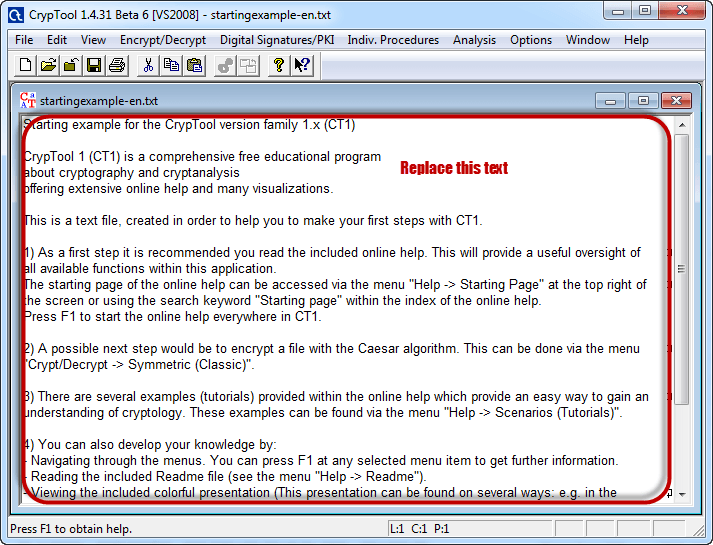
- Replace the text with the phrase above.

Step 3) Encrypt the text
- Click the Encrypt/Decrypt menu.

- Point to Symmetric (modern), then select RC4.

Step 4) Select the encryption key
- Select 24 bits as the key length.
- Set the value to 00 00 00.
- Click Encrypt to produce the stream cipher below.
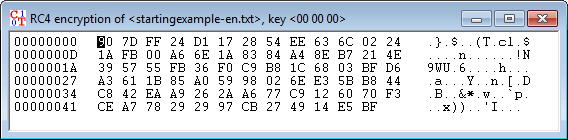
Attacking the Stream Cipher
Step 5) Start the analysis
- Click the Analysis menu.

- Point to Symmetric Encryption (modern), then select RC4.

- The assumption is a 24-bit secret key, so select 24 bits as the key length.
- Click Start.

- Note: the time taken depends on the processing capacity of the machine being used and on the key length. A longer key takes longer, which is why modern keys are 128 bits or more.
Step 6) Analyze the results
- When the analysis finishes, candidate keys appear ranked as follows.

- Note: a lower entropy value usually indicates the correct result, though a higher one can be right.
- Select the line that reads as sensible text, then click Accept selection.
