
What is Social Engineering? Definition & Types
 Editorial Team
⚡ Smart Summary
Social engineering is the art of manipulating people into revealing confidential information or granting access, and this page explains how those attacks are staged, the techniques attackers favor, and the countermeasures that stop them.
What is Social Engineering?
Social engineering is the art of manipulating users of a computing system into revealing confidential information that can be used to gain unauthorized access to that system. The term also covers exploiting human kindness, greed, and curiosity to enter restricted buildings or to persuade users to install backdoor software.
Knowing the tricks attackers use to talk people out of login details is fundamental to protecting computer systems. Because the target is a person rather than a server, no firewall alone can close the gap.
In this article, you will learn the common social engineering techniques and the security measures that counter them.
How Does Social Engineering Work?
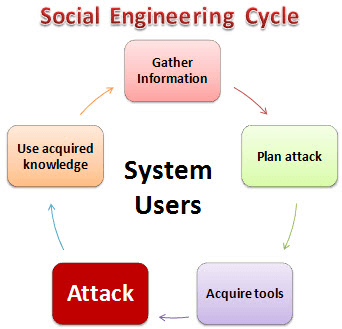
A social engineering attack follows a repeatable cycle. The diagram below shows the five stages an attacker moves through.
HERE,
- Gather Information: In this first stage, the attacker learns as much as possible about the intended victim. Information comes from company websites, public filings, social media, and casual conversation with users.
- Plan Attack: The attacker outlines how the attack will run and who will be approached first.
- Acquire Tools: These include the computer programs and props used when launching the attack.
- Attack: The attacker exploits the weaknesses in the target system, usually by prompting a person to act.
- Use Acquired Knowledge: Details picked up along the way, such as pet names or founder birthdates, feed later attacks such as password guessing.
Types of Social Engineering Attacks
Social engineering techniques take many forms. The six below account for most reported incidents.
Familiarity Exploit
Users are less suspicious of people they already know, so an attacker may spend time becoming a familiar face first — at meals, on breaks, or at social events. Where a building needs an access code or card, a familiar face is far more likely to have the door held open. The same familiarity encourages people to answer casual questions such as where they met their spouse or the name of a school teacher. Those are the answers password-recovery prompts ask for, so they can become access to email accounts.
Intimidating Circumstances
People steer clear of anyone who appears angry or confrontational. Using this technique, the attacker stages a heated phone argument or a dispute with an accomplice, then asks a user for information. Many users answer simply to end the encounter. The same tactic discourages staff from running a proper check at a security checkpoint.
Phishing
Phishing uses trickery and deceit to obtain private data. The social engineer impersonates a legitimate service, such as a webmail or online banking site, and asks the user to confirm an account name and password. The same technique harvests card numbers, one-time passcodes, and other personal data.
Tailgating
Tailgating means following an authorized user through the door of a restricted area. Out of ordinary courtesy, the user holds the door and the social engineer walks in without presenting a badge.
Exploiting Human Curiosity
Here the social engineer drops a malware-infected USB flash drive where users will pick it up. The finder usually plugs it in, and the drive either runs automatically or tempts the user into opening a file with an inviting name such as Employee Salary Review.docx.
Exploiting Human Greed
The social engineer lures the user with the promise of easy money online, then asks them to complete a form and confirm their identity with credit card details.
How to Prevent Social Engineering Attacks?
Prevention starts with personal habits. The following practices protect against all types of social engineering attacks:
- Avoid plugging an unknown USB drive into your computer.
- Do not click links in unexpected emails; type the address or use a saved bookmark.
- Use long, unique passwords stored in a password manager.
- Turn on multi-factor authentication, preferring an app or hardware key over SMS.
- Be cautious about online-only friendships that move quickly to money or access.
- Keep the operating system and all applications updated.
- Secure your devices with disk encryption and a screen lock.
- Install reputable anti-virus or endpoint protection software.
- Back up your data regularly and test the restore.
- Shred sensitive documents instead of discarding them.
- Use a VPN on untrusted networks.
- Lock your laptop whenever you step away.
- Verify unusual requests through a second, known channel before acting.
Social Engineering Countermeasures
Individual habits are only half the answer. Because each technique manipulates a predictable human bias, an organization can map a countermeasure to each one.
| Technique | Organizational countermeasure |
|---|---|
| Familiarity exploit | Train users not to substitute familiarity for a security check. Even a known colleague proves authorization for restricted areas and information. |
| Intimidating circumstances | Train users to recognize pressure tactics that fish for sensitive information, politely refuse, then report the encounter. |
| Phishing | Reputable sites use secure connections to encrypt data and prove their identity. Check the address bar, and never answer an email requesting personal information. |
| Tailgating | Train users never to let another person enter on their clearance. Everyone badges in separately, and reception challenges unbadged visitors. |
| Human curiosity | Hand any found flash drive to system administrators, who scan it on an isolated machine rather than a production workstation. |
| Human greed | Train employees to recognize get-rich-quick scams and give them one easy channel for reporting them. |
Patching supports this training, because an attacker who fails to talk a user into cooperating falls back on unpatched software.

