
How to Create Item Proposal VA51 in SAP
 Editorial Team
⚡ Smart Summary
Item proposal in SAP is a saved list of materials and order quantities that can be copied into a sales order. Transaction VA51 creates it, and the resulting number links to a customer so agents reuse frequent orders quickly.
What is Item Proposal?
Item proposal is the list of materials and order quantities that can be copied into the sales order .Item proposal is same as product proposal and SAP uses the two terms interchangeably.“MS” is a standard document type for Product Proposal.A customized document type can be created for item proposal by T-code –VOV8.
VA51 is T-code for creating Item Proposal. This T-code gives a number upon saving, which is linked to the customer data in sales view.
Step 1)
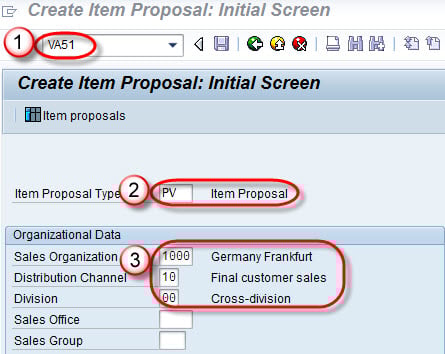
- Enter T-code VA51 in the command field.
- Enter Item proposal type .
- Enter Sales organization / Distribution Channel / Division.
Step 2)
- Enter Proposal number / description / Valid from date / Valid To date.
- Enter Material No./ Quantity.

Step 3)
- Click on Save
 Button.
 - A message “Item Proposal 50000071 has been saved”.
 Button.
How to Use an Item Proposal in a Sales Order
Creating the proposal is only half the value; the benefit appears when an agent reuses it. Once a proposal is assigned to a customer, its materials and quantities can be pulled into a new order in seconds.
- Create the sales order in VA01 for the customer.
- Choose Edit > Propose Items (or the Item Proposal button) in the order.
- Select the proposal number and copy all items or only the ones required.
- Adjust quantities if needed, then save the order.
Assigning the proposal to the customer master sales area makes it appear automatically, which is ideal for customers who reorder the same materials.
Best Practices for Item Proposals
- Set validity dates: Limit each proposal with valid-from and valid-to dates.
- Keep proposals current: Review materials and quantities as product ranges change.
- Assign to the customer: Link the proposal in the customer master for automatic display.
- Use clear descriptions: Name proposals so agents pick the right one quickly.
- Combine with listing: Pair proposals with material listing to guide correct ordering.
