
Text Determination for Sales Document: SAP VOTXN
 Editorial Team
⚡ Smart Summary
Text determination in SAP, configured with transaction VOTXN, controls how texts such as sales text flow into sales documents. This resource explains what text determination is, its key elements, and how to set it up for headers and items.
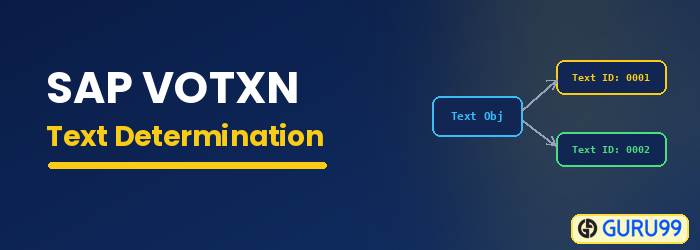
What Is Text Determination in SAP SD?
Text determination is the SAP configuration that decides which texts appear in a document and where they come from. Texts are used to exchange information through documents with partners and end users, and they can be attached to objects such as the customer master, the sales document header and item, the billing document header and item, and condition records. Common text types include customer text, sales text, item note, and packing note. To determine these texts, SAP uses the same condition technique it uses for pricing and output.
For example, the material master holds text about a material, but that text alone is often not enough for a salesperson to complete a sales order. Material sales text therefore flows from the sales view of the material master to the line item in the sales order, provided the system is configured for it. The process of creating and configuring these texts, and defining when and where they are called, is known as text determination. It is maintained in transaction VOTXN.
Key Elements of Text Determination
Text determination is built from a few standard elements. Understanding them makes the VOTXN configuration much easier to follow:
- Text object: The object the text belongs to, such as the sales document header or item.
- Text ID: The specific type of text, for example sales text, item note, or packing note.
- Text procedure: A grouping of text IDs that applies to a document and controls which texts are allowed.
- Access sequence: The search order the condition technique uses to find the source of a text.
- Procedure assignment: The link that assigns a text procedure to a sales document type (for the header) or an item category (for the item).
Together, these elements tell the system which texts to show, in what order, and where to read them from, so that the right notes reach the sales document automatically. In practice, you build a text procedure, list its allowed text IDs with a sequence, and then assign the procedure to a document type or an item category, which is exactly the flow the steps below follow.
Text determination for sales document header
Configure text determination for the header in transaction VOTXN by creating a text procedure and assigning it to the sales document type.
Step 1) Open the header procedure.
- Enter T-code VOTXN in the command field.
- Select the “Sales document header” radio button.
- Click on the Change button.
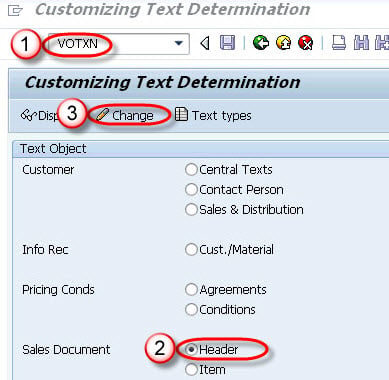
Step 2) Create the text procedure.
- Select “Text procedure” and click on the New Entries button.
- Enter the text procedure and a description.
- Click on the Save button.

Step 3) Assign the text procedure.
- Select the “Text procedure assignment” node.
- Assign the text procedure to the sales document type.
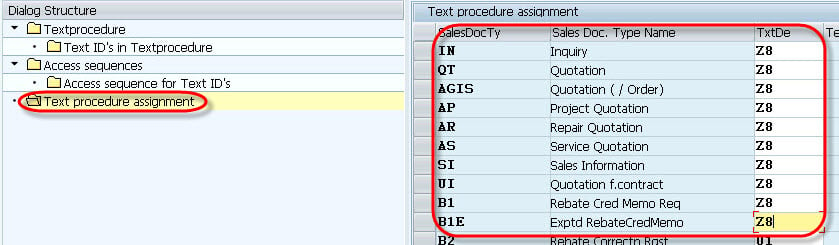
Step 4) Click on the Save button.
Text Determination for Sales Document Item
Now configure text determination for the item in transaction VOTXN. The steps mirror the header, but the procedure is assigned to an item category.
Step 1) Open the item procedure.
- Enter T-code VOTXN in the command field.
- Select the sales document item radio button.
- Click on the Change button.

Step 2) Add a new text procedure.
- Select the “Text procedure” node.
- Click on the New Entries button.

Step 3) Enter the text procedure.
- Select the “Text procedure” button.
- Enter the text procedure and a description.
- Click on the Save button.

Step 4) Review the text procedure.

Step 5) Assign text IDs.
- Select the “Text IDs in text procedure” node.
- Assign a sequence number to each Text ID.
- Click on the Save button.

Step 6) Assign the procedure to the item category.
- Select “Text procedure assignment”.
- Assign the text procedure to the item category.
- Click on the Save button.

