
Community Cloud: Example, Architecture, Advantages
 Editorial Team
⚡ Smart Summary
Community cloud is a shared, cloud-based infrastructure where multiple organizations with common regulatory, security, and operational requirements pool services and resources, managed collaboratively by community members, third-party vendors, or both to meet industry-specific compliance needs cost-effectively.
A community cloud can be defined as a cloud-based infrastructure that enables multiple organizations to share services and resources derived from common regulatory and operational requirements. It offers a shared platform and resources for different organizations to work on their business requirements. It is operated and managed by community members, third-party vendors, or even both.
The organizations that share common business requirements constitute the members of the community cloud. Common business requirements comprise shared industry regulations, shared data storage, or shared infrastructure requirements.
Factors to consider before adopting Community Cloud
Community cloud helps organizations with common business concerns use the public or private cloud cost-effectively. It offers unlimited scalability and delivers faster cloud deployment.
Here are the key factors that you need to consider before adopting the community cloud:
- The community cloud allows individual organizations to work together.
- It enables data sharing among different organizations while adhering to strict regulations and security requirements.
- Service level agreements should be reviewed and understood by organizations.
- The trading firms need to understand the economic model of the community cloud.
- They should understand how it manages data storage and security issues.
- Organizations should consider the availability/uptime of the community cloud.
- Organizations should evaluate how tenants manage issues when selecting a community cloud.
- Service outages should be communicated to companies in advance.
- Community cloud challenges should be mitigated by the cloud provider.
- Sensitive data should be managed effectively by the cloud provider.
Community Cloud Architecture
Members of the community cloud are essentially organizations with similar business needs. These business requirements are derived from the industry regulations along with the need for shared data and services.
Here are all the entities of community cloud architecture:

- In the above image, they are represented as “Org 1”, “Org 2”, and “Org 3,” respectively. Such organizations generally have shared policies and protocols.
- IAM: is an abbreviation for identity and access management that provides authorization and access to the specific cloud that meets the shared protocols and policies adopted by different organizations.
- Cloud manager: is an entity that becomes an interface for different organizations to manage their shared resources and protocols.
- Storage requirements: Different clouds may offer separate storage in accordance with the requirements of different organizations. They are documented under the service level agreements of the community cloud.
The cloud managers have to further split the data centers’ responsibilities and costs among participating organizations.
Since implementing the community cloud could be complex, the community cloud prepares a handbook that covers the mission statement, services, and resources ownership. The handbook provides detailed information on several cloud solutions.
Key Components of Community Cloud Architecture
The community cloud generally has a distributed architecture. The components of the community cloud can be listed as shown below:
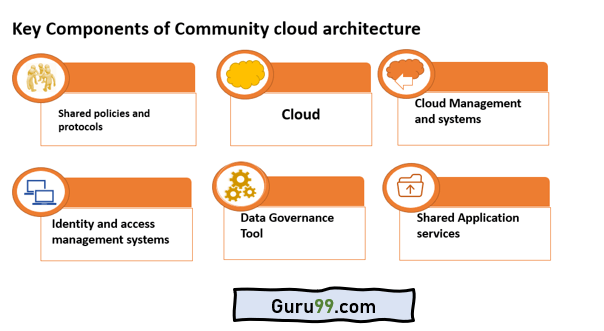
Shared Policies and protocols
Participating organizations are able to operate and maintain the community cloud through a long-term commitment. The members have to collaborate and design the following as explained below:
Governance Policies: A community cloud is always monitored through a governance model. In the shared cloud platform, governance policies enable effective monitoring among all stakeholders.
Security protocols: Regulations must be designed, analyzed, and interpreted periodically to ensure the community cloud’s smooth functioning. Such regulations together constitute security protocols for a community cloud.
HIPAA is an example of a security protocol that requires email encryption to meet the standards of compliance protocols.
Access policies: Participating organizations need to document and maintain access policies. These are policies that govern who is authorized to use which resources under the community cloud.
Policies about allocation: The community cloud developers should answer all questions related to business continuity before setting up the community cloud.
Cloud
Cloud computing is a key component of any community cloud.
A community cloud is built on top of a private cloud.
Moreover, there is an off-the-shelf community cloud that is tailored to meet the needs of specific industries and government agencies.
Cloud management system
Under the community cloud, a cloud management system plays an important role. It helps in delivering cloud operations with ease.
It further runs regular updates from time to time to ensure systems are up to date. A community cloud also needs more specific controls for resource allocation, app and data management, as well as placement of security protocols.
Identity and access management system
The identity and access management system helps in the identification of multiple users that are a part of different organizations and would access the community cloud.
Data governance tool
The community cloud offers a tool that supports data governance. It oversees the creation, updating, and deletion of the data.
These activities are performed per the data policies already agreed upon and defined between stakeholders.
Shared application service
This is one of the crucial components of a community cloud. It primarily looks into getting common services and applications. Different departments working under the same organization utilize these clouds.
The key building step in the community cloud is resource allocation. The specifics of bandwidth and storage should be carefully considered while allocating resources for the community cloud.
Advantages of Community Cloud
The community cloud offers many benefits, as described below:
Cost efficacy: The community cloud allows multiple and different users to connect with the same environment. The sessions of such users are arranged logically. The system ensures that there is no additional need for separate servers. It offers cost-effective solutions for organizations.
Regulatory compliance: Regulatory laws that govern privacy tend to evolve every second. They tend to vary at the national, regional, and global levels.
High unlimited scalability and availability: The cloud community offers the same level of availability and scalability as cloud services. There is no downtime under community cloud operations.
Security requirements per industry standards: Community clouds typically provide the expertise that meets industry security standards.
More and Better Control: A community cloud is designed in such a manner that it combines the best features of both public and private clouds. It also offers off-site backup at regular intervals.
Community Cloud Use cases & Examples
A number of industry-specific community clouds are featured in several use cases telling their success story. There is an exponential growth in demand for the usage of community clouds. Various cloud service providers are now delivering solutions based on the community cloud model.
Finance: The community cloud has become a popular model for financial institutions to manage sensitive customer information and applicable monetary transactions. Models like these are designed to meet the security and compliance requirements of financial institutions.
Public and Government sectors: The community cloud model has become popular among government departments for managing sensitive communication and infrastructure needs. Federal agencies generally develop highly secure government clouds which ensure that the data remains protected.
Educational institutions: The community cloud model is the most suited model for educational institutions as it allows them to share information, research material, and educational content on the cloud. In group projects, the model can be used to facilitate question-and-answer sessions that help foster collaboration.
Health care industry: The community cloud model has use cases for the healthcare sector. This sector deals with highly sensitive information when collaborating with several pharmaceutical companies. Community cloud helps in information sharing without disclosing any private information. Many pharmaceutical companies are part of the healthcare sector and collaborate with hospitals to provide quick healthcare solutions.
Best Practices for Community Cloud
Below are the best practices that should be adopted for the community cloud model:
Evaluation and selection of correct cloud management system: Organizations need to select robust and comprehensive management systems. It must be of high priority when selecting third-party vendors. The system should be robust enough for the administrators to identify how the storage space is being used and provide a proper audit trail for work.
Documentation on shared ownership terms: Each term and condition documented under the community cloud should be thoroughly discussed. The terms and conditions are to be approved by participating organizations before they make it to the final draft. The service level agreement should specifically highlight the allotment of storage percentage and bandwidth for each approved member of the community cloud.
Determine the cost policies applicable to procurement of a new community cloud: Organizations must decide on who provides basic funding for the community cloud and who hires the cloud experts and integrators. There should be an additional decision on the management and terms of fund transfers. They also need to establish the metering capability to check on granular resources.
Management of security and patch requirements: Community clouds should establish security standards that match those established within their industry. Members of the community must establish their security standards.
Decision over data segmentation plan: Data segmentation is contingent on the regulations put forward and defined under the industry’s regulations. For example, a community cloud may segment cloud resources to meet the security requirements of high-level government departments.
