
5 BEST AI Email Marketing Tools (2026)
 Editorial Team
Trying to pick the right platform without wasting time or money? Sorting through crowded software categories can feel less like research and more like damage control. I see people lose hours on clunky dashboards, chase weak results from overhyped platforms, run into hidden limits just when campaigns grow, and deal with automation that feels smart until it misfires. Add inconsistent deliverability, confusing analytics, and pricing that gets slippery fast, and the wrong choice starts costing real momentum. What many miss is that a few overlooked details separate frustrating tools from genuinely useful ones. Once those become clear, better decisions come much faster and with far less second-guessing.
I spent 180+ hours researching and evaluating 34+ options. My team and I tested these AI-powered tools through firsthand evaluation before narrowing down to 5. These 5 best AI email marketing tools were selected through a process backed by research that weighed core features, usability, pricing, and real tradeoffs, not just promises. I looked closely at strengths, weaknesses, and practical pros and cons so you can move forward with more confidence as you keep reading. Read more…
Best AI Tools for Email Marketing: Top Picks!
| Tool Name | Best For | Top Features | Free/Trial Plans | Link |
|---|---|---|---|---|
| Campaigner | Growing teams needing email automation | Automation workflows, segmentation, personalization, analytics | 30-day free trial | Learn More |
| Salesforce Marketing Cloud | Enterprise cross-channel marketing teams | Customer journeys, CRM data, personalization, analytics | 30-day free trial | Learn More |
| Brevo | SMBs wanting email plus SMS | Email, SMS, automation, segmentation | Free forever plan | Learn More |
| GetResponse | Creators and SMBs needing funnels | Automation, landing pages, segmentation, webinars | 14-day free trial | Learn More |
| Moosend | Budget-conscious teams focused on automation | Workflow builder, AI writer, landing pages, reports | 30-day free trial | Learn More |
1) Campaigner
Campaigner is an email marketing automation platform for targeted campaigns. It supports segmentation, automated workflows, personalization, forms, and reporting tools. That makes it useful for lifecycle campaigns and repeatable marketing tests. Its customizable workflows and reporting make day-to-day execution easier for teams.
In my use, the setup felt organized, and recurring automations stayed stable. That helps when checking subject lines and audience segments before launches. You can rerun journeys, confirm timing, and catch mistakes early. Campaigner also offers a free trial, which lowers beginner friction.

Feature:
- Email Builder: Campaigner lets users build emails with drag-and-drop blocks or custom HTML. This helps beginners launch campaigns faster while giving experienced users tighter design control. It also makes it easier to update layouts without rebuilding every campaign.
- Audience Segments: You can group contacts by using the signup source, campaign activity, or saved data fields. This makes messages more relevant and reduces wasted sends to the wrong audience. It also helps teams send targeted offers instead of broad generic campaigns.
- Workflow Triggers: This feature sends follow-up emails based on actions, dates, or simple conditions. It helps users automate welcome sequences, reminders, and re-engagement without repeated manual work. That saves time when managing larger lists or recurring campaigns.
- SMS Messaging: It supports SMS alongside email inside the same marketing workflow. In my experience, this is useful when email alone misses time-sensitive promotions. It gives users another way to reach subscribers when timing matters most.
- Campaign Testing: Users can test subject lines, content variations, and send timing before scaling. This feature helps teams learn what actually improves opens, clicks, and conversions. It also reduces guesswork when planning future campaigns.
- Performance Reports: Campaigner tracks clicks, opens, conversions, and location-based engagement after each send. I have noticed these reports help spot weak campaigns before they drain list quality. They also help users identify which messages deserve to be repeated or revised.
Pros
Cons
Pricing:
Campaigner offers a 30-day free trial, with paid plans starting at $14/month for 1,000 contacts.
| Plan | Pricing |
|---|---|
| Essentials | $14 / month |
| Advanced | $35 / month |
| Custom | Custom pricing |
2) Salesforce Marketing Cloud
Salesforce Marketing Cloud is an AI-powered platform for email marketing and journeys. It supports automation, personalization, segmentation, and cross-channel campaign testing workflows. Salesforce positions it around real-time audiences, AI agents, and optimization. That scale makes it a dependable choice for growing teams.
I have found the automation flows stable during repeated campaign checks. It fits well before releases when emails, segments, and triggers change. A team can validate welcome sequences, fallback content, and timing. That helps catch regression issues before messages reach real customers.

Feature:
- Audience Builder: Salesforce Marketing Cloud groups contacts by behavior, profile data, and lifecycle stage. This helps users send relevant campaigns instead of broad blasts. It also makes list targeting easier to manage as audiences grow.
- Journey Mapping: It lets teams build customer journeys across email, mobile, and web touchpoints. Thus, helping beginners visualize each step before automating follow-up messages. Users can spot weak points in the flow before campaigns go live.
- Triggered Messaging: You can send messages after specific actions, such as sign-ups or purchases. That reduces manual campaign work and keeps follow-ups better timed. It is especially useful for routine responses that need consistent delivery.
- Content Personalization: Salesforce Marketing Cloud adjusts offers and recommendations using real-time customer behavior. In my experience, this makes campaigns feel timely without rebuilding everything manually. It also helps marketers reuse content more effectively across different audiences.
- Cross-Channel Sends: Users can coordinate email, mobile, advertising, and web messaging from one system. This reduces channel gaps and keeps campaigns more consistent. It is helpful when teams want the same message delivered across multiple touchpoints.
- Engagement Tracking: This feature shows how people respond to campaigns and ongoing journeys. I often rely on that feedback to spot weak messaging quickly. Teams can use this data to improve timing, content, and targeting decisions.
Pros
Cons
Pricing:
Salesforce Marketing Cloud offers a 30-day free trial entry plan and enterprise-level marketing automation starting at $25/user/month or $1,500/org/month annually.
| Plan | Pricing |
|---|---|
| Salesforce Starter | $25 USD/user/month (billed monthly or annually) |
| Marketing Cloud Growth Edition | $1,500 USD/org/month (billed annually) |
| Marketing Cloud Advanced Edition | $3,250 USD/org/month (billed annually) |
3) Brevo
Brevo is an AI-powered email marketing platform for campaigns and automation. It supports email, SMS, WhatsApp, and transactional messaging from one dashboard. Teams use it for audience segmentation, triggered journeys, and customer outreach. It feels dependable because many businesses use it, plus 150+ integrations.
I found its automation setup straightforward, and campaign workflows stayed stable. A common use case is checking personalized sequences before launches. You can review messages, timing, and triggers without repetitive manual work.

Feature:
- Automation Flows: You can set up triggered email sequences based on user actions like signups or purchases. It removes repetitive manual sending. This ensures timely communication without needing constant monitoring.
- Transactional Emails: Brevo handles order confirmations, password resets, and notifications through dedicated workflows. I have noticed this improves reliability compared to standard campaign tools. It keeps critical messages consistent and trackable.
- Campaign Scheduling: Users can schedule emails for specific dates and times in advance. This feature supports planning campaigns around peak engagement periods. It reduces the need to send emails manually during busy hours.
- Performance Tracking: This specific functionality tracks open rates, clicks, and delivery outcomes for each campaign. It helps users understand what content performs well. In my experience, this makes optimization decisions much clearer.
- Contact Management: Brevo stores and updates contact details in a centralized database. It helps maintain clean lists by removing duplicates or inactive users. This improves deliverability and keeps campaigns efficient.
- Multi-channel Messaging: Using this feature, users can send emails, SMS, and chat messages from one platform. I often rely on this when coordinating campaigns across channels. It simplifies managing communication in one place.
Pros
Cons
Pricing:
Brevo offers a free plan with 300 emails/day, plus paid plans starting at $9/month based on email volume.
| Plan | Pricing |
|---|---|
| Starter | $8 |
| Standard | Starts at $16 |
| Professional | Starts at $449 |
4) GetResponse
GetResponse is an AI email marketing platform for campaigns and automation. It supports email testing, autoresponders, landing pages, funnels, and audience segmentation. Its 99% deliverability, 150-plus integrations, and broad adoption add credibility.
I found the workflow builder stable during repetitive campaign automation checks. Before a release, it helps validate sequences, timing, and messages. That matters when teams retest signup flows after copy changes.
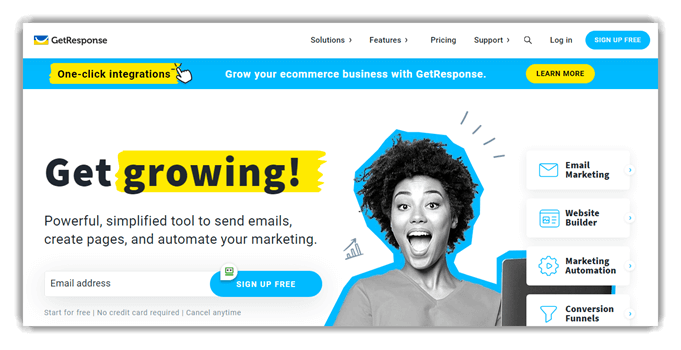
Feature:
- List Segmentation: You can group contacts based on behavior, location, or engagement history. This allows targeted messaging instead of sending generic emails. It improves response rates by matching content with audience interests.
- Landing Pages: GetResponse includes tools to create standalone pages for campaigns or lead capture. Users can publish pages without external website builders. This helps capture leads faster during promotions or product launches.
- Performance Tracking: This feature tracks metrics like open rates, clicks, and conversions in real time. It highlights which campaigns perform well or need adjustment. I often rely on this to refine messaging and timing.
- Autoresponders: Using the autoresponder feature, emails can be sent automatically after specific triggers or schedules. It supports welcome emails, onboarding sequences, and reminders. This reduces repetitive tasks while maintaining consistent communication.
- Conversion Funnels: GetResponse allows users to build complete marketing funnels from signup to purchase. It connects emails, pages, and offers into one workflow. This helps manage campaigns without switching between multiple tools.
- Webinar Hosting: This functionality enables hosting live webinars directly within the platform. Users can collect registrations and follow up with attendees automatically. In my experience, this simplifies audience engagement without extra software.
Pros
Cons
Pricing:
GetResponse offers a free forever plan with limited features, plus paid plans starting from $15.58/month billed annually.
| Plan | Pricing |
|---|---|
| Starter | $15.58/month |
| Marketer | $48.38 |
| Creator | $56.58 |
Link: https://www.getresponse.com/features/email-marketing
5) Moosend
Moosend is an AI email marketing platform built for campaigns, automation, and audience management. It supports newsletter creation, segmentation, A/B testing, and behavior-based workflows. That makes it useful for beginners learning email automation and for teams refining repeatable marketing tasks. Its wide integration support and established market presence also make it feel like a dependable option when you are comparing tools for real workflows.
I found the automation builder easy to work with in day-to-day testing. In a typical workflow, a team can trigger free welcome emails after a signup, then test different subject lines before a release or product update. That helps reduce repetitive manual checks while making it easier to validate campaign logic, monitor engagement, and catch issues early before sending at scale.

Feature:
- Personalization Tools: Users can insert dynamic content based on subscriber data fields. Emails can adapt to each recipient automatically. In my experience, this increases relevance and improves overall campaign response rates.
- List Management: It helped me organize, clean, and update subscriber lists efficiently. You can remove inactive contacts or merge duplicates. It keeps your database accurate and improves email deliverability.
- Behavior Tracking: Moosend records how subscribers interact with emails and website elements. You can identify which links or pages drive interest. It helps refine targeting based on actual user actions.
- Conditional Logic: This feature allows branching workflows based on subscriber behavior or data. You can send different emails depending on actions taken. It ensures each user receives messages that match their journey stage.
- Real-Time Triggers: Moosend can send emails instantly when a specific event occurs. You can react to actions like cart abandonment or link clicks. I often rely on this to maintain timely and relevant communication.
- A/B Testing: This functionality lets users test different subject lines or email content variations. You can compare performance across multiple versions. It helps identify what resonates best before scaling campaigns.
Pros
Cons
Pricing:
Moosend offers a 30-day free trial with full features, then paid plans starting from subscriber-based monthly pricing.
| Plan | Pricing |
|---|---|
| Pro | $7 |
| Moosend+ | Custom |
| Enterprise | Custom |
Feature Comparison: Top AI Tools for Email Marketing
Use the table below to compare the features of the tools:
| Feature | Campaigner | Salesforce | Brevo | GetResponse | Moosend |
| AI campaign tools | ❌ | ✔️ | ✔️ | ✔️ | ✔️ |
| Visual automation | ✔️ | ✔️ | ✔️ | ✔️ | ✔️ |
| Budget entry plan | ✔️ | ❌ | ✔️ | ✔️ | ✔️ |
| Human support | ✔️ | ✔️ | ✔️ | ✔️ | ✔️ |
| Compliance signals | ❌ | ✔️ | ✔️ | ✔️ | ✔️ |
| Enterprise ecosystem | ❌ | ✔️ | ✔️ | ✔️ | ❌ |
What are AI Email Marketing Tools and How do They Work?
AI email marketing tools use machine learning to automate campaigns and improve targeting. These tools analyze user behavior, preferences, and engagement patterns continuously. They help create personalized emails that match audience interests effectively. Most platforms offer smart segmentation, predictive analytics, and automated workflows.
Businesses use them to save time and improve conversion rates. AI also optimizes send times and subject lines automatically. This improves open rates and click-through performance significantly. Beginners can start easily because many tools offer templates and guided setup features.
How to Troubleshoot Common Issues in AI Email Marketing Tools?
Even advanced AI email marketing tools can face occasional issues. Understanding common problems and solutions helps maintain smooth campaign performance.
- Issue: Emails are not reaching inboxes due to poor sender reputation.
Solution: The system should improve domain authentication and gradually warm up sending reputation through consistent email activity. - Issue: AI recommendations feel inaccurate due to insufficient or poor-quality data inputs.
Solution: The platform should be fed with clean, structured, and sufficient historical data for better machine learning accuracy. - Issue: Automation workflows fail to trigger correctly based on user behavior conditions.
Solution: Workflow logic should be reviewed carefully, ensuring triggers and conditions are properly configured and tested. - Issue: Integration errors occur between email tools and CRM or analytics platforms.
Solution: Integration settings should be revalidated, and API connections must be checked for proper authentication and syncing.
How do AI email marketing tools compare with traditional email platforms?
AI email marketing tools offer advanced capabilities compared to traditional platforms. Traditional email marketing softwares rely heavily on manual setup and static segmentation. AI tools automate targeting and continuously optimize campaigns. They provide predictive insights instead of basic analytics reports.
Personalization is much deeper with AI-driven recommendations. Traditional platforms often lack real-time learning capabilities. AI tools adapt based on user behavior instantly. This leads to better engagement and improved ROI. Businesses looking for growth often prefer AI solutions for smarter marketing strategies.
How Did We Select the Best AI Email Marketing Tool?
We at Guru99 carefully evaluate AI email marketing tools through research, testing, and expert analysis. Our goal is to help users find reliable, scalable, and performance-driven solutions.
- Feature Evaluation: We analyze automation, personalization, and analytics capabilities in detail.
- Ease of Use: We ensure tools are beginner-friendly and intuitive for marketers.
- Integration Support: Our experts check the compatibility with CRM, eCommerce, and workflow systems.
- Performance Testing: The team tested real campaign scenarios to measure effectiveness.
- Pricing Analysis: We compare value for money across different pricing plans.
- User Feedback Review: The team studies real user reviews and community discussions deeply.
- Scalability Check: We assess whether tools support growing business needs efficiently.
This structured approach helps users confidently select the best tool.
Verdict
After testing several AI email marketing platforms hands-on, I found three tools that consistently delivered smarter automation. They also showed better targeting and measurable campaign improvements without unnecessary complexity.
- Campaigner: I found its automation workflows especially flexible. It handled complex email sequences with ease and delivered consistently strong personalization without requiring a steep learning curve.
- Salesforce Marketing Cloud: What stood out to me was its deep data integration. I managed highly targeted campaigns using real-time insights that significantly improved engagement and segmentation accuracy.
- Brevo: I appreciated its balance of simplicity and capability. It handled email and SMS campaigns smoothly, making it a reliable choice for efficient, multi-channel communication without overcomplication.
