
What is PHP? Write your first PHP Program
⚡ Smart Summary
PHP is a free, server-side scripting language that powers dynamic websites and web applications by running on the server and sending plain HTML to the browser, which makes it easy to learn and ideal for beginners.
What is PHP?
PHP is a server-side scripting language used to develop static websites, dynamic websites, and web applications. PHP stands for Hypertext Preprocessor, which earlier stood for Personal Home Pages. PHP scripts can only be interpreted on a server that has PHP installed, while client computers accessing the PHP scripts require a web browser only.
A PHP file contains PHP tags and ends with the extension “.php”. Because the server does all the heavy lifting, PHP makes it easy to deliver dynamic content without forcing users to install any special software on their devices.
What is a Scripting Language?
Before diving deeper into PHP itself, it helps to understand what a scripting language is and how it differs from a traditional compiled language.
A script is a set of programming instructions that is interpreted at runtime. A scripting language is a language that interprets scripts at runtime, and scripts are usually embedded into other software environments.
The purpose of the scripts is usually to enhance the performance or perform routine tasks for an application. Server-side scripts are interpreted on the server while client-side scripts are interpreted by the client application.
PHP is a server-side script that is interpreted on the server while JavaScript is an example of a client-side script that is interpreted by the client browser. Both PHP and JavaScript can be embedded into HTML pages, which allows developers to combine logic and presentation on the same page.
Programming Language Vs Scripting Language
The line between a programming language and a scripting language can be blurry, but the table below highlights the most common differences that beginners should know.
| Programming language | Scripting language |
|---|---|
| Has all the features needed to develop complete applications. | Mostly used for routine tasks. |
| The code has to be compiled before it can be executed. | The code is usually executed without compiling. |
| Does not need to be embedded into other languages. | Is usually embedded into other software environments. |
What Does PHP Stand For?
PHP originally meant Personal Home Page, but it now stands for the recursive backronym PHP: Hypertext Preprocessor. The shift in meaning reflects how the language has evolved from a simple set of personal-page tools into a fully featured platform for the modern web.
PHP code may be embedded into HTML code, or it can be used in combination with various web template systems, web content management systems, and web frameworks such as Laravel, Symfony, and WordPress.
PHP Syntax
Now that the basics are clear, let us look at the actual syntax that PHP uses inside an HTML page.
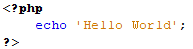
A PHP file can also contain tags such as HTML and client-side scripts such as JavaScript. Before you start writing your first script, the following resources are useful:
- HTML is an added advantage when learning PHP. You can learn PHP without knowing HTML, but it is recommended that you at least know the basics of HTML.
- Database management systems (DBMS) are important for database-powered applications.
- For more advanced topics such as interactive applications and web services, you will need JavaScript and XML.
The flowchart diagram shown below illustrates the basic architecture of a PHP web application and how the server handles the requests.

Why Use PHP?
You have probably heard of a number of programming languages out there, so you may be wondering why we would choose PHP for web programming. Below are some of the most compelling reasons that PHP remains a top pick for new developers and growing teams.
- PHP is open source and free.
- Short learning curve compared with other languages such as JSP and ASP.
- Large community and extensive documentation.
- Most web hosting servers support PHP by default, unlike other languages such as ASP that need IIS. This makes PHP a cost-effective choice.
- PHP is regularly updated to keep abreast of the latest technology trends.
- PHP is a server-side scripting language, which means you only need to install it on the server. Client computers requesting resources from the server do not need to have PHP installed; only a web browser is required.
- PHP has in-built support for working hand in hand with MySQL. This does not mean you cannot use PHP with other database management systems. You can still use PHP with:
- Postgres
- Oracle
- MS SQL Server
- ODBC, etc.
- PHP is cross-platform, which means you can deploy your application on a number of different operating systems such as Windows, Linux, and Mac OS.
What is PHP Used For and Market Share
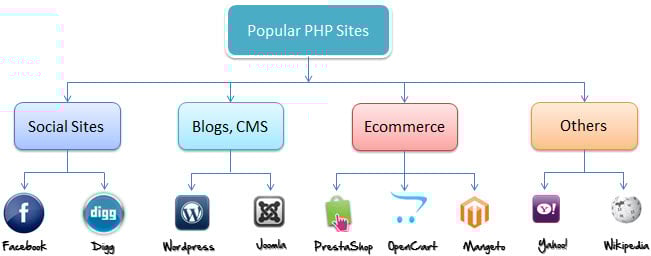
In terms of market share, there are over 20 million websites and applications on the internet developed using the PHP scripting language. This may be attributed to the points raised above, including its low barrier to entry and excellent hosting support.
The diagram below shows some of the popular sites that use PHP.
PHP vs ASP.Net vs JSP vs CFML
To put PHP in context, the table below compares it with three other widely used server-side scripting technologies: ASP (Active Server Pages), JSP (Java Server Pages), and CFML (Cold Fusion Markup Language).
| FEATURE | PHP | ASP | JSP | CFML |
|---|---|---|---|---|
| Learning curve | Short | Longer than PHP | Longer than PHP | Longer than PHP |
| Web hosting | Supported by almost all hosting servers | Needs dedicated server | Fairly supported | Needs dedicated server |
| Open source | Yes | No | Yes | Both commercial and open source |
| Web services support | Built in | Uses the .NET framework | Uses add-on libraries | Built in |
| Integration with HTML | Easy | Fairly complex | Fairly complex | Easy |
| MySQL support | Native | Needs third-party drivers | Needs third-party drivers | Current version has native support. Older versions use ODBC |
| Easily extended by other languages | Yes | No | Extended using Java classes and libraries | Yes |
PHP File Extensions
File extension and tags: In order for the server to identify our PHP files and scripts, we must save the file with the “.php” extension. Older PHP file extensions include:
- .phtml
- .php3
- .php4
- .php5
- .phps
PHP was designed to work with HTML, and as such, it can be embedded into the HTML code.

You can also create PHP files without any HTML tags, which is called a pure PHP file. The server interprets the PHP code and outputs the results as HTML code to the web browsers.
In order for the server to identify the PHP code from the HTML code, we must always enclose the PHP code in PHP tags. A PHP tag starts with the less-than symbol followed by the question mark and then the word “php”.
PHP is a case-sensitive language: “VAR” is not the same as “var”. The PHP tags themselves are not case-sensitive, but it is strongly recommended that we use lowercase letters. The code below illustrates the basic PHP tag syntax.
<?php … ?>
We will be referring to the PHP lines of code as statements. PHP statements end with a semicolon (;). If you only have one statement, you can omit the semicolon. If you have more than one statement, then you must end each line with a semicolon. For the sake of consistency, it is recommended that you always end your statements with a semicolon. PHP scripts are executed on the server, and the output is returned in the form of HTML.
PHP Hello World Program
Now it is time to put the theory into practice and write your first PHP program. The script shown below is a basic PHP application that outputs the words “Hello world!” when viewed in a web browser.
<?php
echo "Hello world";
?>
Output:
Hello world
Save the file as hello.php in your web server’s document root, open it in a browser via http://localhost/hello.php, and you should see the greeting appear. With this single program, you have already exercised the full PHP request, parse, and response cycle.
