
PHP XML Tutorial: Create, Parse, Read with Example
 Editorial Team
⚡ Smart Summary
PHP and XML work together to structure, store, and exchange data between systems. This walkthrough explains XML, the DOM, and XML parsers, then shows how to read an XML document with SimpleXML and how to create one with the DOMDocument class, ending with when to use each.
What is XML?
XML is the acronym for Extensible Markup Language.
XML is used to structure, store, and transport data from one system to another.
XML is similar to HTML. It uses opening and closing tags. Unlike HTML, XML allows users to define their own tags.
What is DOM?
DOM is the acronym for Document Object Model.
It is a cross-platform and language-neutral standard that defines how to access and manipulate data in:
- HTML
- XHTML
- XML
DOM XML is used to access and manipulate XML documents. It views the XML document as a tree structure.
XML Parsers
An XML parser is a program that translates the XML document into an XML Document Object Model (DOM) object.
The XML DOM object can then be manipulated using JavaScript, Python, PHP, and other languages.
The keyword CDATA, which is the acronym for (unparsed) Character Data, is used to ignore special characters such as “<” and “>” when parsing an XML document.
Why use XML?
- Web services such as SOAP and REST use the XML format to exchange information. Learning what XML is and how it works gives you a competitive advantage as a developer, since modern applications make heavy use of web services.
- XML documents can be used to store the configuration settings of an application.
- It allows you to create your own custom tags, which makes it more flexible.
XML Document example
Let us suppose that you are developing an application that gets data from a web service in XML format.
Below is a sample of what the XML document looks like.
<?xml version="1.0" encoding="utf-8"?>
<employees status = "ok">
<record man_no = "101">
<name>Joe Paul</name>
<position>CEO</position>
</record>
<record man_no = "102">
<name>Tasha Smith</name>
<position>Finance Manager</position>
</record>
</employees>
HERE,
- “<?xml version=”1.0″ encoding=”utf-8″?>” specifies the XML version and encoding to be used
- “<employees status = “ok”>” is the root element.
- “<record…>…</record>” are the child elements, one per employee record.
How to Read XML using PHP
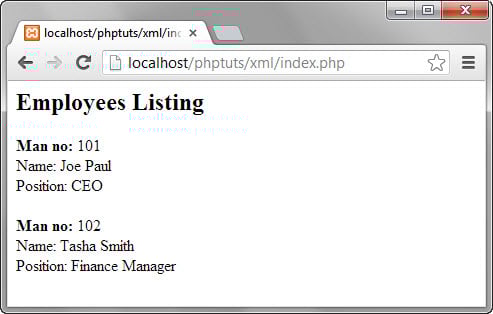
Let us now write the code that will read the employees XML document and display the results in a web browser. index.php
<?php
$xml = simplexml_load_file('employees.xml');
echo '<h2>Employees Listing</h2>';
$list = $xml->record;
for ($i = 0; $i < count($list); $i++) {
echo '<b>Man no:</b> ' . $list[$i]->attributes()->man_no . '<br>';
echo 'Name: ' . $list[$i]->name . '<br>';
echo 'Position: ' . $list[$i]->position . '<br><br>';
}
?>
HERE,
- “$xml = simplexml_load_file(’employees.xml’);” uses the simplexml_load_file function to load the file named employees.xml and assign the contents to the variable $xml.
- “$list = $xml->record;” gets the contents of the record nodes.
- “for ($i = 0; $i < count(…)…” is the for loop that reads the array and outputs the results
- “$list[$i]->attributes()->man_no;” reads the man_no attribute of the element
- “$list[$i]->name;” reads the value of the name child element
- “$list[$i]->position;” reads the value of the position child element
Testing the XML Reader
Assuming you saved the file index.php in the phptuts/xml folder, browse to the URL http://localhost/phptuts/xml/index.php
How to Create an XML document using PHP
We will now look at how to create an XML document using PHP.
The following code uses the PHP built-in class DOMDocument to create an XML document.
<?php

$dom = new DOMDocument();

$dom->encoding = 'utf-8';

$dom->xmlVersion = '1.0';

$dom->formatOutput = true;

$xml_file_name = 'movies_list.xml';

$root = $dom->createElement('Movies');

$movie_node = $dom->createElement('movie');

$attr_movie_id = new DOMAttr('movie_id', '5467');

$movie_node->setAttributeNode($attr_movie_id);

$child_node_title = $dom->createElement('Title', 'The Campaign');

$movie_node->appendChild($child_node_title);

$child_node_year = $dom->createElement('Year', 2012);

$movie_node->appendChild($child_node_year);

$child_node_genre = $dom->createElement('Genre', 'Comedy');

$movie_node->appendChild($child_node_genre);

$child_node_ratings = $dom->createElement('Ratings', 6.2);

$movie_node->appendChild($child_node_ratings);

$root->appendChild($movie_node);

$dom->appendChild($root);

$dom->save($xml_file_name);

echo "$xml_file_name has been successfully created";
?>
HERE,
- “$dom = new DOMDocument();” creates an instance of the DOMDocument class.
- “$dom->encoding = ‘utf-8’;” sets the document encoding to utf-8
- “$dom->xmlVersion = ‘1.0’;” specifies the version number 1.0
- “$dom->formatOutput = true;” ensures that the output is well formatted
- “$root = $dom->createElement(‘Movies’);” creates the root node named Movies
- “$attr_movie_id = new DOMAttr(‘movie_id’, ‘5467’);” defines the movie_id attribute of the movie node
- “$dom->createElement(‘ElementName’, ‘ElementValue’)” creates a child node. ElementName specifies the name of the element, e.g. Title. ElementValue sets the child node value, e.g. The Campaign.
- “$root->appendChild($movie_node);” appends the movie node to the root node Movies
- “$dom->appendChild($root);” appends the root node to the XML document.
- “$dom->save($xml_file_name);” saves the XML file in the root directory of the web server.
- “echo “$xml_file_name has been successfully created”;” displays a success message.
Testing the XML Creator
Assuming you saved the file create_movies_list.php in the phptuts/xml folder, browse to the URL http://localhost/phptuts/xml/create_movies_list.php

Open the movies_list.xml file.

SimpleXML vs DOMDocument
PHP offers two main ways to work with XML. SimpleXML is best when you mainly need to read data, while DOMDocument gives finer control for building and heavily editing documents. The table below compares them.
| Aspect | SimpleXML | DOMDocument |
|---|---|---|
| Ease of use | Very simple; the document behaves like nested objects | More verbose, node-based API |
| Best for | Reading and light editing | Creating documents and complex manipulation |
| Access style | $xml->record->name | createElement() and appendChild() |
| XPath support | Yes, via ->xpath() | Yes, via the DOMXPath class |
A practical rule is to reach for SimpleXML first for reading feeds and simple files, and switch to DOMDocument when you need to create documents, insert nodes at specific positions, or validate against a schema.
