
PHP Data Types, Variables, Constants, Operators
 Editorial Team
⚡ Smart Summary
PHP Data Types, Variables, and Operators form the foundation of every PHP script. This walkthrough explains how PHP infers integer, float, string, and Boolean types, how variables store data, how type casting works, and how arithmetic, assignment, comparison, and logical operators behave.
PHP Data Types
A data type is the classification of data into a category according to its attributes:
- Alphanumeric characters are classified as strings
- Whole numbers are classified as integers
- Numbers with decimal points are classified as floating points.
- True or false values are classified as Boolean.
PHP is a loosely typed language; it does not have explicitly defined data types. PHP determines the data types by analyzing the attributes of the data supplied. PHP implicitly supports the following data types:
- Integer – whole numbers e.g. -3, 0, 69. The maximum value of an integer is platform-dependent. On a 32 bit machine, it is usually around 2 billion. 64 bit machines usually have larger values. The constant PHP_INT_MAX is used to determine the maximum value.
<?php
echo PHP_INT_MAX;
?>
Output:
9223372036854775807
- Floating point number – decimal numbers e.g. 3.14. They are also known as double or real numbers. The maximum value of a float is platform-dependent. Floating point numbers are larger than integers.
- Character string – e.g. Hello World
- Boolean – e.g. True or false.
Before we go into more detail discussing PHP data types, let us first discuss variables.
PHP Variable
A variable is a name given to a memory location that stores data at runtime.
The scope of a variable determines its visibility.
A PHP global variable is accessible to all the scripts in an application.
A local variable is only accessible to the script that it was defined in.
Think of a variable as a glass containing water. You can add water into the glass, drink all of it, refill it again etc. The same applies to variables.
Variables are used to store data and provide the stored data when needed. Just like in other programming languages, PHP supports variables too. Let us now look at the rules followed when creating variables in PHP.
- All variable names must start with the dollar sign, e.g.

- Variable names are case sensitive; this means $my_var is different from $MY_VAR

- All variable names must start with a letter, followed by other characters e.g. $my_var1. $1my_var is not a legal variable name.

- Variable names must not contain any spaces. “$first name” is not a legal variable name. You can instead use an underscore in place of the space e.g. $first_name. You cannot use characters such as the dollar or minus sign to separate variable names.


Let us now look at how PHP determines the data type depending on the attributes of the supplied data.
<?php
$my_var = 1;
echo $my_var;
?>
Output:
1
Floating point numbers
<?php
$my_var = 3.14;
echo $my_var;
?>
Output:
3.14
Character strings
<?php
$my_var = "Hypertext Pre Processor";
echo $my_var;
?>
Output:
Hypertext Pre Processor
Use of Variables
Variables help separate data from the program algorithms.
The same algorithm can be used for different input data values.
For example, suppose that you are developing a calculator program that adds up two numbers. You can create two variables that accept the numbers, then you use the variable names in the expression that does the addition.
Variable Type Casting
Performing arithmetic computations using variables in a language such as C# requires the variables to be of the same data type.
Type casting is converting a variable or value into a desired data type.
This is very useful when performing arithmetic computations that require variables to be of the same data type.
Type casting in PHP is done by the interpreter.
In other languages such as C#, you have to cast the variables. The code below shows type casting in C#.
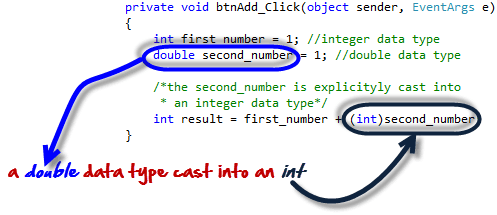
The diagram below shows PHP implementing the above example.

PHP also allows you to cast the data type. This is known as explicit casting. The code below demonstrates explicit type casting.
<?php
$a = 1;
$b = 1.5;
$c = $a + $b;
$c = $a + (int) $b;
echo $c;
?>
Output:
2
The above code outputs 2. The var_dump function is used to determine the data type. The code below demonstrates how to use the var_dump function.
<?php
$a = 1;
var_dump($a);
$b = 1.5;
var_dump($b);
$c = "I Love PHP";
var_dump($c);
$d = true;
var_dump($d);
?>
Output:
int(1) float(1.5) string(10) "I Love PHP" bool(true)
PHP Constant
Define constant – a constant is a variable whose value cannot be changed at runtime.
Suppose we are developing a program that uses the value of PI 3.14. We can use a constant to store its value.
Let us now look at an example that defines a constant.
<?php
define('PI', 3.14); // creates a constant with a value of 3.14
echo PI;
?>
Once you define PI as 3.14, writing code like PI = 4; will generate an error, because PI has been defined as a constant and therefore assigning a value to it is not permissible.
PHP Operators
Arithmetic operators
Arithmetic operators are used to perform arithmetic operations on numeric data. The concatenation operator works on string values too. PHP supports the following operators.
| Operator | Name | Description | Example | Output |
|---|---|---|---|---|
| + | Addition | Summation of x and y | 1 + 1; | 2 |
| – | Subtraction | Difference between x and y | 1 – 1; | 0 |
| * | Multiplication | Multiplies x and y | 3 * 7; | 21 |
| / | Division | Quotient of x and y | 45 / 5; | 9 |
| % | PHP Modulus | Gives the remainder of dividing x and y | 10 % 3; | 1 |
| -n | Negation | Turns n into a negative number | -(-5); | 5 |
| x . y | Concatenation | Puts together x and y | “PHP” . ” ROCKS”;10 . 3; | PHP ROCKS103 |
Assignment Operators
Assignment operators are used to assign values to variables. They can also be used together with arithmetic operators.
| Operator | Name | Description | Example | Output |
|---|---|---|---|---|
| x = y | assignment | Assigns the value of y to x | $x = 5; | 5 |
| x += y | addition | Increments the value of x by y | $x = 2;$x += 1; | 3 |
| x -= y | subtraction | Subtracts y from the value of x | $x = 3;$x -= 2; | 1 |
| x *= y | multiplication | Multiplies the value of x, y times | $x = 0;$x *= 9; | 0 |
| x /= y | division | Quotient of x and y | $x = 6;$x /= 3; | 2 |
| x %= y | modulus | The remainder of dividing x by y | $x = 3;$x %= 2; | 1 |
| x .= y | concatenate | Puts together items | $x = ‘Pretty’;$x .= ‘ Cool!’; | Pretty Cool! |
Comparison operators
Comparison operators are used to compare values and data types.
| Operator | Name | Description | Example | Output |
|---|---|---|---|---|
| x == y | Equal | Compares x and y, then returns true if they are equal | 1 == “1”; | True or 1 |
| x === y | identical | Compares both values and data types. | 1 === “1”; | False or 0, since 1 is an integer and “1” is a string |
| x != y, x <> y | PHP Not equal | Compares values of x and y, returns true if the values are not equal | 2 != 1; | True or 1 |
| x > y | Greater than | Compares values of x and y, returns true if x is greater than y | 3 > 1; | True or 1 |
| x < y | Less than | Compares values of x and y, returns true if x is less than y | 2 < 1; | False or 0 |
| x >= y | Greater than or equal | Compares values of x and y, returns true if x is greater than or equal to y | 1 >= 1 | True or 1 |
| x <= y | Less than or equal | Compares values of x and y, returns true if x is less than or equal to y | 8 <= 6 | False or 0 |
Logical operators
When working with logical operators, any number greater than or less than zero (0) evaluates to true. Zero (0) evaluates to false.
| Operator | Name | Description | Example | Output |
|---|---|---|---|---|
| x and y, x && y | And | Returns true if both x and y are true | 1 and 4;True && False; | True or 1False or 0 |
| x or y, x || y | Or | Returns true if either x or y is true | 6 or 9;0 || 0; | True or 1False or 0 |
| x xor y | Exclusive or, xor | Returns true if only x is true or only y is true | 1 xor 1;1 xor 0; | False or 0True or 1 |
| !x | Not | Returns true if x is false and false if x is true | !0; | True or 1 |
