
PHP Loop: For, ForEach, While, Do While [Example]
 Editorial Team
⚡ Smart Summary
PHP Loops repeat a block of code until a condition is met, which removes repetitive typing and drives array processing. This walkthrough covers the four PHP loop types, for, foreach, while, and do-while, with syntax, flowcharts, and working output for each.
A loop is an iterative control structure that involves executing the same block of code a number of times until a certain condition is met. PHP supports four loop types, compared in the table below.
| Loop | Best for | Condition checked | Runs at least once |
|---|---|---|---|
| for | A known number of iterations | Before each iteration | No |
| foreach | Iterating over array elements | Per array element | No |
| while | Repeating while a condition holds | Before each iteration | No |
| do-while | Running once, then re-checking | After each iteration | Yes |
PHP For Loop
The for loop executes a block of code a specified number of times. It is the right choice when you know in advance how many iterations are needed.
Syntax. It has the following basic syntax.
<?php
for (initialize; condition; increment){

// code to be executed

}
?>
HERE,
- “for…{…}” is the loop block
- “initialize” is usually an integer; it is used to set the counter’s initial value.
- “condition” is the condition that is evaluated for each PHP execution. If it evaluates to true, then execution of the for loop continues. If it evaluates to false, the execution of the for loop is terminated.
- “increment” is used to increment the initial value of the counter integer.
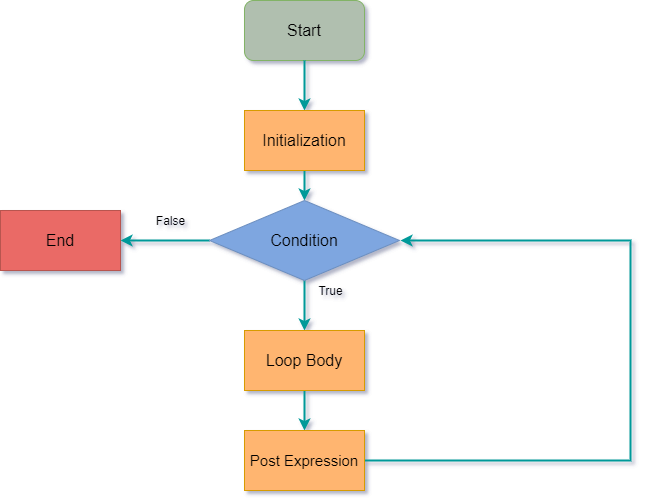
How it works. The flowchart shown below illustrates how the for loop in PHP works.
How to code. The code below uses the for loop to print the values of multiplying 10 by 0 through to 9.
<?php

for ($i = 0; $i < 10; $i++){

$product = 10 * $i;

echo "The product of 10 * $i is $product <br/>";
}

?>
Output:
The product of 10 * 0 is 0
The product of 10 * 1 is 10
The product of 10 * 2 is 20
The product of 10 * 3 is 30
The product of 10 * 4 is 40
The product of 10 * 5 is 50
The product of 10 * 6 is 60
The product of 10 * 7 is 70
The product of 10 * 8 is 80
The product of 10 * 9 is 90
PHP Foreach Loop
The PHP foreach loop is used to iterate through array values. It has the following basic syntax.
<?php
foreach($array_variable as $array_values){

block of code to be executed

}
?>
HERE,
- “foreach(…){…}” is the foreach loop block code
- “$array_variable” is the array variable to be looped through
- “$array_values” is the temporary variable that holds the current array item value.
- “block of code…” is the piece of code that operates on the array values
How it works. The flowchart shown below illustrates how the foreach loop works.

Practical examples. The code below uses the foreach loop to read and print the elements of an array.
<?php

$animals_list = array("Lion","Wolf","Dog","Leopard","Tiger");

foreach($animals_list as $array_values){

echo $array_values . "<br>";

}

?>
Output:
Lion
Wolf
Dog
Leopard
Tiger
Let us look at another example that loops through an associative array. An associative array uses alphanumeric words for access keys.
<?php

$persons = array("Mary" => "Female", "John" => "Male", "Mirriam" => "Female");

foreach($persons as $key => $value){

echo "$key is $value"."<br>";

}

?>
The names have been used as array keys and gender as the values.
Output:
Mary is Female
John is Male
Mirriam is Female
PHP While Loop
The while loop is used to execute a block of code repeatedly until the set condition is satisfied.
When to use while loops
- While loops are used to execute a block of code until a certain condition becomes true.
- You can use a while loop to read records returned from a database.
Types of while loops
- Do… while – executes the block of code at least once before evaluating the condition
- While… – checks the condition first. If it evaluates to true, the block of code is executed as long as the condition is true. If it evaluates to false, the execution of the while loop is terminated.
While loop. It has the following syntax.
<?php
while (condition){

block of code to be executed;

}
?>
HERE,
- “while(…){…}” is the while loop block code
- “condition” is the condition to be evaluated by the while loop
- “block of code…” is the code to be executed if the condition gets satisfied
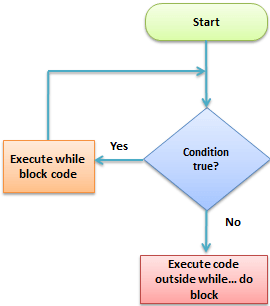
How it works. The flow chart shown below illustrates how the while loop works.
Practical example. The code below uses the while loop to print numbers 1 to 5.
<?php

$i = 0;

while ($i < 5){

echo $i + 1 . "<br>";

$i++;

}

?>
Output:
1
2
3
4
5
PHP Do While Loop
The difference between the while loop and the do-while loop is that the do-while loop is executed at least once before the condition is evaluated.
Let us now look at the basic syntax of a do-while loop.
<?php
do{

block of code to be executed

} while(condition);
?>
HERE,
- “do{…} while(…)” is the do-while loop block code
- “condition” is the condition to be evaluated by the while loop
- “block of code…” is the code that is executed at least once by the do-while loop
How it works. The flow chart shown below illustrates how the do-while loop works.

Practical example. We are now going to modify the while loop example and implement it using the do-while loop, and set the counter initial value to 9.
The code below implements the above modified example.
<?php

$i = 9;

do{

echo "$i is"." <br>";

}
while($i < 9);

?>
The above code outputs:
9
Note: the above example outputs 9 only. This is because the do-while loop is executed at least once even if the set condition evaluates to false.
