
PHP MVC Framework Tutorial
 Editorial Team
⚡ Smart Summary
PHP MVC Framework design separates application data and business logic from presentation, using Models, Views, and Controllers. CodeIgniter makes this pattern practical, letting PHP developers build secure, maintainable web applications faster.

What is PHP MVC framework?
PHP MVC is an application design pattern that separates the application data and business logic (model) from the presentation (view). MVC stands for Model, View & Controller.
The controller mediates between the models and views.
Think of the MVC design pattern as a car and the driver.
The car has the windscreens (view) which the driver (controller) uses to monitor traffic ahead, then speed up or brake (model) depending on what he sees ahead.
Next, let’s see why a framework built on this pattern is worth using.
Why use PHP MVC Framework?
PHP MVC frameworks simplify working with complex technologies by:
- Hiding all the complex implementation details
- Providing standard methods that we can use to build our applications
- Increasing developer productivity, because base implementations of activities such as connecting to the database and sanitizing user input are already partially implemented
- Encouraging adherence to professional coding standards
PHP MVC Design Pattern
Let’s now briefly discuss each component of the MVC design pattern.
Model – this part is concerned with the business logic and the application data. It can be used to perform data validations, process data and store it. The data can come from;
- flat file
- database
- XML document
- Other valid data sources.
Controller – this is the part that deals with the user’s requests for resources from the server.
As an example, when the user requests the URL …/index.php?products=list, the controller will load the products model to retrieve the products data, then output the results in the list view.
In a nutshell, the controller links the models and views together depending on the requested resources.
Views – this part deals with presenting the data to the user. This is usually in the form of HTML pages.
Types of PHP MVC framework
Selecting the best PHP framework is a challenge.
You don’t have to write your own framework to benefit from the advantages of MVC.
You should only attempt to create your own MVC related application design for understanding how MVC frameworks work.
Once you are comfortable with the way MVC frameworks work, you should move on to the mature and already tested frameworks.
The table below briefly describes some of the popular PHP frameworks and the features that each framework offers.
| Framework | Description |
|---|---|
|
|
It is one of the most popular PHP MVC frameworks, now in its fourth major version (CodeIgniter 4). It’s lightweight and has a short learning curve. It has a rich set of libraries that help build websites and applications rapidly. Users with limited knowledge of OOP programming can also use it. Applications built with CodeIgniter include;
|

|
It’s a Hierarchical Model View Controller (HMVC) secure and lightweight framework. Note: Kohana was officially discontinued in 2017; its last stable release was 3.3.6 (July 2016). The community fork Koseven continued its codebase. Companies that used Kohana include; |

|
It is modeled after Ruby on Rails and remains actively maintained (version 5.x). It’s known for concepts such as software design patterns, convention over configuration, ActiveRecord etc. CakePHP powered applications include; |

|
It is a powerful framework that is;
It’s ideal for developing business applications. In 2020, Zend Framework transitioned to the open source Laminas Project. Zend/Laminas powered applications include;
Companies that have used the Zend framework include;
|

PHP MVC Framework vs Plain PHP: Key Differences
What does a framework actually change in practice? Plain PHP gives you complete freedom, but every project ends up reinventing routing, validation, and database access from scratch. A PHP MVC framework standardizes these repetitive tasks, so your code stays consistent across projects and teams.
| Aspect | Plain PHP | PHP MVC Framework |
|---|---|---|
| Code organization | Mixed HTML, SQL, and logic in single files | Separated into models, views, and controllers |
| Database access | Hand-written queries on every page | Built-in query builder or ORM with parameter binding |
| Security | Developer must remember every safeguard | Input filtering, XSS, and CSRF protection included |
| Maintenance | Changes ripple unpredictably through files | Each layer can change independently |
💡 Tip: Build one small plain PHP project first, like the opinion poll below; the pain of mixed code makes the value of MVC separation obvious.
Porting the opinion poll application to CodeIgniter
In this tutorial, we created a PHP poll application. Here, we will port that code to CodeIgniter
- Download the latest version of CodeIgniter from their website.
- Extract the contents of the zipped file to your development directory in your web server directory. We will use ciopinionpoll as the folder name in this lesson.
- Browse to the URL http://localhost/ciopinionpoll/
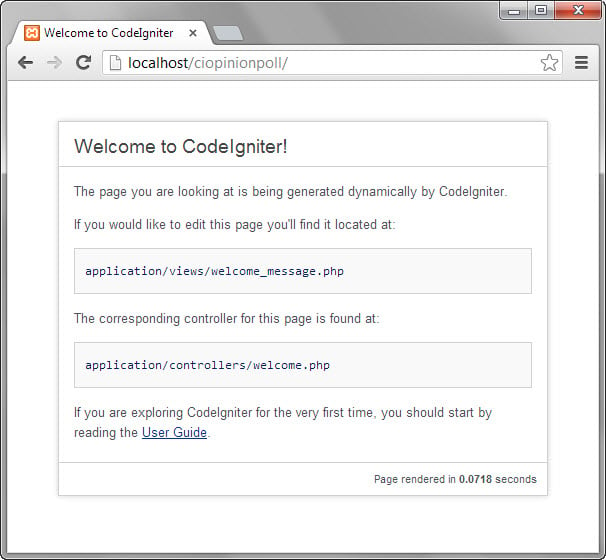
The CodeIgniter welcome page above confirms the framework is installed correctly. We are now going to port our opinion poll application to CodeIgniter. Recall that our application was divided into three major components, namely the;
- Front controller – this is the part that responds to URL requests and returns the requested page. This code will go into the controller
- Model – this is the code that responds to data requests and returns the requested data. This code will go into the model
- Views – this is the code responsible for formatting and displaying the data. This code will go into the view
Database configuration settings
To configure the database connection:
- Browse to the ciopinionpoll folder
- Open the database.php file located in the application/config directory.
- Locate the following lines of code

- Set the username to root
- Set the password to your localhost root password
- Set the database name to opinion_poll. Note we will be using the database created in the previous lesson.
- Save the changes and close the file.
Creating Our Model
Next we are going to create our model that will extend the CI_Model. The CI_Model is part of the CodeIgniter libraries. The model will be located in application/models opinion_poll_model.php
<?php
class Opinion_poll_model extends CI_Model
{
    public function __construct()
    {
        parent::__construct();
        $this->load->database();
    }

    public function total_votes()
    {
        $query = $this->db->select('COUNT(choice) as choices_count')->get('js_libraries');
        return $query->row()->choices_count;
    }

    public function get_results()
    {
        $libraries = array("", "JQuery", "MooTools", "YUI Library", "Glow");
        $table_rows = '';

        for ($i = 1; $i < 5; $i++)
        {
            $query = $this->db->select('COUNT(choice) as choices_count')
                              ->where('choice', $i)
                              ->get('js_libraries');

            $table_rows .= "<tr><td>" . $libraries[$i] . " Got:</td><td><b>" . $query->row()->choices_count . "</b> votes</td></tr>";
        }

        return $table_rows;
    }

    public function add_vote($choice)
    {
        $ts = date("Y-m-d H:i:s");
        $data = array('choice' => $choice, 'ts' => $ts);
        $this->db->insert('js_libraries', $data);
    }
}
?>
HERE,
- “class Opinion_poll_model extends CI_Model…” is our model that extends the CI_Model
- “parent::__construct();” calls the CI_Model constructor
- “$this->load->database();” loads the database library so that our application can interact with the database
- “$this->db->” is CodeIgniter’s active record. Check this link for more information on the active record.
Creating Our Controller
Let’s now create the controller. We will use the default CodeIgniter controller located in application/controllers/welcome.php. Replace its source code with the following code.
<?php

if (!defined('BASEPATH'))  exit('No direct script access allowed');

class Welcome extends CI_Controller {

    public function __construct() {

        parent::__construct();

        $this->load->model('opinion_poll_model');

    }

    public function index() {

        if ($this->input->post('submitbutton') && !$this->input->post('vote')) {

            echo "<script>alert('You did not vote!');</script>";

        }

        if ($this->input->post('vote')) {

            $this->opinion_poll_model->add_vote($this->input->post('vote'));

            $data['total_votes'] = $this->opinion_poll_model->total_votes();

            $data['rows'] = $this->opinion_poll_model->get_results();

            $this->load->view('results', $data);

        } else {

            $this->load->view('opinion_poll_form');

        }

    }

}

/* End of file welcome.php */

/* Location: ./application/controllers/welcome.php */
?>
HERE,
- “if (!defined(‘BASEPATH’)) exit(‘No direct script access allowed’);” ensures that users do not directly access the controller class
- “class Welcome extends CI_Controller…” our controller extends the CI_Controller class
- “public function __construct()” calls CI_Controller’s class constructor method and loads our Opinion_poll_model model
- “public function index()…” is the function that maps to index.php. It uses CodeIgniter’s input class to check if a vote has been submitted, add it to the database then display the results. If the post array of the input class is empty, it loads the voting page.
- “$this->input->post(‘…’)” is the CodeIgniter input class that grabs the contents of the $_POST global variable.
- “$this->opinion_poll_model->add_vote($this->input->post(‘vote’))” calls the model’s add_vote method to add the vote into the database.
Creating Our Views
Recall from the previous example that we had two HTML pages, one for voting and the other for results. We will use the same HTML code with minimal modifications to create our views. Create the following files in the application/views directory
opinion_poll_form.php
<html>
<head>
    <title>
        JavaScript Libraries - Opinion Poll
    </title>
</head>

<body>
    <h2>JavaScript Libraries - Opinion Poll</h2>
    <p><b>What is your favorite JavaScript Library?</b></p>
    <form method="POST" action="index.php">
        <p>
            <input type="radio" name="vote" value="1" /> JQuery
            <br />
            <input type="radio" name="vote" value="2" /> MooTools
            <br />
            <input type="radio" name="vote" value="3" /> YUI Library
            <br />
            <input type="radio" name="vote" value="4" /> Glow </p>
        <p>
            <input type="submit" name="submitbutton" value="OK" />
        </p>
    </form>
</body>
</html>
Let’s now create the results page results.php
<html>
    <head>
        <title>JavaScript Libraries - Opinion Poll Results</title>
    </head>
    <body>

        <h2>JavaScript Libraries - Opinion Poll Results</h2>

        <p><b>What is your favorite JavaScript Library?</b></p>

        <p><b><?php echo $total_votes; ?></b> people have thus far taken part in this poll:</p>

        <p><table><tr><td>

            <?php print($rows); ?>

        </tr></td></table></p>

        <p><a href="#">Return to voting page</a></p>
</body>
</html>
Testing our application
Assuming the root directory of your application is ciopinionpoll, browse to http://localhost/ciopinionpoll/

The voting page above comes from our opinion_poll_form view. Click OK without selecting an option, and you will see the following alert message

Vote for your favorite library, then click on OK. You will see the following results page

This confirms the three layers work together: the controller received the vote, the model stored and counted it, and the view displayed the totals.
