
What is Star Schema in Data Warehouse modeling?
 Editorial Team
⚡ Smart Summary
Star Schema in data warehouse modeling places a central fact table at the core of surrounding dimension tables, creating a denormalized, star-shaped design that simplifies analytical queries, speeds up reporting, and powers OLAP cubes across business intelligence platforms.
What is a Star Schema?
A star schema in a data warehouse is a modeling structure in which one central fact table connects to a number of associated dimension tables. It is called a star schema because the layout resembles a star, with the fact table sitting at the center and the dimension tables radiating outward like points.
The star schema is the simplest type of data warehouse schema, and it is also known as the star join schema. Because its dimension tables are denormalized, the model is optimized for querying very large data sets, which makes it a common choice for dimensional modeling and reporting.
What is a Multidimensional Schema?
A multidimensional schema is designed specifically to model data warehouse systems. These schemas address the unique needs of very large databases that are built for the analytical purpose of OLAP rather than for routine transaction processing.
Types of data warehouse schema: There are three chief types of multidimensional schema, and each one offers its own advantages.
- Star schema – a central fact table joined directly to denormalized dimension tables.
- Snowflake schema – an extension of the star schema in which the dimensions are normalized into additional sub-dimension tables.
- Galaxy schema – also called a fact constellation, it uses multiple fact tables that share common dimension tables.
Because the snowflake schema builds directly on the star schema, it helps to compare the two models before working through a detailed star schema example.
Star Schema vs Snowflake Schema
The star schema and the snowflake schema both organize data around fact and dimension tables, but they differ in how the dimensions are stored. A star schema keeps each dimension in a single denormalized table, while a snowflake schema normalizes those dimensions into several related tables.
- Structure: The star schema is flat and simple; the snowflake schema branches dimensions into sub-dimensions.
- Query speed: Star schemas need fewer joins, so queries usually run faster and the SQL stays simpler.
- Storage: Snowflake schemas remove redundancy, so they use less space but add design complexity.
- Data integrity: Normalized snowflake dimensions enforce integrity better, whereas denormalized star dimensions favor performance.
- Ease of use: A star schema is simpler for analysts to understand and quicker to maintain, while a snowflake schema demands more careful design.
In practice, teams often choose a star schema for data marts and dashboards that demand fast, straightforward reporting, and a snowflake schema when storage savings and strict consistency matter more.
Example of Star Schema
In the following star schema example, the fact table sits at the center and holds the keys to every dimension table, such as Dealer_ID, Model_ID, Date_ID, Product_ID, and Branch_ID, along with measurable attributes like units sold and revenue.
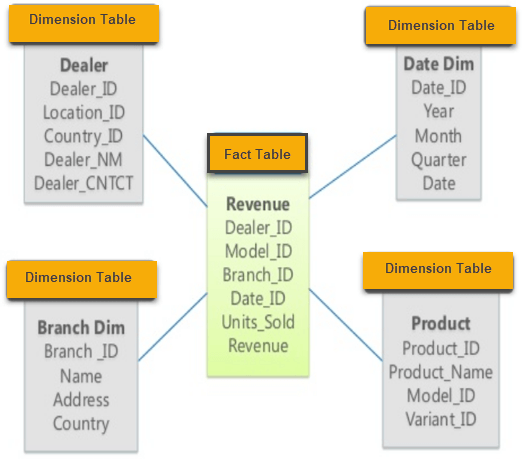
Each surrounding dimension table adds descriptive context to those measures, so a single query can group or filter the sales facts by dealer, model, date, product, or branch without joining any other tables.
Fact Tables
A fact table in a star schema contains facts and is connected to the dimensions. A fact table holds two types of columns:
- A column that stores the facts, or measures.
- Foreign keys that link to each dimension table.
Generally, the primary key of a fact table is a composite key made up of all the foreign keys that make up the table.
Fact tables can contain detail-level facts or aggregated facts. Fact tables that include aggregated facts are often called summary tables, and they usually contain facts that have already been aggregated to some level.
Dimension Tables
A dimension is a structure that categorizes data into a hierarchy. A dimension without hierarchies and levels is called a flat dimension or list. Each dimension table’s primary key is part of the composite primary key of the fact table.
A dimension attribute is a descriptive, textual attribute that helps describe a dimensional value, such as a product name or a city. Because dimension tables store this descriptive context rather than transactional events, fact tables are usually much larger than dimension tables.
How to Design a Star Schema
Designing a star schema follows the dimensional modeling approach popularized by Ralph Kimball. The goal is to organize business measures around clear, reusable dimensions so that the finished model is easy to query and quick to report on. The five steps below outline the process that most dimensional modeling projects follow, moving from the highest-level business question down to the physical fact and dimension tables.
- Identify the business process: Choose the activity you want to analyze, such as sales, shipping, or inventory. This decision defines what the fact table will measure.
- Declare the grain: Decide the level of detail that each fact row represents, for example one row per line item, per transaction, or per day. A clear grain keeps the model consistent.
- Identify the dimensions: List the descriptive context needed to slice the facts, such as product, customer, dealer, branch, and date. Each one becomes a dimension table of attributes.
- Identify the facts: Determine the numeric measures the business wants to track, such as units sold, revenue, or cost, and place them in the central fact table.
- Build the star: Connect the fact table to each dimension through foreign keys, keeping the dimensions denormalized so the diagram forms a single central fact table surrounded by its dimensions.
After the star is built, add a surrogate key to every dimension, make sure each fact table has an associated date dimension, and confirm that all facts sit at the same grain. It is also good practice to load atomic, lowest-level data first, because summary tables can always be derived later. Following these rules keeps the schema optimized for high performance and simple data warehouse reporting.
Characteristics of Star Schema
- Every dimension in a star schema is represented by only one dimension table.
- Each dimension table contains its own set of attributes.
- The dimension table is joined to the fact table using a foreign key.
- The dimension tables are not joined to each other.
- The fact table contains keys and measures.
- The star schema is easy to understand and provides optimal disk usage.
- The dimension tables are not normalized. For instance, in the example above, Country_ID does not have a separate Country lookup table the way an OLTP design would.
- The schema is widely supported by BI tools.
Advantages of Star Schema
The star schema offers several benefits that make it a popular starting point for data warehouse design:
- Star schemas use simpler join logic than other schemas when fetching data from highly normalized transactional sources.
- The star schema simplifies common business reporting logic, such as period-over-period and as-of reporting.
- Star schemas are widely used by OLAP systems to build cubes efficiently, and a star schema can serve as a source without designing a cube structure in most major OLAP systems.
- By enabling specific performance tuning that can be applied to queries, the query processor can offer better execution plans.
Disadvantages of Star Schema
- Because the schema is highly denormalized, data integrity is not strongly enforced.
- It is not flexible in terms of advanced analytical needs.
- Star schemas do not reinforce many-to-many relationships between business entities.
When to Use a Star Schema
A star schema is the right choice when fast, predictable query performance matters more than saving storage space. Because the model keeps its dimension tables denormalized and the number of joins low, it suits analytical workloads where business users repeatedly run similar reports, dashboards, and aggregations over large volumes of historical data.
Typical situations where a star schema is a strong fit include:
- Data marts: Departmental data marts with simple, well-understood relationships benefit from the readable structure.
- BI dashboards: Business intelligence tools map cleanly onto star schemas, so reports and visuals are quick to build.
- OLAP cubes: Star schemas are a natural source for OLAP cubes, aggregation, and slice-and-dice analysis.
If the priority instead shifts toward minimal storage, strict data integrity, or deep, changing hierarchies, a snowflake schema or a more normalized design may serve better. Many teams even combine the two, starting with a star schema and normalizing only the dimensions that genuinely require it.
