
Snowflake Schema in Data Warehouse Model
 Editorial Team
⚡ Smart Summary
Snowflake Schema in Data Warehouse modeling arranges normalized dimension tables that branch from a central fact table, resembling a snowflake. It extends the star schema, reduces data redundancy, and organizes hierarchies across multiple related lookup tables.
What is a Snowflake Schema?
A Snowflake Schema in a data warehouse is a logical arrangement of tables in a multidimensional database whose entity relationship (ER) diagram resembles the shape of a snowflake. It is a dimensional model in which a central fact table links to dimension tables, and those dimension tables are further divided into related sub-dimension tables.
The snowflake schema is an extension of the star schema. While a star schema keeps each dimension in a single flat table, the snowflake schema normalizes those dimensions, splitting repeating groups of data into additional lookup tables. This normalization removes redundancy and creates the branching, hierarchical structure that gives the schema its name.
Snowflake Schema Example
In the following snowflake schema example, a Sales fact table sits at the center, surrounded by dimensions such as Product, Date, and Store. Instead of storing every attribute inside one dimension table, the geography information is normalized so that Country is moved into its own separate table.

Here, the Store dimension references a City table, the City table references a State table, and the State table references a Country table. Each value is stored only once and linked by a foreign key, so a country name is never repeated across millions of rows. This layered normalization is what distinguishes a snowflake schema from a flat star schema.
Characteristics of Snowflake Schema
The snowflake schema has several defining characteristics:
- It uses smaller disk space, because normalized dimension tables avoid storing repeated values.
- New dimensions can be added to the schema with relatively little effort.
- Query performance can drop, because retrieving data requires joining many tables.
- It needs more maintenance effort, since a larger number of lookup tables must be managed.
How to Design a Snowflake Schema
Designing a snowflake schema starts the same way as any dimensional model and then adds a normalization step. The aim is to identify the business process you want to analyze, model it first as a star schema, and then normalize the dimensions that contain deep hierarchies. Work through the following steps:
- Identify the business process and grain. Decide what a single row of the fact table represents, such as one sales transaction, and define the numeric measures, or facts, that you need to report on.
- Build the central fact table. Add the numeric measures along with the foreign keys that point to each dimension; together those foreign keys usually form the composite primary key.
- Define the dimension tables. Create one table for each descriptive dimension, such as Product, Customer, Date, and Store, and assign each a surrogate primary key.
- Normalize the hierarchies. Split every dimension that holds repeating attributes into sub-dimension tables, for example moving Category out of Product, or City, State, and Country out of a Store dimension.
- Connect the tables with foreign keys. Link each sub-dimension back to its parent table so the branches form clear one-to-many hierarchies that resemble a snowflake.
- Validate and test with queries. Run representative reporting queries to confirm that the joins return correct results and that overall performance stays acceptable.
Because the design normalizes data toward third normal form, document the join paths clearly so that analysts understand how to navigate each branch. With the structure defined, it is worth weighing the schema’s benefits against its costs.
Advantages of Snowflake Schema
The snowflake schema offers a number of benefits:
- Its primary advantage is reduced disk storage, because joining smaller normalized lookup tables avoids duplicating dimension data.
- It provides greater scalability in the relationships between components and dimension levels.
- It removes redundancy, which improves data integrity and makes the model easier to maintain.
- A descriptive attribute is updated in only one place, which lowers the risk of inconsistent data.
Disadvantages of Snowflake Schema
The design also comes with trade-offs to consider:
- The normalized structure increases the maintenance required to manage many related tables.
- Complex queries that span multiple joins can be difficult to write and understand.
- A larger number of tables means more joins, which lengthens query execution time.
- Business users often find the branching model harder to navigate than a simple star schema.
Snowflake Schema vs Star Schema
The snowflake schema and the star schema are the two most common multidimensional designs in data warehousing, and the key difference between them is normalization. A star schema keeps each dimension in a single flat, denormalized table for maximum query speed, whereas a snowflake schema normalizes those dimensions into several related tables to save storage and protect data integrity. Because of this, the two schemas suit different priorities.
| Aspect | Star Schema | Snowflake Schema |
|---|---|---|
| Dimension tables | Denormalized, one table per dimension | Normalized into sub-dimension tables |
| Storage | Uses more space due to redundancy | Uses less space, no redundancy |
| Query performance | Faster, fewer joins | Slower, more joins |
| Query complexity | Simple to write | More complex |
| Best suited for | Fast reporting and BI | Large, hierarchical dimensions |
In short, choose a star schema when query speed and reporting simplicity matter most, and choose a snowflake schema when storage efficiency, clean hierarchies, and low data redundancy are the priority. Many real warehouses combine both patterns depending on the size and depth of each dimension.
When to Use a Snowflake Schema
A snowflake schema is not always the right choice, so it helps to match the design to the workload and reporting needs. It tends to work best in the following situations:
- Dimensions are very large and contain many repeating attributes that waste storage space when they are denormalized.
- Dimensions have deep, well-defined hierarchies, such as Region to Country to State to City, that map naturally onto separate tables.
- Data integrity and consistency are more important for the project than raw query speed.
- Storage costs are a real concern and the disk savings across huge dimension tables are meaningful.
- The model feeds OLAP tools that can navigate normalized hierarchies efficiently.
Conversely, when fast and simple reporting for business analysts is the priority, a star schema or a hybrid star cluster design is usually the better fit. Many data warehouse architectures deliberately blend both approaches to balance speed and storage.
What is a Galaxy Schema?
A Galaxy Schema contains two or more fact tables that share dimension tables between them. It is also called a Fact Constellation Schema, and because it can be viewed as a collection of stars, it earns the name galaxy schema.
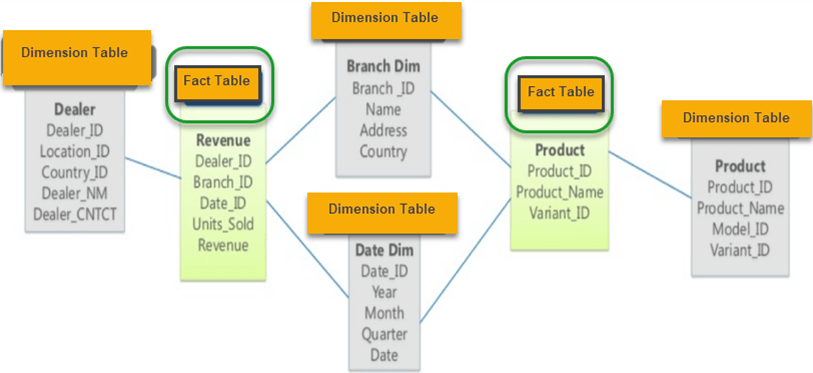
As you can see in the example above, there are two fact tables:
- Revenue
- Product
In a galaxy schema, the dimensions that are shared between the fact tables are called conformed dimensions.
Characteristics of Galaxy Schema
The galaxy schema has the following characteristics:
- The dimensions are separated into distinct dimensions based on the various levels of the hierarchy.
- For example, if geography has four levels of hierarchy — region, country, state, and city — then the galaxy schema should have four dimensions.
- It is possible to build this type of schema by splitting a single star schema into more star schemas.
- The dimensions in this schema are large and must be built according to the levels of the hierarchy.
- The schema is helpful for aggregating fact tables to support better analysis and understanding.
What is Star Cluster Schema?
A snowflake schema contains fully expanded hierarchies, which can add complexity and require extra joins. A star schema, on the other hand, contains fully collapsed hierarchies, which may lead to redundancy. The best solution is often a balance between these two designs, known as a Star Cluster Schema.
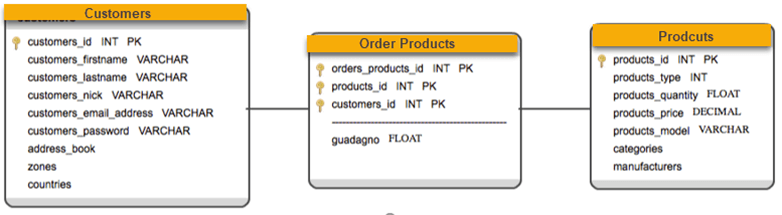
Overlapping dimensions appear as forks in the hierarchies. A fork happens when an entity acts as a parent in two different dimensional hierarchies. These fork entities are then identified as classifications with one-to-many relationships, which limits the number of extra tables the design creates.
