
What is Mutation Testing? (Example)
 Editorial Team
⚡ Smart Summary
Mutation Testing deliberately introduces small faults into source code and then runs the existing test suite against every faulty version, measuring whether those tests are strong enough to detect the change.
What is Mutation Testing?
Mutation Testing is a type of software testing in which certain statements of the source code are changed, or mutated, to check whether the test cases are able to find errors in the source code. The goal of Mutation Testing is to assure the quality of the test cases in terms of robustness, so that they fail against the mutated source code.
The change made in a mutant program must be kept extremely small, so that it does not affect the overall objective of the program. Mutation Testing is also called a fault-based testing strategy, because it involves deliberately creating a fault in the program. It is a form of White Box Testing that is applied mainly during Unit Testing.
Mutation Testing was proposed in 1971 in a student paper by Richard Lipton and formalised in the 1978 paper “Hints on Test Data Selection” by DeMillo, Lipton, and Sayward. It lost momentum on the computing cost of the day and has since regained ground for languages such as Java, C#, Python, JavaScript, and XML.
How to execute Mutation Testing?
Following are the steps to execute mutation testing, also known as mutation analysis:
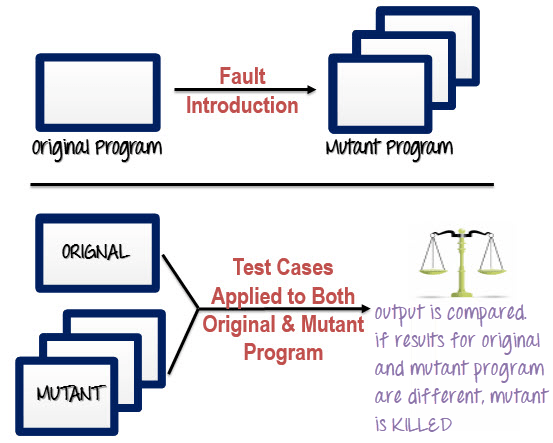
Step 1: Faults are introduced into the source code of the program by creating many versions called mutants. Each mutant should contain a single fault, and the goal is to cause the mutant version to fail, which demonstrates the effectiveness of the test cases.
Step 2: Test cases are applied to the original program and also to the mutant program. A Test Case should be adequate, and it is tweaked to detect faults in a program.
Step 3: Compare the results of the original and the mutant program.
Step 4: If the original program and the mutant program generate different output, then the mutant is killed by the test case. Hence the test case is good enough to detect the change between the original and the mutant program.
Step 5: If the original program and the mutant program generate the same output, the mutant is kept alive. In such cases, more effective test cases need to be created that kill all the mutants.
The diagram below traces the same five steps, from the original program through mutant generation to the killed or surviving verdict.
How to Create Mutant Programs?
A mutation is nothing but a single syntactic change that is made to a program statement. Each mutant program should differ from the original program by exactly one mutation.
| Original Program | Mutant Program |
| If (x>y) Print “Hello” Else Print “Hi” |
If (x<y) Print “Hello” Else Print “Hi” |
In the pair above only the comparison operator changed, yet a test case where x is greater than y now prints “Hi” instead of “Hello”. The illustration shows that one syntactic edit.

What to change in a Mutant Program?
There are several techniques that can be used to generate mutant programs. The three families below cover most of the mutation operators that tools ship with.
| Operand replacement operators | Expression modification operators | Statement modification operators |
| Replace the operand with another operand (x with y, or y with x) or with a constant value. | Replace an operator, or insert a new operator, in a program statement. | Programmatic statements are modified to create mutant programs. |
| Example: If(x>y) replace x and y values If(5>y) replace x by constant 5 |
Example: If(x==y) We can replace == with >= and have the mutant program as If(x>=y) and inserting ++ in the statement If(x==++y) |
Example: Delete the else part in an if-else statement Delete the entire if-else statement to check how the program behaves |
Some sample mutation operators:
- GOTO label replacement
- Return statement replacement
- Statement deletion
- Unary operator insertion (such as – and ++)
- Logical connector replacement
- Comparable array name replacement
- Removing the else part of an if-else statement
- Adding or replacing operators
- Statement replacement by changing the data
- Data modification for the variables
- Modification of data types in the program
Operators that touch a boundary condition survive most often, so mutation results frequently point back at gaps in boundary value analysis.
Types of Mutation Testing
In Software Engineering, Mutation Testing is fundamentally categorised into three types — statement mutation, value mutation, and decision mutation.
- Statement Mutation – a statement is cut, pasted, or deleted, so the outcome may be the removal of some lines of code.
- Value Mutation – the values of primary parameters and constants are modified, for example changing a loop bound or a threshold.
- Decision Mutation – control statements are changed, for example flipping a relational operator or negating a condition.
Tools group their operators under these three headings, so the family that produced a surviving mutant tells the tester which kind of assertion is missing. A surviving decision mutant usually marks an untested branch, which overlaps with loop testing.
Automation of Mutation Testing
Mutation Testing is extremely time consuming and complicated to execute manually, so it is advisable to use automation tools, which also reduce cost. A mutation tool compiles the mutants, schedules the runs, records which mutant each failing test killed, and reports the score.
List of tools available:
- Stryker — an open-source mutation testing framework with editions for JavaScript and TypeScript (StrykerJS), C# and .NET (Stryker.NET), and Scala (Stryker4s).
- PIT, also written PITest — a mutation testing system for Java and the JVM that mutates compiled bytecode and plugs into Maven and Gradle builds alongside JUnit.
Both run as a build step, so they belong in the same continuous integration pipeline as the rest of the automation testing suite.
Mutation Score
The mutation score is defined as the percentage of killed mutants out of the total number of mutants.
Mutation Score = (Killed Mutants / Total number of Mutants) * 100
The formula is shown below in the form most tools report it.

Test cases are described as mutation adequate when the score reaches 100 percent. In practice the denominator must exclude equivalent mutants — mutants whose changed syntax behaves exactly like the original, so no test can kill them. Tools therefore report killed mutants divided by killed plus surviving non-equivalent mutants, and let the tester flag equivalents.
Experimental results have shown that mutation testing is an effective way to measure the adequacy of test cases. The main drawback is the cost of generating the mutants and executing every test case against each one.
Mutation Testing vs Code Coverage
High test coverage does not prove strong tests. Line and branch coverage record which statements ran, not whether anything was verified afterwards, so a test that calls a method and asserts nothing still counts as covered. Mutation Testing closes that gap, because a mutant only dies when an assertion actually fails.
| Aspect | Code coverage | Mutation score |
| What it measures | Which lines or branches the tests executed | Which injected faults the tests detected |
| Sensitive to assertions | No — a test with zero assertions still adds coverage | Yes — a mutant survives when no assertion fails |
| Cost of a run | One instrumented test run | One test run per surviving mutant, so far slower |
| Typical use | A quick gate on every commit | A deeper periodic check on critical modules |
| Failure mode | 100 percent coverage with no real verification | Equivalent mutants that can never be killed |
The two metrics are complementary. Coverage names the code that was never reached; the mutation score names the reached code that was never checked. Both feed the same defect management process, alongside measures such as defect density.
Advantages of Mutation Testing
Following are the advantages of Mutation Testing:
- It is a powerful approach for attaining high coverage of the source program.
- It tests the test suite itself, which no other software testing technique does directly.
- Mutation Testing brings a good level of error detection to the software developer.
- The method uncovers ambiguities in the source code and has the capacity to expose faults that ordinary runs never reach.
- Surviving mutants are actionable: each one names a specific line and a specific change that the suite failed to notice.
- Customers benefit from this testing by receiving a more reliable and stable system.
Disadvantages of Mutation Testing
On the other side, the following are the disadvantages of Mutation Testing:
- Mutation Testing is extremely costly and time consuming, because a large number of mutant programs need to be generated and compiled.
- Since it is time consuming, it is fair to say that this testing cannot be done without an automation tool.
- Every mutant is exercised by the same number of test cases as the original program, so a large mutant population must be run against the whole test suite.
- Equivalent mutants cannot be killed by any test, and separating them from genuine survivors usually needs manual review.
- Because the method changes the source code, it is not applicable to Black Box Testing.
When to Use Mutation Testing
The cost profile above means Mutation Testing is rarely run across a whole codebase on every commit. It pays for itself where an undetected fault is expensive and the code under test is small enough to mutate quickly.
- Safety-critical or financial logic — payment calculation, tax rules, and authorisation checks, where a silent wrong answer is worse than a crash.
- Suites with suspiciously high coverage — when coverage reads near 100 percent but defects still escape.
- Legacy code being refactored — mutation results reveal whether the existing tests would catch a regression.
- Libraries and shared components — a fault in a reused component multiplies across every caller.
- Teams practising test-driven development — the score checks that the tests written first do real work.
It is usually not worth running on throwaway prototypes, on thin glue or generated code with no branching logic, or on suites dominated by slow integration tests that already take hours for a single pass.
Most teams therefore scope the run to changed files, set a threshold for the modules that matter, and let the wider regression testing suite carry the rest of the software testing life cycle.
