
Microsoft Azure Tutorial for Beginners: Learn Basics in 1 Day
 Editorial Team
⚡ Smart Summary
Microsoft Azure is the cloud computing platform launched by Microsoft in 2010 that supports application development, data storage, service hosting, and management through a global network of Microsoft-operated data centers and hundreds of integrated services.

What is Cloud Computing?
Cloud computing is a term referred to storing and accessing of data over the internet. It does not store any data on the hard disk of your personal computer. In cloud computing, you access data from a remote server.
What is Microsoft Azure?
Azure is a cloud computing platform which was launched by Microsoft in February 2010. It is an open and flexible cloud platform which helps in development, data storage, service hosting, and service management. The Azure tool hosts web applications over the internet with the help of Microsoft data centers.
Types of Azure Clouds
There are mainly three types of clouds in Microsoft Azure:
- PaaS
- SaaS
- IaaS
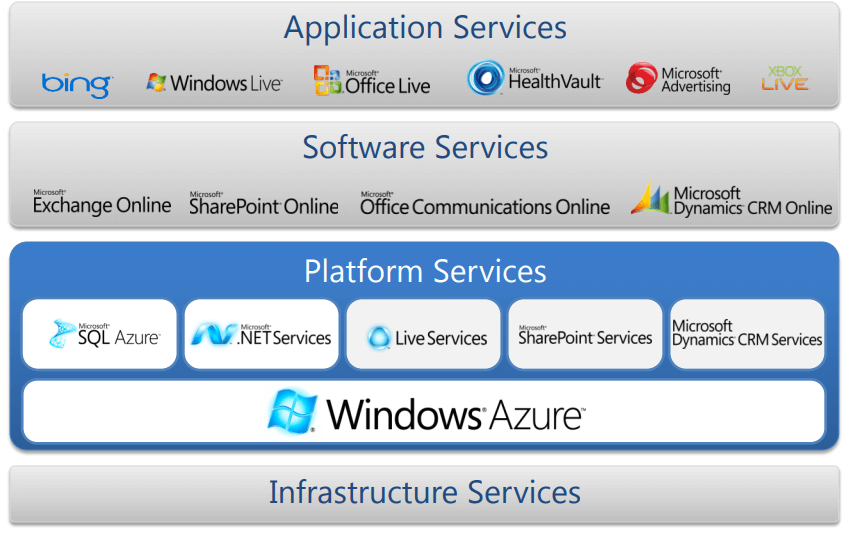
Azure as IaaS
IaaS (Infrastructure as a Service) is the foundational cloud platform layer. This Azure service is used by IT administrators for processing, storage, networks, or any other fundamental computer operations. It is one of the Azure topics to learn that allows users to run arbitrary software.
Advantages:
- It offers efficient design time portability.
- It is advisable for the application which needs complete control.
- IaaS offers quick transition of services to clouds.
- The apparent benefit of IaaS is that it frees you from the concerns of setting up many physical or virtual machines.
- Helps you to access, monitor, and manage datacenters.
Disadvantages of IaaS:
- Plenty of security risks from unpatched servers.
- Some companies have defined processes for testing and updating on-premise server vulnerabilities. This cannot be done with Azure.
Azure as PaaS
PaaS is a computing platform which includes an operating system, programming language execution environment, database, or web services. This Azure service is used by developers and application providers.
As its name suggests, this platform is provided to the client to develop and deploy software. It is one of the Azure basic concepts which allows the client to focus on application development instead of worrying about hardware and infrastructure. It also takes care of operating systems, networking, and server issues.
Advantages:
- The total cost is low as the resources are allocated on demand and servers are automatically added or subtracted.
- Azure is less vulnerable because servers are automatically checked for all known security issues.
- The entire process is not visible to the developer, so it does not have a risk of a data breach.
Disadvantages:
- Portability issues can occur when you use PaaS services.
- There may be a different environment at Azure, so the application needs to adapt accordingly.
Azure as SaaS
SaaS (Software as a Service) is software which is centrally hosted and managed. It is a single version of the application used for all customers. You can scale out to multiple instances. This helps you to ensure the best performance in all locations. The software is licensed through a monthly or annual subscription. MS Exchange, Office, and Dynamics are offered as a SaaS.
Azure Key Concepts
Now in this Azure basics for beginners tutorial, we will learn Azure key concepts as listed below:
| Concept Name | Description |
|---|---|
| Regions | Azure is a global cloud platform which is available across various regions around the world. When you request a service, application, or VM in Azure, you are first asked to specify a region. The selected region represents the datacenter where your application runs. |
| Datacenter | In Azure, you can deploy your applications into a variety of data centers around the globe. So, it is advisable to select a region which is closer to most of your customers. It helps you to reduce latency in network requests. |
| Azure portal | The Azure portal is a web-based application which can be used to create, manage, and remove Azure resources and services. It is located at https://portal.azure.com. |
| Resources | An Azure resource is an individual computer, networking data, or app hosting service which is charged individually. Some common resources are virtual machines (VM), storage account, or SQL databases. |
| Resource groups | An Azure resource group is a container which holds related resources for an Azure solution. It may include every resource or just the resources which you want to manage. |
| Resource Manager templates | It is a JSON file which defines one or more resources to deploy to a resource group. It also establishes dependencies between deployed resources. |
| Automation | Azure allows you to automate the process of creating, managing, and deleting resources by using PowerShell or the Azure command-line Interface (CLI). |
| Azure PowerShell | PowerShell is a set of modules that offer cmdlets to manage Azure. In most cases, you are allowed to use the cmdlets command for the same tasks which you are performing in the Azure portal. |
| Azure command-line interface (CLI) | The Azure CLI is a tool that you can use to create, manage, and remove Azure resources from the command line. |
| REST APIs | Azure is built on a set of REST APIs that help you perform the same operations that you do in the Azure portal UI. It allows your Azure resources and apps to be manipulated via any third-party software application. |
Azure Domains (Components)
Now in this Azure fundamentals tutorial, let us learn the key Azure components:

Compute
It offers computing operations like app hosting, development, and deployment in the Azure platform. It has the following components:
- Virtual Machine: Allows you to deploy any language or workload in any operating system.
- Virtual Machine Scale Sets: Allows you to create thousands of similar virtual machines in minutes.
- Azure Container Service: Creates a container hosting solution which is optimized for Azure. You scale and arrange applications using Kubernetes, DC/OS, Swarm, or Docker.
- Azure Container Registry: This service stores and manages container images across all types of Azure deployments.
- Functions: Lets you write code regardless of infrastructure and provisioning of servers, for situations when your function’s call rate scales up.
- Batch: Batch processing helps you scale to tens, hundreds, or thousands of virtual machines and execute compute pipelines.
- Service Fabric: Simplifies microservice-based application development and lifecycle management. It supports Java, PHP, Node.js, Python, and Ruby.
Storage
Azure Storage is a cloud storage solution for modern applications. It is designed to meet the needs of its customers’ demand for scalability. It allows you to store and process hundreds of terabytes of data. It has the following components:
- Blob Storage: Azure Blob storage is a service which stores unstructured data in the cloud as objects/blobs. You can store any type of text or binary data, such as a document, media file, or application installer.
- Queue Storage: It provides cloud messaging between application components. It delivers asynchronous messaging to establish communication between application components.
- File Storage: Using Azure File storage, you can migrate legacy applications. It relies on file shares to Azure quickly and without costly rewrites.
- Table Storage: Azure Table storage stores semi-structured NoSQL data in the cloud. It provides a key/attribute store with a schema-less design.
Database
This category includes Database as a Service (DBaaS) which offers SQL and NoSQL tools. It also includes databases like Azure Cosmos DB and Azure Database for PostgreSQL. It has the following components:
- SQL Database: It is a relational database service in the Microsoft cloud based on the market-leading Microsoft SQL Server engine.
- DocumentDB: It is a fully managed NoSQL database service which is built for fast and predictable performance and ease of development.
- Redis Cache: It is a secure and highly advanced key-value store. It stores data structures like strings, hashes, lists, etc.
Content Delivery Network
Content Delivery Network (CDN) caches static web content at strategically placed locations. This helps you to offer speed for delivering content to users. It has the following components:
- VPN Gateway: VPN Gateway sends encrypted traffic across a public connection.
- Traffic Manager: It helps you to control and distribute user traffic for services like WebApps, VM, Azure, and cloud services in different datacenters.
- Express Route: Helps you to extend your on-premises networks into the Microsoft cloud over a dedicated private connection to Microsoft Azure, Office 365, and CRM Online.
Security + Identity Services
It provides capabilities to identify and respond to cloud security threats. It also helps you to manage encryption keys and other sensitive assets. It has the following components:
- Key Vault: Azure Key Vault allows you to safeguard cryptographic keys and helps you to create secrets used by cloud applications and services.
- Azure Active Directory: Azure Active Directory is an identity management service. This includes multi-factor authentication, device registration, etc.
- Azure AD B2C: Azure AD B2C is a cloud identity management solution for your consumer-facing web and mobile applications. It allows you to scale to hundreds of millions of consumer identities.
Enterprise Integration Services
- Service Bus: Service Bus is an information delivery service which works on the third-party communication system.
- SQL Server Stretch Database: This service helps you migrate any cold data securely and transparently to the Microsoft Azure cloud.
- Azure AD Domain Services: It offers managed domain services like domain join, group policy, LDAP, etc. This authentication is compatible with Windows Server Active Directory.
- Multi-Factor Authentication: Azure Multi-Factor Authentication (MFA) is two-step verification. It helps you to access data and applications with a simple sign-in process.
Monitoring + Management Services
These services allow easy management of Azure deployment.
- Azure Resource Manager: It makes it easy for you to manage and visualize resources in your app. You can even control who in your organization can act on the resources.
- Automation: Microsoft Azure Automation is a way to automate manual, long-running, error-prone, and constantly repeated tasks. These tasks are commonly performed in a cloud and enterprise environment.
Azure Networking
- Virtual Network: Performs network isolation and segmentation. It offers filtering and routing of network traffic.
- Load Balancer: Offers high availability and network performance for any application. Load balances incoming internet traffic to virtual machines.
- Application Gateway: It is a dedicated virtual appliance that offers an Application Delivery Controller (ADC) as a service.
- Azure DNS: Azure DNS hosting service offers name resolution using Microsoft Azure infrastructure.
Web and Mobile Services
- Web Apps: Web Apps allows you to build and host websites in the programming language of your choice without the need to manage its infrastructure.
- Mobile Apps: Mobile Apps Service offers a highly scalable, globally available mobile app development platform for users.
- API Apps: API apps make it easier to develop, host, and consume APIs in the cloud and on-premises.
- Logic Apps: Logic Apps helps you to simplify and implement scalable integrations.
Workflows in the Cloud
It provides a visual designer to create and automate your process as a series of steps known as a workflow.
- Notification Hubs: Azure Notification Hubs offers an easy-to-use, multi-platform, scaled-out push engine.
- Event Hubs: Azure Event Hubs is a data streaming platform which can manage millions of events per second. Data sent to an event hub can be transformed and stored using any real-time analytics provider or batching/storage adapters.
- Azure Search: It is a cloud search-as-a-service solution which offers server and infrastructure management. It offers a ready-to-use service that you can populate with your data. This can be used to add search to your web or mobile application.
Migration
Migration tools help an organization estimate workload migration costs. It also helps to perform the migration of workloads from your local data centers to the Azure cloud.
Traditional vs. Azure Cloud Model
Now in this Azure cloud tutorial, let us learn about the difference between the Traditional cloud model and the Azure cloud model:
| Traditional | Azure Cloud Model |
|---|---|
| Dedicated infrastructure for each application | Loosely coupled apps and micro-services |
| Purpose-built hardware | Industry-standard hardware |
| Distinct infrastructure and operations teams | Service-focused DevOps teams |
| Customized processes & configurations | Standardized processes & configurations |
Applications of Azure
Now in this Azure for beginners tutorial, we will learn the applications of Azure. Microsoft Azure is used in a broad spectrum of applications like:
- Infrastructure Services
- Mobile Apps
- Web Applications
- Cloud Services
- Storage, Backup, and Recovery
- Data Management
- Media Services
Advantages of Azure
Here are the advantages of using Azure:
- Azure infrastructure will cost-effectively enhance your business continuity strategy.
- It allows you to access the application without buying a license for the individual machine.
- Windows Azure offers the best solution for your data needs, from SQL database to blobs to tables.
- Offers scalability, flexibility, and cost-effectiveness.
- Helps you to maintain consistency across clouds with familiar tools and resources.
- Allows you to extend the data center with a consistent management toolset and familiar development and identity solutions.
- You can deploy premium virtual machines in minutes, which also include Linux and Windows servers.
- Helps you to scale your IT resources up and down based on your needs.
- You are not required to run a high-powered and high-priced computer to run cloud computing’s web-based applications.
- You will not require processing power or hard disk space if you are using Azure.
- Cloud computing offers virtually limitless storage.
- If your personal computer or laptop crashes, all your data is still out there in the cloud, and it is still accessible.
- Sharing documents leads directly to better collaboration.
- If you change your device, your computers, applications, and documents follow you through the cloud.
Disadvantages of Azure
- Cloud computing is not possible if you cannot connect to the Internet.
- Azure is a web-based application which requires a lot of bandwidth to download, as do large documents.
- Web-based applications can sometimes be slower compared to accessing a similar software program on your desktop PC.
