
MM17 Tcode in SAP: Mass Maintenance of Material Master
 Editorial Team
⚡ Smart Summary
Mass creation of material master records replaces repetitive single entry with tools such as MM17, LSMW, eCATT, BDC, and BAPI. Transaction MM17 changes or extends many materials at once when the target data is identical.

What is Mass Maintenance in SAP MM?
Mass maintenance means applying the same master data operation to many records in one execution instead of opening each material individually. A project that loads two thousand materials during a go live, or a business decision that moves an entire product group to a new unit of measure, is impractical through MM01 and MM02 alone.
Two distinct needs sit behind the term, and they are often confused:
- Mass creation builds material master records that do not yet exist. It requires a data load tool that can drive the full creation transaction with different values per record.
- Mass change updates a field on records that already exist, or extends existing materials to further organizational levels. This is what transaction MM17 performs.
The distinction matters because MM17 cannot invent a material number or populate every mandatory field of a new record. It writes one supplied value across a selected set. Genuine creation at volume therefore uses LSMW, eCATT, a BDC recording, or a BAPI call, all of which read a source file containing a different row per material.
The comparison below shows where each tool fits before the MM17 procedure is demonstrated.
SAP Mass Maintenance Tutorial
In order to create multiple materials at once, you should have access to a function like
- eCatt tool
- LSMW (Legacy System Migration Workbench)
- BDC (Batch Data Communication) recordings
- BAPI (Business Application Programming Interface)
You can also use mass maintenance transaction MM17 to create views in some cases. But you must keep in mind that not all of the organizational levels should contain the same data (MM17 requires that all data for the materials and organizational levels you select should be the same).
Mass creation is never considered to be end user responsibility. But as a module specialist you may need to work on MM17. In case of LSMW, BDC or BAPI, it is considered to be developer or consultant work. So you do not have to understand in detail, you just have to know the concept, and that there is this kind of possibility for mass data maintenance.
You can use MM17 for mass changing of material master data (if something can’t be accomplished by this transaction it can be done using LSMW, BDC or BAPI).
Mass Creation Tools Compared: MM17, LSMW, eCATT, BDC and BAPI
Each tool trades setup effort against flexibility. The table summarises which one to reach for in a given situation.
| Tool | Creates new records? | Different value per record? | Who normally uses it | Best suited for |
|---|---|---|---|---|
| MM17 | No, changes and extends only | Yes, values can be typed per row in the grid | Module specialist | Uniform field updates across a material list |
| LSMW | Yes | Yes, read from a source file | Consultant | One time migration and repeatable loads |
| eCATT | Yes | Yes, driven by a test data container | Consultant or tester | Loads combined with system testing |
| BDC recording | Yes | Yes, from an internal table | ABAP developer | Screens without a standard load option |
| BAPI | Yes | Yes, per call | ABAP developer | Interfaces and recurring automated loads |
BAPI is the most robust choice because it validates data through the same business logic as the transaction without depending on screen sequence. A BDC recording, by contrast, breaks whenever the underlying screen changes.
How to Use MM17 for Mass Maintenance
Step 1)
- Enter transaction MM17
- Select the data type you need to change, for example, we need to change a field in general data.
- Execute.
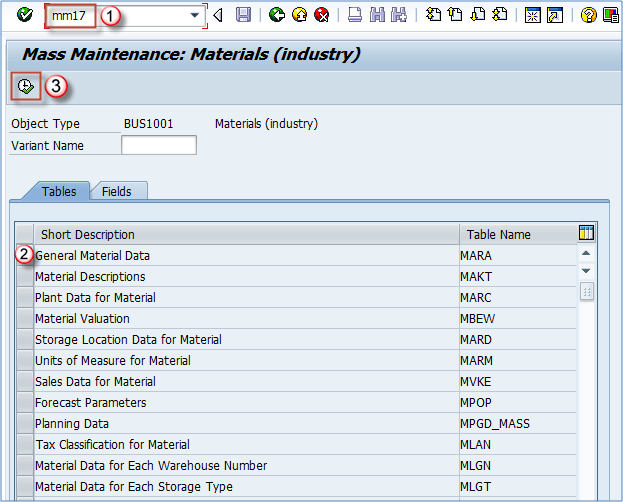
The tables listed on this first screen correspond to the material master views. MARA holds general data, MARC holds plant data, and MVKE holds sales data, so the table chosen here decides which fields become available later.
Step 2)
- Enter the material range or list for which we want to change the data
- Execute

Step 3)
- When clicking on the button shown below – you will get the Select fields screen.
- Check the appropriate field (we are changing base unit of measure for our two materials).
- Click the arrow pointing to the left to add the selected field to the list of fields to be changed.
- Click the OK button.

Step 4) Now we are presented with the next screen where we can input our value to be transferred. Let’s say we have maintained PAL – pallet as the base unit of measure for our TV sets of 24″ and 32″ and we need to change that to PCS – pieces.
- Enter the value you want to copy in the box.
- Click on the column heading.
- Select the button, to overwrite the old values by “PCS”.
- Execute.

Now your settings are saved, and your material master data is changed.
MM17 Limitations and Best Practices
MM17 writes directly to master data with no approval step, so a mistake propagates across every selected material at once. The following practices keep that risk under control.
- Test in a sandbox first. Run the identical selection and field change in a non productive client and inspect a sample of records before repeating it in production.
- Start with a narrow selection. Execute for two or three materials, verify the result in MM03, then widen the material range.
- Understand the overwrite button. Choosing to overwrite replaces existing entries, while the alternative fills only fields that are currently blank. The wrong choice silently destroys maintained values.
- Watch for dependent data. Changing the base unit of measure, as in the example above, is rejected when stock exists or open documents reference the old unit.
- Record the selection. Save the material list used, so the change can be traced or reversed if a downstream report looks wrong.
- Check the results log. MM17 reports which records were updated and which failed. A run that ends without a green message has not fully applied the change.
When a requirement genuinely needs different values per material, or fields that MM17 does not expose, escalate to LSMW or a BAPI load rather than forcing the transaction. For single record work, the copy material master and change material master tutorials remain the correct route.
