
SAP BAPI Tutorial – How to Create BAPI in ABAP
 Editorial Team
⚡ Smart Summary
BAPI in SAP ABAP is a standardized, RFC enabled method of a business object that lets external applications reach R/3 processes and data. This page explains standardized BAPIs, how to create one in SWO1, testing, releasing, and how to call a BAPI from ABAP.
What is BAPI?
Business Application Programming Interface(BAPI) are standardized programming interfaces (methods) enabling external applications to access business processes and data in the R/3 System.
They provide stable and standardized methods to achieve seamless integration between the R/3 System and external applications, legacy systems and add-ons.
BAPIs are defined in the BOR(Business object repository) as methods of SAP business object types that carry out specific business functions.They are implemented as RFC-enabled function modules and are created in the Function Builder of the ABAP Workbench.
Some BAPIs and methods provide basic functions and can be used for most SAP Business Objects.These are called STANDARDIZED BAPI’s.
List of Standardized BAPIs:
- BAPIs for Reading Data – GetList() , GetDetail() , GetStatus() , ExistenceCheck()
- BAPIs for Creating or Changing Data- Create() ,Change(),Delete() and Undelete() ,
- BAPIs for Mass Processing -ChangeMultiple(), CreateMultiple(), DeleteMultiple().
Advantages of BAPI
A BAPI is preferred over screen based techniques because it is a documented, released interface that SAP keeps stable across releases. This brings several practical benefits.
- Stable interface: The signature of a released BAPI does not change on an upgrade, so the calling program keeps working.
- Business logic reuse: A BAPI runs the same validations as the transaction, so the data added through it stays consistent.
- Remote enabled: Because a BAPI is an RFC enabled function module, it can be called from another SAP system, a Java or .NET program, or a web service.
- No screen dependency: Unlike a batch input recording, a BAPI does not break when a screen layout changes.
With the concept and its benefits clear, the next section builds a BAPI step by step.
How to create a BAPI
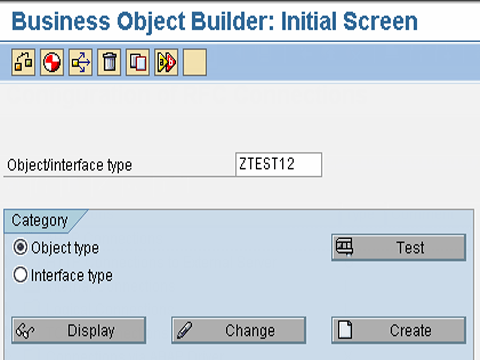
Step 1) Go to transaction swo1 (Tools->Business Framework -> BAPI Development ->Business Object builder ) .Select the business object, according to the functional requirement for which the BAPI is being created.
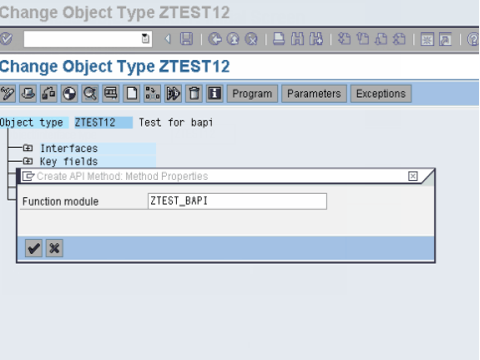
Step 2) Open the business object in change mode. Then Select Utilities ->API Methods ->Add method.Then enter the name of the function module and select Continue.
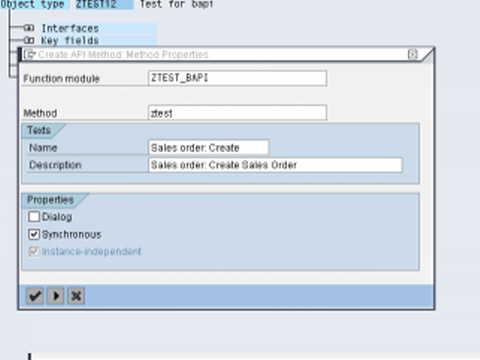
Step 3) In the next dialog box, following information needs to be specified :
- Method : Suggest an appropriate name for the method,
- Texts : Enter description for the BAPI,
- Radio buttons : Dialog, Synchronous, Instance-independent . BAPI ‘s are usually implemented synchronously.
Step 4) To create the method select Yes in the next dialog box.
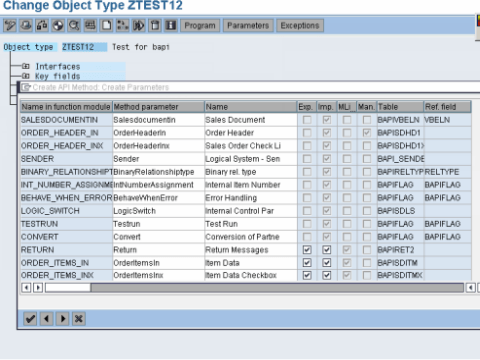
Step 5) After the program has been generated and executed, check the program in the method just created.Thus , a BAPI is created.
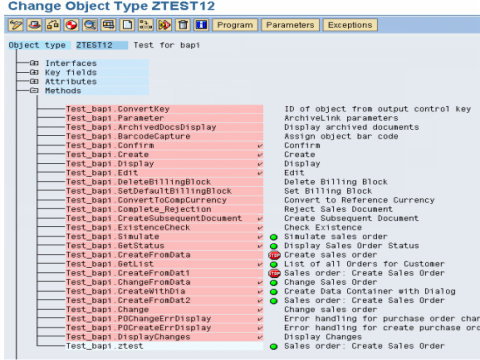
Testing the BAPI
You can test the BAPI by Testing the individual method of the Business Object in the Business Object Builder. ( or one can use the transaction ‘SWUD’ to test the method ) .
Releasing and freezing the BAPI
- To release the BAPI , first release the function module ( using transaction se37 ) .
- Set the status of the method to ‘released’ in the Business Object Builder ( using transaction SWo1 – Edit-> change status-> released. )
You can also use the BAPI Explorer (Transaction code BAPI) for 360′ view on BAPI
How to Call a BAPI in ABAP
A BAPI is called like any RFC enabled function module. The important rule is that a BAPI never issues its own COMMIT WORK, so the caller must confirm the change with BAPI_TRANSACTION_COMMIT, or discard it with BAPI_TRANSACTION_ROLLBACK. The example below creates a sales order with a standard BAPI.
DATA: ls_header  TYPE bapisdhd1,
      lt_items   TYPE STANDARD TABLE OF bapisditm,
      lt_return  TYPE STANDARD TABLE OF bapiret2,
      lv_order   TYPE vbeln.

* Fill the header and item structures, then call the BAPI
CALL FUNCTION 'BAPI_SALESORDER_CREATEFROMDAT2'
  EXPORTING
    order_header_in = ls_header
  IMPORTING
    salesdocument   = lv_order
  TABLES
    order_items_in  = lt_items
    return          = lt_return.

* A BAPI does not commit on its own - decide based on the return table
READ TABLE lt_return WITH KEY type = 'E' TRANSPORTING NO FIELDS.
IF sy-subrc = 0.
  CALL FUNCTION 'BAPI_TRANSACTION_ROLLBACK'.
ELSE.
  CALL FUNCTION 'BAPI_TRANSACTION_COMMIT'
    EXPORTING
      wait = 'X'.
ENDIF.
⚠️ Warning: Always check the RETURN table for a message of type E or A before committing. Calling BAPI_TRANSACTION_COMMIT after an error saves an incomplete document, which is one of the most common BAPI mistakes.
BAPI vs BDC vs RFC
A BAPI, a BDC, and a plain RFC all move data into SAP, but they differ in stability and in what they reuse. The table below compares them.
| Criteria | BAPI | BDC | RFC (custom) |
|---|---|---|---|
| Interface | Released method of a business object | Screen sequence of a transaction | Any custom function module |
| Stability on upgrade | Guaranteed for released BAPIs | Breaks if a screen changes | Depends on the developer |
| Remote enabled | Yes | No | Yes |
| Business validation | Full, same as the transaction | Full, runs the actual screens | Only what the developer codes |
| Best for | Stable integration and interfaces | Loads where no BAPI exists | Custom point to point services |
The rule of thumb is to use a released BAPI whenever one exists, fall back to a BDC when it does not, and reserve custom RFCs for bespoke services.
