
Fuzz Testing (Fuzzing) Tutorial
 Editorial Team
⚡ Smart Summary
Fuzz Testing feeds invalid, unexpected or random data into a program and watches for crashes, hangs and memory errors, exposing security defects that scripted functional tests almost never reach on their own.

What is Fuzz Testing?
Fuzz Testing or Fuzzing is a software testing technique of putting invalid or random data called FUZZ into a software system to discover coding errors and security loopholes. The purpose of fuzz testing is inserting data using automated or semi-automated techniques and testing the system for various exceptions like system crashing or failure of built-in code.
Fuzz testing was originally developed by Barton Miller at the University of Wisconsin–Madison, who coined the term after line noise on a modem link crashed the programs he was using. His students ran the first fuzzers in 1989 and found that roughly a third of the UNIX utilities they targeted crashed or hung. Fuzz testing is a software testing technique, and it is a type of Security Testing.
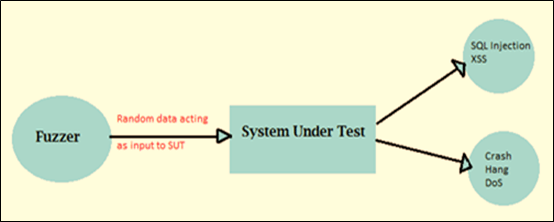
The diagram below shows the basic fuzzing loop, where generated data is pushed at the application under test and the response is observed.
Why to do Fuzz Testing?
Fuzzing earns its place in a test plan because it explores the inputs nobody thought to write a test case for. The main reasons teams adopt it are listed below.
- Fuzz testing usually finds the most serious security faults and defects, because a crash is direct evidence of an unhandled input path.
- Fuzz testing gives a more effective result when used with Black Box Testing, Beta Testing, and other debugging methods.
- Fuzz testing is used to check the vulnerability of software, and it is a very cost-effective testing technique because the inputs are generated rather than hand-written.
- Fuzz testing is one of the black box testing techniques. Fuzzing is also one of the most common methods hackers use to find a vulnerability in a system, so running it first removes an attacker’s easiest route in.
Types of Fuzz Testing
Fuzzers are usually grouped by how much they know about the program they are attacking. The more the fuzzer knows, the deeper into the code it can push.
| Type | What the fuzzer knows | Typical use |
| Black box fuzzing | Nothing about the internals; it only sees inputs and outputs. | Quick smoke runs against a binary or a live endpoint. |
| White box fuzzing | Full source code, often combined with symbolic execution to solve for hard-to-reach branches. | Deep analysis of a component whose source is available. |
| Grey box fuzzing | No source review, but runtime feedback such as which code branches an input reached. | The default for modern engines like AFL++ and libFuzzer. |
A second, older split separates dumb fuzzing from smart fuzzing. A dumb fuzzer flips bits without any idea of the input format, so most of its data is rejected by the first parser it meets. A smart fuzzer understands checksums, length fields and message structure, so its inputs survive validation and reach the logic underneath. Coverage-guided fuzzing is the grey box refinement that made fuzzing mainstream: the engine instruments the binary, keeps any input that reaches a new branch, and mutates the survivors, so the corpus steadily evolves toward unexplored code instead of restarting from random noise.
How to do Fuzz Testing
The steps for fuzz testing include the basic testing steps:
Step 1) Identify the target system — choose the binary, library, service or protocol endpoint that will be attacked, and confirm you are allowed to test it.
Step 2) Identify inputs — list every entry point the target reads from: files, command-line arguments, environment variables, network packets, form fields and API payloads.
Step 3) Generate Fuzzed data — produce malformed inputs by mutating valid samples, by generating them from a model of the format, or by combining both.
Step 4) Execute the test using fuzzy data — run the target against the generated inputs, ideally in a loop that restarts the process automatically after each failure.
Step 5) Monitor system behavior — watch for crashes, hangs, assertion failures, runaway memory use and sanitizer reports rather than only checking the printed output.
Step 6) Log defects — save the exact input that triggered each failure, shrink it to the smallest reproducing case, and file it with the stack trace attached.
Examples of Fuzzers
Fuzzers are also classified by how they build their input, and the three approaches below are the ones you will meet most often.
- Mutation-Based Fuzzers alter existing data samples to create new test data. This is a very simple and straightforward approach: it starts with valid samples of a protocol and keeps mangling every byte or file.
- Generation-Based Fuzzers define new data based on the input of the model. They start generating input from scratch based on the specification.
- Protocol-based fuzzers depend on detailed knowledge of the protocol format being tested, and that understanding comes from the specification. It involves writing an array of the specification into the tool, then using a model-based test generation technique to go through the specification and add irregularity in the data contents, sequence, and so on. This is also known as syntax testing, grammar testing or robustness testing. A fuzzer can generate test cases from an existing one, or it can use valid or invalid inputs.
There are two limitations of protocol-based fuzzing:
- Testing cannot proceed until the specification is mature.
- Many useful protocols are an extension of published protocols. If fuzz testing is based on published specifications, Test coverage for new protocols will be limited.
The simplest form of fuzzing technique is sending random input to the software either as protocol packets or as an event. This technique of passing random input is very powerful for finding bugs in many applications and services. Other techniques are also available, and they are very easy to implement. To implement these techniques we just need to change the existing inputs, and we can change an input simply by interchanging its bits.
Types of bugs detected by Fuzz Testing
Because fuzzing judges a run by how the program behaves rather than by an expected value, the defects it surfaces cluster into three families.
- Assertion failures and memory leaks: this methodology is widely used for large applications where the bugs affect memory safety, which is a severe vulnerability. Buffer overflows, use-after-free and out-of-bounds reads all appear here.
- Invalid input: in fuzz testing, fuzzers are used to generate invalid input which is used for testing error-handling routines, and this is important for software that does not control its input. Simple fuzzing can be seen as a way to automate negative testing.
- Correctness bugs: fuzzing can also be used to detect some types of “correctness” bugs, such as a corrupted database or poor search results. Differential fuzzing, which feeds the same input to two implementations and compares the answers, is the usual way to catch these.
Fuzz Testing Tools
Tools which are used in web security can widely be used in fuzz testing, such as Burp Suite and Peach Fuzzer. Several of the classic names below are now archived, so their current status is stated alongside each entry.
- Peach Fuzzer: Peach Fuzzer provides more robust security coverage than a scanner. Other testing tools can search only for known threats, whereas Peach Fuzzer enables users to find known and unknown threats. Peach Tech was acquired by GitLab, and Community Edition v3 is no longer maintained; the maintained successor is the GitLab Protocol Fuzzer Community Edition.
- Spike Proxy: a professional-grade tool that looks for application-level vulnerabilities in web applications. SPIKE Proxy covers the basics, such as SQL Injection and cross-site scripting, on a completely open Python infrastructure, and it was available for Linux and Windows. It has not been maintained for many years and is included here for historical context.
- WebScarab: WebScarab is written in Java and is therefore portable to many platforms. The WebScarab framework communicates using HTTP and HTTPS protocols and works as an intercepting proxy: it allows the operator to review and modify requests created by the browser before the server receives them, and to review and update responses generated by the server before the browser receives them. Any loophole WebScarab finds is added to its list of reported issues. The repository was archived in April 2024 and is now read-only.
- OWASP WSFuzzer: WSFuzzer is a GPL-licensed program written in Python that targeted web services, and in its last version HTTP-based SOAP services were the main target. It shipped as part of WebScarab and was retired with it; OWASP ZAP and its Fuzzer add-on are the recommended replacement.
- Maintained alternatives: AFL++ and libFuzzer are the standard coverage-guided engines for native code, OSS-Fuzz runs them continuously and free of charge for open-source projects, and boofuzz covers network-protocol fuzzing in Python. A wider list is collected in the guide to security testing tools.
Fuzz Testing Best Practices
A fuzzer that is pointed at a target and left alone rarely finds much. The practices below separate a campaign that produces filed defects from one that only burns CPU time.
- Start from a good seed corpus. Collect real, valid inputs the application already accepts. Mutating a genuine file reaches parsing code far faster than mutating random bytes.
- Write a small, fast harness. The entry point should do one thing per run, avoid network calls and disk writes, and return quickly, because throughput is measured in executions per second.
- Turn on sanitizers. Silent memory corruption often does not crash. AddressSanitizer and UndefinedBehaviorSanitizer convert it into an immediate, diagnosable failure.
- Run long, and run continuously. A one- or two-hour run catches shallow bugs; deep paths usually need many hours, which is why fuzzing belongs in a nightly CI job rather than a manual session.
- Minimise and de-duplicate every crash. Shrink the failing input to its smallest form and group crashes by stack trace, otherwise one bug arrives as hundreds of tickets.
- Keep a regression corpus. Add each reproducing input to a permanent set that runs on every build, so a fixed defect cannot quietly return.
- Scope the target legally. Fuzzing a live third-party service without written permission is indistinguishable from an attack.
Advantages of Fuzz Testing
Used with realistic expectations, fuzzing adds value that other techniques struggle to match.
- Fuzz testing improves software Security Testing.
- Bugs found in fuzzing are sometimes severe and are often the same ones used by attackers, including crashes, memory leaks and unhandled exceptions.
- If any bugs fail to get noticed by the testers because of limitations of time and resources, those bugs are also found in fuzz testing.
- The inputs are generated by a machine, so coverage keeps growing overnight without extra manual effort.
Disadvantages of Fuzz Testing
The same properties that make fuzzing cheap also cap what it can prove.
- Fuzz testing alone cannot provide a complete picture of an overall security threat or set of bugs.
- Fuzz testing is less effective at dealing with security threats that do not cause program crashes, such as some viruses, worms and Trojans.
- Fuzz testing can detect only relatively simple faults or threats, and it will not reason about business logic.
- To perform effectively, it requires significant machine time.
- Setting a boundary value condition with random inputs is very problematic, although testers now solve much of this with deterministic algorithms driven by user inputs.
Fuzz Testing vs Penetration Testing
Both activities look for security defects, yet they answer different questions and are rarely interchangeable.
| Criteria | Fuzz Testing | Penetration Testing |
| Driven by | An automated engine generating malformed input | A skilled tester reasoning about the system |
| Looks for | Crashes, hangs and memory-safety faults | Exploitable weaknesses, including logic and configuration flaws |
| Depth | Very wide input coverage, shallow reasoning | Narrow coverage, deep reasoning |
| Output | Reproducing inputs and stack traces | A findings report with exploit paths and risk ratings |
| Best moment | Continuously, in the build pipeline | Periodically, against a release candidate |
In practice the two feed each other: fuzzing clears the cheap, automatable crashes so that a tester’s limited hours go into the flaws only a human will spot.
