
Use Case Testing with Examples
 Editorial Team
⚡ Smart Summary
Use Case Testing validates end-to-end transactions by exercising the interactions between an actor and the system. The technique drives system and acceptance-level test cases, surfaces integration gaps, and complements unit-level checks with realistic user workflows.
What is Use Case Testing?
Use Case Testing is a software testing technique that identifies test cases covering an entire system on a transaction-by-transaction basis, from start to end. The test cases describe the interactions between users and the software application. Use case testing exposes gaps that may not be revealed by testing individual software components in isolation.
A use case in testing is a brief description of a particular use of the software by an actor or user. Use cases are written from user actions and the corresponding responses of the application, and they are widely used to derive test cases at the system and acceptance levels.
Key Components of a Use Case
Every use case is built from the same set of building blocks. Knowing the parts upfront makes it easier to design coverage that maps neatly to test cases:
- Actor: the user or external system that initiates an interaction. Represented as “A” in textual flows.
- System: the software under test that responds to the actor. Represented as “S”.
- Pre-conditions: the state the system must be in before the use case can start.
- Main success scenario: the happy-path sequence of actor and system steps.
- Extensions / alternate flows: branches that handle exceptions, validation failures, or alternative choices.
- Post-conditions: the state the system is left in once the use case ends.
How to do Use Case Testing: Example
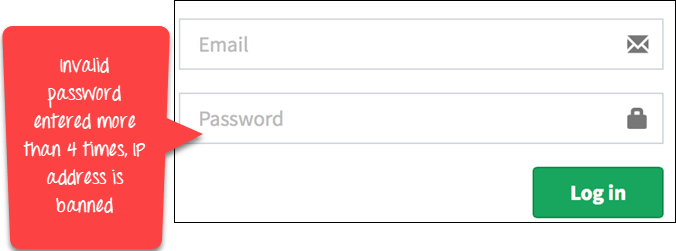
In a use case, the actor is represented by “A” and the system by “S”. The example below describes the login functionality of a web application.
| Main Success Scenario | Step | Description |
|---|---|---|
| A: Actor S: System | 1 | A: Enter Agent Name and Password |
| 2 | S: Validate Password | |
| 3 | S: Allow Account Access | |
| Extensions | 2a | Password not valid S: Display Message and ask for re-try (up to 4 times) |
| 2b | Password not valid 4 times S: Close Application |
The flow above describes one happy path and two extensions. Reading it step by step:
- The actor enters an email and password as the first step of the end-to-end login flow.
- The system validates the password.
- If the password is correct, access is granted.
- If the password is invalid, the system displays a message and prompts up to four retry attempts.
- If the password remains invalid after four attempts, the system blocks further attempts (in this example, by banning the IP address).
From this use case you would test the success scenario plus one case of each extension. That yields a minimum of three test cases: a valid login, a recoverable invalid password, and a lock-out after repeated failures.
Advantages of Use Case Testing
Use case testing fits naturally between requirements and test cases. The key advantages are:
- End-to-end coverage: tests transactions across modules, not isolated functions.
- User-focused validation: each scenario reflects how a real actor uses the system.
- Clear traceability: use cases map directly to acceptance criteria for stakeholder sign-off.
- Defect prevention: surfaces integration gaps before regression cycles begin.
- Reusable artefacts: the same use case feeds test cases, training material, and user documentation.
Limitations of Use Case Testing
The technique is powerful but not exhaustive. Be aware of the following constraints:
- Not a substitute for unit testing: low-level component faults still need targeted tests.
- Depends on accurate use cases: ambiguous flows produce ambiguous tests.
- Limited for non-functional coverage: performance, security, and accessibility need their own techniques.
- Maintenance overhead: use cases must be updated when business rules change.
