
Blue Prism Tutorial for Beginners: What is RPA?
 Editorial Team
⚡ Smart Summary
Blue Prism is an enterprise robotic process automation platform that builds a governed digital workforce, using two visual design surfaces — Process Studio for business logic and Object Studio for application interfaces — with no coding required.

What is Blue Prism?
Blue Prism is a UK-based software company working in the field of Robotic Process Automation. Founded in 2001 by Alastair Bathgate and David Moss, it supplies software robots that carry out clerical back-office work the way a human would. In 2012 the company coined the term Robotic Process Automation (RPA), which is why it is widely described as the industry’s pioneer.
Blue Prism software makes business operations more agile and cost-effective by automating manual, rule-based, repetitive back-office processes and improving accuracy through a “Digital Workforce”. The tool offers a flowchart-style designer with drag-and-drop stages, so each step of a business process can be automated visually.
One point worth knowing before you start: SS&C Technologies acquired Blue Prism in March 2022, and the platform is now marketed as SS&C Blue Prism. Older courses and screenshots still say simply “Blue Prism” — the studios described below work the same way.
Blue Prism RPA Features
Here are the popular Blue Prism RPA features:
- Secure, scalable and central management of a virtual workforce of software robots
- Complete automation solution that provides work distribution and queue management
- Robust platform features such as load balancing, encryption and audit logging, with robots defined and managed centrally
- The Blue Prism automation tool comes with several spying modes for different application types
- Configurable dashboards, so session information can be directed to external analytics and monitoring systems
- Cloud deployment on Microsoft Azure and Amazon AWS. Support arrived in version 6 (2017); the current line runs from version 7.1 through the cloud-native Next Generation platform released in 2024
- Exception stages can be set to save a screen capture, which helps resolve resource processing issues securely in a production environment
- You can automate Excel, XML, CSV, PDF and image files, among others
- There is no need to write code while working with the Blue Prism tool
- It can automate software built in Java, mainframe, web-based and Windows applications
Components of Blue Prism
Blue Prism is a set of libraries, tools and runtime environments for RPA.
Every software robot has two main parts:
- Process Studio
- Object Studio
The two are covered in turn below, starting with the layer that talks to your applications.
What is Object Studio?
Object Studio is used for building objects. It is where you create the Visual Business Object, abbreviated VBO, which interacts with other applications. Several types of action can be defined within these objects.
Object Studio looks a lot like Process Studio, but there are key differences:
- Object Studio offers stages that are not available in Process Studio
- Object Studio has no Main Page, but it does have two default pages
- Pages are organized as a flat group rather than the hierarchy used in Process Studio
Benefits of Developing a VBO
- Consistency and scalability
- Less bot creation time for subsequent processes
- System changes need updating in one location instead of in every process, so bot maintenance becomes easier
What is Process Studio?
Process Studio is the area where an actual process is created. It looks similar to a traditional flowchart and lets business logic, control loops, variables and object calls be sequenced and tested as a visible business flow. Each page in a process has its own tab.
A process acts like a human user and implements a software robot’s logic. It mirrors the way a person would move between several applications to carry out a series of steps.
Process Diagram
- Process diagrams are made up of stages connected by links to form logical structures.
- Stages are selected from the toolbar and placed on the diagram with the mouse.
- They can be selected, moved, resized, formatted, cut, copied, pasted and deleted.
- Stages also have properties, which are accessed by double-clicking.
- Links are created with the link tool by dragging from the center of one stage to the center of another.
- Dragging without the link tool selects more than one stage at a time.
Now in this Blue Prism tutorial with examples, we will learn how to create a process in Blue Prism.
How to Create a New Process
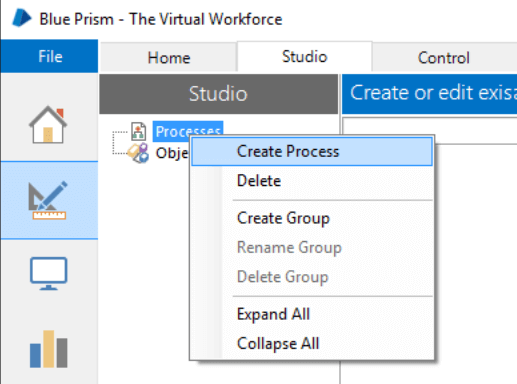
From the main Blue Prism window, select “Studio” from the tabbed menu at the top of the screen.

Main Screen Toolbar
Or select the Studio icon from the left-hand navigation menu.

- Right-click the Processes heading under Studio and select “Create a Process” from the context menu.
- Name the new process “First Process”.
- Enter a brief description of the process.
The Create a Process dialog looks like this:
- The new process appears beneath the Processes heading. Double-click it to open it.
- Along the left-hand side of the screen is the Stages toolbar. To put a stage on the page, click and drag it into position. Try this with a few different stages.
- One stage in the toolbar carries a blue rectangle highlighting it. Whichever stage is highlighted is the one added when you click directly on the page. Click the calculation stage to highlight it.

Process Studio Stages Toolbar
Notice how the cursor changes and carries the calculation stage icon. Click on the process page to add a calculation stage. This saves returning to the toolbar when you have several stages of the same type to add.
Even with the calculation stage cursor active, you can still drag and place other stage types.
When stages are on the page you can:
- Double-click a stage to view its properties
- Press Save while keeping the diagram open
Space in Process Studio is effectively infinite, and the pan and zoom tools let you maneuver around the diagram. Grid lines and “snap” settings are on by default but can be switched off from the View menu.
Advantages of Process Studio
- A process is very similar to a business object.
- Every process is defined using one or more pages.
- Each page contains stages and data.
- Execution always begins at the Main page.
- Each page has its own tab, so you can divide a process into logical groupings.
- A process acts like a human user who thinks and types very fast.
- A process must be published before it becomes visible in the Control Room.
- The biggest advantage is that logic is designed graphically on the design surface.
What are Business Objects?
To implement an RPA system in an organization, a real process needs to do useful work, and to do that it must interact with external applications.
The interface to an application is never held in the process diagram itself but in a separate diagram called a Business Object.
- A Business Object is configured in Object Studio, not Process Studio.
- Its purpose is to provide an interface to a single application.
- A Business Object is not exposed to the Control Room and is never run on its own. It is always called by a process.
Benefits of Using Blue Prism
Following are the main benefits of using Blue Prism:
- Processes are configured visually, so business analysts can contribute without writing code
- A first automation can typically be delivered in a four-to-six-week window
- Strong return on investment, with payback often self-funding further automation
- Automates an application’s controls and fields regardless of their on-screen position, which increases robot speed and resilience
- Custom digital front ends connect front-office agents with back-office automation
- Robust, feature-rich analytics suite
- Double-byte character set support extends RPA to systems that need it, such as Asian languages
- Multi-tiered encryption algorithms secure connectivity, data storage and access
- Enterprise-wide password vaults with certified CyberArk credential management
- Custom permissions give user-specific access to robot groups, robots and processes
- The Control Room gives real-time feedback on robot status and full insight into the digital workforce
- Supports highly efficient, automated end-to-end business processes
Next in this Blue Prism RPA tutorial, we will look at international case studies.
Blue Prism International Case Studies
Following are two prominent case studies of Blue Prism implementation. Both figures are as published by the vendor.
Case 1: National Retail Bank
- Inter-bank transfers completed in 20 seconds with Blue Prism, against a 10-minute manual process
- 130 processes automated
- 100 robots deployed
- More than 200 full-time equivalents (FTE) saved
- An audit that took almost a full 8-hour working day now completes in 1 minute
Case 2: Global Telco
The telco launched RPA software in 2013 to optimize its back-office operations.
Blue Prism RPA Capabilities Covered
- 15 core processes covered
- 1,000–1,200 FTE reallocated
- 400,000–500,000 cases per month
- 160 robots deployed, run by a team of 3
- 12-month payback period
- Three-year ROI of 650–800%
Other Popular RPA Tools
Blue Prism is not the only option. The table below lists the platforms most often shortlisted alongside it.
| RPA tool | Best known for |
|---|---|
| Blue Prism | Enterprise governance, auditability and a centrally managed digital workforce |
| UiPath | Largest market share, broad ecosystem and an approachable drag-and-drop designer |
| Automation Anywhere | Cloud-native architecture with heavy investment in intelligent document processing |
| Microsoft Power Automate | Native fit with Microsoft 365, Azure and Dynamics, often the fastest to deploy |
| Pega Robotic Automation | Formerly OpenSpan; RPA embedded inside a wider case-management suite |
| WorkFusion | Pre-built digital workers aimed at banking compliance and onboarding |
