
ASP.NET MVC Tutorial for Beginners: What is, Architecture
 Editorial Team
⚡ Smart Summary
ASP.NET MVC is the open source Microsoft framework that separates a web application into Model, View, and Controller layers, giving developers full control over HTML, testable code, clean routing, and a lightweight alternative to classic Web Forms.
What is ASP.NET MVC?
ASP.NET MVC is an open source web development framework from Microsoft that provides a Model View Controller architecture. ASP.NET MVC offers an alternative to ASP.NET web forms for building web applications. It is a part of the .NET platform for building, deploying and running web apps. You can develop web apps and website with the help of HTML, CSS, jQuery, JavaScript, etc.
Learn MVC with this ASP.NET MVC tutorial which covers all the basic concepts of MVC for beginners:
Why ASP.NET MVC?
Although web forms were very successful, Microsoft thought of developing ASP.NET MVC. The main issue with ASP.NET webForms is performance.
In a web application, there are four main aspects which define performance:-
- Response time issues
- Problem of Unit Testing
- HTML customization
- Reusability of the code-behind class
ASP.NET MVC excels on the above parameters.
Version History of MVC
ASP.NET MVC1
- Released on Mar 13, 2009
- It runs on .NET 3.5
- Visual Studio 2008
- MVC Pattern architecture with WebForm Engine
- Main Features includes Html & Unit Testing, Ajax Helpers, Routing, etc.
ASP.NET MVC2
- This version released on March 10, 2010
- Runs on .NET 3.5, 4.0 and with Microsoft Visual Studio 2008
- Include Feature like Templated helpers, UI helpers with automatic scaffolding & customizable templates
- It supports for DataAnnotations Attributes to apply model validation on client and server sides
ASP.NET MVC3
- It was released on Jan 13, 2011
- Runs on .NET 4.0 and with Microsoft Visual Studio 2010
- Use of NuGet to deliver software and allows you to manage dependencies across the platform
- Better JavaScript support with jQuery Validation and JSON binding
- It offers features like the Razor view engine and enhanced Data Annotations attributes for model validation on both client and server sides
ASP.NET MVC4
- This version was released on Aug 2012
- It runs on .NET 4.0, 4.5 and with Visual Studio 2010 & Visual Studio 2012
- Enhancements to default project templates
- Offers features like Mobile project template using jQuery Mobile, Task support for Asynchronous Controllers, bundling, minification, etc.
ASP.NET MVC5
- Released on 17 October 2013
- Runs on .NET 4.5, 4.5.1 and with Visual Studio 2012 & Visual Studio 2013
- Supports attribute routing in MVC
Features of MVC
- Easy and frictionless testability
- Full control over your HTML, JavaScript, and URLs
- Leverage existing ASP.NET Features
- A new presentation option for ASP.NET
- A simpler way to program ASP.NET
- Clear separation of logic: Model, View, Controller
- Test-Driven Development
- Support for parallel development
Things to remember while creating MVC Application
Here are a few useful things in this ASP.NET MVC tutorial which you need to remember for creating MVC application:
- You need to remember that ASP.NET MVC is NOT a replacement of ASP.NET web forms based applications
- The approach of MVC app development must be decided based on the application requirements and features provided by ASP.NET MVC to suit the specific development needs.
- Application development process with ASP.NET MVC is more complex compared with web forms based applications.
- Application maintainability always be higher with separation of application tasks.
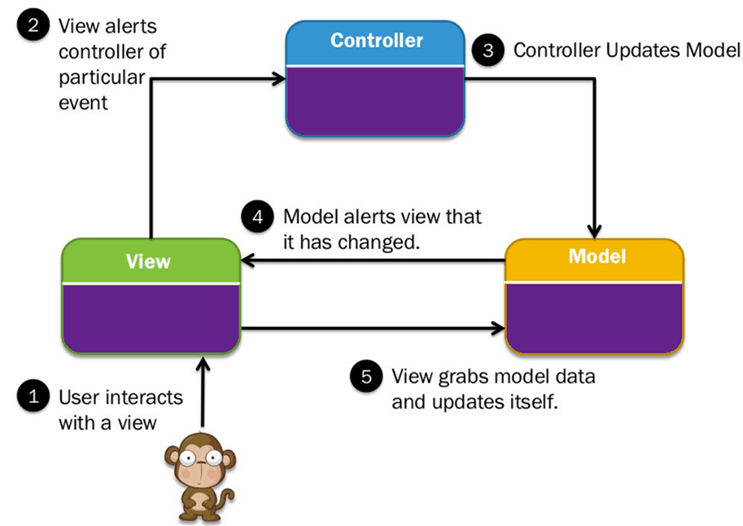
MVC architectural Pattern
MVC is a software architecture pattern which follows the separation of concerns method. In this model .NET applications are divided into three interconnected parts which are called Model, View, and Controller.
The goal of the MVC pattern is that each of these parts can be developed, tested in relative isolation and also combined to create a very robust application.
Let us see all of them in detail:
Models
Model objects are parts of the application which implement the logic for the application’s data domain. It retrieves and stores model state in a database. For example, product object might retrieve information from a database, operate on it. Then write information back to products table in the SQL server.
Views
Views are the components which are used to display the application’s user interface (UI) also called viewmodel in MVC. It displays the .NET MVC application’s which is created from the model data.
The common example would be an edit view of an Item table. It displays text boxes, pop-ups and checks boxes based on the current state of products & object.
Controller
Controllers handle user interaction, work with the model, and select a view to render that display UI. In a .NET MVC app, the view only displays information, the controller manages and responds to user input & interaction using action filters in MVC.
For example, the controller manages query-string values and passes those values to the model.
Web Forms vs. MVC
| Parameters | WebForms | MVC |
|---|---|---|
| Model | ASP.NET Web Forms follow event-driven development model. | ASP.NET MVC uses MVC pattern based development model. |
| Used Since | Been around since 2002 | It was first released in 2009 |
| Support for View state | ASP.NET Web Form supports view state for state management at the client side. | .NET MVC does not support view state. |
| URL type | ASP.NET Web Form has file-based URLs. It means file name exists in the URLs and they must exist physically. | ASP.NET MVC has route-based URLs that means URLs which are redirected to controllers and actions. |
| Syntax | ASP.NET Web Forms follow Web Forms Syntax. | ASP.NET MVC follows the customizable syntax. |
| View type | Web Form, views are tightly coupled to Code behind (ASPX-CS), i.e., logic. | MVC, Views, and logic are always kept separately. |
| Consistent look and feel | It has master pages for a consistent look. | ASP.NET MVC has layouts for a consistent look. |
| Code Reusability | Web Form offers User Controls for code re-usability. | ASP.NET MVC has offered partial views for code re-usability. |
| Control for HTML | Less control over rendered HTML. | Full control over HTML |
| State management | Automatic state management of controls. | Manual state management. |
| TDD support | Weak or custom TDD required. | Encourages and includes TDD. |
Advantages of ASP.NET MVC
- Highly maintainable applications by default
- It allows you to replace any component of the application.
- Better support for Test Driven Development
- Complex applications are easy to manage because of divisions of Model, View, and Controllers.
- Offering robust routing mechanism with front controller pattern
- Offers better control over application behavior with the elimination of view state and server-based forms
- .NET MVC applications are supported by large teams of developers and Web designers
- It offers more control over the behaviors of the application. It also uses an optimized bandwidth for requests made to the server
Disadvantages of ASP.NET MVC
- You cannot see design page preview like the .aspx page.
- You need to run the program every time to see its actual design.
- Understanding the flow of the application can be challenging
- It is quite complicated to implement, so it is not an ideal option for small level applications
- It is hard to learn MVC for ASP.NET, as it requires a great understanding of MVC pattern
Best practices while using ASP.NET MVC
- Create a separate assembly for MODEL in case of large and complex code to avoid any unwanted situation
- The model should include business logic, session maintenance, validation part, and data logic part.
- VIEW should not contain any business logic and session maintenance, use ViewData to access data in View
- Business logic and data access should never occur in Controller
- The controller should only be responsible for preparing and return a view, calling model, redirect to action, etc.
- Delete Demo code from the application when you create it (Delete AccountController)
- Use only specific view engine to create HTML markup from your view as it is the combination of HTML and the programming code.
