
Advantages and Disadvantages of Cloud Computing
 Editorial Team
⚡ Smart Summary
Cloud computing delivers major advantages, including cost savings, scalability, mobility, and automatic backups, yet carries real disadvantages such as security risks, downtime, and internet dependence that organizations must weigh before moving workloads to remote servers.
What is Cloud Computing?
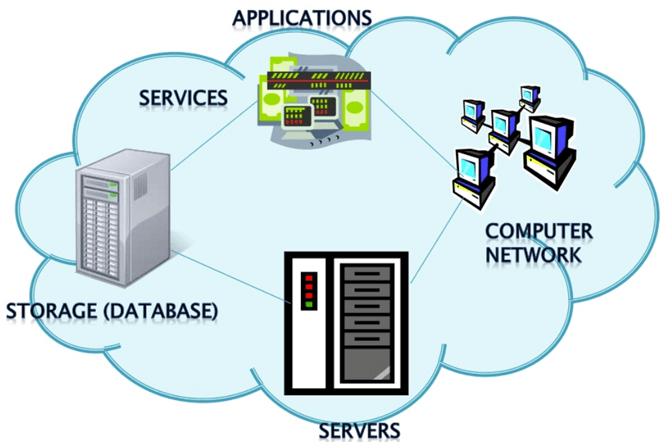
Cloud computing refers to storing and accessing data over the internet rather than on your personal computer’s hard disk. Instead, you access data from a remote server. Below, we explain the advantages and disadvantages of cloud computing.
Advantages of Cloud Computing
Here are the benefits of cloud computing in your organization:
Cost Savings
Cost saving is one of the biggest cloud computing benefits. It saves substantial capital cost, as it needs no physical hardware investments. Also, you do not need trained personnel to maintain the hardware. The buying and managing of equipment is done by the cloud service provider.
Strategic edge
Cloud computing offers a competitive edge over your competitors. This advantage lets you access the latest applications any time without spending your time and money on installations.
High Speed
Cloud computing allows you to deploy your service quickly in fewer clicks. This faster deployment allows you to get the resources required for your system within fewer minutes.
Back-up and restore data
Once the data is stored in a cloud, it is easier to get the back-up and recovery of that, which is otherwise a very time-consuming process on-premise.
Automatic Software Integration
In the cloud, software integration occurs automatically. Therefore, you do not need extra effort to customize and integrate your applications as per your preferences.
Reliability
Reliability is one of the biggest benefits of cloud hosting. You can always get instantly updated about the changes.
Mobility
Employees who are working on the premises or at remote locations can easily access all the cloud services. All they need is internet connectivity.
Unlimited storage capacity
The cloud offers almost limitless storage capacity. You can quickly expand your storage capacity anytime for a very nominal monthly fee.
Collaboration
The cloud computing platform helps employees who are located in different geographies to collaborate in a highly convenient and secure manner.
Quick Deployment
Cloud computing enables rapid deployment. When you use the cloud, your entire system can be fully functional in minutes, although the time depends on the technologies used in your business.
Other Important Benefits of Cloud Computing
Apart from the above, some other cloud computing advantages are:
- On-Demand Self-service
- Multi-tenancy
- Offers Resilient Computing
- Fast and effective virtualization
- Provide you low-cost software
- Offers advanced online security
- Location and Device Independence
- Always available, and scales automatically to adjust to the increase in demand
- Allows pay-per-use
- Web-based control and interfaces
- API Access available.
Disadvantages of Cloud Computing
Here are the significant challenges of cloud computing:

Performance Can Vary
When you are working in a cloud environment, your application is running on the server which simultaneously provides resources to other businesses. Any greedy behavior or DDOS attack on your tenant could affect the performance of your shared resource.
Technical Issues
Cloud technology is always prone to an outage and other technical issues. Even the best cloud service providers may face this type of trouble despite maintaining high standards of maintenance.
Security Threat in the Cloud
Another drawback while working with cloud computing services is security risk. Before adopting cloud technology, you should be well aware of the fact that you will be sharing all your company’s sensitive information with a third-party cloud computing service provider. Hackers might access this information.
Downtime
Downtime should also be considered while working with cloud computing. That is because your cloud provider may face power loss, low internet connectivity, service maintenance, etc.
Internet Connectivity
Good internet connectivity is a must in cloud computing. You cannot access the cloud without an internet connection. Moreover, you do not have any other way to gather data from the cloud.
Lower Bandwidth
Many cloud storage service providers limit the bandwidth usage of their users. So, in case your organization surpasses the given allowance, the additional charges could be significantly costly.
Lack of Support
Cloud computing companies fail to provide proper support to the customers. Moreover, they want their users to depend on FAQs or online help, which can be a tedious job for non-technical persons.
