
SAP CRM Business Partner (BP): Grouping & Roles
 Mason Garcia
⚡ Smart Summary
SAP CRM Account Management centralizes Business Partner creation and maintenance through the CRM Web UI, enabling organizations to manage accounts, contacts, and employees across sales, marketing, and service modules.
SAP CRM Business Partner: Overview
- Almost all business transactions in an organization involve certain stakeholders like employee, contact person, organizational unit, etc.
- Within SAP CRM these participants involved in a business transaction are maintained as CRM Business Partner. Following can be involved in a business transaction as Business Partner:

- In SAP CRM, business partners are created centrally. The roles that a business partner plays, such as sold-to party and ship-to party, are also maintained centrally.
- A business partner created in SAP CRM can be involved in any business transaction across different modules like sales, marketing, and service. This involvement depends upon the role assigned to the business partner and the partner functions defined in the transaction.
- Creating and maintaining the business partner in SAP CRM is handled by the Account Management application within CRM Web UI. Users need access to Account Management in the Web UI to work on business partners:


For a particular business transaction, involved business partners can be found within the Parties Involved assignment block:
- Within SAP GUI, business partner maintenance is available with transaction code BP. SAP has stopped supporting GUI for CRM transactions, so Web UI is used for business partner creation and maintenance.
- Account management in CRM Web UI provides a 360° view of business partner data, representing complete information including:
- Header details of the business partner
- Relationships to other business partners
- Account life cycle information
- Business transactions the partner is involved in
- Change history of business partner data
- Using CRM Middleware, it is possible to populate business partners in SAP CRM using data maintained in SAP ERP. Updates in business partner data in either system (ERP or CRM) can be synchronized through the CRM Middleware.
- Below is the SPRO path for Business Partner customizing. The Partner Processing implemented for a business transaction depends on the customizing settings for business partners. Customizing is implemented in SPRO; CRM Web UI is then used to create and maintain the partners:

Business Partner Category
- SAP CRM supports three possible categories:
- Person or Individual
- Group
- Organization
- A business partner can belong to any one of these categories. An account can be further sub-divided as follows:
- Account: A company, group, or individual with which your organization has a business relationship.
- Corporate Account (organizations or companies)
- Individual Account (individuals)
- Groups (e.g., households)
- Contact: A person with whom you have a business relationship; mostly assigned to a corporate account.
- Employee: A member of your organization involved in interactions between your organization and vendors, prospects, customers, and other parties.
- Account: A company, group, or individual with which your organization has a business relationship.

- It is not possible to modify these categories or create new ones.
- When a business partner is created in SAP CRM, a category is assigned to it. The category can only be set once during creation and cannot be modified later. Account search can be filtered by category for faster results:

- The business partner category is also displayed in the header of the account display, create, and modify pages:

Business Partner Grouping
- When a business partner is created, a number called the “business partner number” is assigned to it. This number can be configured in SPRO customizing to be generated automatically on creation.
- For this purpose, Business Partner Grouping and Number Ranges are used.
- A Number Range defines a range of numbers using start and end values (identified by a Number Range ID in SAP CRM):

- Number ranges can be Internal or External:
- Internal Number Range: Generated automatically by the CRM system as a sequential number from the configured range.
- External Number Range: The user assigns a number during record creation, or the number is derived from an external system. In both cases the number must fall within the defined range interval.
- The number range is assigned to a Grouping. SPRO path: IMG → Cross-Application Components → SAP Business Partner → Business Partner → Number Ranges and Grouping → Define Groupings and Assign Number Ranges.
- Business Partner Grouping acts as a container holding the Number Range settings:
- While creating a BP, the user selects the Grouping.
- The selected grouping determines the number to be generated.
- If the grouping uses an internal number range, the business partner number is auto-assigned on save.
- For external number range groupings, the ID field allows user entry, or the BP number can be fetched from an external system (e.g., connected ERP).

Business Partner Roles
- BP Roles assigned to a business partner reflect the partner’s functions and the business transactions in which the partner may be involved.
- More than one business partner role can be assigned to a single business partner:
- A business partner can participate in different transactions with different roles.
- General information like name and address is entered only once regardless of the number of roles assigned.
- Custom BP roles can be created as per business requirements.

- A business partner role is assigned to a business partner role category:

- BP Role Category controls the properties of the BP role:

- A dedicated assignment block in the Accounts Overview displays BP Roles. The dropdown list shows available roles and the Insert button allows assigning new roles to a business partner:

BP Relationships
- A business partner can have a relationship with another business partner.
- A connection between two business partners is formed using “business partner relationships”.
- Within SAP CRM, relationships between business partners are described using business partner relationship categories:

- BP Relationship Categories define the properties of the business partner relationship:

- A BP Relationship can be unidirectional or bidirectional.
- BP Relationships can be assigned to a business partner in the Web UI Relationship assignment block:
- This updates all business partners involved in the relationship.
- Existing relationships can be modified using the Actions buttons.

- Relationships can be time-dependent. The relationship will be valid only for the time frame specified during creation.
- Use the New button in the Relationship Assignment Block to create a new relationship.
Account Classification
- SAP CRM provides account classification functionality, enabling organizations to classify accounts according to any business criteria. This is especially useful for large enterprises with diverse business areas.
- Account search can be performed based on classification criteria.
- Account classification appears as an individual assignment block on the Account page:

- The role in this assignment block is different from the Business Partner Role. Any number of criteria and attributes can be defined.
- Account criteria can be combined to create a Classification Category. Each category can consist of up to 5 criteria and any number of attributes.
- All classification constituents are defined in SPRO customizing.
- Each criteria and attribute has a helper class that provides a value help dropdown in the Web UI.
- Criteria definition:

- Attribute definition:

- Assignment of attributes:
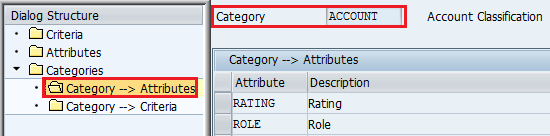
- Assigning Criteria:

360° View of Business Partner

SAP CRM provides a 360° view of the business partner, meaning all data related to the business partner is accessible in one place. The header data holds information applicable in all scenarios — first name, last name, BP number, etc. Separate assignment blocks display data like BP Role, BP Relationship, and all business transactions in which the partner is involved. For example, the Opportunities assignment block displays all opportunity transactions linked to the business partner.
- It is possible to navigate to the corresponding business transaction document from these assignment blocks. New business transactions can also be created directly through them — for example, using the New button on the Opportunity block to navigate to the Opportunity page and create an opportunity for the business partner.
- SAP CRM therefore supports the complete business partner life cycle in a single location, making it convenient for end users and simplifying reporting.
