
What is SAP? Meaning of SAP ERP Software
 Editorial Team
⚡ Smart Summary
SAP ERP integrates business functions into a centralized system, resolving inefficiencies, enabling real-time data sharing, and supporting decisions. Its modularity, automation, scalability, and global adaptability streamline operations and boost competitiveness. With SAP ERP, you can:
What is SAP?
SAP stands for Systems Applications and Products in Data Processing. SAP, by definition, is also the name of the ERP (Enterprise Resource Planning) software as well as the name of the company. SAP Software is a European multinational, founded in 1972 by Wellenreuther, Hopp, Hector, Plattner, and Tschira. They develop software solutions for managing business operations and customer relationships.
SAP system consists of a number of fully integrated modules, which covers virtually every aspect of business management. SAP is #1 in the ERP market. As of 2010, SAP has more than 140,000 installations worldwide, over 25 industry-specific business solutions and more than 75,000 customers in 120 countries. Other Competitive products of SAP Software in the market are Oracle, Microsoft Dynamics, etc.
What is SAP ERP? Why is it Required?
The following video will explain the need for an ERP software like SAP in an enterprise
Click here if the video is not accessible
The very fundamental question for any beginners is why Enterprise Resource Planning also called ERP, is required? To answer this, let’s examine this typical business scenario.

Suppose a client approaches a sales team asking for a particular product. The sales team contacts the inventory department to check the availability of the product. To their surprise, the sales team found out that the product is out of stock. So next time this doesn’t happen, they have to introduce an SAP ERP tool.
Before we actually see in detail what ERP is and how ERP can help in your business process, we will understand how different departments are involved in the whole business process, right from the ordering of the raw material – to manufacturing goods – to delivering final products to the customer.
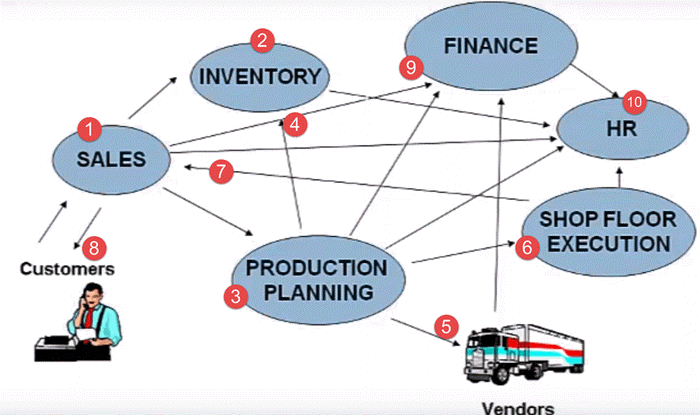



Here is the whole process that is followed by any business unit.
- Client contacts the sales team to check the availability of the product
- Sales team approaches the Inventory department to check for the availability of the product
- In case the product is out of stock, the sales team approaches the Production Planning Department to manufacture the product
- The production planning team checks with inventory department for availability of raw material
- If the raw material is not available with inventory, the Production Planning team buys the raw material from the Vendors
- Then Production Planning forwards the raw materials to the Shop Floor Execution for actual production
- Once ready, the Shop Floor Team sends the goods to the Sales Team
- Sales Team who in turn deliver it to the client
- The sales team updates the finance with revenue generated by the sale of the product. Production planning team update the finance with payments to be made to different vendors for raw materials.
- All departments approach the HR for any Human Resource related issue.
That is a typical business process for any manufacturing company. Some key inferences one could derive from the scenario would be.
- It has many departments or business units
- These departments or business units continuously communicate and exchange data with each other
- The success of any organization lies in effective communication, and data exchange, within these departments, as well as associated third party such as vendors, outsourcers, and customers.
Based on the manner in which communication and data exchanged is managed. Enterprise systems can be broadly classified as
1) Decentralized System
2) Centralized System which is also called as ERP
Decentralized System
Let’s look at Decentralized system first, in a company with Decentralized System of Data Management. There are two major problems –
- Data is maintained locally at the individual departments
- Departments do not have access to information or data from other departments
To identify issues arising due to decentralized Enterprise management system lets look at the same business process again. The customer approaches the sales team for a product, but this time around, he needs the product, on an urgent basis.
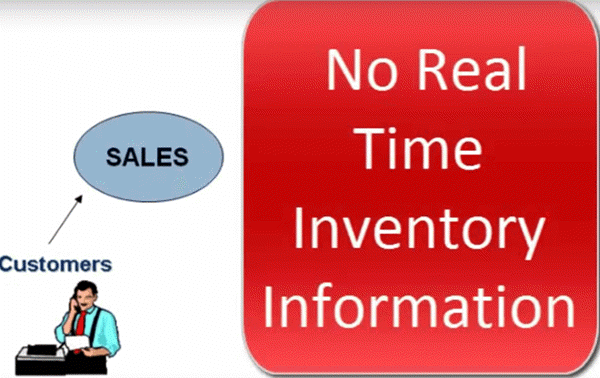
Since it is a decentralized process, the Sales Team do not have any real-time information access to the product availability. So they approach the Inventory department to check the availability of the product. This process takes time, and the customer chooses another vendor leading to loss of revenue and customer dissatisfaction.

Now, suppose the product is out of stock, and the Sales Team approaches the Production Planning team to manufacture the product for future use. Production Planning Team checks the availability of the raw materials required.
In a decentralized system, raw material information is stored separately by Production Planning as well as the Inventory Department. Thus, data maintenance cost (in this case, Raw Material) goes up.

The raw material information is available in two different departments Inventory as well as Production Planning. When sales team check a particular raw material required to manufacture the product, it shows the raw material is available as per the inventory, but as per the database of the production planning team, the raw material is out of stock.
So, they go ahead and buy the raw material. Thus, material, as well as inventory cost, goes up.
Once the raw material is available, the shop floor department suddenly realizes they are short of workers. They approach the HR, who in turn hire temporary employees at higher than market rates. Thus LABOR Cost Increases.
The production planning department fails to update the finance department on the materials they have purchased. The finance department defaults the payment deadline set by the vendor causing the company loss of its reputation and even inviting a possible legal action.

These are just a few of many problems with decentralized systems.
Some Major problems with the decentralized system are –
- Numerous disparate information systems created individually over time which are difficult to maintain
- Integrating the data is time and money consuming
- Inconsistencies and duplication of data
- Lack of timely information leads to customer dissatisfaction, loss of revenue and reputation
- High Inventory, material, and human resource cost.
These are some major drawbacks for which we need a solution. Well, the Solution lies in Centralized Systems i.e., ERP.
Centralized System
In a company, with a Centralized System of Information and Data Management.
1) Data is maintained at a central location and is shared with various Departments
2) Departments have access to information or data from other Departments
Let’s look at the same business process again to understand how a Centralized Enterprise System helps to overcome problems posed by a Decentralized Enterprise System.

In this case, all departments update a Central Information System.
- When Customer approaches the sales team to buy a product on an urgent basis. The Sales Team has real-time information access to the products in inventory which is updated by the Inventory Department in the Centralized System
- Sales Team respond to customer request on time, leading to Increased Revenue and Customer Delight.
- In case, manufacturing is required the Sales Team update the Centralized Database, so that all the department remain informed about the product status.
- Production Planning Department is auto updated by the Centralized Database for requirements. Production Planning Team checks the availability of the raw materials required via the Central Database, which is updated by the Inventory Department.
- Thus, Data Duplication is avoided, and accurate data is made available. The Shop Floor Team update their Man Power Status regularly in the Central Database, which can be accessed by the HR department.
- In case of shortage of workforce, HR team starts the recruitment process with considerable lead time to hire a suitable candidate at market price. Thus labor cost goes down.
- While vendors can directly submit their invoices to the Central Enterprise System, which can be accessed by the finance department. Thus, payments are made on time, and possible legal actions are avoided
- SAP software is a type of Centralized System. SAP Systems are the most popularly used in ERP software.
Key benefits of the Centralized System
- It eliminates the duplication, discontinuity, and redundancy in data
- Provides information across departments in real time.
- SAP Company provides control over various business processes
- Increases productivity, better inventory management, promotes quality, reduced material cost, effective human resources management, reduced overheads boosts profits
- Better customer interaction and increased throughput. It also improves customer service
- Hence, a centralized enterprise management system is required.
- SAP Software is a centralized enterprise management system, also known as Enterprise Resource Planning.
- The abbreviation of SAP is Systems Applications and Products in Data Processing.
How does SAP ERP work?
SAP ERP works by centralizing all business data into one system so different departments can access and share information in real time. Instead of each department working in isolation with its own software, SAP creates a single source of truth for the entire organization.
For example:
- Sales checks product availability instantly from Inventory, avoiding miscommunication.
- Production Planning sees raw material levels and can plan manufacturing efficiently.
- Finance gets automatic updates on payments, invoices, and revenues.
- HR tracks employee needs and workforce availability within the same system.
This integration reduces duplication, improves accuracy, and ensures seamless collaboration across departments. The end result is faster decision-making, better customer service, and lower operational costs.
Key Features of SAP ERP
SAP ERP stands out because it is modular, integrated, and scalable, allowing organizations of all sizes to streamline operations. Its features are designed to connect every corner of a business under one platform. Have a look at the key features of SAP ERP:
1. Real-Time Data Processing
SAP ensures that information flows instantly across departments. For example, when inventory updates stock levels, sales and finance teams see the change immediately.
2. Integrated Business Modules
From finance and HR to sales, procurement, and logistics, SAP ERP has dedicated modules that work together seamlessly without duplicate data entry.
3. Customization and Flexibility
SAP can be tailored for different industries and business sizes. Companies can activate only the modules they need and expand later.
4. Automation of Processes
Routine tasks like payroll, order tracking, invoicing, and reporting are automated, reducing errors and saving time.
5. Global Reach
Supports multiple languages, currencies, and regulatory requirements, making it a true global business solution.
✨ In short, SAP ERP’s key features revolve around integration, real-time insights, automation, and adaptability, which together help businesses become more efficient and competitive.
Benefits of SAP for Businesses
Adopting SAP ERP gives companies a competitive edge by simplifying operations, cutting costs, and improving decision-making. Its benefits go beyond IT efficiency — it transforms the way organizations run daily processes.
1. Improved Efficiency and Productivity
Departments work on a single integrated system, which eliminates duplicate data entry and delays. Teams collaborate faster, leading to higher productivity.
2. Better Decision-Making with Real-Time Insights
Executives and managers can access live dashboards and reports, helping them make quick, data-driven business decisions.
3. Reduced Operational Costs
By automating tasks and streamlining workflows, SAP lowers inventory, procurement, and labor costs, reducing waste and unnecessary expenses.
4. Enhanced Customer Experience
Faster order processing, accurate product availability, and smoother service delivery increase customer satisfaction and loyalty.
5. Scalability and Adaptability
Whether you’re a mid-sized company or a global enterprise, SAP can grow with your business and adapt to new markets or industries.
✅ In summary: SAP helps businesses become smarter, faster, and more profitable by aligning people, processes, and technology on one integrated platform.
Popular SAP Modules
One of SAP ERP’s biggest strengths is its modular design. Companies can choose the modules they need, ensuring flexibility while keeping everything connected in one integrated system. Here are the most widely used SAP modules:
- SAP FI (Financial Accounting)
Manages all financial transactions, external reporting, and compliance. Essential for accurate balance sheets and profit tracking. - SAP CO (Controlling)
Supports cost monitoring, budgeting, and internal reporting to help businesses stay profitable. - SAP MM (Materials Management)
Handles procurement, vendor management, and inventory control, ensuring smooth supply chain operations. - SAP SD (Sales and Distribution)
Covers order processing, billing, shipping, and customer relationship management. - SAP PP (Production Planning)
Optimizes manufacturing processes, resource allocation, and shop floor activities. - SAP HCM (Human Capital Management)
Takes care of payroll, employee data, talent management, and workforce planning. - SAP CRM (Customer Relationship Management)
Focuses on sales pipelines, marketing campaigns, and after-sales service. - SAP BW/BI (Business Warehouse/Business Intelligence)
Provides data warehousing and analytics to generate actionable business insights.
💡 In practice: Businesses rarely use just one module. They often combine FI + CO for finance, MM + SD for supply chain, or HCM + CRM for people and customer management — all seamlessly linked under SAP ERP.
