
SAP CRM Modules: Full Form & Architecture
 Editorial Team
⚡ Smart Summary
SAP CRM Modules provide organizations with a comprehensive platform for managing customer relationships across marketing, sales, and service channels, enabling businesses to optimize interactions and deliver consistent customer experiences at scale.
What is CRM?
CRM stands for “Customer Relationship Management,” which is a set of methodologies and tools that helps organizations manage customer relationships in an organized way. Customer Relationship Management is a business strategy for optimizing customer interactions. It also helps in understanding your customers, their needs, and requirements.
In today’s highly competitive business environment, the focus of top companies is on their most valuable assets — customers. Companies require a suitable software solution that is user-friendly, easily customizable, fully integrated, and can be implemented flexibly.
What is SAP CRM Module and What is It Used for?
SAP CRM is the CRM tool provided by SAP and is used for many business processes.
SAP CRM is a part of SAP Business Suite. It can implement customized business processes, integrate with other SAP and non-SAP systems, and help achieve CRM strategies.
SAP CRM helps an organization stay connected to customers. This way an organization can meet customer expectations with the types of services and products that customers actually need.
It also helps achieve a “single face to customer,” meaning the customer receives regular and accurate information independent of the channel through which he or she contacts your company.
SAP CRM Overview
As a part of SAP Business Suite, SAP provides solutions that are flexible and open, supporting applications, databases, hardware platforms, and operating systems from most major vendors.
The following SAP solutions are the constituents of SAP Business Suite:
- SAP CRM – Customer Relationship Management
- SAP PLM – Product Lifecycle Management
- SAP SCM – Supply Chain Management
- SAP SRM – Supplier Relationship Management
- SAP ERP – Enterprise Resource Planning
SAP Business Suite is based on SAP NetWeaver. NetWeaver provides the development and runtime environment for SAP applications and is used for custom development and integration with other applications and systems.

SAP CRM is embedded in the business environment of the SAP Business Suite.
Typical SAP CRM Workflow

A customer may raise an issue with the vendor via any medium such as fax, email, or telephone. If the resolution cannot be provided immediately by front-end customer representatives, they raise a ticket in SAP CRM, which is then addressed by more technically equipped personnel. The resolution is then forwarded to the customer.
Features of SAP CRM
- It is a part of SAP Business Suite for managing customer relationships.
- It supports all customer-focused business areas such as marketing, sales, and service.
- It is implemented for different customer interaction channels, such as Interaction Centre, Internet, and Mobile clients.
- CRM Analytics, a component of SAP CRM, enables your organization to gather all relevant information about key factors such as customers and analyze this knowledge base to incorporate insights into operational processes and strategic decision-making.
SAP CRM Marketing

- SAP CRM provides extensive marketing functionalities.
- It automates marketing planning, campaign execution, and measurement of marketing effort.
- SAP CRM unites the following key functions related to marketing on a user-friendly and configurable interface:
- Marketing Planning,
- Campaign Management,
- Lead Management,
- E-Marketing,
- Market Analytics,
- Customer Segmentation.
SAP CRM Sales
- SAP CRM is developed for handling customer contact anytime, anywhere.
- Companies can choose one or more of these SAP CRM Sales implementations:
- Telesales,
- Enterprise Sales,
- E-Selling, and
- Field Sales.
- SAP CRM Sales supports the sales force of your business to be time-efficient and effective.
- It provides information that leads to insight into action and maintains focus on productive activity.
- SAP CRM Sales helps the sales force of your business to secure customers, then develop and maintain beneficial relationships with them.

- SAP CRM also provides sales forecasting and analytics that help your business collect historical and predictive information.
- It includes territory and account management, which can be used to optimize and increase the effectiveness of your sales organization.
- It also includes opportunity and pipeline management processes that provide maximum visibility into potential sales, sales processes, and methodologies, leading to standardization of company-specific best practices.
- It provides seamless order-to-cash processes that enable your sales organization to manage customer demands most effectively.
Thus, SAP CRM Sales has many features including dedicated interactions, seamless integration, insightful information, always-on accessibility, and a user-friendly interface.
SAP CRM Service

- All aspects related to service order processing supported by SAP CRM Service start with responding to the customer’s initial inquiry through confirmation and billing of the service provided.
- SAP CRM Service also provides your organization with quotation creation and processing, creation of service orders, and assignment to field service representatives.
SAP CRM Channels
SAP CRM provides implementations for different channels within your business — such as Internet, telephony, field sales, and partners — leading to the optimization of customer interactions. For all channels supported, SAP CRM provides employees with an intuitive and user-friendly interface to carry out their daily work.
SAP CRM enables customers to implement different customer-specific requirements and industry-specific processes. For interaction with these implementations, customers have different interaction channels offered by SAP CRM:

- Back-office: This is role-based web access. For each relevant task in service, sales, and marketing, it represents the single point of entry. All relevant systems are assigned to a Business Role, which is assigned to employees, giving each employee all relevant systems in a single UI.
- Field Service or Offline-User: SAP CRM offers several field applications for field service representatives that they can access anywhere, anytime. These applications are developed for handheld devices.
- Interaction Centre: SAP CRM provides customer care employees with an interface comprehensively integrated with different communication channels such as phone and email. It also includes various features that employees can use while communicating with customers for making notes or working on transactions.
- WebChannel Management: This enables an E-service, E-commerce, and E-marketing platform to provide personalized, reliable, and convenient service to target customers 24x7x365. End customers can access and research data, then purchase services or products anytime, anywhere.
- PCM – Partner Channel Management: This interface supports collaboration with resellers, dealers, and agents. It combines Web Channel Management with regular CRM to provide a complete solution for partner management.
Overview of SAP CRM Architecture
The SAP CRM solution incorporates the CRM components along with SAP ERP, SAP SCM, and SAP BI components. SAP CRM contains a central CRM system with access through various channels and a connection to other systems.
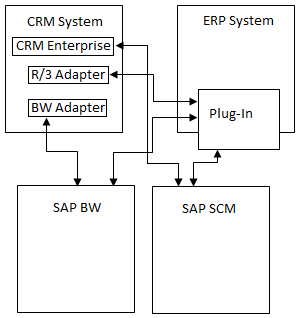
The following are the fully-integrated connections offered as SAP CRM Solution:
- SAP CRM System provides corresponding software components of the SAP CRM solution as a central CRM server.
- SAP ERP System provides all ERP functionalities and can be integrated with the SAP CRM system as a back-end system. Data exchange between these connected systems can be configured and implemented with the help of CRM Middleware.
- SAP BI provides functionalities for detailed statistical and analysis functions. It can be integrated with SAP CRM to use its features for SAP CRM reporting and analysis.
- For demand planning and global Available-to-Promise (ATP) checks, SAP CRM can be integrated with the SAP SCM system:
- For a Sales Order entered through any implemented UI, a check on delivery needs to be performed.
- Available-to-Promise (ATP) checks are implemented on the connected SAP SCM system.
- At runtime, the CRM system connects to SAP SCM to verify if it is possible to deliver items requested on time.
- SAP NetWeaver Portal provides integrated access to all systems.
Channel Architecture
The SAP CRM channels architecture includes:
- Internet applications:
- Internet Sales
- Internet Customer Self-Service
- Internet Pricing Configurator
- Mobile applications:
- Mobile Sales
- Mobile Service
- Interaction Centre

Internet Applications
- The Internet software components of SAP CRM are J2EE technology-based (an open, non-SAP platform). These are provided as a ready-to-run solution with standard shipped templates and can be further adjusted to meet customer-specific requirements.
- SAP CRM offers an Internet Sales software component that presents published catalogs to end users who can configure and purchase products.
- It also offers an Internet Self-Service software component where end users can request a particular service.
- The Internet Pricing and Configurator (IPC) component is another J2EE-based web application for product configuration and pricing data.
Interaction Centre
- The Interaction Centre is provided with tools and features required while communicating with the end customer.
- Various communication channels are supported by the Interaction Centre such as fax, email, telephone, and Voice over Internet Protocol (VoIP).
- The Interaction Centre is linked with the CRM WebClient, so an employee in contact with the customer can make notes, trigger emails, create activities, and work on business transactions such as service orders.
- The Interaction Centre connects to different communication channels using a Communication Management System, which can be SAP Business Communication Manager (BCM) or a third-party product.
- To strengthen IC WebClient multichannel options in the Interaction Centre, Integrated Communication Interface (ICI) is used.
Mobile Applications
- SAP CRM Mobile Sales and Mobile Service components help a company’s mobile field sales and service representatives.
- Depending upon the area of responsibility, users have access to all relevant data on their device.
- These devices connect briefly to the central CRM servers for data synchronization. This data transfer occurs through SAP CRM Middleware.
- SAP Mobile Application Studio can be used to customize these mobile applications.
Introduction to CRM WebClient User Interface
SAP CRM User Interface started with SAPGUI, and its evolution has resulted in the SAP CRM Web Client User Interface. CRM Web Client is an enhanced version of the IC Web Client UI and is business role-based; the content visible to the logged-in user depends upon the business roles assigned. This results in a simpler UI where each user can access and process only the tasks relevant to them. For example, a sales representative not concerned with marketing processes will only access and work on sales-related processes as per assigned authorizations.

CRM Web Client UI is component-based software that presents the CRM UI to the user in an L-Shape. It contains a Header in the top row and a Navigation Bar on the left side, constituting the L-Shape. The remaining space on the CRM Web UI page is called the Work Area. The Header area contains predefined system links such as the Log Off hyperlink.

The following are the components of the Header area:
- System Links
- Saved Searches
- Work Area Title
- History

The position of the Header Area is fixed and cannot be changed. The Navigation Bar contains links to various applications assigned to the logged-in user. The Work Area content updates with user action on links available in the Header Area, Navigation Bar, or within the Work Area itself. Views are displayed in the CRM Web UI as Assignment Blocks. The following pages are offered as part of the SAP CRM Web UI implementation:
- Home page
- Worklist page
- Calendar
- E-Mail inbox
- Work Centre
- Advanced Search Page
- Overview Page
- Assignment blocks
Users can navigate between these pages using links available in the Navigation Bar, Work Centre, or hyperlinks available in search pages, applications, or business transactions.
- As soon as a user logs in, he or she will be able to see the Home page.
- Further navigation to other pages or specific applications can be accomplished with the navigation links in the Navigation Bar or in the Work Centre.
- For example, a user can access the Work Centre for Account Management from the link available in the Navigation Bar:

- Users can navigate to Account Search using the link in the Work Centre or the Account Search link in the second level of the Navigation Bar:


